PayPal
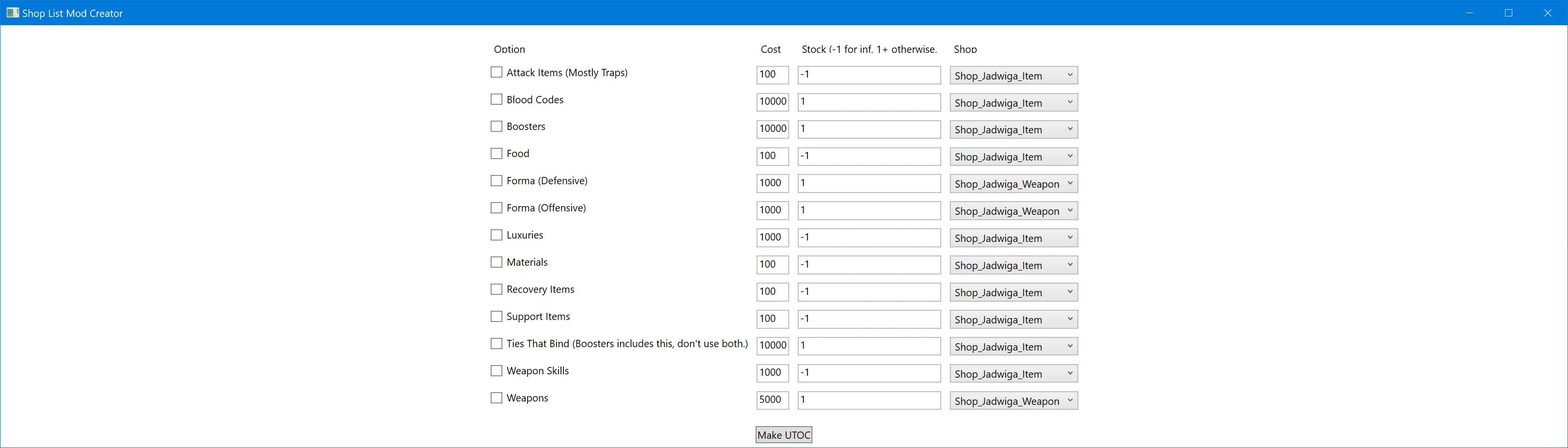
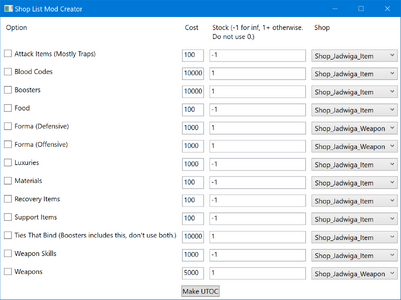
Basically, check the boxes of the item groups you want to appear in the shop, and press 'Make UTOC'.
Alters only the hub shops; either the item or the weapon shops.
Weapons will add to her weapon shop, not the item shop. (Still technically the same uasset file.)
Usage
It also has an embedded copy of the unmodified shop list data asset extracted from the game.
It'll basically write out what it needs (to a temp folder) to make a mod, edit the date file, and go. Temp data is deleted on app exit.
Made for v1.0.3.
Code Vein Modding Discord
Basically, check the boxes of the item groups you want to appear in the shop, and press 'Make UTOC'.
- It's kinda barebones. It took an annoyingly long time to make, and I don't really wanna do more UI work, so, yeah, barebones.
- I have not done checking to ensure all items are legal. I know at least some of the materials are unused and will literally disappear from your save after restarting the game.
- KEEP SAVE BACKUPS!!!!! THIS IS YOUR ONE AND ONLY WARNING!!!!
- You can probably sell most things, though prolly not blood codes. (I haven't checked.) so if you get something you don't want and don't wanna go to a save backup, try that first.
- Blood codes, boosters, and items you are only supposed to have 1 of have been limited to a stock of 1. The rest are limitless. THIS MIGHT RESET ON RESTARTING THE GAME!!!! The game doesn't expect these to be in a shop and thus it appears it sometimes resets? I'm not sure if it's storing the position of the items or what. I know I've seen counts get reset sometimes, and sometimes not.
- I do not know what happens if you buy a blood code you already have. From my tests, it looks like nothing, but it still feels unclean. (My theory is, when you get blood codes in NG+, the game just adds them the same way, and nothing happens if you already have it.)
- Going by the extract booster thing letting you repeat extraction if you really want, the game probably doesn't care if you have extras or maybe lets you sell them?
- Duplicates are checked for, and if the items appears in the shop for any reason, it will not be added by this; no matter the unlock conditions.
Alters only the hub shops; either the item or the weapon shops.
Weapons will add to her weapon shop, not the item shop. (Still technically the same uasset file.)
Usage
- DL, extract wherever the fuck you want, run the exe. I wish I didn't have to say this, but people don't think critically.
- DO NOT RUN FROM WITHIN THE ARCHIVE, ACTUALLY FOLLOW THE ABOVE INSTRUCTIONS AND EXTRACT IT SOMEWHERE!!!!!
- Requires some version of .Net Desktop Runtime. Prolly 7 or 8? MS tends to do a good job of showing an appropriate error message and link if it's not installed though so just FYI.
- Check the boxes you want.
- Feel free to edit price/stock, the store things are in, etc.
- The stock must be either `-1`, or a value above 0. THERE'S NO VALIDATION ON THE FIELDS, THIS IS ON YOU. `-1` will be treated as 'infinite' in the shop. Any other value will force a stock of exactly that value.
- The two store options are the hub item & weapon shops.
- Press 'Make UTOC'.
- It'll as you where you want to save the output UTOC file. It technically asks you to 'open' a file, but you are creating/overwriting whatever path/name you select.
- MAKE SURE THE FILENAME ENDS WITH A `_P`!
- Conflicts with anything altering `CodeVein2\Content\Blueprint\GameSystem\shop\DT_ShopLineup.uasset`.
- Use the output UTOC like any other content mod. Put in the game dir with others of its kind or the `~mods` folder. Whatever you prefer.
It also has an embedded copy of the unmodified shop list data asset extracted from the game.
It'll basically write out what it needs (to a temp folder) to make a mod, edit the date file, and go. Temp data is deleted on app exit.
Made for v1.0.3.
Code Vein Modding Discord