# SAOFB Mod Manager
A simple tool to manage mods for Sword Art Online: Fatal Bullet.
## Features
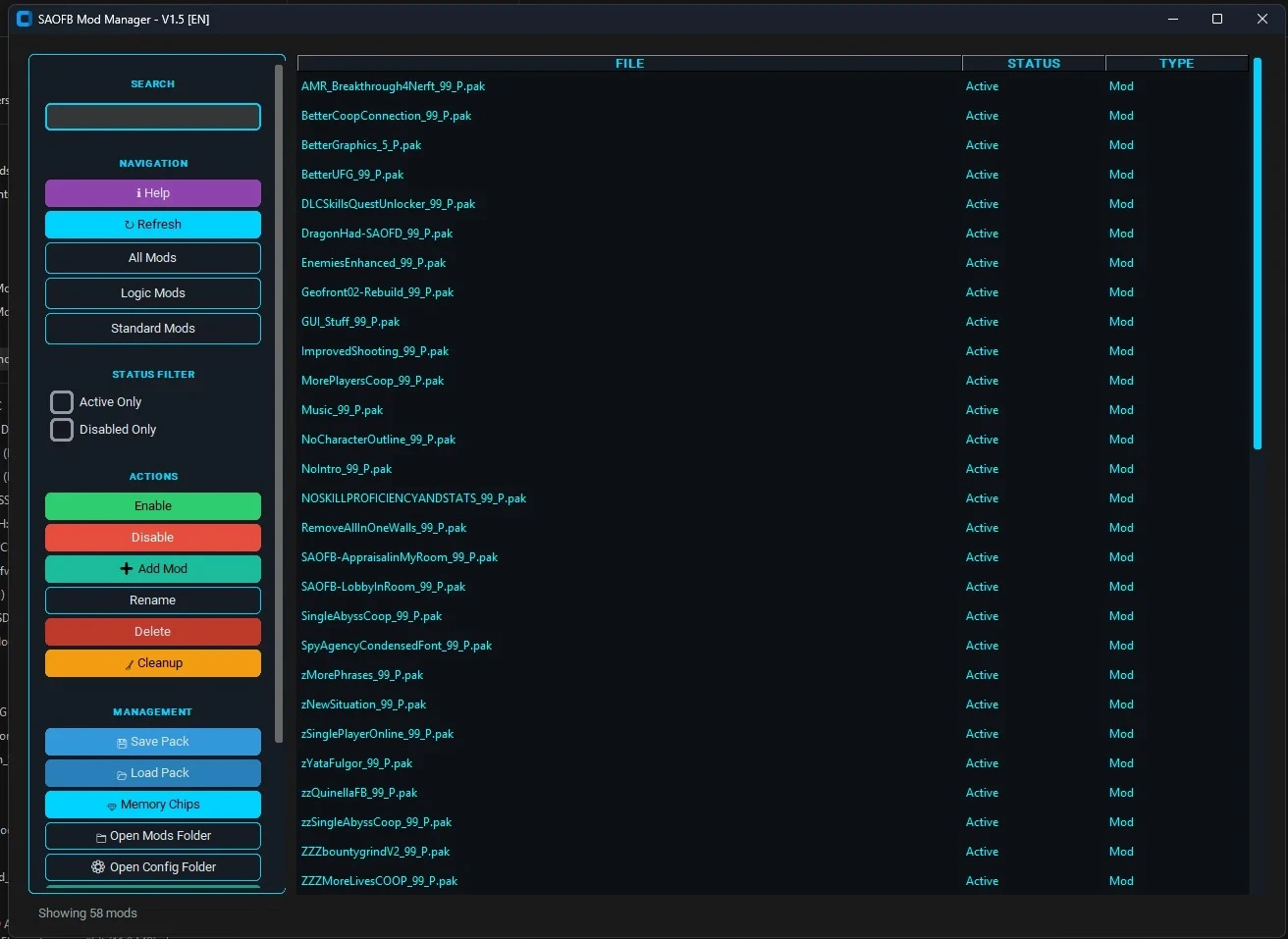
- Enable/disable mods with one click
- Backup save game files with timestamps
- Manage mods from ~mods folder, main Paks folder, and LogicMods
- Quick access buttons to open mod folders
- Customizable UI colors
- Works with or without Python installed (exe version)
## Quick Start
1. **Download & Run** - Double-click `SAOFBManagerV1.5.exe`
2. **Auto-Detection** - The tool will find your game automatically
3. **Manage Mods** - Enable/disable mods from the list or use filter tabs
4. **Backup Saves** - Click "Backup Save Files" to create timestamped backups
## How It Works
- **~mods Tab** - Mods in the ~mods subfolder
- **Paks Tab** - Mods in the main Paks folder
- **LogicMods Tab** - Logic mods management
- **Quick Access** - Open folders directly from the manager
- **Settings** - Customize colors and save file path
## Notes
- Disabled mods are stored in `disabled_mods` folder
- Your icon.ico file is automatically applied
- All backups are saved with timestamps in `SaveGameBackups` folder
## Support
Join the community: https://discord.gg/XpGgDtEYYE
A simple tool to manage mods for Sword Art Online: Fatal Bullet.
## Features
-
Enable/disable mods with one click-
Backup save game files with timestamps-
Manage mods from ~mods folder, main Paks folder, and LogicMods-
Quick access buttons to open mod folders-
Customizable UI colors-
Works with or without Python installed (exe version)## Quick Start
1. **Download & Run** - Double-click `SAOFBManagerV1.5.exe`
2. **Auto-Detection** - The tool will find your game automatically
3. **Manage Mods** - Enable/disable mods from the list or use filter tabs
4. **Backup Saves** - Click "Backup Save Files" to create timestamped backups
## How It Works
- **~mods Tab** - Mods in the ~mods subfolder
- **Paks Tab** - Mods in the main Paks folder
- **LogicMods Tab** - Logic mods management
- **Quick Access** - Open folders directly from the manager
- **Settings** - Customize colors and save file path
## Notes
- Disabled mods are stored in `disabled_mods` folder
- Your icon.ico file is automatically applied
- All backups are saved with timestamps in `SaveGameBackups` folder
## Support
Join the community: https://discord.gg/XpGgDtEYYE