Enemy HP HUD+:重甲头顶血条与部位血量
在https://www.nexusmods.com/helldivers2/mods/16849 基础上修改使用GPT6.1sol创作,无任何人工痕迹
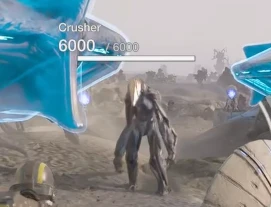
在附近地面重甲敌人的头顶显示常驻总血条,并在准星附近显示当前攻击部位的血量,帮助你判断敌人的整体状态和弱点剩余血量。
主要功能
- 重甲常驻血条:显示敌人名称及当前/最大血量,无需提前标记。血条根据已适配的模型高度定位,随距离近大远小。
- 部位血量显示:检测到玩家造成的部位伤害时,显示受损部位的血量及名称;未识别名称的部位使用编号,无独立部位信息时可能显示主血量。
- 血量颜色渐变:满血为白色,随血量下降逐渐变为黄色和红色。
- 遮挡处理:地形或建筑遮挡后的总血条可设为 50% 不透明度、25% 不透明度或隐藏,也可关闭遮挡检测。
- 伤害来源筛选:过滤已识别的自动炮塔及战备伤害,保留玩家武器和手动操作装备的部位捕捉。
- 范围内符合筛选条件的重甲血条没有数量上限。
在我的设备上测试并未出现明显的帧数降低,如果你在装了之后有明显的帧数下降,请告诉我
游戏内设置
可调整模组开关、显示范围(50/100/150/200 米)、总血条位置与头顶高度余量、部位血条位置、遮挡显示方式,以及总血条长度(25/50/75/100%)。支持恢复默认设置。
默认范围为 100 米,遮挡不透明度为 25%,总血条长度为 75%。
另提供可选的标记诊断功能,默认关闭。需要反馈漏标或误标目标时,可启用 F8/F9/F10,标记目标后按对应按键记录诊断信息。
安装依赖
需要 Bingus Shared Loader v18 或以上及 Mod Options Menu 。通过模组管理器导入本模组,并保持 Bingus Shared Loader 最后加载。
Mod hosting service
遮挡检测主要针对静态地形和建筑,不包含完整的烟雾或动态物体遮挡。敌人名称、部位识别和头顶定位取决于已适配的数据。
Enemy HP HUD+: Persistent Heavy Enemy Health Bars and Hit-Part Health
Modified from this mod.Created entirely using GPT-6.1 Sol, with no manual coding.
Displays persistent total health bars above nearby ground-based heavy enemies, while showing the health of the part you are currently attacking near the crosshair. This helps you track an enemy’s overall condition and the remaining health of its weak points.
Main Features
- Persistent Heavy Enemy Health Bars: Displays enemy names and current/max health without requiring you to mark them first. Bars are positioned using supported model heights and scale with distance—larger up close and smaller farther away.
- Hit-Part Health: When player-inflicted part damage is detected, displays the damaged part’s health and name. Unrecognized parts use numbered labels. If no separate part-health information is available, main health may be shown instead.
- Health-Based Colors: Bars are white at full health, gradually changing to yellow and then red as health decreases.
- Occlusion Settings: Total health bars behind terrain or buildings can be shown at 50% opacity, 25% opacity, or hidden completely. Occlusion detection can also be disabled.
- Damage Source Filtering: Filters out recognized automated turret and stratagem damage, while retaining hit-part detection for player weapons and manually operated equipment.
- No limit on the number of eligible heavy enemy health bars within the configured range.
I have not noticed a significant FPS drop when testing on my setup. If you experience a noticeable FPS decrease after installing this mod, please let me know.
In-Game Settings
Adjust the mod toggle, display range (50/100/150/200 meters), total health bar position and head-height offset, hit-part bar position, occlusion behavior, and total health bar length (25/50/75/100%). A Restore Defaults option is also available.
The default range is 100 meters, occluded bar opacity is 25%, and total health bar length is 75%.
An optional marked-target diagnostic feature is included and disabled by default. To report missing or incorrect health bars, enable F8/F9/F10, mark the target, and press the selected key to record diagnostic information.
Requirements and Installation
Requires Bingus Shared Loader v18 or newer and Mod Options Menu. Import this mod through the mod manager and keep Bingus Shared Loader last in the load order.
Occlusion detection primarily covers static terrain and buildings; it does not provide full smoke or dynamic-object occlusion. Enemy names, part identification, and head-level positioning depend on the supported game data.