After being familiarized with the LR Photo Studio Tool, these are the ones I do recomend for people wanting to get deeper into DOA5LR modding.
ABC Transformer Tool will be your main option if you want to port a mod from one character to another.
It has better weight transfer in the outfit, and you should have less issues with clipping.
Limitations of ABC Tool are:
1. It doesn't convert mods to Mai Shiranui
2. It doesn't convert hair mods
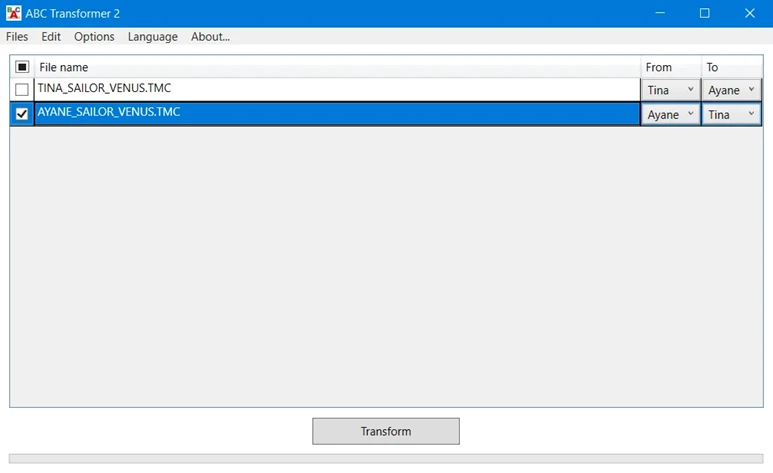
To use it, just open the ABC Tool, drag and drop the *.TMC mod file in its work space.
The tool might not recognize the origin character properly, so you might have to change it in the "From" column.
Choose the destination character in the "To" column, make sure the square box in the first column is checked, click the "Transform" button.
After done, you will get three files: *.TMC, *.TMCL and *.--P
The *.--P file is the one which has the costume icon shown in game, so this tool is good to generate costume icons easily.
Rename the files as you want, making sure the name is exactly the same for all of them, keeping the original file extension.
Notes about ABC Tool:
After a while, the tool work space might get full. Just right click the line you want to remove and choose "delete".
Do not mess with the tool configuration, as it's not necessary.
Special Note for ABC Tool, thanks MutatedMark for pointing out this one:
If you got an error regarding "input string format". It might be common or not, in any case. A fix for this is to:
Go to Control Panel >Region>Additional Settings.
And Change Decimal place from "," to "." in Windows.
Timmy's Chacater Transformer Tool is quite easy to use also.
Its main limitation is regarding the body texture, as it uses a standard one which is not compatible with DOAXVV outfits.
I will post a tutorial with the TMC Texture Tool here on Nexus, which should cover this part.
Another limitation is regarding Honoka. Her body mesh usually gets corrupted in the finget tips, when converting a mod to her with this tool.
This tool doesn't generate the *.--P icon file.
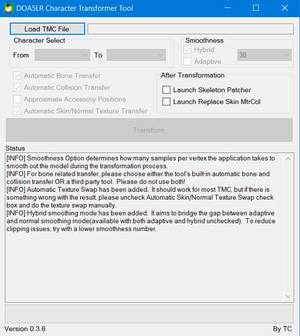
Open TimmyC's Tool, drag and drop the *.TMC mod file in the "Load TMC file" field.
This tool usually gets the origin character right.
Choose the destination character in the "To" field, click the "Transform" button.
After done, you will get two files: *.TMC and *.TMCL
Rename the files as you want, making sure the name is exactly the same for all of them, keeping the original file extension.
Notes about TimmyC's Tools:
Choose smoothness as hybrid and leave the value at 30.
If you have body clipping thru clothing, and can't fix thru Blender, change smoothness value to 5 or 10, but be aware costume curves will be more "squarish".
If you can't do Blender work to fix acessories position, do select Aproximate Acessories Position option.
Leave all other options untouched, as per screenshot at Image section.
Special note about Mai Shiranui and Nyotengu:
These two will require some work with the TMC Object Tool, in order to add wings, uchiwa, etc.
I will cover this topic soon.
Special notes about hair mods:
If you are porting a hair which works together with a costume, make sure to keep it's file extensions as *.HAIR.TMC and *.HAIR.TMCL
Example of costume and hair files:
AYANE_SAILOR_MERCURY.TMC
AYANE_SAILOR_MERCURY.TMCL
AYANE_SAILOR_MERCURY.HAIR.TMC
AYANE_SAILOR_MERCURY.HAIR.TMCL
If you are porting a stand alone hair mod, make sure to put a @ in the beginning of the hair mod name, if you want it to be available for all mods.
Exemple:
@AYANE_HAIR_LONG_PURPLE.TMC
@AYANE_HAIR_LONG_PURPLE.TMCL
In this case the hair mod name doesn't need the ".HAIR" extension and it can be placed in any outfit number folder.
COMING UP NEXT: Archive Tool
ABC Transformer Tool will be your main option if you want to port a mod from one character to another.
It has better weight transfer in the outfit, and you should have less issues with clipping.
Limitations of ABC Tool are:
1. It doesn't convert mods to Mai Shiranui
2. It doesn't convert hair mods
To use it, just open the ABC Tool, drag and drop the *.TMC mod file in its work space.
The tool might not recognize the origin character properly, so you might have to change it in the "From" column.
Choose the destination character in the "To" column, make sure the square box in the first column is checked, click the "Transform" button.
After done, you will get three files: *.TMC, *.TMCL and *.--P
The *.--P file is the one which has the costume icon shown in game, so this tool is good to generate costume icons easily.
Rename the files as you want, making sure the name is exactly the same for all of them, keeping the original file extension.
Notes about ABC Tool:
After a while, the tool work space might get full. Just right click the line you want to remove and choose "delete".
Do not mess with the tool configuration, as it's not necessary.
Special Note for ABC Tool, thanks MutatedMark for pointing out this one:
If you got an error regarding "input string format". It might be common or not, in any case. A fix for this is to:
Go to Control Panel >Region>Additional Settings.
And Change Decimal place from "," to "." in Windows.
Timmy's Chacater Transformer Tool is quite easy to use also.
Its main limitation is regarding the body texture, as it uses a standard one which is not compatible with DOAXVV outfits.
I will post a tutorial with the TMC Texture Tool here on Nexus, which should cover this part.
Another limitation is regarding Honoka. Her body mesh usually gets corrupted in the finget tips, when converting a mod to her with this tool.
This tool doesn't generate the *.--P icon file.
Open TimmyC's Tool, drag and drop the *.TMC mod file in the "Load TMC file" field.
This tool usually gets the origin character right.
Choose the destination character in the "To" field, click the "Transform" button.
After done, you will get two files: *.TMC and *.TMCL
Rename the files as you want, making sure the name is exactly the same for all of them, keeping the original file extension.
Notes about TimmyC's Tools:
Choose smoothness as hybrid and leave the value at 30.
If you have body clipping thru clothing, and can't fix thru Blender, change smoothness value to 5 or 10, but be aware costume curves will be more "squarish".
If you can't do Blender work to fix acessories position, do select Aproximate Acessories Position option.
Leave all other options untouched, as per screenshot at Image section.
Special note about Mai Shiranui and Nyotengu:
These two will require some work with the TMC Object Tool, in order to add wings, uchiwa, etc.
I will cover this topic soon.
Special notes about hair mods:
If you are porting a hair which works together with a costume, make sure to keep it's file extensions as *.HAIR.TMC and *.HAIR.TMCL
Example of costume and hair files:
AYANE_SAILOR_MERCURY.TMC
AYANE_SAILOR_MERCURY.TMCL
AYANE_SAILOR_MERCURY.HAIR.TMC
AYANE_SAILOR_MERCURY.HAIR.TMCL
If you are porting a stand alone hair mod, make sure to put a @ in the beginning of the hair mod name, if you want it to be available for all mods.
Exemple:
@AYANE_HAIR_LONG_PURPLE.TMC
@AYANE_HAIR_LONG_PURPLE.TMCL
In this case the hair mod name doesn't need the ".HAIR" extension and it can be placed in any outfit number folder.
COMING UP NEXT: Archive Tool