

Anomaly
A stable, flexible and open source plugin platform for Neverness to Everness.Discord
中文介绍
What this is
Anomaly is not a single-purpose cheat DLL — it is a plugin platform for NTE. The runtime itself is Anomaly\Anomaly.Core.dll, and there are two ways to get it into the game: proxy install, where a very thin dwmapi.dll forwarder sits next to HTGame.exe, forwards the system exports and bootstraps Core at startup; or live attach, where the launcher manually maps Core into HTGame.exe and writes nothing into the game directory. Either way, everything after that happens inside an in-game menu you open with Insert: built-in plugins ship in the box, and community plugins can be browsed, installed, updated and hot-reloaded from inside the game.Core is C++20 for Windows x64 and exposes a pure C ABI v1 SDK plus high-level UE5/NTE services (session, player, camera, entities, map landmarks, teleport, vehicles), so a plugin project needs neither the runtime source nor the C++ ABI.
Highlights
- Two install paths — proxy install copies the forwarder into the game folder for long-term use; live attach maps Core into a newly started or already running HTGame.exe without touching the game directory. The proxy can be disabled at any time (the launcher renames dwmapi.dll to dwmapi.dll.disabled) and takes effect on the next launch.
- Considerate attach — when attaching to a running game, the launcher first redirects a thread already parked in a system call (no game code change, no new thread) and only falls back to creating one. Neither path writes configuration or touches the game directory, so the next normal launch is unaffected.
- In-game management — Insert opens a CN/EN menu to enable, disable, reload and configure plugins in one place.
- Community plugin browser — Available, Updates, Installed and Sources pages, plus your own trusted HTTPS sources.
- Full plugin lifecycle — Manifest, SemVer, dependency and capability validation, package validation, file-watch hot reload, and automatic rollback if a new version fails.
- Fault isolation — one broken plugin no longer takes the whole session down.
- Real diagnostics — incompatibility, missing dependencies or an unprepared Build Profile are reported with an actual reason instead of a silent no-op.
- Memory analysis tools — process modules, PE sections, memory regions, byte signature scan, offline TestHost.
Built-in plugins
Everything below is disabled by default — enable only what you need under Plugins > Installed.World info and visuals
- Coordinate Display — player coordinates, session state and sampling metrics.
- Entity ESP — entity bounding boxes and labels.
- NTE Damage Dashboard — live player damage, hits, crits, team/skill split and recent hit records.
- Pink Paw Heist ESP — loot and extraction points with value filtering, count limits, bank loop pickup and entry animation skip.
- Deserted — suppresses pedestrian and traffic spawns without affecting stationary NPCs.
Camera, character and UI
- Camera Tools — draw distance, view FOV, free camera, optional scene load at the free camera position. Draw distance, FOV and free camera share one camera hook, so two camera plugins can finally coexist.
- CameraBlurFix — removes the blur that appears when the camera tilts up.
- Better Pose — animation speed, pause and displacement scale, joint pose editing, MMD motion and camera import, per-joint calibration, limb extension and landing points, manual A/T-pose skeleton calibration.
- Model Scale — scales the local character mesh without touching movement or collision.
- Jelly — squash and stretch for characters, vehicles and dynamic models, with adjustable strength, frequency, stop interval and self-rotation.
- Skin Swapper Lite — character accessories, glider, awakened appearance previews and custom license plates.
- Custom UID — sets a custom UID in the client UI.
- UI Buttons — lists clickable game UI buttons and clicks them through the UI service.
Automation and movement
- Resource Auto Pickup — reads the resource point table and collects EXP books, furniture, food and wallets by teleport or pathing.
- Combat Resource Points — visits combat chests and Anomaly furniture material points one by one, fights automatically, then marks and caches them locally.
- Clone Enter — enters an instance by instance and difficulty, fights, claims rewards and exits, with optional looping.
- 999 Nights Script — loops Red Dragon Castle farming for a set number of runs, with camp respawn and automatic combat at two combat points.
- WalletCollector — scans wallet spawn points, plans a route for the target count and collects them.
- AutoFish — casts, reels and plays fish automatically, with continuous fishing, bait restocking and selling past a threshold.
- Quick Ultimate — hold Alt+1/2/3/4 to switch characters automatically and keep sending Q; release to stop.
- Free Fly — free flight and noclip, WASD to move, Space up, Ctrl down, direction follows the view, configurable hotkey.
Vehicles and audio
- NTE Vehicle (developer mode) — inspect, summon and tune the current vehicle: catalog, display name, speed, torque, wheel friction, non-player vehicle control.
- HiFi Vehicle Music — replaces in-vehicle music with a local lossless library, with WASAPI, DirectSound and ASIO support.
Community plugins
- Available — search for plugins, download and install them.
- Updates — new versions of the plugins you already run.
- Installed — enable, disable, reload or uninstall.
- Third-party plugins — add, disable or remove plugin sources.
Installation
- Extract the runtime ZIP completely into an ordinary folder — do not run it from inside the archive and do not pull out only AnomalyLauncher.exe, because the launcher also reads dwmapi.dll and the Anomaly\ directory next to it.
- Run AnomalyLauncher.exe. A UAC prompt is normal — it needs administrator rights to write into the game directory.
- Proxy install: keep the "Game directory" pointing at the folder that directly contains HTGame.exe (not the installation root), click Install, and wait until the status reads Enabled.
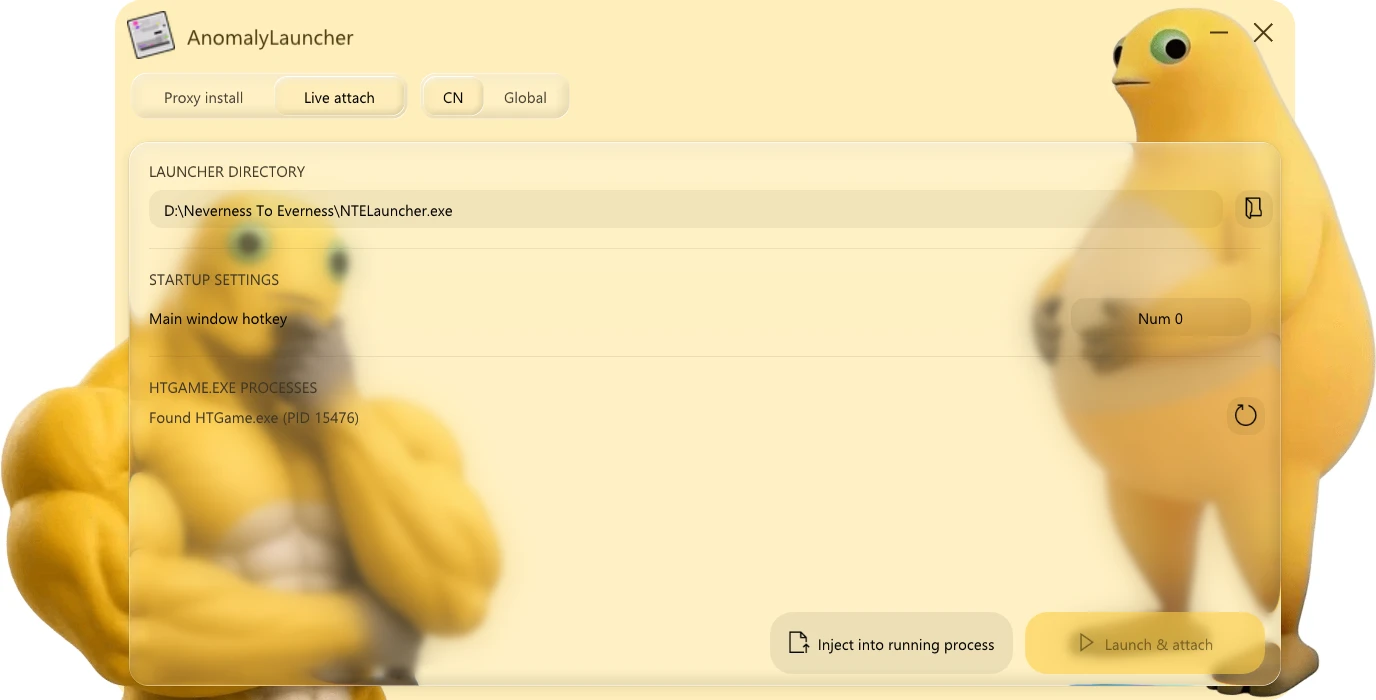
- Live attach: switch to the Live attach page, pick NTELauncher.exe manually if it was not detected, then click Start and attach when no game is running, or Inject into running process when one already is.
- Start the game as usual and press Insert after entering. Success is recorded in Anomaly\logs\anomaly-runtime.log and Anomaly\anomaly-platform.log.
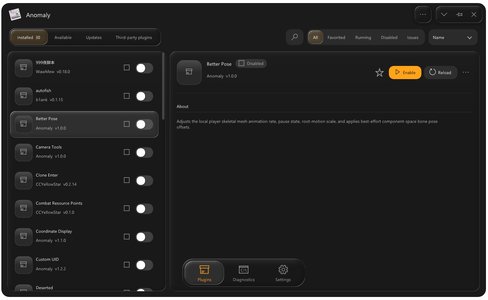
- Built-in plugin: Plugins > Installed → select it → Enable. Community plugin: Plugins > Available → Install → back to Installed → Enable.
- Updating: extract the new runtime into a new folder, run the new launcher and click Update. It keeps anomaly.ini, the settings under config\, state\/logs\/crashes\, plugins you added yourself and the proxy's enabled state — never unzip over the old folder.
Requirements and compatibility
- Windows x64 only.
- NTE retail client. Features that depend on a signature or layout only light up when the active NTE Build Profile validates; otherwise they report "unavailable" instead of crashing. A new game patch can require an updated profile.
- The proxy file name is dwmapi.dll (proxy install only), so Anomaly's proxy cannot share one game folder with RE-UE4SS, which uses the same file name. Anomaly is its own entry point and does not load UE4SS.dll.
- Live attach writes nothing into the game directory, but if the game restricts process handles from the moment it is created, attach fails — use proxy install in that case.
Troubleshooting
- Insert does nothing — check whether Anomaly\logs\anomaly-runtime.log and Anomaly\anomaly-platform.log were created and record a PID; then change the main window hotkey in Anomaly Launcher > Startup settings, or set [Platform] ToggleKey in anomaly.ini (Win32 virtual-key code, default 45 = VK_INSERT).
- Available is empty — Plugins > Third-party plugins: confirm both the master switch and the source are enabled, then hit refresh.
- Third-party install failed — usually an unreachable download address, a wrong ZIP structure, or an ID/version/game/API mismatch. The UI shows the reason; the full record is in Anomaly\anomaly-platform.log.
- Plugin won't load — it must be a folder package containing manifest.json; loose DLLs at the root are never loaded.
- Live attach failed — the message carries a Win32 error code and the stage that failed, and the game is neither restarted nor killed, so you can simply try again. Common causes: the game runs at a higher privilege (launch AnomalyLauncher as administrator), or the game never lets a thread become attachable. Try Start and attach, or fall back to proxy install.
- Coordinates / entities / other features unavailable — the active Profile is missing the required signature, or symbol/layout validation failed.
Before you install
- Anomaly is published for research, diagnostics and plugin development. Entering a process and reading or writing memory, hooks and patches change another process at runtime: a crashed game, corrupted data or a banned account are all possible outcomes, and you accept that risk yourself.
- The official NTE Fair Play declaration prohibits third-party tools that undermine fair play, including unattended automation, skill acceleration, invincibility, teleportation and game data modification. Expect enforcement if you use such features online.
- Logs, crash dumps, Profile data and diagnostic bundles can contain sensitive information. Review and redact before posting them anywhere.
- Real-time process tools (write / patch / protect / alloc / free) are not part of normal use and belong on your own test processes.

