BANNED ON NEXUS MODS 
DAD'S HOME - PRIDE PROFILE ARTWORK REPLACEMENT
Gears of War: E-Day | PC | Xbox app / Microsoft Store / PC Game Pass
ABOUT
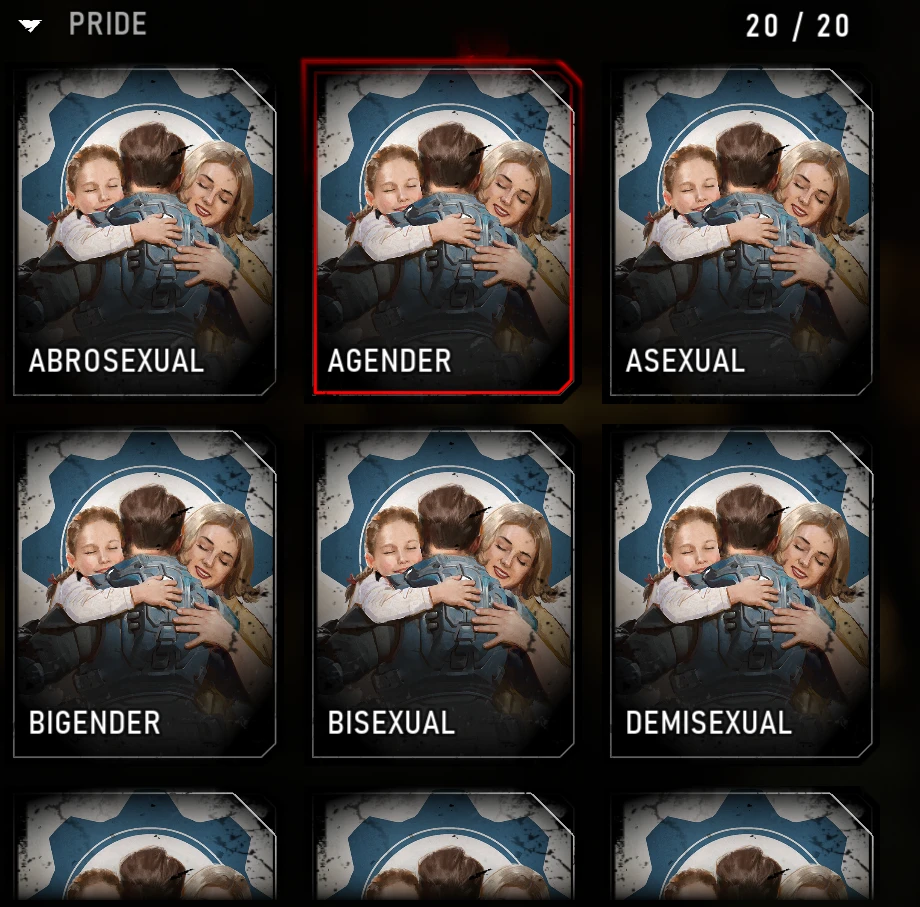
Replaces the artwork for all 20 included Pride profile entries with the
game's existing Dad's Home poster artwork. Covers small and large emblems,
banners, and banner previews (84 texture assets in total).
The entries keep their original names, descriptions, IDs, and ownership
requirements. Select a Pride entry in Customization to see the replacement.
The existing Dad's Home entry is preserved.
REQUIREMENTS AND COMPATIBILITY
Built from the Xbox app / WinGDK PC version of the game (Unreal Engine 5.6).
Steam and console compatibility have not been verified.
Manual installation is described below; no mod manager or build tools
are required. Game updates may affect compatibility.
INSTALLATION
1. Fully close Gears of War: E-Day.
2. Extract this downloaded ZIP to a temporary folder. Do not put the ZIP
itself in the game folder.
3. Find your game installation. In the Xbox app, open the game's Manage
options and look for the installation location under Files. Folder
names and the drive letter may differ on your PC.
4. Inside the installed game's folder, navigate to:
Content\FairlightConcept\Content\Paks
Example for a default installation on C: with the folder name shown:
C:\XboxGames\Gears of War- E-Day\Content\FairlightConcept\Content\Paks
If the game is on D: or another drive, use that installation instead.
Confirm this Paks folder contains the game's existing .pak, .utoc and
.ucas archives before continuing.
5. Create a folder named ~mods inside Paks if it does not already exist.
Include the tilde (~) in the name.
6. Copy these THREE extracted files directly into Paks\~mods:
DadsHome_AllPride_P.pak
DadsHome_AllPride_P.utoc
DadsHome_AllPride_P.ucas
Keep the names unchanged and the three files together. Do not copy
README.txt or manifest.json into the game folder. Do not overwrite
any of the game's original archives.
Your resulting layout should look like:
Paks\
[existing game archives]
~mods\
DadsHome_AllPride_P.pak
DadsHome_AllPride_P.utoc
DadsHome_AllPride_P.ucas
7. Launch the game normally through the Xbox app, with its normal
anti-cheat protection enabled. Open Customization and inspect the
Pride emblem and banner entries, including their enlarged previews.
UPGRADING OR SWITCHING FROM ANOTHER REPLACEMENT
Close the game before changing files. Remove the previous version of this
mod before copying the new version; replace all three files together.
Avoid other mods that replace the same Pride textures.
UNINSTALLATION
Close the game and delete ONLY the following added files from ~mods:
DadsHome_AllPride_P.pak
DadsHome_AllPride_P.utoc
DadsHome_AllPride_P.ucas
Launch again to restore the original artwork. Leave other mods and the
original game archives in place.
TROUBLESHOOTING
Artwork unchanged: check the installation path, the ~mods folder name,
and that all three files were extracted directly into that folder.
Confirm you selected a Pride entry and restart the game completely.
Mixed artwork: check for an older version or another mod replacing the
same textures.
Crash or integrity/anti-cheat error: close the game, remove this mod's
three files, and retry without the mod. Do not disable or bypass
anti-cheat to use this package.
LOCAL DISPLAY
This is a local artwork replacement, not a custom image upload.
Other PCs would need the same replacement installed to show the artwork;
PCs without it continue to use the original assets.
CREDITS
Dad's Home artwork and the original game assets: The Coalition / Microsoft.
Asset packaging: retoc v0.1.5 (https://github.com/trumank/retoc).
This is an unofficial community mod, not endorsed by the game developers.
manifest.json contains the asset list, package hashes and validation status.
DAD'S HOME - PRIDE PROFILE ARTWORK REPLACEMENT
Gears of War: E-Day | PC | Xbox app / Microsoft Store / PC Game Pass
ABOUT
Replaces the artwork for all 20 included Pride profile entries with the
game's existing Dad's Home poster artwork. Covers small and large emblems,
banners, and banner previews (84 texture assets in total).
The entries keep their original names, descriptions, IDs, and ownership
requirements. Select a Pride entry in Customization to see the replacement.
The existing Dad's Home entry is preserved.
REQUIREMENTS AND COMPATIBILITY
Built from the Xbox app / WinGDK PC version of the game (Unreal Engine 5.6).
Steam and console compatibility have not been verified.
Manual installation is described below; no mod manager or build tools
are required. Game updates may affect compatibility.
INSTALLATION
1. Fully close Gears of War: E-Day.
2. Extract this downloaded ZIP to a temporary folder. Do not put the ZIP
itself in the game folder.
3. Find your game installation. In the Xbox app, open the game's Manage
options and look for the installation location under Files. Folder
names and the drive letter may differ on your PC.
4. Inside the installed game's folder, navigate to:
Content\FairlightConcept\Content\Paks
Example for a default installation on C: with the folder name shown:
C:\XboxGames\Gears of War- E-Day\Content\FairlightConcept\Content\Paks
If the game is on D: or another drive, use that installation instead.
Confirm this Paks folder contains the game's existing .pak, .utoc and
.ucas archives before continuing.
5. Create a folder named ~mods inside Paks if it does not already exist.
Include the tilde (~) in the name.
6. Copy these THREE extracted files directly into Paks\~mods:
DadsHome_AllPride_P.pak
DadsHome_AllPride_P.utoc
DadsHome_AllPride_P.ucas
Keep the names unchanged and the three files together. Do not copy
README.txt or manifest.json into the game folder. Do not overwrite
any of the game's original archives.
Your resulting layout should look like:
Paks\
[existing game archives]
~mods\
DadsHome_AllPride_P.pak
DadsHome_AllPride_P.utoc
DadsHome_AllPride_P.ucas
7. Launch the game normally through the Xbox app, with its normal
anti-cheat protection enabled. Open Customization and inspect the
Pride emblem and banner entries, including their enlarged previews.
UPGRADING OR SWITCHING FROM ANOTHER REPLACEMENT
Close the game before changing files. Remove the previous version of this
mod before copying the new version; replace all three files together.
Avoid other mods that replace the same Pride textures.
UNINSTALLATION
Close the game and delete ONLY the following added files from ~mods:
DadsHome_AllPride_P.pak
DadsHome_AllPride_P.utoc
DadsHome_AllPride_P.ucas
Launch again to restore the original artwork. Leave other mods and the
original game archives in place.
TROUBLESHOOTING
Artwork unchanged: check the installation path, the ~mods folder name,
and that all three files were extracted directly into that folder.
Confirm you selected a Pride entry and restart the game completely.
Mixed artwork: check for an older version or another mod replacing the
same textures.
Crash or integrity/anti-cheat error: close the game, remove this mod's
three files, and retry without the mod. Do not disable or bypass
anti-cheat to use this package.
LOCAL DISPLAY
This is a local artwork replacement, not a custom image upload.
Other PCs would need the same replacement installed to show the artwork;
PCs without it continue to use the original assets.
CREDITS
Dad's Home artwork and the original game assets: The Coalition / Microsoft.
Asset packaging: retoc v0.1.5 (https://github.com/trumank/retoc).
This is an unofficial community mod, not endorsed by the game developers.
manifest.json contains the asset list, package hashes and validation status.

