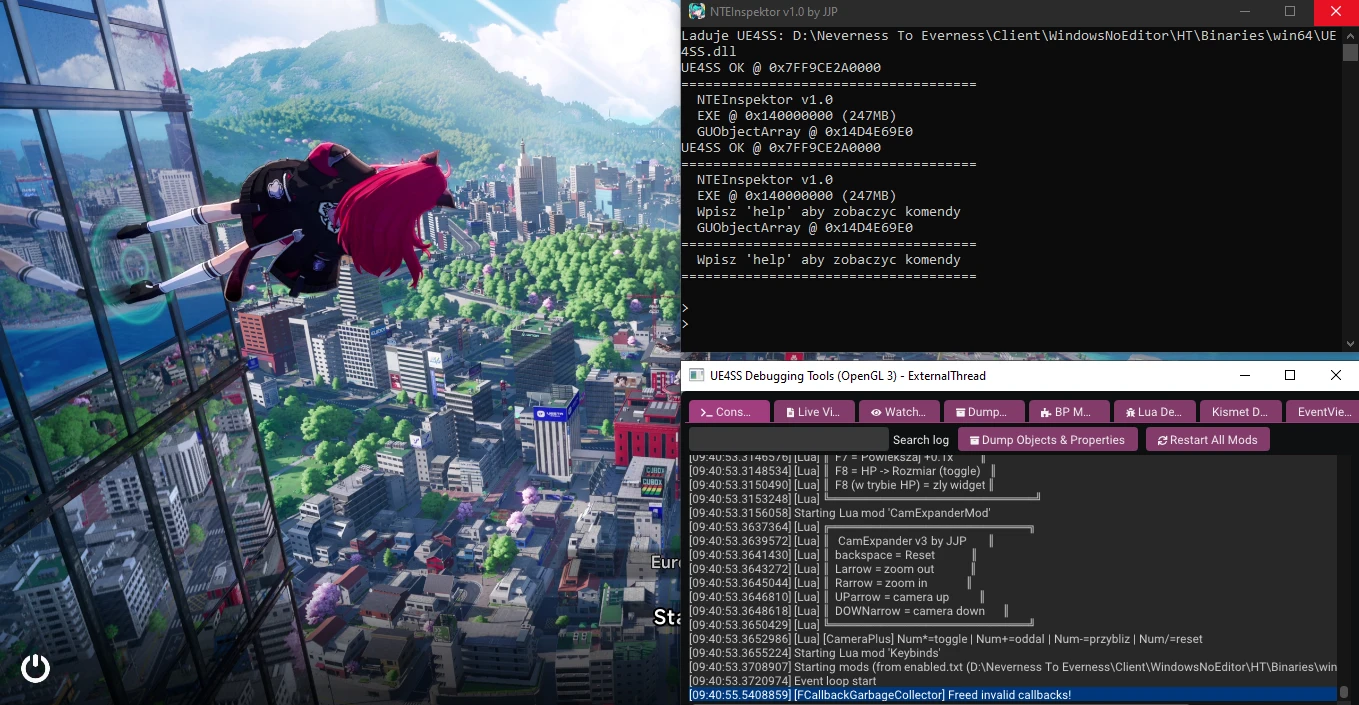
NTE-ModKit
A toolkit for
Neverness to Everness combining ready-to-use mods for players, a Lua scripting environment for developers, and a full memory inspector for advanced modders.
For Players — What You Get
ScaleMod
- <span>0</span> → Unlock mod controls for 15 seconds
While controls are unlocked:
- <span>0</span> → Resets size and stops HP modes
- <span>Arrow Up</span> → Increase character scale by <span>+0.1x</span>
- <span>Arrow Down</span> → Decrease character scale by <span>-0.1x</span>
HP Modes
- <span>Arrow Right</span> → Set HP mode to <span>HP</span> 1000 HP = 10% SIZE
- <span>Arrow Left</span> → Set HP mode to <span>HP %</span> 1% HP = 1% SIZE
HP Source Recovery
If the HP reading source breaks or stops updating:
- Double press <span>Arrow Left</span>
or
- Double press <span>Arrow Right</span>
This forces the mod to refresh and recover the HP source.
ExtendedCameraMod
- <span>0</span> → Unlock mod controls for 15 seconds
While controls are unlocked:
- <span>0</span> → Resets camera
- <span>Arrow Up</span> → camera up
- <span>Arrow Down</span> → camera down
- <span>Arrow Left</span>→ zoom in
- <span>Arrow Right</span>→ zoom out
For Scripters — Lua Environment
The pack includes a pre-configured
UE4SS ready for writing your own Lua mods with zero setup.
What you get out of the box:
- Access to game objects via
UEHelpers.GetPlayerController()
- Working code examples in ScaleMod and CameraExpander — read, copy, modify
FindAllOf("TextBlock") to read live UI data from the gameRegisterKeyBind to bind your own keysExecuteWithDelay for loops and timers
For Modders — NTEInspector
A full-featured memory and UE5 engine inspector running as an in-game console.
UE5 Inspection
| Command | Description |
|---|
uobj ADDR | Dump UObject — vtable, flags, class, name, outer |
fname ADDR | Resolve FName at address (uses FName::ToString) |
vtable ADDR | Dump vtable entries |
iterobj [filter] | Browse GUObjectArray with optional name filter |
objcount | Number of active objects in the engine |
Memory Scanning
| Command | Description |
|---|
aob 48 8B 05 ?? ?? ?? | Pattern scan with wildcards across all memory |
aobexe 48 8B 05 ?? ?? | Pattern scan inside EXE only |
findf 1.5 | Find float value in memory |
findi 1000 | Find int32 value in memory |
findp ADDR | Find all pointers to an address |
strscan BP_Player | Find ASCII string in memory |
Memory Tools
| Command | Description |
|---|
hexdump ADDR [rows] | Hex + ASCII dump |
readtyped ADDR | Read as float / int / uint / ptr simultaneously |
chain ADDR OFF1 OFF2 | Follow a pointer chain |
watch ADDR f 500 | Monitor a value every X ms in a separate thread |
writei / writep | Write int32 / pointer |
modules | List loaded modules with base addresses |
call OFFSET | Call an EXE function directly |
Scale3D Scanner (original feature)
Find Scale3D addresses in memory using binary search, candidate stepping, and float dumps.
Installation
- Download and install AyakaNTEBypasser → https://ayakamods.com/mods/ayakantebypasser-nte-signature-bypass.2325/
- Extract NTE-ModKit
- Move contents of "NTE-ModKit by JJP" folder to "Neverness To Everness\Client\WindowsNoEditor\HT\Binaries\Win64" game folder
- Launch the game — the inspector console appears automatically after 60 seconds
- All files are pre-configured — nothing needs to be set up.
 Requirements
- Neverness to Everness
- AyakaNTEBypasser
ScaleMod, CameraExpander and NTEInspector — original tools created for this pack. UE4SS — open source project (MIT), configured for NTE.