NTEMM (Mod Manager) 1.3.1

A Mod for Neverness to Everness
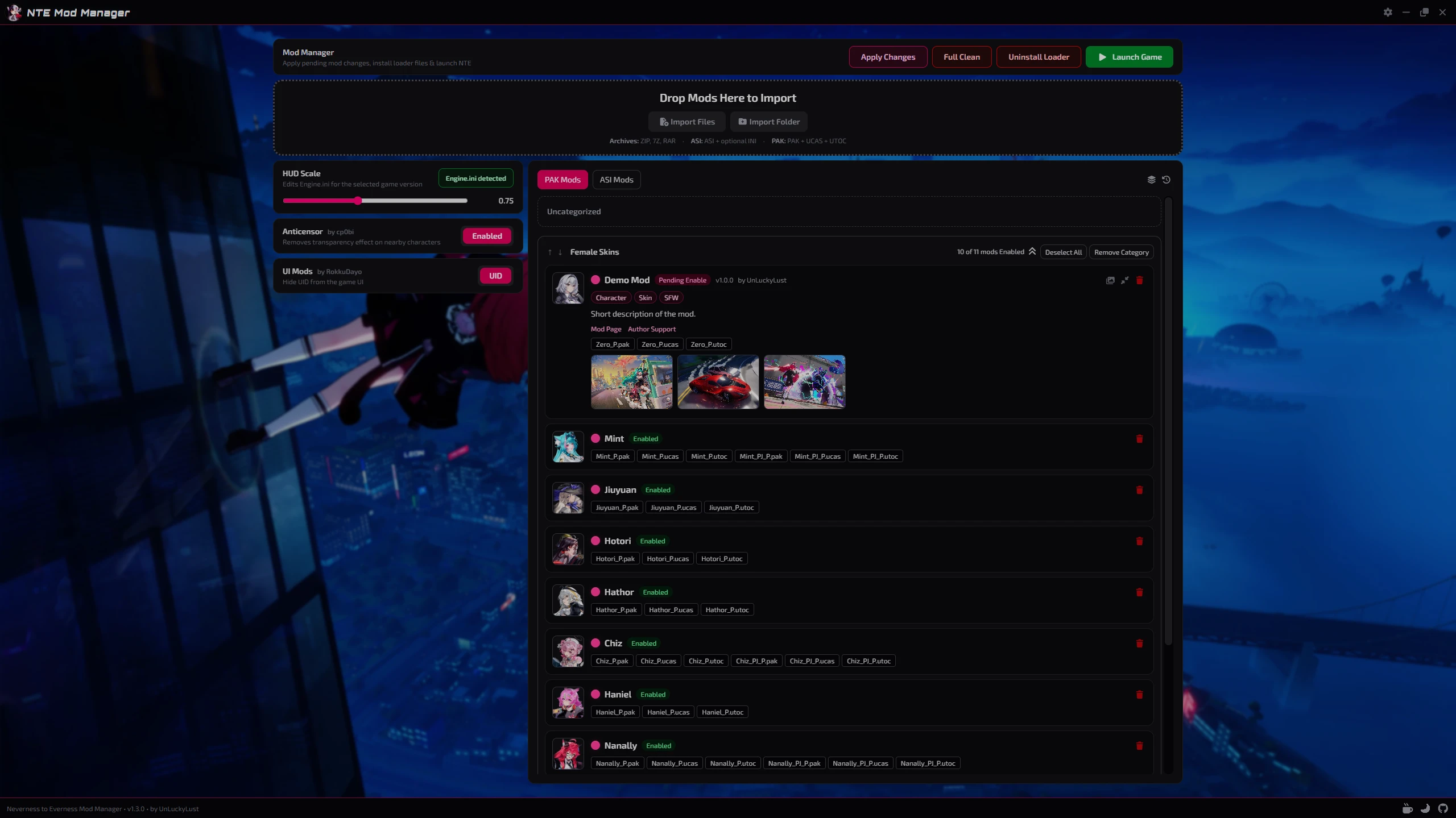
NTEMM (Mod Manager) Mod Preview Image
  • NTEMM_HomePage.png
    NTEMM_HomePage.png
    1.7 MB · Views: 32
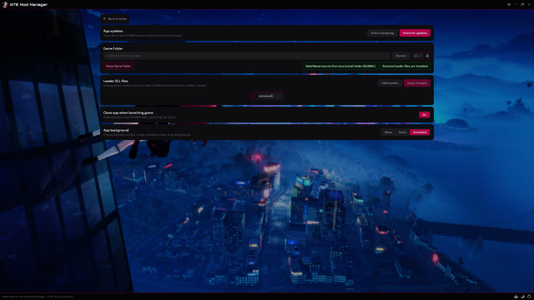
  • NTEMM_Settings.png
    NTEMM_Settings.png
    2.5 MB · Views: 19

NTEMM - Neverness to Everness Mod Manager​

Tired of manually moving `.pak` files around?
NTEMM is a lightweight mod manager made for Neverness to Everness that will helps you organize, install and manage your mods through a clean desktop interface.

Supports both .pak and .asi mods with built-in loader management, drag & drop organization, integrated tools and a sleek modern UI for fast and simple mod management.


Features

  • Easy .pak and .asi mod management
  • Drag & drop categories
  • Pending changes system
  • Automatic game detection
  • Global + CN + TW versions support
  • Built-in loader installer
  • Custom mod folder icons
  • Lightweight modern UI


Integrated Tools

Loader Management
  • Install or remove loader files directly from NTEMM.
Anticensor Toggle
HUD/UI Scale Editor
  • Adjust the in-game HUD scale directly from the app with automatic `Engine.ini` detection.
    huge thanks to Tayuya UI Scale Fix
UID Hider


Installation

  1. Download the installer
  2. Run setup
  3. Launch NTEMM.exe
  4. Select your game folder
  5. Start importing mods


Supported Mod Types

  • .pak
  • .asi


For Mod Creators

NTEMM supports optional mod.json metadata file.
Adding a mod.json file to your mod folder allows the manager to automatically display additional information such as the mod name, author, version, description, tags and links directly inside the app.
Example mod.json:
Code:
{
  "name": "ModName",
  "version": "1.0.0",
  "author": "AuthorName",
  "description": "Short description of the mod.",
  "modLink": "https://ayakamods.com/mods/ntemm-mod-manager.2624/",
  "supportLink": "https://ko-fi.com/unluckylust",
  "tags": ["Character", "Skin", "SFW"]
}

Preview Images

NTEMM supports an option to include preview images with mods so they can be displayed directly inside the app.
To add previews, simply place the images next to the mod files and make sure their file names contain preview.
Supported image formats include: .png | .jpg | .jpeg | .webp | .gif | .bmp | .avif


Important Notes

Windows Defender or SmartScreen may show a warning on first launch because the application is currently unsigned. This is common for many indie/open-source applications.
NTEMM does not create mods or modify game code.
It is only used to organize and manage existing community-made mods.
Latest builds are publicly scanned on VirusTotal

Support and donations

The mod is offered for free, but if you are interested in supporting its development and the other mods I publish, you can do so through Ko-fi or Buymeacoffee, any donation is greatly appreciated!

Feedback, suggestions, and testing reports are always welcome.​

40.1 MB
Log in or sign up to download
Uploaded by
UnLuckyLust
Downloads
107
Views
928
First release
Last update
Platform
PC 
Version
1.3.1
Total Size
40.1 MB
Rating
0.00 star(s) 0 ratings

Uploaded by

  • 107
  • 928

Ratings

0.00 star(s) 0 ratings

Latest updates

  1. Mods and Loader State Fixes (v1.3.1)

    - Improved saved mods and loader state handling per game version. - Fixed clean, reset, and...
  2. Expanded Mod Support & Loader Configuration (v1.3.0)

    - Reworked mod importing to support complex nested mods. - Improved mod update handling so...
  3. UI Polish, Preview Images & CN Loader Fixes (v1.2.0)

    - Updated several UI elements to use clearer icons instead of plain text. - Improved mod cards...

puchamy

Members
Members
May 4, 2026
0
0
Nice! Thanks man!!! As a suggestion, Would you add a feature to include a screenshot of the mod, like a preview.png file or something similar, in the mod's folder, so we can paste the screenshot from our clipboard?
 

UnLuckyLust

Building my Dreams...
Members
May 25, 2026
0
0
Nice! Thanks man!!! As a suggestion, Would you add a feature to include a screenshot of the mod, like a preview.png file or something similar, in the mod's folder, so we can paste the screenshot from our clipboard?
Thanks for the suggestion, it's definitely possible, I'll look into it for the next update.

EDIT: Preview images has been implemented and will be available starting in the next update (v1.2.0)
 
Last edited:

Adude698

Members
Members
Jun 15, 2025
0
0
whenever i try to run this for modding both my antivirus programs flag the loader.asi file as a virus and gives me an error saying that the program doesnt work on windows preventing it from being used how can that be fixed?
 
Last edited:

UnLuckyLust

Building my Dreams...
Members
May 25, 2026
0
0
whenever i try to run this for modding both my antivirus programs flag the loader.asi file as a virus and gives me an error saying that the program doesnt work on windows preventing it from being used how can that be fixed?
You will need to add an exception in your antivirus to the .asi file.
 

NightLancerX

Members
Members
May 6, 2026
0
1
How it discerns different mods for same[named] character? Are they go into same line (like those _PJ_ files meaning skin outfit most surely)
And how does it "disables" mods? Red trash bin icon implies they got deleted from mods folder...
 

UnLuckyLust

Building my Dreams...
Members
May 25, 2026
0
0
How it discerns different mods for same[named] character? Are they go into same line (like those _PJ_ files meaning skin outfit most surely)
And how does it "disables" mods? Red trash bin icon implies they got deleted from mods folder...
When importing a mod, you need to define a name for it, it does not automatically recognize what the mod files edits, if the name of the mod (or files) contains the name of a known character, it will automatically apply the character's image.
- Regarding outfits, you can import all the files together and they will be defined as one mod.
- Regarding the option to disable, you can click on the name of the mod (or the checkbox next to the name) and it will mark the mod as disabled, as soon as you apply the changes, it deletes the mod from the game folder but still keeps it in NTEMM.
- Regarding the trash can icon, this is the way to delete the mod completely, the files will be deleted from the game folder and also from NTEMM.