Note: This mod involves memory modification and is strictly considered cheating,NOT RECOMMEND to use it except solo play or premade team matches.Make sure you have fully read the manual below before reporting bugs or mod not working.
注:该mod涉及内存修改,严格来说属于作弊,不推荐在单通或组排之外的场景使用。在报告bug或mod没效果前请确认您已完全阅读以下说明。
Vehicle Specified Seat Switch 0.2.4
DESCRIPTION
Provide 2 versions:NORMAL and ENHANCED.The defalut version is NORMAL,in that case,for example,you can't switch between driver to gunner.And ENHANCED version is Not available in multiplayer mode at present.
Stay inside your vehicle and switch directly to a chosen empty seat with a hotkey. Supports the M-102 Gunner FRV, M-103 Supply FRV, M-104 Incinerator FRV, TD-220 Bastion MK XVI, TD-110 Maelstrom, and the mission fuel tanker.
Both variants check the destination. Seats occupied or reserved by teammates are excluded.
NORMAL — solo and multiplayer, cross-group switching is not available,you can only do what vanilla game permitted.
M-102 / M-103: F1 driver, F2 front passenger; F3 rear left, F4 rear right. Switching stays within your current front or rear pair.
M-104: F1 driver and F2 front passenger, within the front pair only.
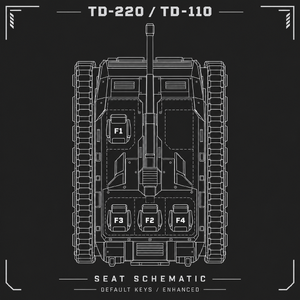
TD-220 / TD-110: F2 gunner, F3 left passenger, F4 right passenger. Switching stays within these three seats; the driver is excluded.
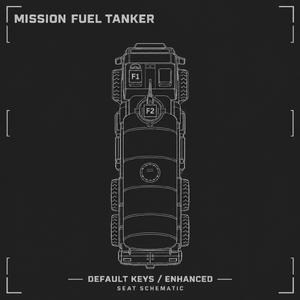
Mission fuel tanker: F1 driver, F2 gunner.
ENHANCED — cross-group switching works ONLY in solo play,you can switch to any seat you want.
Adds direct switching between all seats listed below, provided the vehicle is controlled locally.
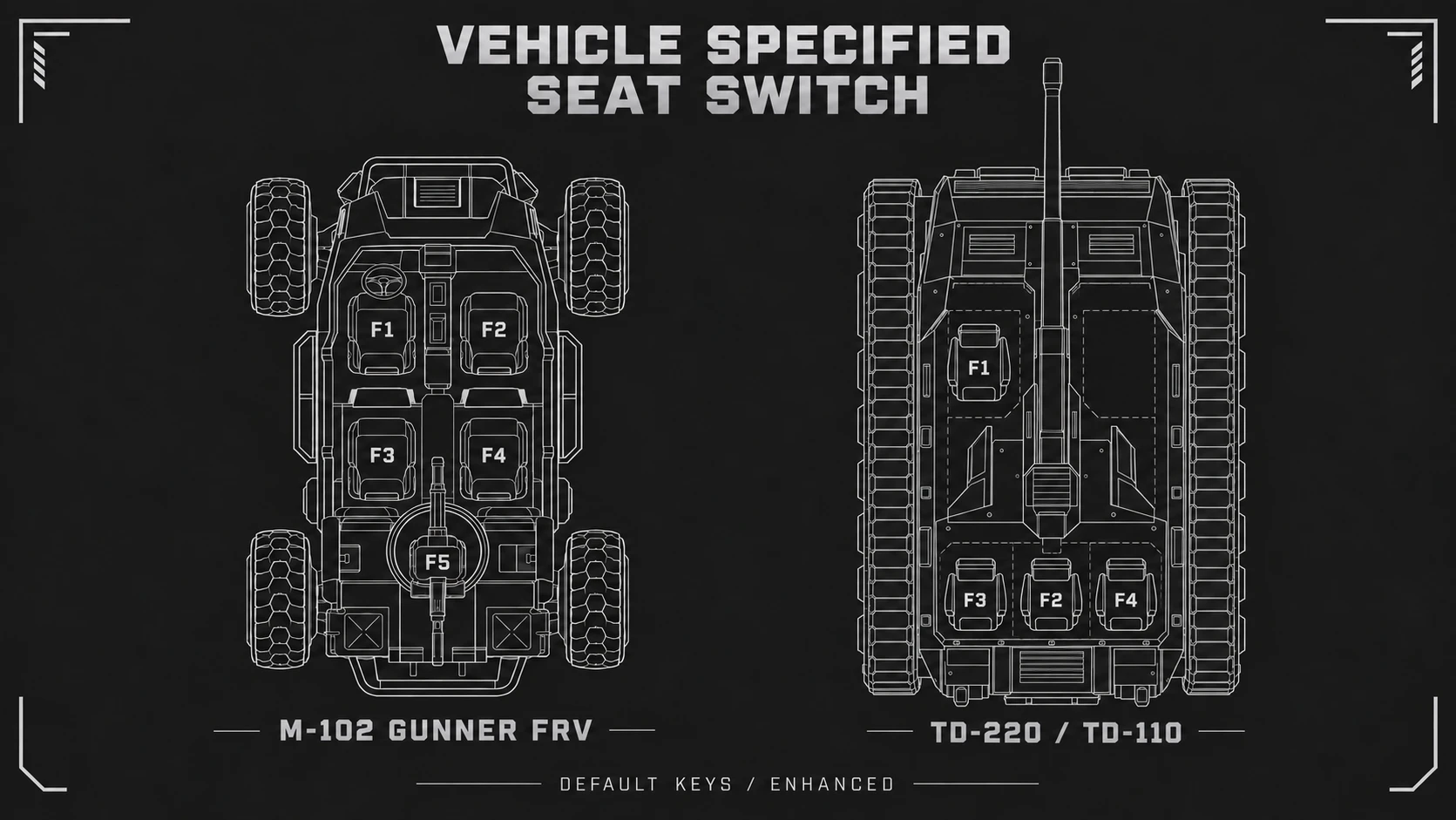
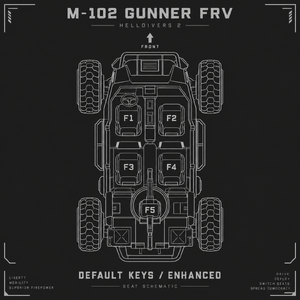
M-102: F1 driver, F2 front passenger, F3 rear left, F4 rear right, F5 machine gunner.
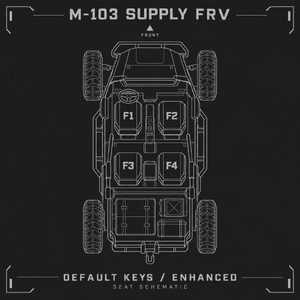
M-103: F1 driver, F2 front passenger, F3 rear left, F4 rear right.
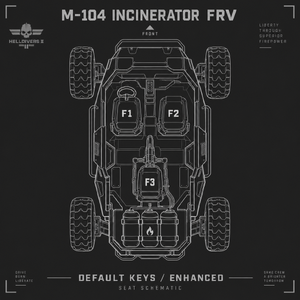
M-104: F1 driver, F2 front passenger, F3 flamethrower operator.
TD-220 / TD-110: F1 driver, F2 gunner, F3 left passenger, F4 right passenger.
Mission fuel tanker: F1 driver, F2 gunner.
In multiplayer, Enhanced retains the Normal switching restrictions. The diagrams show the full default key map; Normal still follows the groups above.
CUSTOM BINDINGS
Created on first launch with the mod: %APPDATA%\Arrowhead\Helldivers2\VehicleSeatSwitch.ini
Both variants share this file. Existing settings are preserved. Edit, save and restart the game.
Supports keyboard keys, five mouse buttons including two side buttons, and combinations such as CTRL+1 or SHIFT+Q. NONE disables a seat binding.
Read KEYS_English.txt in this ZIP for the complete key list, modifier rules and conflict handling. Chinese guide: KEYS_按键清单.txt.
Default F2/F3/F5 may also trigger the game's performance displays. Rebind them if needed. The mod does not consume existing game or operating-system shortcuts.
REQUIREMENTS
Requires Bingus Shared Loader v16: https://github.com/CowboyBingus/BingusSharedLoader
INSTALLATION
Compatible build: Steam 25327279 / EXE 1.8.45850.0. Future game updates may require a mod update.
1. Close the game. Install and enable the Loader first,place it at the end of the mod list.
2. Import this mod directly into Arsenal. Select ONE variant, Normal or Enhanced, in the mod options.
3. To change variants, close the game, change the selection in Arsenal, redeploy and restart.
UNINSTALLATION
Close the game, disable or remove the mod in Arsenal, and redeploy. You may keep your key configuration.
KNOWN ISSUE
Leaving a tank driver seat while holding A/D steering can leave steering active, including after exiting the vehicle. Release steering before switching; if it occurs, re-enter and operate the driver seat to clear it.
This release packaging update does not change gameplay logic; this issue remains unresolved.
Quite a few people reported that the mod didn't work,waiting for thier logs to pinpoint the problem.
TODOLIST
Currently exploring the application of the enhanced version to multiplayer games.
Compatible with Mod Bindings Menu
CREDITS
CowboyBingus — Bingus Shared Loader. Arsenal project — mod installation and management
AI disclosure: GPT-6 Astra assisted with research, implementation, debugging, documentation and artwork. Promotional HUD diagrams and cover art are AI-generated seat schematics, not game screenshots or a new in-game HUD.
REPORTING
Welcome to post your advise and report bugs.If you make sure that you have read the instructions carefully,deployed the mod in right way and use it in supported game but the mod still not working.Please send %LOCALAPPDATA%\CowboyBingus\Helldivers2\Logs\VehicleSeatSwitch.log %APPDATA%\Arrowhead\Helldivers2\VehicleSeatSwitch.ini to lb592900309@gmail.com from the time the issue occurred immediately to let me know why it doesn't work,don't forget to leave your ID,thanks.
vedio:https://www.bilibili.com/video/BV1auhb6mENT/
切换至载具指定位置 Vehicle Specified Seat Switch 0.2.4
介绍
提供两个版本:普通版和加强版。安装后默认启用的是普通版,普通版不能完成如从驾驶位切换到炮位的操作。加强版暂时只能在单人游戏中使用。在车内用快捷键直接切换到指定空位,支持 M-102 Gunner FRV、M-103 Supply FRV、M-104 Incinerator FRV、TD-220 Bastion MK XVI、TD-110 Maelstrom,以及特殊任务油罐车。两版均检查目标座位,已被队友占用或预留的位置不可切换。
普通版:单人和联机,无法进行跨区域换座,即只允许原版游戏可进行的换座
M-102 / M-103:前排 F1 驾驶、F2 副驾驶;后排 F3 左、F4 右。仅在同一排内互换。
M-104:前排 F1 驾驶、F2 副驾驶。
TD-220 / TD-110:F2 炮位、F3 左乘员、F4 右乘员,仅这三个位之间互换,驾驶位不参与。
任务油罐车:F1 驾驶、F2 炮位。
加强版:跨区域换座仅在单人模式生效
在普通版基础上,允许在下列所有座位之间直接切换,需要载具由本机控制。
M-102:F1 驾驶、F2 副驾驶、F3 后左、F4 后右、F5 机枪。
M-103:F1 驾驶、F2 副驾驶、F3 后左、F4 后右。
M-104:F1 驾驶、F2 副驾驶、F3 喷火。
TD-220 / TD-110:F1 驾驶、F2 炮位、F3 左乘员、F4 右乘员。
任务油罐车:F1 驾驶、F2 炮位。
联机时加强版仅保留普通版的换座范围。说明图展示完整默认键位,普通版仍受上述分组限制。
自定义按键
首次启动模组后生成:%APPDATA%\Arrowhead\Helldivers2\VehicleSeatSwitch.ini
两个版本共用此文件;升级保留已有设置。用记事本修改、保存并重启游戏。
支持键盘、鼠标五键(含两个侧键)及 CTRL+1、SHIFT+Q 等组合键。NONE 可禁用单个座位绑定。
完整合法键名、组合规则和冲突说明见本 ZIP 的 KEYS_按键清单.txt;英文见 KEYS_English.txt。
默认 F2/F3/F5 可能同时触发游戏性能面板,建议按自己的游戏设置更换键位。模组不会屏蔽游戏或系统原有快捷键。
安装
本版本适配 Steam build 25327279 / EXE 1.8.45850.0;后续游戏更新可能需要重新适配。
1. 退出游戏,先安装并启用 Loader,将其置于mod队列末尾。
2. 将本mod直接导入 Arsenal,在模组选项中选择普通版或加强版,只选一个。
3. 更换版本时,退出游戏,在 Arsenal 改选、重新部署,再启动。
卸载
退出游戏,在 Arsenal 禁用或移除此模组并重新部署。按键配置文件会保留。
依赖
需要 Bingus Shared Loader v16:https://github.com/CowboyBingus/BingusSharedLoader
致谢
CowboyBingus — Bingus Shared Loader;Arsenal 项目 — 模组管理器。
AI使用说明:模组代码开发使用了 GPT-6 Astra 辅助研究、开发、调试、文档编写和图片生成;宣传 HUD 图和封面为 AI 生成的座位示意图,并非游戏截图或游戏内新增 HUD。
已知问题
坦克驾驶时按住 A/D 转向并换座,可能使坦克持续自旋,即使下车也不停。建议先松开转向再换座;若问题发生,重新进入驾驶位并操控可解除。
本次发布整理未改动换座逻辑,该问题尚未修复。
不少人反馈mod不起效,正在等待他们的日志以定位问题。
待办事项
正在研究将加强版应用于多人游戏
适配 Mod Bindings Menu
视频:https://www.bilibili.com/video/BV1auhb6mENT/
注:该mod涉及内存修改,严格来说属于作弊,不推荐在单通或组排之外的场景使用。在报告bug或mod没效果前请确认您已完全阅读以下说明。
Vehicle Specified Seat Switch 0.2.4
DESCRIPTION
Provide 2 versions:NORMAL and ENHANCED.The defalut version is NORMAL,in that case,for example,you can't switch between driver to gunner.And ENHANCED version is Not available in multiplayer mode at present.
Stay inside your vehicle and switch directly to a chosen empty seat with a hotkey. Supports the M-102 Gunner FRV, M-103 Supply FRV, M-104 Incinerator FRV, TD-220 Bastion MK XVI, TD-110 Maelstrom, and the mission fuel tanker.
Both variants check the destination. Seats occupied or reserved by teammates are excluded.
NORMAL — solo and multiplayer, cross-group switching is not available,you can only do what vanilla game permitted.
M-102 / M-103: F1 driver, F2 front passenger; F3 rear left, F4 rear right. Switching stays within your current front or rear pair.
M-104: F1 driver and F2 front passenger, within the front pair only.
TD-220 / TD-110: F2 gunner, F3 left passenger, F4 right passenger. Switching stays within these three seats; the driver is excluded.
Mission fuel tanker: F1 driver, F2 gunner.
ENHANCED — cross-group switching works ONLY in solo play,you can switch to any seat you want.
Adds direct switching between all seats listed below, provided the vehicle is controlled locally.
M-102: F1 driver, F2 front passenger, F3 rear left, F4 rear right, F5 machine gunner.
M-103: F1 driver, F2 front passenger, F3 rear left, F4 rear right.
M-104: F1 driver, F2 front passenger, F3 flamethrower operator.
TD-220 / TD-110: F1 driver, F2 gunner, F3 left passenger, F4 right passenger.
Mission fuel tanker: F1 driver, F2 gunner.
In multiplayer, Enhanced retains the Normal switching restrictions. The diagrams show the full default key map; Normal still follows the groups above.
CUSTOM BINDINGS
Created on first launch with the mod: %APPDATA%\Arrowhead\Helldivers2\VehicleSeatSwitch.ini
Both variants share this file. Existing settings are preserved. Edit, save and restart the game.
Supports keyboard keys, five mouse buttons including two side buttons, and combinations such as CTRL+1 or SHIFT+Q. NONE disables a seat binding.
Read KEYS_English.txt in this ZIP for the complete key list, modifier rules and conflict handling. Chinese guide: KEYS_按键清单.txt.
Default F2/F3/F5 may also trigger the game's performance displays. Rebind them if needed. The mod does not consume existing game or operating-system shortcuts.
REQUIREMENTS
Requires Bingus Shared Loader v16: https://github.com/CowboyBingus/BingusSharedLoader
INSTALLATION
Compatible build: Steam 25327279 / EXE 1.8.45850.0. Future game updates may require a mod update.
1. Close the game. Install and enable the Loader first,place it at the end of the mod list.
2. Import this mod directly into Arsenal. Select ONE variant, Normal or Enhanced, in the mod options.
3. To change variants, close the game, change the selection in Arsenal, redeploy and restart.
UNINSTALLATION
Close the game, disable or remove the mod in Arsenal, and redeploy. You may keep your key configuration.
KNOWN ISSUE
Leaving a tank driver seat while holding A/D steering can leave steering active, including after exiting the vehicle. Release steering before switching; if it occurs, re-enter and operate the driver seat to clear it.
This release packaging update does not change gameplay logic; this issue remains unresolved.
Quite a few people reported that the mod didn't work,waiting for thier logs to pinpoint the problem.
TODOLIST
Currently exploring the application of the enhanced version to multiplayer games.
Compatible with Mod Bindings Menu
CREDITS
CowboyBingus — Bingus Shared Loader. Arsenal project — mod installation and management
AI disclosure: GPT-6 Astra assisted with research, implementation, debugging, documentation and artwork. Promotional HUD diagrams and cover art are AI-generated seat schematics, not game screenshots or a new in-game HUD.
REPORTING
Welcome to post your advise and report bugs.If you make sure that you have read the instructions carefully,deployed the mod in right way and use it in supported game but the mod still not working.Please send %LOCALAPPDATA%\CowboyBingus\Helldivers2\Logs\VehicleSeatSwitch.log %APPDATA%\Arrowhead\Helldivers2\VehicleSeatSwitch.ini to lb592900309@gmail.com from the time the issue occurred immediately to let me know why it doesn't work,don't forget to leave your ID,thanks.
vedio:https://www.bilibili.com/video/BV1auhb6mENT/
切换至载具指定位置 Vehicle Specified Seat Switch 0.2.4
介绍
提供两个版本:普通版和加强版。安装后默认启用的是普通版,普通版不能完成如从驾驶位切换到炮位的操作。加强版暂时只能在单人游戏中使用。在车内用快捷键直接切换到指定空位,支持 M-102 Gunner FRV、M-103 Supply FRV、M-104 Incinerator FRV、TD-220 Bastion MK XVI、TD-110 Maelstrom,以及特殊任务油罐车。两版均检查目标座位,已被队友占用或预留的位置不可切换。
普通版:单人和联机,无法进行跨区域换座,即只允许原版游戏可进行的换座
M-102 / M-103:前排 F1 驾驶、F2 副驾驶;后排 F3 左、F4 右。仅在同一排内互换。
M-104:前排 F1 驾驶、F2 副驾驶。
TD-220 / TD-110:F2 炮位、F3 左乘员、F4 右乘员,仅这三个位之间互换,驾驶位不参与。
任务油罐车:F1 驾驶、F2 炮位。
加强版:跨区域换座仅在单人模式生效
在普通版基础上,允许在下列所有座位之间直接切换,需要载具由本机控制。
M-102:F1 驾驶、F2 副驾驶、F3 后左、F4 后右、F5 机枪。
M-103:F1 驾驶、F2 副驾驶、F3 后左、F4 后右。
M-104:F1 驾驶、F2 副驾驶、F3 喷火。
TD-220 / TD-110:F1 驾驶、F2 炮位、F3 左乘员、F4 右乘员。
任务油罐车:F1 驾驶、F2 炮位。
联机时加强版仅保留普通版的换座范围。说明图展示完整默认键位,普通版仍受上述分组限制。
自定义按键
首次启动模组后生成:%APPDATA%\Arrowhead\Helldivers2\VehicleSeatSwitch.ini
两个版本共用此文件;升级保留已有设置。用记事本修改、保存并重启游戏。
支持键盘、鼠标五键(含两个侧键)及 CTRL+1、SHIFT+Q 等组合键。NONE 可禁用单个座位绑定。
完整合法键名、组合规则和冲突说明见本 ZIP 的 KEYS_按键清单.txt;英文见 KEYS_English.txt。
默认 F2/F3/F5 可能同时触发游戏性能面板,建议按自己的游戏设置更换键位。模组不会屏蔽游戏或系统原有快捷键。
安装
本版本适配 Steam build 25327279 / EXE 1.8.45850.0;后续游戏更新可能需要重新适配。
1. 退出游戏,先安装并启用 Loader,将其置于mod队列末尾。
2. 将本mod直接导入 Arsenal,在模组选项中选择普通版或加强版,只选一个。
3. 更换版本时,退出游戏,在 Arsenal 改选、重新部署,再启动。
卸载
退出游戏,在 Arsenal 禁用或移除此模组并重新部署。按键配置文件会保留。
依赖
需要 Bingus Shared Loader v16:https://github.com/CowboyBingus/BingusSharedLoader
致谢
CowboyBingus — Bingus Shared Loader;Arsenal 项目 — 模组管理器。
AI使用说明:模组代码开发使用了 GPT-6 Astra 辅助研究、开发、调试、文档编写和图片生成;宣传 HUD 图和封面为 AI 生成的座位示意图,并非游戏截图或游戏内新增 HUD。
已知问题
坦克驾驶时按住 A/D 转向并换座,可能使坦克持续自旋,即使下车也不停。建议先松开转向再换座;若问题发生,重新进入驾驶位并操控可解除。
本次发布整理未改动换座逻辑,该问题尚未修复。
不少人反馈mod不起效,正在等待他们的日志以定位问题。
待办事项
正在研究将加强版应用于多人游戏
适配 Mod Bindings Menu
视频:https://www.bilibili.com/video/BV1auhb6mENT/
