Super Earth Armory Forge
Stack any of the 31 Helldivers 2 armor passives onto the armor you wear and set every value yourself, live in game.
Languages: English · 简体中文 (Simplified Chinese)
In game: F7 → Keys tab → Language / 语言 → 简体中文. Passive and armor names use the game's own official Chinese names. Web builder: click 简体中文 at the top right.
Tip: set the game's text language to Chinese (简体 or 繁體) so the game's font has the Chinese characters.
Install
1. Install Bingus Shared Loader.
2. Add the zip to Arsenal (or your mod manager). There are no options to pick.
3. Start the game and press F7.
In game (F7)
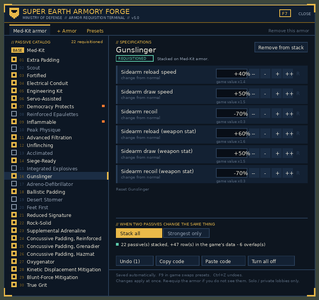
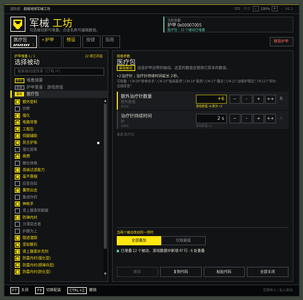
- Tick any passive to stack it onto your armor; values change live
- Plain values: type 75% resist, +30%, +50 armor
- Knows what you're wearing: the box at the top shows your armor and its stack; click it to jump to that tab, or to add it
- Armor weight: make a passive's armors light, medium or heavy (speed, stamina, armor rating), or only the armor you're wearing; the look stays the same
- Presets tab: Kitchen Sink, Tank, Stealth, Survivor, Demolitionist, Gunner, plus your own saved loadouts
- F9 swaps between loadouts without opening the panel
- Undo (Ctrl+Z), Copy code / Paste code to share builds
- Several armor stacks at once (e.g. Med-Kit for tank, Siege-Ready for gunner)
- While the panel is open the game ignores your keyboard and mouse: no shooting, turning or clicking the armory behind it (Keys tab: Blocked / Let through)
- Guide tab: how to use it, step by step, and every key, mouse and controller control
- Controller: Back + Start opens the panel (D-pad, A select, B back, LB/RB tabs)
- Panel size 80-150% (Ctrl + / Ctrl -), sharp on 1440p and 4K
- Drag the panel anywhere by its top strip; it remembers the spot (Ctrl 0 resets size and position)
- Long lists scroll: mouse wheel, the scroll bar, or PageUp / PageDown
- Keys tab: change the F7 / F9 keys, the language, and the input blocking
- Ctrl+F searches passives by name or effect
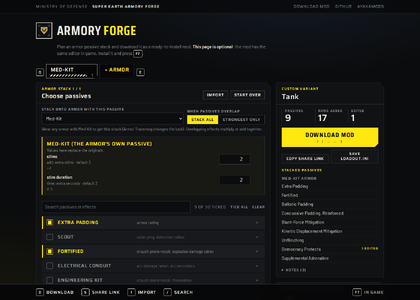
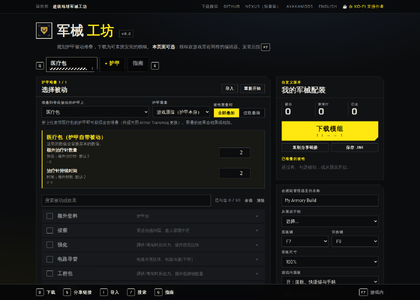
Prefer a browser? Plan a build in the web builder (English / 简体中文) and download it as a mod. It's optional; F7 does the same in game.
Updating from Passive Picker v4
This is the same mod under a new name. It updates in place, and your F7 edits and saved presets carry over.
Notes
- Single-player / private lobbies only. Don't use it in public matchmaking.
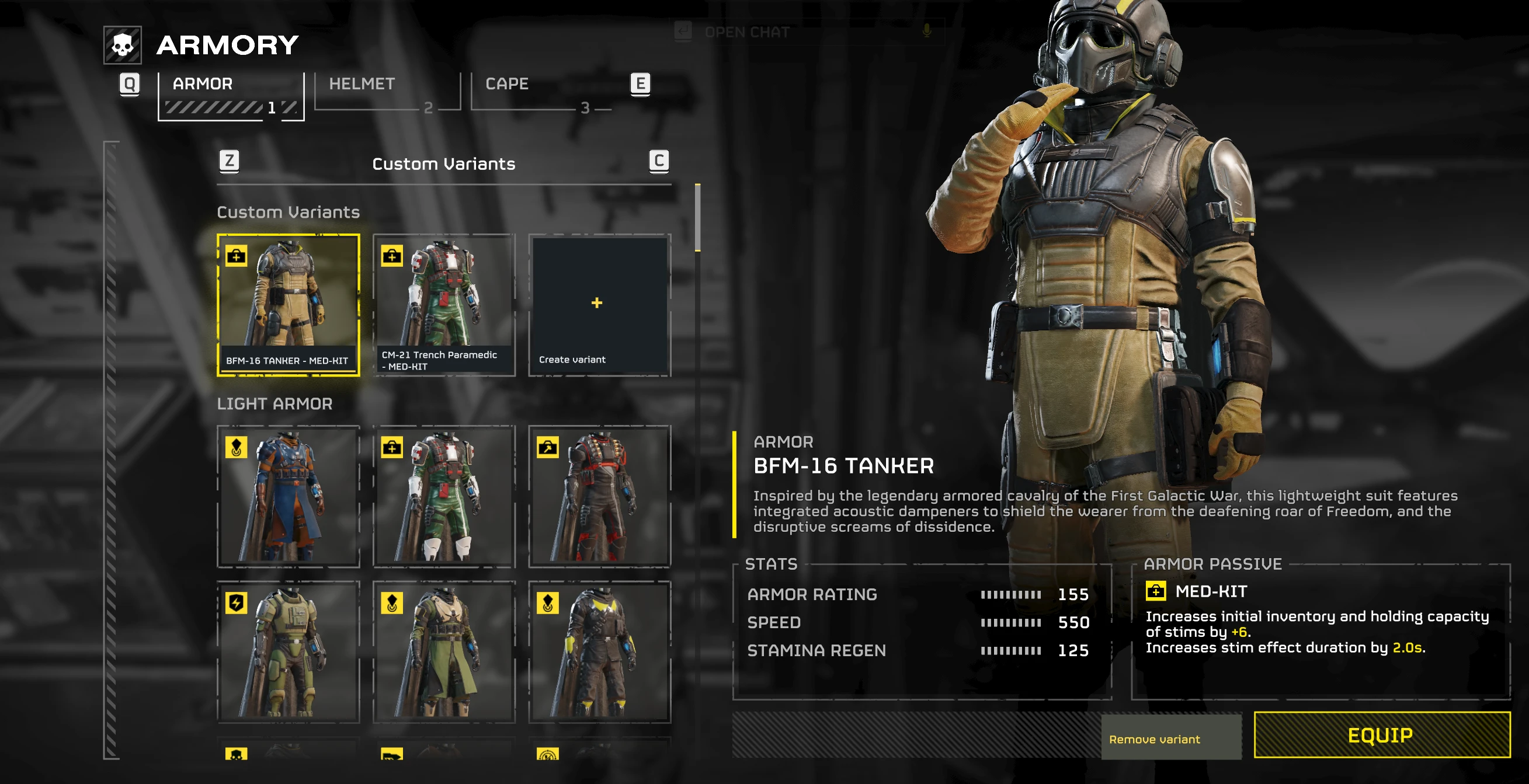
- The stack applies to armor that has the stack's passive (Med-Kit by default). Use Armor Transmog for the look you want.
- Effect names are inferred from the game (it only stores hashes); ones marked ? are guesses.
- Adreno-Defibrillator's revive likely doesn't work when stacked.
- Your loadout file and share codes are the same in any language, so loadouts move between English and Chinese unchanged.
- Not working? Keys tab → Copy problem report, and post it here or open an issue on GitHub. (Or %LOCALAPPDATA%\CowboyBingus\Helldivers2\Logs\ArmoryForge-STATUS.txt)
简体中文
超级地球军械工坊:在游戏内(F7)把任意护甲被动叠加到你的护甲上,并修改每一项数值。
开启中文:按 F7 → 「按键」页 → Language / 语言 → 简体中文。被动与护甲名称为游戏官方中文译名。
网页版生成器:右上角点「简体中文」。
提示:请把游戏的文字语言设为中文(简体或繁體),游戏字体才有中文字形。
中文翻译:hd2modpj。仅限单人 / 私人房间。
Credits
Started from Passive Picker v3 by mostlycloudy, used with his permission: memory-patching engine, archive format and passive data (engine credit also SHODAN). Panel drawing techniques adapted from SHODAN Stat Editor v1.4.1 (public domain). Simplified Chinese translation by hd2modpj. Armor data layout from FileDiver by xypwn. Requires CowboyBingus's Bingus Shared Loader.
Source: GitHub | Also on Nexus Mods
Stack any of the 31 Helldivers 2 armor passives onto the armor you wear and set every value yourself, live in game.
Languages: English · 简体中文 (Simplified Chinese)
In game: F7 → Keys tab → Language / 语言 → 简体中文. Passive and armor names use the game's own official Chinese names. Web builder: click 简体中文 at the top right.
Tip: set the game's text language to Chinese (简体 or 繁體) so the game's font has the Chinese characters.
Install
1. Install Bingus Shared Loader.
2. Add the zip to Arsenal (or your mod manager). There are no options to pick.
3. Start the game and press F7.
In game (F7)
- Tick any passive to stack it onto your armor; values change live
- Plain values: type 75% resist, +30%, +50 armor
- Knows what you're wearing: the box at the top shows your armor and its stack; click it to jump to that tab, or to add it
- Armor weight: make a passive's armors light, medium or heavy (speed, stamina, armor rating), or only the armor you're wearing; the look stays the same
- Presets tab: Kitchen Sink, Tank, Stealth, Survivor, Demolitionist, Gunner, plus your own saved loadouts
- F9 swaps between loadouts without opening the panel
- Undo (Ctrl+Z), Copy code / Paste code to share builds
- Several armor stacks at once (e.g. Med-Kit for tank, Siege-Ready for gunner)
- While the panel is open the game ignores your keyboard and mouse: no shooting, turning or clicking the armory behind it (Keys tab: Blocked / Let through)
- Guide tab: how to use it, step by step, and every key, mouse and controller control
- Controller: Back + Start opens the panel (D-pad, A select, B back, LB/RB tabs)
- Panel size 80-150% (Ctrl + / Ctrl -), sharp on 1440p and 4K
- Drag the panel anywhere by its top strip; it remembers the spot (Ctrl 0 resets size and position)
- Long lists scroll: mouse wheel, the scroll bar, or PageUp / PageDown
- Keys tab: change the F7 / F9 keys, the language, and the input blocking
- Ctrl+F searches passives by name or effect
Prefer a browser? Plan a build in the web builder (English / 简体中文) and download it as a mod. It's optional; F7 does the same in game.
Updating from Passive Picker v4
This is the same mod under a new name. It updates in place, and your F7 edits and saved presets carry over.
Notes
- Single-player / private lobbies only. Don't use it in public matchmaking.
- The stack applies to armor that has the stack's passive (Med-Kit by default). Use Armor Transmog for the look you want.
- Effect names are inferred from the game (it only stores hashes); ones marked ? are guesses.
- Adreno-Defibrillator's revive likely doesn't work when stacked.
- Your loadout file and share codes are the same in any language, so loadouts move between English and Chinese unchanged.
- Not working? Keys tab → Copy problem report, and post it here or open an issue on GitHub. (Or %LOCALAPPDATA%\CowboyBingus\Helldivers2\Logs\ArmoryForge-STATUS.txt)
简体中文
超级地球军械工坊:在游戏内(F7)把任意护甲被动叠加到你的护甲上,并修改每一项数值。
开启中文:按 F7 → 「按键」页 → Language / 语言 → 简体中文。被动与护甲名称为游戏官方中文译名。
网页版生成器:右上角点「简体中文」。
提示:请把游戏的文字语言设为中文(简体或繁體),游戏字体才有中文字形。
中文翻译:hd2modpj。仅限单人 / 私人房间。
Credits
Started from Passive Picker v3 by mostlycloudy, used with his permission: memory-patching engine, archive format and passive data (engine credit also SHODAN). Panel drawing techniques adapted from SHODAN Stat Editor v1.4.1 (public domain). Simplified Chinese translation by hd2modpj. Armor data layout from FileDiver by xypwn. Requires CowboyBingus's Bingus Shared Loader.
Source: GitHub | Also on Nexus Mods
Enjoying the mod? It's free and always will be. If you'd like to support it, I have a Ko-fi page. Every tip is really appreciated and helps me keep updating it.

