wheeltext · Usage
What is this?
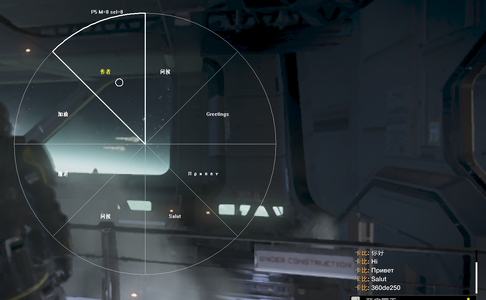
An in-game quick text wheel for HD2. Hold E to bring up a circular menu, move your mouse to a section, and left-click to send that section's text straight to squad chat.
No typing needed, no need to open the chat box. Up to 8 sections (mapped to @1 ~ @8), supports Chinese, rich text, and multiple lines. Works for both host and client.
Install
Import wheeltext.zip through HD2 Mod Manager / Arsenal, Deploy, and enter the game.
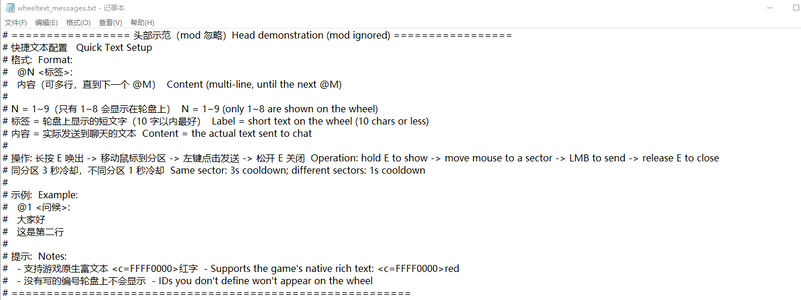
On first run, it will automatically create a config file at %LOCALAPPDATA%\CowboyBingus\Helldivers2\wheeltext_messages.txt, with bilingual example instructions at the top.
Prerequisite: Bingus Shared Loader v15+ (API level 1). No other mods needed.
Configuration
Config file location:
%LOCALAPPDATA%\CowboyBingus\Helldivers2\wheeltext_messages.txt
Format:
@N <label>:
content
Notes:
N in @N is 1~8.
At first I wanted to make a hotkey version with numpad 1 to 9 for simplicity, but it seems that after deploying the text locally, users end up forgetting which key maps to which content once there are more of them. So I made an eight-section wheel + label reminder style.
<label> is the short text shown on the wheel, used to remind the user what kind of content that section will send. 10 characters or less is recommended; too long and it overflows the section.
The content is the actual text sent to chat. It can be multi-line (until the next @M or end of file).
Lines starting with # are ignored entirely, used for the header instructions.
Example:
@1 <Greeting>:
Hello everyone
@2 <Retreat>:
Retreat! Retreat!
@3 <Push>:
Go go go
Advanced:
Multi-line: Content supports line breaks, and the game chat displays them as separate lines.
Rich text: Whether the short label supports it hasn't been tested.
Sent content supports <c=AARRGGBB> (color) and <s=N> (font size). Example: <c=FFFF0000>Retreat! displays in red.
Changes take effect immediately: After editing the config, the next time you bring up the wheel it uses the new content. No need to restart the game.
Dynamic section count: However many entries you write, that's how many sections there are. Write only 3 and it's a three-section wheel; there are no empty sections.
Usage
Step 1: Hold E for about 0.7 seconds, and the wheel appears.
Places in the game that require holding E to interact will be overridden by the in-game interaction. Wait, are there any? Not sure. I forgot again to make an external mod hotkey config mod this time. No way around it—when I make mods, I always use web-based DS plus PS command interaction to modify files. I've never had a suitable interface, never archived skills, and keep forgetting.
Step 2: Try moving the mouse to the wheel. There will be a cursor as a feel reminder, then move to the target section. The outer arc of the section you're in gets thicker and lights up, and the label turns yellow.
Step 3: Left-click to send that section's content to chat.
Step 4: To send multiple in a row, keep holding E, move to another section, and click again.
Step 5: Release E to close the wheel, and the view returns to normal.
Fake cursor: The hollow white circle on the wheel is a custom-drawn cursor (the game's system cursor is hidden), and it follows the mouse.
Cooldown
The same section can't be sent again within 3 seconds.
Different sections must be at least 1 second apart.
When the cooldown triggers, the entire ring (outline, dividers, highlighted arc) flashes red once.
Notes
Works for both host and client.
The game's native long-press Q communication wheel is unaffected. I originally wanted to start from that angle because my UI is always poorly made. I remember seeing a few mods that modify the game wheel info, but I forget their names and can't be bothered to look.
Rich text spec: <c=...> and <s=...> are supported; </c> will reject the whole segment; <color=red> is not supported.
While the wheel is displayed, the game view won't turn with the mouse, but character movement controls are unaffected. The custom cursor only shows when moved into the square area drawn by the wheel. Releasing E immediately restores everything.
Log location: %LOCALAPPDATA%\CowboyBingus\Helldivers2\Logs\wheeltext.log
Quick file reference
Config file: %LOCALAPPDATA%\CowboyBingus\Helldivers2\wheeltext_messages.txt
Log: %LOCALAPPDATA%\CowboyBingus\Helldivers2\Logs\wheeltext.log
Compatibility
Prerequisite: Bingus Shared Loader v15+ (API level 1).
Environment: PC version.
Anti-cheat: Memory reads only (network context, chat object), calls the game's built-in chat function, temporarily takes over the mouse via RawInput (restored with SHOW/HIDE), and briefly filters mouse button messages in the game window WndProc.
Uninstall
Disable or delete it in Mod Manager.
Optional: Delete %LOCALAPPDATA%\CowboyBingus\Helldivers2\wheeltext_messages.txt.
Known limitations
Maximum 8 sections. Entry 9 and beyond won't show on the wheel.
Long-pressing E may fail in interaction scenarios (see Notes).
The fake cursor is custom-drawn, not the system cursor (the game's system cursor is hidden).
Final ramblings
The mods above that can be published are just ones I made because I got interested in this direction during this whole incident. I also have some personal-use mods that would basically get removed even from Git.
Due to life and work commitments, for mods whose features already do what I need, I probably won't provide any updates or maintenance fixes. So feel free to unpack and study them, so people after me can make even better mods.
For the development of this mod, thanks to CowboyBingus—not just for the origin, but for actually reusing the auto-kick-reason feature from his BetterLobbyManagement, and also for the UI approach in SHADAN's mod.
Actually, the direction I've been making mods in has always been based on the current mod explosion, the hard-to-judge random lobby environment, and doing the mods I want to make in the direction of prevention and division.
Right now I still don't have a good idea for the design of reading local config text. I only know about the mod config menu and mod hotkey config mods. The location can only be under %LOCALAPPDATA%\CowboyBingus\Helldivers2, one level outside the log folder.
Lastly, thanks to all the open-source work out there for the learning experience, inspiration, and ideas. Thanks to DS.
Timestamp: Beijing Time, October 8, 2026, 21:54
wheeltext · 使用说明
这是什么
HD2 游戏内的快捷文本轮盘。长按 E 唤出圆形菜单,鼠标移到分区,左键点击就把该分区对应的文本直接发到小队聊天。
不需要打字,不需要打开聊天框。最多 8 个分区(对应 @1 ~ @8),支持中文、富文本、多行。主客机都能用。
安装
通过 HD2 Mod Manager / Arsenal 导入 wheeltext.zip,Deploy,进游戏。
首次运行会在 %LOCALAPPDATA%\CowboyBingus\Helldivers2\ 下自动生成配置文件 wheeltext_messages.txt,头部有双语示范说明。
前置:Bingus Shared Loader v15+(API level 1)。不需要其它 mod。
配置
配置文件位置:
text
%LOCALAPPDATA%\CowboyBingus\Helldivers2\wheeltext_messages.txt
格式:
text
@N <标签>:
内容
说明:
@N 里的 N 是 1~8。
一开始想做热键版小键盘1到9简单点的,但是好像本地部署文本用户写了后实际多了也不记得哪个键位是对于哪个内容的,就做了八分轮盘+标签提醒的样式。
<标签> 是轮盘上显示的短文字,用于给用户分辨提醒该条下会发出什么样内容,建议 10 字以内,太长会超出分区。
内容是实际发送到聊天的文本,可多行(到下一个 @M 或文件尾为止)。
以 # 开头的行整行忽略,头部说明用。
示例:
text
@1 <问候>:
大家好
@2 <撤退>:
撤退!撤退!
@3 <加油>:
兄弟们冲
高级:
多行:内容支持换行,游戏聊天原样分行显示。
富文本:短标签是否支持未测试过
发送内容支持 <c=AARRGGBB>(颜色)、<s=N>(字号)。例:<c=FFFF0000>撤退! 会显示红色。
修改实时生效:改完配置后,下次唤出轮盘就是新内容,不用重启游戏。
分区数量动态:写几条就分几个区。只写 3 条就是三分区,没有内容为空轮盘。
使用
第一步:长按 E 约 0.7 秒,轮盘出现。
游戏实际里有要长按E交互的地方会被游戏内交互覆盖,再说有吗?不太清楚,我这次又忘记做外接模组热键配置的mod的口了,没得办法,我搓mod都是网页版DS+ps指令交互文件修改的,一直没有配适的接口一直没有归档skill一直忘记
第二步:尝试移动鼠标到轮盘,会有一个光标提醒下手感,然后挪到目标分区。所在分区外弧加粗亮起,标签变黄。
第三步:左键点击,发送该分区内容到聊天。
第四步:想连发多条就保持按住 E,移到别的分区再点击。
第五步:松开 E,关闭轮盘,视角恢复正常。
假光标:轮盘上那个空心白圆圈是自绘光标(游戏系统光标被隐藏),跟着鼠标走。
冷却
同一分区 3 秒内不能重复发。
不同分区之间至少间隔 1 秒。
触发冷却时整个圆环(轮廓、分界线、高亮弧)会全部闪红一下。
注意事项
主客机都能用。
游戏原生 Q 长按通讯轮盘不受影响,我本来想从这个方面入手做的,因为我ui一向做得烂,记得看见过几个修改游戏轮盘信息的mod的,忘记啥名字也懒得找了
富文本规格:<c=...> 和 <s=...> 支持;</c> 会拒绝整段;<color=red> 不支持
轮盘显示期间游戏视角不会随鼠标转动,但是游戏角色移动操控未有影响,自制的光标挪到轮盘所划的正方区域内才会显示,松开 E 后立即恢复。
日志位置:%LOCALAPPDATA%\CowboyBingus\Helldivers2\Logs\wheeltext.log
文件位置速查
配置文件:%LOCALAPPDATA%\CowboyBingus\Helldivers2\wheeltext_messages.txt
日志:%LOCALAPPDATA%\CowboyBingus\Helldivers2\Logs\wheeltext.log
兼容性
前置:Bingus Shared Loader v15+(API level 1)。
环境:PC 版。
反作弊:仅内存读(network context、chat 对象)、调用游戏自带聊天函数、RawInput 临时接管鼠标(SHOW/HIDE 恢复)、游戏窗口 WndProc 短时过滤鼠标按键消息。
卸载
在 Mod Manager 里禁用或删除。
可选:删除 %LOCALAPPDATA%\CowboyBingus\Helldivers2\wheeltext_messages.txt。
已知限制
最多 8 分区。第 9 条及以后不显示在轮盘上。
E 长按在互动场景可能失效(见注意事项)。
假光标是自绘的,不是系统光标(游戏系统光标被隐藏)。
最后依旧碎碎念
以上能够上架的mod只是我出于这次风波有兴趣方向而做的mod,还有些自用mod基本属于git也会被移除的情况。
碍于生活工作原因,对于已实现功能达到我目的的mod,我可能不会有任何更新或者维护修补,所以欢迎解包学习以便后来人做出更为优秀的mod,对于此mod的开发,在此感谢CowboyBingus,不止从起源上,更从实际上搬运他BetterLobbyManagement里面踢人自动说明理由这项功能的复用,还有SHADAN的mod其中ui的做法
实际我搓mod的方向一直基于当前mod井喷,野排环境难评,预防划分的方向做我想做的mod
现在对于要读取本地配置文本的设计也没有好的想法,目前只知道模组配置菜单,模组热键配置的mod,
其位置也只能取%LOCALAPPDATA%\CowboyBingus\Helldivers2其下,log文件夹的外一层
最后也感谢各方开源给我的学习经验灵感思路,感谢DS
时间点:北京时间 2026年10月8日21:54
What is this?
An in-game quick text wheel for HD2. Hold E to bring up a circular menu, move your mouse to a section, and left-click to send that section's text straight to squad chat.
No typing needed, no need to open the chat box. Up to 8 sections (mapped to @1 ~ @8), supports Chinese, rich text, and multiple lines. Works for both host and client.
Install
Import wheeltext.zip through HD2 Mod Manager / Arsenal, Deploy, and enter the game.
On first run, it will automatically create a config file at %LOCALAPPDATA%\CowboyBingus\Helldivers2\wheeltext_messages.txt, with bilingual example instructions at the top.
Prerequisite: Bingus Shared Loader v15+ (API level 1). No other mods needed.
Configuration
Config file location:
%LOCALAPPDATA%\CowboyBingus\Helldivers2\wheeltext_messages.txt
Format:
@N <label>:
content
Notes:
N in @N is 1~8.
At first I wanted to make a hotkey version with numpad 1 to 9 for simplicity, but it seems that after deploying the text locally, users end up forgetting which key maps to which content once there are more of them. So I made an eight-section wheel + label reminder style.
<label> is the short text shown on the wheel, used to remind the user what kind of content that section will send. 10 characters or less is recommended; too long and it overflows the section.
The content is the actual text sent to chat. It can be multi-line (until the next @M or end of file).
Lines starting with # are ignored entirely, used for the header instructions.
Example:
@1 <Greeting>:
Hello everyone
@2 <Retreat>:
Retreat! Retreat!
@3 <Push>:
Go go go
Advanced:
Multi-line: Content supports line breaks, and the game chat displays them as separate lines.
Rich text: Whether the short label supports it hasn't been tested.
Sent content supports <c=AARRGGBB> (color) and <s=N> (font size). Example: <c=FFFF0000>Retreat! displays in red.
Changes take effect immediately: After editing the config, the next time you bring up the wheel it uses the new content. No need to restart the game.
Dynamic section count: However many entries you write, that's how many sections there are. Write only 3 and it's a three-section wheel; there are no empty sections.
Usage
Step 1: Hold E for about 0.7 seconds, and the wheel appears.
Places in the game that require holding E to interact will be overridden by the in-game interaction. Wait, are there any? Not sure. I forgot again to make an external mod hotkey config mod this time. No way around it—when I make mods, I always use web-based DS plus PS command interaction to modify files. I've never had a suitable interface, never archived skills, and keep forgetting.
Step 2: Try moving the mouse to the wheel. There will be a cursor as a feel reminder, then move to the target section. The outer arc of the section you're in gets thicker and lights up, and the label turns yellow.
Step 3: Left-click to send that section's content to chat.
Step 4: To send multiple in a row, keep holding E, move to another section, and click again.
Step 5: Release E to close the wheel, and the view returns to normal.
Fake cursor: The hollow white circle on the wheel is a custom-drawn cursor (the game's system cursor is hidden), and it follows the mouse.
Cooldown
The same section can't be sent again within 3 seconds.
Different sections must be at least 1 second apart.
When the cooldown triggers, the entire ring (outline, dividers, highlighted arc) flashes red once.
Notes
Works for both host and client.
The game's native long-press Q communication wheel is unaffected. I originally wanted to start from that angle because my UI is always poorly made. I remember seeing a few mods that modify the game wheel info, but I forget their names and can't be bothered to look.
Rich text spec: <c=...> and <s=...> are supported; </c> will reject the whole segment; <color=red> is not supported.
While the wheel is displayed, the game view won't turn with the mouse, but character movement controls are unaffected. The custom cursor only shows when moved into the square area drawn by the wheel. Releasing E immediately restores everything.
Log location: %LOCALAPPDATA%\CowboyBingus\Helldivers2\Logs\wheeltext.log
Quick file reference
Config file: %LOCALAPPDATA%\CowboyBingus\Helldivers2\wheeltext_messages.txt
Log: %LOCALAPPDATA%\CowboyBingus\Helldivers2\Logs\wheeltext.log
Compatibility
Prerequisite: Bingus Shared Loader v15+ (API level 1).
Environment: PC version.
Anti-cheat: Memory reads only (network context, chat object), calls the game's built-in chat function, temporarily takes over the mouse via RawInput (restored with SHOW/HIDE), and briefly filters mouse button messages in the game window WndProc.
Uninstall
Disable or delete it in Mod Manager.
Optional: Delete %LOCALAPPDATA%\CowboyBingus\Helldivers2\wheeltext_messages.txt.
Known limitations
Maximum 8 sections. Entry 9 and beyond won't show on the wheel.
Long-pressing E may fail in interaction scenarios (see Notes).
The fake cursor is custom-drawn, not the system cursor (the game's system cursor is hidden).
Final ramblings
The mods above that can be published are just ones I made because I got interested in this direction during this whole incident. I also have some personal-use mods that would basically get removed even from Git.
Due to life and work commitments, for mods whose features already do what I need, I probably won't provide any updates or maintenance fixes. So feel free to unpack and study them, so people after me can make even better mods.
For the development of this mod, thanks to CowboyBingus—not just for the origin, but for actually reusing the auto-kick-reason feature from his BetterLobbyManagement, and also for the UI approach in SHADAN's mod.
Actually, the direction I've been making mods in has always been based on the current mod explosion, the hard-to-judge random lobby environment, and doing the mods I want to make in the direction of prevention and division.
Right now I still don't have a good idea for the design of reading local config text. I only know about the mod config menu and mod hotkey config mods. The location can only be under %LOCALAPPDATA%\CowboyBingus\Helldivers2, one level outside the log folder.
Lastly, thanks to all the open-source work out there for the learning experience, inspiration, and ideas. Thanks to DS.
Timestamp: Beijing Time, October 8, 2026, 21:54
wheeltext · 使用说明
这是什么
HD2 游戏内的快捷文本轮盘。长按 E 唤出圆形菜单,鼠标移到分区,左键点击就把该分区对应的文本直接发到小队聊天。
不需要打字,不需要打开聊天框。最多 8 个分区(对应 @1 ~ @8),支持中文、富文本、多行。主客机都能用。
安装
通过 HD2 Mod Manager / Arsenal 导入 wheeltext.zip,Deploy,进游戏。
首次运行会在 %LOCALAPPDATA%\CowboyBingus\Helldivers2\ 下自动生成配置文件 wheeltext_messages.txt,头部有双语示范说明。
前置:Bingus Shared Loader v15+(API level 1)。不需要其它 mod。
配置
配置文件位置:
text
%LOCALAPPDATA%\CowboyBingus\Helldivers2\wheeltext_messages.txt
格式:
text
@N <标签>:
内容
说明:
@N 里的 N 是 1~8。
一开始想做热键版小键盘1到9简单点的,但是好像本地部署文本用户写了后实际多了也不记得哪个键位是对于哪个内容的,就做了八分轮盘+标签提醒的样式。
<标签> 是轮盘上显示的短文字,用于给用户分辨提醒该条下会发出什么样内容,建议 10 字以内,太长会超出分区。
内容是实际发送到聊天的文本,可多行(到下一个 @M 或文件尾为止)。
以 # 开头的行整行忽略,头部说明用。
示例:
text
@1 <问候>:
大家好
@2 <撤退>:
撤退!撤退!
@3 <加油>:
兄弟们冲
高级:
多行:内容支持换行,游戏聊天原样分行显示。
富文本:短标签是否支持未测试过
发送内容支持 <c=AARRGGBB>(颜色)、<s=N>(字号)。例:<c=FFFF0000>撤退! 会显示红色。
修改实时生效:改完配置后,下次唤出轮盘就是新内容,不用重启游戏。
分区数量动态:写几条就分几个区。只写 3 条就是三分区,没有内容为空轮盘。
使用
第一步:长按 E 约 0.7 秒,轮盘出现。
游戏实际里有要长按E交互的地方会被游戏内交互覆盖,再说有吗?不太清楚,我这次又忘记做外接模组热键配置的mod的口了,没得办法,我搓mod都是网页版DS+ps指令交互文件修改的,一直没有配适的接口一直没有归档skill一直忘记
第二步:尝试移动鼠标到轮盘,会有一个光标提醒下手感,然后挪到目标分区。所在分区外弧加粗亮起,标签变黄。
第三步:左键点击,发送该分区内容到聊天。
第四步:想连发多条就保持按住 E,移到别的分区再点击。
第五步:松开 E,关闭轮盘,视角恢复正常。
假光标:轮盘上那个空心白圆圈是自绘光标(游戏系统光标被隐藏),跟着鼠标走。
冷却
同一分区 3 秒内不能重复发。
不同分区之间至少间隔 1 秒。
触发冷却时整个圆环(轮廓、分界线、高亮弧)会全部闪红一下。
注意事项
主客机都能用。
游戏原生 Q 长按通讯轮盘不受影响,我本来想从这个方面入手做的,因为我ui一向做得烂,记得看见过几个修改游戏轮盘信息的mod的,忘记啥名字也懒得找了
富文本规格:<c=...> 和 <s=...> 支持;</c> 会拒绝整段;<color=red> 不支持
轮盘显示期间游戏视角不会随鼠标转动,但是游戏角色移动操控未有影响,自制的光标挪到轮盘所划的正方区域内才会显示,松开 E 后立即恢复。
日志位置:%LOCALAPPDATA%\CowboyBingus\Helldivers2\Logs\wheeltext.log
文件位置速查
配置文件:%LOCALAPPDATA%\CowboyBingus\Helldivers2\wheeltext_messages.txt
日志:%LOCALAPPDATA%\CowboyBingus\Helldivers2\Logs\wheeltext.log
兼容性
前置:Bingus Shared Loader v15+(API level 1)。
环境:PC 版。
反作弊:仅内存读(network context、chat 对象)、调用游戏自带聊天函数、RawInput 临时接管鼠标(SHOW/HIDE 恢复)、游戏窗口 WndProc 短时过滤鼠标按键消息。
卸载
在 Mod Manager 里禁用或删除。
可选:删除 %LOCALAPPDATA%\CowboyBingus\Helldivers2\wheeltext_messages.txt。
已知限制
最多 8 分区。第 9 条及以后不显示在轮盘上。
E 长按在互动场景可能失效(见注意事项)。
假光标是自绘的,不是系统光标(游戏系统光标被隐藏)。
最后依旧碎碎念
以上能够上架的mod只是我出于这次风波有兴趣方向而做的mod,还有些自用mod基本属于git也会被移除的情况。
碍于生活工作原因,对于已实现功能达到我目的的mod,我可能不会有任何更新或者维护修补,所以欢迎解包学习以便后来人做出更为优秀的mod,对于此mod的开发,在此感谢CowboyBingus,不止从起源上,更从实际上搬运他BetterLobbyManagement里面踢人自动说明理由这项功能的复用,还有SHADAN的mod其中ui的做法
实际我搓mod的方向一直基于当前mod井喷,野排环境难评,预防划分的方向做我想做的mod
现在对于要读取本地配置文本的设计也没有好的想法,目前只知道模组配置菜单,模组热键配置的mod,
其位置也只能取%LOCALAPPDATA%\CowboyBingus\Helldivers2其下,log文件夹的外一层
最后也感谢各方开源给我的学习经验灵感思路,感谢DS
时间点:北京时间 2026年10月8日21:54