EXOSUIT OVERLORD — Shield & Tesla Warfare System 

 Make sure you have all four required dependencies installed and enabled in your mod manager, as shown in the screenshot: Bingus Shared Loader (BSL), HD2Runtime, HD2 Scanner, and Mod Options Menu. Also, make sure BSL is placed at the very bottom of the load order.
THE NEXT EVOLUTION OF MECHANIZED WARFARE HAS ARRIVED.
ONE MACHINE. TWO SYSTEMS. UNLIMITED DESTRUCTION.Why settle for ordinary armor when you can command a walking fortress armed with a 360° energy shield and a devastating Tesla warfare system?
EXOSUIT OVERLORD transforms the exosuits of HELLDIVERS 2 into customizable mechanized war machines, combining powerful defensive technology, electrifying offensive capabilities, advanced tactical HUD monitoring, and unlimited-distance remote control.
Every exosuit can be individually configured. Every system can be independently controlled.
THE ENEMY BROUGHT AN ARMY. YOU BROUGHT THE STORM.
FOR SUPER EARTH! FOR MANAGED DEMOCRACY!

1. 360° ENERGY SHIELD SYSTEM
A FORTRESS DOES NOT NEED WALLS WHEN IT HAS AN ENERGY SHIELD.Equip your exosuit with a fully enveloping, 360° energy shield that surrounds the entire machine.
Unlike a directional physical shield, this energy barrier provides protection around the exosuit.
Features
- 360° Energy Protection: Surrounds the entire exosuit with a spherical energy barrier.
- Exosuit-Sized Shield: The original shield bubble has been reduced in size to better fit the exosuit's body.
- Independent Activation: Manually enable or disable the shield whenever needed.
- Remote Control: Toggle the shield from any distance, even when you are outside the exosuit.
- Delayed Regeneration: Shield regeneration begins only after the shield has gone 5 consecutive seconds without taking damage.
- Limited Full-Break Recovery: After being completely depleted, the shield of each individual exosuit can recover from a full break a maximum of two times.
Shield Recovery Rules
The shield does not begin regenerating immediately after taking damage.It must remain undamaged for 5 seconds before regeneration can begin.
Each individual exosuit has a maximum of two recovery opportunities after its shield has been completely broken.
YOUR SHIELD IS POWERFUL — BUT NOT INVINCIBLE.
Manage your defenses wisely. Every recovery matters.
2. TESLA WARFARE SYSTEM
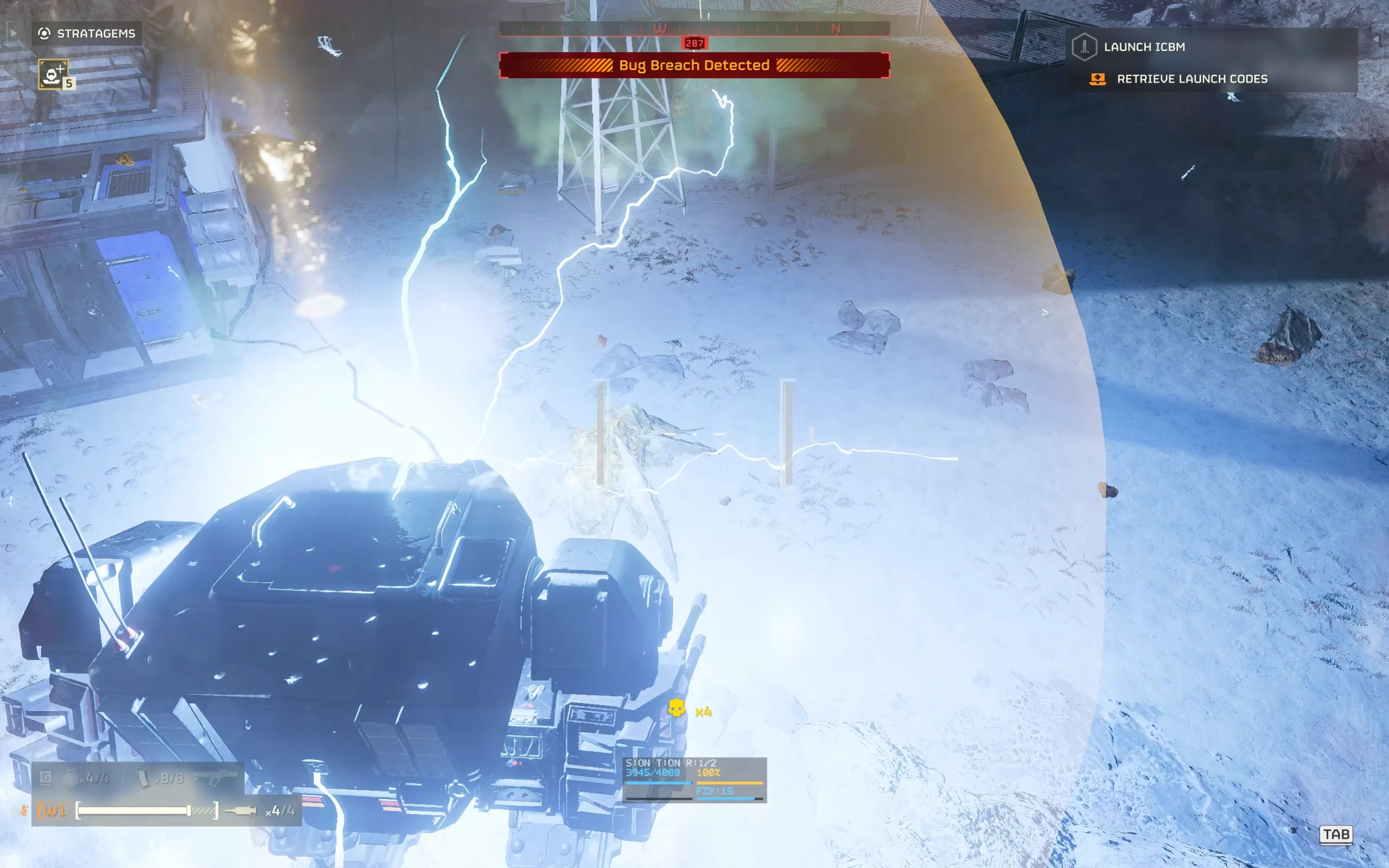
BECOME THE STORM. DELIVER ELECTRIFIED DEMOCRACY.Equip your exosuit with the electrical capabilities of a Tesla Tower and transform it into a mobile electrical weapon.
Features
- Mounted Tesla System: Adds Tesla Tower functionality to the exosuit.
- Electrical Attacks: Electrifies nearby targets while the Tesla system is active.
- Independent Activation: Enable or disable the Tesla system without affecting the energy shield.
- Unlimited-Distance Remote Control: Toggle the Tesla system regardless of your distance from the exosuit.
- Automatic Pilot-Exit Shutdown: The Tesla system automatically turns off when the player exits the exosuit.
- Manual Remote Reactivation: The Tesla system can be reactivated remotely even when the exosuit is unoccupied.
Friendly Fire Warning
WARNING: ELECTRICITY DOES NOT CARE WHO FIGHTS FOR SUPER EARTH.The Tesla system can still electrocute players while active.
This includes the operator, nearby teammates, and other friendly players.
The automatic shutdown feature reduces the risk of being electrocuted when exiting the exosuit, but it does not eliminate friendly-fire hazards.
Always exercise caution when manually activating the Tesla system outside the exosuit.
THE STORM OBEYS YOUR COMMANDS — NOT YOUR FRIENDLIES.
 3. CUSTOMIZABLE EXOSUIT LOADOUTS
YOUR EXOSUIT. YOUR LOADOUT. YOUR RULES.Every exosuit can be configured individually through the in-game Mod Options Menu.
Available Configurations
SHIELD ONLYEquip the exosuit with the 360° energy shield system.
Turn your machine into a heavily protected mobile fortress.
TESLA ONLYEquip the exosuit with the Tesla warfare system.
Turn your machine into a mobile electrical weapon.
SHIELD + TESLAEquip both systems simultaneously.
Combine all-around protection with devastating electrical capabilities.
STANDARD CONFIGURATIONDisable both optional systems to retain a standard exosuit configuration.
Individual Exosuit Settings
- Select mounted equipment separately for each exosuit.
- Enable the shield system, Tesla system, or both.
- Customize the activation keys for each exosuit.
- Change equipment configurations through the in-game Mod Options Menu.
 4. CONTROLS & KEYBINDINGS
Both systems feature independent, customizable controls.| Default Key | Function |
|---|---|
| F9 | Toggle Tesla System ON/OFF |
| F7 F8 | Toggle Energy Shield ON/OFF Toggle Shield Size |
Customizable Controls
All activation keys can be changed through the in-game Mod Options Menu.Each exosuit can have its own equipment configuration and control settings.
Unlimited-Distance Remote Control
Both systems support remote activation and deactivation without distance restrictions.You do not need to be inside the exosuit to control them.
Even when your exosuit is far away, you can still toggle its shield and Tesla systems.
DISTANCE IS NO LONGER A LIMITATION.
 5. DEPLOYMENT & AUTOMATIC SAFETY SYSTEM
POWER IS NOTHING WITHOUT CONTROL.EXOSUIT OVERLORD includes deployment and safety behavior designed to give players direct control over their equipment.
Initial Deployment
Whenever an exosuit is called in:- Energy Shield: OFF
- Tesla System: OFF
After entering the exosuit, the player must manually activate the desired systems using the configured keys.
Exiting the Exosuit
When the player exits the exosuit:- The Tesla system automatically shuts down.
- This reduces the risk of the player being electrocuted immediately after exiting.
Remote Reactivation
After exiting the exosuit, the player can manually reactivate the Tesla system remotely.The shield system also supports remote toggling.
Both systems can be controlled regardless of distance.
Important Safety Reminder
The automatic Tesla shutdown does not prevent every possible friendly-fire incident.If you reactivate the Tesla system while standing near the exosuit, you may still be electrocuted.
CONTROL THE STORM. RESPECT THE STORM.
 6. ADVANCED TACTICAL HUD
KNOW YOUR SHIELD. MONITOR YOUR POWER. DOMINATE THE BATTLEFIELD.EXOSUIT OVERLORD includes a tactical HUD that displays essential information about your exosuit's shield and Tesla systems.
No more guessing when your shield will regenerate or how much Tesla charge remains.
Energy Shield HUD
Shield HealthDisplays the shield's current health, allowing you to monitor its remaining durability during combat.
Shield Regeneration Countdown
Displays the remaining time before shield regeneration can begin.
The shield must avoid taking damage for 5 consecutive seconds before regeneration starts.
Shield Recovery Counter
Displays the remaining number of full-break shield recoveries available for the current exosuit.
Each individual exosuit can recover from complete shield depletion a maximum of two times.
Shield Repair Timer / Status
Displays the shield repair timing and progress, helping you track the restoration of your defenses.
Tesla System HUD
Tesla Charging ProgressDisplays the current charging progress of the Tesla system.
Monitor the electrical system's charging state and prepare for the next engagement.
Tactical Advantages
With real-time system information, you can:- Monitor shield durability during combat.
- Track the 5-second shield regeneration delay.
- Keep track of remaining full-break recovery opportunities.
- Monitor shield repair progress.
- Monitor Tesla charging progress.
- Make better decisions about when to attack, defend, retreat, or reactivate your systems.
 7. REQUIREMENTS & DEPENDENCIES
BEFORE DEPLOYING YOUR WAR MACHINE, INSTALL ALL REQUIRED SYSTEMS.This mod requires the following dependencies:
| Required Dependency | Version Requirement |
|---|---|
| Bingus Shared Loader (BSL) | v18 or newer |
| HD2Runtime | v0.28.1 or newer |
| HD2 Scanner | v0.8.3 or newer |
| Mod Options Menu | v1.1 or newer |
Make sure the installed versions meet the requirements before enabling EXOSUIT OVERLORD.
 8. INSTALLATION GUIDE
STEP 1 — Install Required Dependencies
Download and install:- Bingus Shared Loader (BSL)
- HD2Runtime
- HD2 Scanner
- Mod Options Menu
STEP 2 — Install EXOSUIT OVERLORD
Import EXOSUIT OVERLORD into your HELLDIVERS 2 mod manager.Enable the mod.
STEP 3 — Configure Mod Load Order
CRITICAL INSTALLATION REQUIREMENT BINGUS SHARED LOADER (BSL) MUST BE PLACED AT THE VERY END OF YOUR MOD MANAGER'S LOAD ORDER!
BSL must be the last mod in the load order.
Do not place EXOSUIT OVERLORD or any other mod after BSL.
INCORRECT LOAD ORDER MAY PREVENT THE MOD FROM WORKING PROPERLY.
Remember: Installation order and load order are not the same thing.
STEP 4 — Configure Exosuit Equipment
Launch HELLDIVERS 2.Open the in-game Mod Options Menu.
Select the exosuit you want to configure.
Choose your preferred equipment configuration:
- Shield Only
- Tesla Only
- Shield + Tesla
- Neither
STEP 5 — Deploy Your Exosuit
Enter the battlefield and call in your configured exosuit.Both the shield and Tesla systems will be disabled by default.
Enter the exosuit and manually activate your selected systems.
Default Controls:
- F9 — Tesla System
- F10 — Energy Shield
9. IMPORTANT GAMEPLAY & COMPATIBILITY WARNINGS
PLEASE READ BEFORE INSTALLING.EXOSUIT OVERLORD is a gameplay modification, not a cosmetic replacement.
Modified Original Game Systems
This mod affects the original game's:- A/Arc-3 Tesla Tower
- FX-12 Shield Generator Relay
- Exosuits
The behavior of the original equipment may also be affected.
Mod Compatibility
Other mods that modify the same equipment, weapon properties, shield behavior, Tesla mechanics, or exosuit systems may conflict with EXOSUIT OVERLORD.Compatibility with every other gameplay mod is not guaranteed.
Shield Limitations
- Shield regeneration requires 5 consecutive seconds without damage.
- Each individual exosuit's shield can recover from complete depletion a maximum of two times.
- The shield is not indestructible.
Tesla Safety
- An active Tesla system can electrocute players.
- Exiting the exosuit automatically disables the Tesla system.
- Manually reactivating the Tesla system can still cause friendly-fire incidents.
- Remote activation does not remove the risk of electrocution.
 10. MULTIPLAYER USAGE WARNING
RECOMMENDED FOR SOLO PLAY AND PRIVATE SESSIONS WITH FRIENDS.This mod changes gameplay mechanics and can affect the original Tesla Tower, Shield Generator, and Exosuit systems.
Recommended
- Solo Play
- Private Sessions With Friends
- Cooperative Sessions Where Everyone Understands and Agrees to the Modified Gameplay
Not Recommended
- Public Matchmaking
- Random Multiplayer Lobbies
Please respect other players and avoid using this mod in public matchmaking.
Use the mod responsibly.