TAKE COMMAND OF YOUR MODS.
DBF MOD CONFIGURATION MENU · 0.1.71 PREVIEW · BY GOOSE
A commandant brings order to the battlefield. MCM brings order to your mods.
DBF MOD CONFIGURATION MENU · 0.1.71 PREVIEW · BY GOOSE
A commandant brings order to the battlefield. MCM brings order to your mods.
Your mod setup deserves a clear chain of command. MCM gives compatible mods one organized home for their settings—readable controls, precise adjustments and clear feedback. Existing Mod Options Menu entries are imported automatically.
0.1.71 · LESS MENU OVERHEAD
Retained drawing, cached mod grouping and quieter console input reduced measured MCM CPU work from 4.8 ms to 2.0 ms per frame in a local live sample. This measures MCM work, not total game FPS.
YOUR COMMAND CENTER
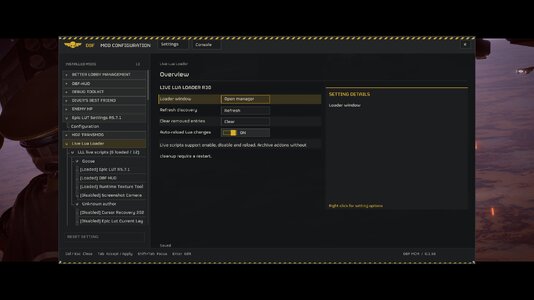
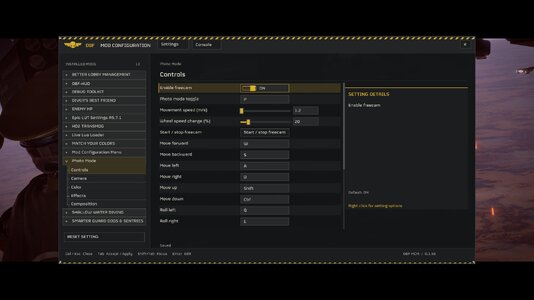
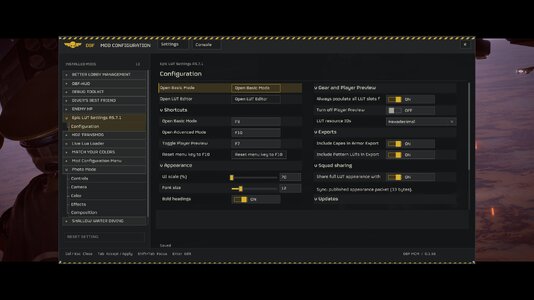
- Looks like it belongs. The game's main font, sliding On/Off switches, a yellow skull and restrained hazard stripes.
- Room to read. Controls stay close to their labels. Extra space shows setting details, and authored multi-column pages keep their layout.
- Quick to use. Clean dropdowns, clear inactive rows, draggable scrollbars and right-click setting actions. Tab accepts an edit or applies pending changes.
- Your setup stays yours. Existing mod IDs, saved values and legacy settings integration are preserved.
COMMAND YOUR KEYBINDINGS
Bind Mod Bindings Menu keyboard shortcuts directly in MCM. Click the key field or press Enter, then press the new key. It saves immediately; Escape cancels. Right-click a key field and choose Unbind key to clear it. MBM clearing preserves mouse/controller inputs; ordinary key fields show Not bound and respect Apply/Discard.
Saved bindings survive restarting Helldivers. Existing native action IDs, activation type and mouse/controller mappings stay intact. Later native MODS-page edits take priority; multiple-key and chord bindings remain editable there.
DIRECT ORDERS. CLEAR FEEDBACK.
Type a command, choose a suggestion with the arrows, and complete it with Tab. Under LLL, MCM shares the loader's commands, diagnostics and log reader. Errors keep their mod owner, with optional registration details through verbose_registration.
The console starts closed. Open it with Console or the grave/tilde key while MCM is open.
MCM keeps its own Escape-menu tab while cooperating with Bingus MODS and peer tabs. Authenticated MODS callbacks receive their expected tab count. Owner lookup handles deeper update wrappers, backs off failed searches for 60 frames, and preserves newer owners during cleanup. Native-menu polling remains lifecycle driven. This revision passed offline regressions; live results remain unverified.
CHOOSE YOUR LOADER
MAIN · BINGUS SHARED LOADER
Download BSL Standalone 0.1.71
Import into Arsenal, enable alongside Shared Loader v15+ / API 1, deploy and restart.
OPTIONAL · MDL / LIVE LUA LOADER
Download the combined MDL / LLL package
One ZIP for MDL API 2 or LLL R30+. Extract the complete dbf_mcm folder into your loader's Mods directory and restart. LLL does not require MDL. Run one MCM instance.
FOR MOD AUTHORS
Pages, categories, switches, sliders, choices, keybinds, text, colors and actions—with stable IDs and callbacks that respect persistence.
Short author guide · API reference · Source
HUD+ 0.2.8 and 0.2.9 settings are detected automatically. Legacy HUD+ 0.2.2 uses a local owner bridge. Integration setup
Preview: main font, console, direct MBM rebinding and restart persistence confirmed in LLL; unbinding passed isolated tests and still needs live validation. Other loader routes need their own live validation. No controller navigation. Gallery captures show an older development build.
Made by Goose. Thanks to Muchacho for helping troubleshoot keybindings; CowboyBingus for Shared Loader, Mod Options Menu and credited native helpers; SkyUI and Fallout 4 MCM for inspiration.