

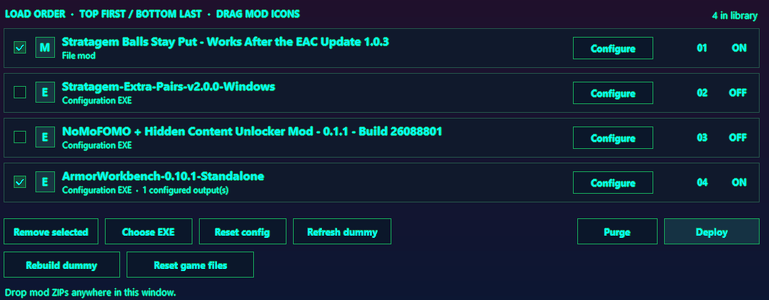
Run all of your EAC bypass/EXE config mods at the same time! (hopefully)
Looking to support this project and/or me? donate here! https://ko-fi.com/oscarfaux
Note! Mods that require their own integrity checks/backups to deploy will NOT function with this, tell the mod author to turn them off and to read https://github.com/OscarFaux/lunas-loader/blob/main/README_DEVELOPERS.md !
Note note! If you get this error: Stopped: Unknown boot installer needs an adapter
Then it should be able to be safely ignored, if not, then comment the mod that causes it and i'll take a look!
# PLEASE REPORT BUGS TO THE GITHUB
https://github.com/OscarFaux/lunas-loader/tree/main
MOD AUTHOR DOCUMENTATION IS HERE: https://github.com/OscarFaux/lunas-loader/blob/main/README_DEVELOPERS.md
# Luna's Modloader 0.5.1
Roadmap (in order):
1. Core Stability
2. Auto-modloader integration(will require support from mod authors)
3. Partial LUA file functionality
## Start
1. Extract this ZIP and run **Luna's Modloader.exe**.
2. Choose the real game folder containing `bin` and `data`.
3. Drop mod ZIP files onto the window, or use Add ZIPs.
4. Enable your mods. Drag their picture/M/E handle to order them: top first, bottom last.
5. Use Configure or double-click a mod. Standard manifests show checkboxes/variants. For an EXE, copy the directory from Luna's prompt and paste it into the mod's game-directory picker. Close the configurator when finished.
6. Close the game, then click Deploy. Use Purge to restore Luna's recorded changes.
Your library, imported archives, staged files, saved configurations and backups are stored under `%LOCALAPPDATA%\\lunas\_loader`. Replacing the manager EXE does not erase that data. Only import and run mod programs you intend to use; import alone does not run them.
## Configurator compatibility
EXE installers must support writing to the selected staged directory. Some existing tools reject already modified input or demand their own original backup. Their author must add a compatible loader/export mode; Luna cannot automatically disable checks inside an EXE.
The dummy is a partial working copy, not a running game or full installation. Saved complete-file outputs use the visible order; later complete replacements override earlier ones. Composition requires a configurator that preserves the earlier input changes. Unknown boot/script installers may need an integration.
## Repair controls
* **Refresh dummy:** rebuild staged inputs/outputs, preserving the previous contents in snapshots.
* **Rebuild dummy:** discard unsaved staging changes and refresh the contents, retaining saved EXE outputs/options. Close other configurators first.
* **Reset config:** clear the selected mod's saved output so it can be configured again.
* **Recover:** recover an interrupted Luna file transaction.
* **Reset game files:** review the listed base files, back them up, remove them, clear saved EXE outputs and request Steam verification. Other managers' direct edits to those base files may also be replaced. Wait for Steam to finish, then use Rebuild dummy and reconfigure EXE mods. Luna cannot detect Steam completion.
Luna leaves unrelated Arsenal patches/state in place and manages its own recorded deployment. Finish Arsenal changes before configuring/deploying Luna. Changes to Luna-owned files by another program or a game update still require attention; do not delete the game's `.unifiedmods` backup/journal folder while Luna mods are deployed.
Looking to support this project and/or me? donate here! https://ko-fi.com/oscarfaux
Note! Mods that require their own integrity checks/backups to deploy will NOT function with this, tell the mod author to turn them off and to read https://github.com/OscarFaux/lunas-loader/blob/main/README_DEVELOPERS.md !
Note note! If you get this error: Stopped: Unknown boot installer needs an adapter
Then it should be able to be safely ignored, if not, then comment the mod that causes it and i'll take a look!
# PLEASE REPORT BUGS TO THE GITHUB
https://github.com/OscarFaux/lunas-loader/tree/main
MOD AUTHOR DOCUMENTATION IS HERE: https://github.com/OscarFaux/lunas-loader/blob/main/README_DEVELOPERS.md
# Luna's Modloader 0.5.1
Roadmap (in order):
1. Core Stability
2. Auto-modloader integration(will require support from mod authors)
3. Partial LUA file functionality
## Start
1. Extract this ZIP and run **Luna's Modloader.exe**.
2. Choose the real game folder containing `bin` and `data`.
3. Drop mod ZIP files onto the window, or use Add ZIPs.
4. Enable your mods. Drag their picture/M/E handle to order them: top first, bottom last.
5. Use Configure or double-click a mod. Standard manifests show checkboxes/variants. For an EXE, copy the directory from Luna's prompt and paste it into the mod's game-directory picker. Close the configurator when finished.
6. Close the game, then click Deploy. Use Purge to restore Luna's recorded changes.
Your library, imported archives, staged files, saved configurations and backups are stored under `%LOCALAPPDATA%\\lunas\_loader`. Replacing the manager EXE does not erase that data. Only import and run mod programs you intend to use; import alone does not run them.
## Configurator compatibility
EXE installers must support writing to the selected staged directory. Some existing tools reject already modified input or demand their own original backup. Their author must add a compatible loader/export mode; Luna cannot automatically disable checks inside an EXE.
The dummy is a partial working copy, not a running game or full installation. Saved complete-file outputs use the visible order; later complete replacements override earlier ones. Composition requires a configurator that preserves the earlier input changes. Unknown boot/script installers may need an integration.
## Repair controls
* **Refresh dummy:** rebuild staged inputs/outputs, preserving the previous contents in snapshots.
* **Rebuild dummy:** discard unsaved staging changes and refresh the contents, retaining saved EXE outputs/options. Close other configurators first.
* **Reset config:** clear the selected mod's saved output so it can be configured again.
* **Recover:** recover an interrupted Luna file transaction.
* **Reset game files:** review the listed base files, back them up, remove them, clear saved EXE outputs and request Steam verification. Other managers' direct edits to those base files may also be replaced. Wait for Steam to finish, then use Rebuild dummy and reconfigure EXE mods. Luna cannot detect Steam completion.
Luna leaves unrelated Arsenal patches/state in place and manages its own recorded deployment. Finish Arsenal changes before configuring/deploying Luna. Changes to Luna-owned files by another program or a game update still require attention; do not delete the game's `.unifiedmods` backup/journal folder while Luna mods are deployed.

