Jakein8r's Dog Pack & Multi-Packs BETA— HellForge Mod V0.11.8
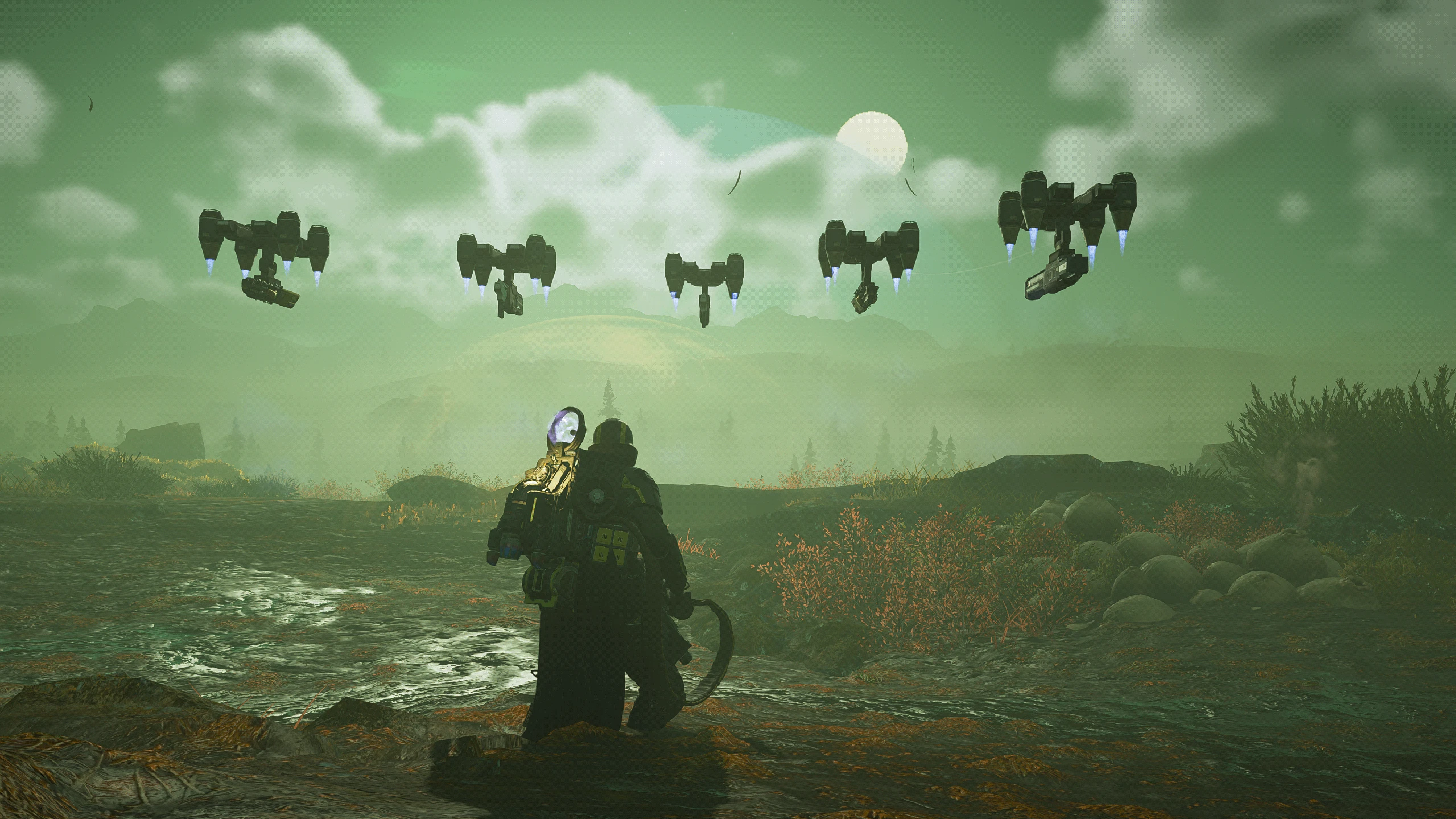
Wear several backpacks, any or all at once, and bring a squad of five Guard Dog robots that fly in formation around you. Pick your extra gear and preferred robots on a new Extra Gear page on the loadout screen, and get it every life or from a kit cache you drop when you die. Every player with the mod sees all of it: your packs, their effects, your reloads and your robots.Game modding community
This mod is in beta, please message me if you find conflicts with other mods or have suggestions.
Game modding tutorials
This mod is intended to be used with 'Chef's Smarter Guard Dogs and Sentries 5.3.0'. You can find the compatible version here: https://hf-mod.com/Mods/Details/80
The robot squad
Five robots of your choice fly with you, without taking a backpack slot. Pick any mix of the five Guard Dog types on the Extra Gear page; duplicates are allowed.
- 11 formations, cycled with Y: ring, avatar (3 inner + 2 outer), avatar 2+3, high, spin, close, wedge, wings, column, tornado and pulse. Every formation fits any number of robots.
- Compatible with 'Smarter Guard Dogs' 5.3.0 By Chefbo. This mod will greatly improve your experience with the Dog Pack and it is highly suggested to use along side, for features like preventing the dogs from shooting you and your teammates, as well as better targeting ability, and more.
Game modding community
- Fight style, cycled with N: hold (every robot keeps its formation slot while shooting; default), hybrid (the gunners shoot from their slot, Hot Dog and Dog Breath chase targets) and classic (an engaged robot drifts back to a flat ring; Hot Dog and Dog Breath chase).
- Move style, cycled with M: rigid (the whole shape glides after you; default), trail (the shape streams behind you and closes up when you stop) and native (the classic ring motion).
- Join, toggled with J: your robots circle both you and a nearby teammate, and join with their robots if they have them. (within about 5 m).
- Stow and launch, with a tap of T: the robots dock and come back out. Holding T still opens the game's communication wheel.
Preorder Games
- Your choices stick. Your last formation, fight style, move style and join setting come back after a respawn, a cache pickup, the next mission and a game restart.
Preorder Games
- The formation faces the way you travel by default and stays put when you only turn the camera. Height, speeds and the Avatar ring options are in dog_formation_config.txt.
Multi-packs: what you can carry
One pack sits in your back slot as usual; the rest ride on your back "off-slot" and the mod swaps the right one into the slot when you need it.
| Gear | Up to | How it works |
|---|---|---|
| Mobility packs (Jump, Warp, Hover) | 3 | All on Space, chosen by presses: hold = Jump, tap then hold = Warp, tap twice then hold = Hover. The order can be changed in dog_mobility_config.txt. A launched pack stays in the slot until you land. |
| SH-32 Shield Generator Pack | 1 | Works from off-slot; its shield stays up while another pack is in the slot. |
| Hand shield (SH-20 Ballistic or SH-51 Directional) | 1 | Sits in your slot so it works as in the base game. Holding Space puts your mobility pack in for the jump; key 8 switches shield and mobility pack. |
| B-1 Supply Pack | 1 | Key 5: the pack is in the slot while you hold the key, and the game's own 5 uses it. |
| B-100 Portable Hellbomb | 1 | Key 6: one press arms it with the game's own use key and drops it. One a teammate armed drops straight away. A new one comes after the respawn time (default 300 s, counted from when you got the last one; set it on the KEYS screen). |
| Support weapon | 1 | Spawned into your hands. Backpack weapons bring their pack, which rides off-slot: AC-8 Autocannon, GR-8 Recoilless Rifle, FAF-14 Spear, RL-77 Airburst, StA-X3 W.A.S.P., GL-28 Belt-Fed Grenade Launcher, M-1000 Maxigun, B/FLAM-80 Cremator. |
- Backpack weapons fire and reload from the off-slot pack. Press R and the pack borrows the slot just for the reload; teammates can assisted-reload you as normal. Your mobility pack keeps working while the gun is out.
- Every other support weapon (MG-43, Stalwart, Railgun, Quasar, Laser Cannon, flamethrowers, expendables and more) spawns alone into your hands. The B/MD C4 Pack and MS-11 Solo Silo are not available yet.
- Mission items you pick up go off-slot, so your gear stays usable. Key 7 drops the mission item first; with none, it drops your newest off-slot weapon pack.
- Packs picked up in the mission (a teammate's drop, a supply pod) also go off-slot when they are a Supply Pack, a Hellbomb or a weapon pack; any other pack is worn in your slot as in the base game. The list is in dog_offslot_list.txt.
- Knocked off? If a blast knocks a carried pack off your back, the mod puts it back on. If the game drops your mobility pack when you pick up another pack, the mod picks it back up.
The Extra Gear page
Open EXTRA GEAR on the loadout screen, next to Briefing and Loadout. Everything you pick is saved automatically and applies from the next mission.
- Equipped extra gear (left): three Mobility squares, one Support weapon, a Shield box (shield pack + hand shield), Supply Pack and Portable Hellbomb on/off, and five robot slots. Click a slot, then pick an item on the right. Double-click a slot to clear it.
- Catalogue (right): tabs for Mobility, Support, Shield and Dogs, eight items a page. Hover or focus an item to see what it does. Items marked NOT AVAILABLE YET can't be picked; items you haven't unlocked in the game aren't offered.
- Presets: save up to 16 named loadouts (new, duplicate, rename, delete, update). A preset is a snapshot; editing your loadout doesn't change it until you press UPDATE PRESET.
- Delivery: EVERY LIFE or KIT CACHE (see the next section). In KIT CACHE mode, KIT RETURNS AFTER 1 / 2 / 3 / NEVER sets how many deaths in a row without your cache bring the kit back anyway.
- KIT ON / OFF (top right): ON = robots + your extra gear kit. OFF = Dog Pack Lite: the robots only, with no kit.
- KEYS (top right): opens the key bindings screen. Click an action and press its new key; ESC cancels. Keys the game also uses are allowed; two mod actions can't share a key. The same screen sets your game reload and jump keys (if you changed them in the game) and the Hellbomb respawn time in seconds (default 300). RESET TO DEFAULTS restores them all. Key changes apply from the next mission.
- UNDO, CLEAR SLOT, SAVE NOW and DONE sit along the bottom. The page works with the mouse or the keyboard: arrows move, ENTER selects, TAB changes area, DELETE clears, CTRL+Z undoes.
Death, respawn and the kit cache
Your robots and kit come at the start of each mission, after you land, and the delivery setting decides what happens after a death.
- EVERY LIFE: you get your kit and robots again each time you are reinforced.
- KIT CACHE: the pack in your back slot when you die (a mobility pack, a shield or the Supply Pack) is your cache. Pick it back up to get your whole kit and robots back. If nothing in your slot can be a cache, one kit item is called down in a pod where you died, so there is always something to recover. Your cache shows on the map in your player colour.
◦ If a teammate takes your cache or it disappears, the kit comes after 2 minutes or with your next life.
◦ KIT RETURNS AFTER 1 / 2 / 3 deaths in a row without picking up your cache gives you the kit anyway; NEVER means only the cache brings it back.
- At a death the mod's kit items vanish with your body so nothing is left hanging on it, and packs you picked up during the mission are dropped there for anyone to take.
- The Hellbomb comes with your first life. After that a new one arrives after the respawn time, counted from when you got the last one; one already due arrives 20 s after you drop the current one.
Default Keys
Change any of these on the Extra Gear page's KEYS screen.
| Key | Action |
|---|---|
| Space | Mobility packs by press count: hold = Jump, tap + hold = Warp, tap + tap + hold = Hover |
| 5 | Use the Supply Pack (hold) |
| 6 | Arm and drop the Portable Hellbomb |
| 7 | Drop the mission item (with none: the newest off-slot weapon pack) |
| 8 | Mobility pack into your slot; press again for an empty slot (with a hand shield: switches shield and mobility pack) |
| R | Reload a backpack weapon from its off-slot pack |
| T (tap) | Stow or launch the robots (hold T = the game's communication wheel) |
| Y | Next formation |
| N | Next fight style |
| M | Next move style |
| J | Join on or off |
Settings Files
The Extra Gear page covers the everyday settings. For finer tuning, these files live in
HellForge\userdata\environment\Local\MultiBackpack and are created on the first start.| File | What it sets | When it applies |
|---|---|---|
dog_placement_config.txt | Each pack's size and position on your back | Save it: shows within about 2 s, even mid-mission |
dog_formation_config.txt | Starting formation, fight / move style, heading, hover height, Avatar ring and join options | Next mission |
dog_mobility_config.txt | Space press order and tap timing for the mobility packs | Game restart |
dog_slot_config.txt | Hellbomb drop mode, death drop, mobility recovery and other slot rules | Game restart |
dog_offslot_list.txt | Which picked-up packs go off-slot | Game restart |
dog_keys.txt and mb_settings.txt | Written by the Extra Gear page (keys, kit on/off, kit returns, Hellbomb respawn) | Use the page instead |
dog_placement_config.txt. For everyone to see the same sizes, share the file with your squad.Known limits (beta)
- One game build. Helldivers 2 build 25480438 (HellForge's downpatched build) only; on any other build the mod does nothing.
- Tested with two players so far. Larger lobbies are next; please report what you see.
- Keyboard and mouse only for now. The mod's keys and the Extra Gear page don't have full controller or handheld support yet.
- Not available yet: the B/MD C4 Pack and MS-11 Solo Silo.
- Modded and newly backported gear isn't added to the Extra Gear page automatically.
- A player who leaves may keep their packs visible on the other screens for a while. This is harmless.
- The Recoilless Rifle's ammo pack swings on your back (the game's physics).
- HellForge may crash when you quit the game. This is a known HellForge issue, not this mod.
- When players join your lobby mid mission your robots have to be respawned, this takes a few seconds.
- You cannot use another backpack while a hellbomb is armed.
- You cannot use a 1 handed shield while flying with Hover/Jump packs, or warping.
Bug reports and credits
Reporting a bug: zip and send the whole folder HellForge\userdata\environment\Local\MultiBackpack and the HellForge logs folder (Documents\HellForge\logs). Say roughly what time it happened and what you were doing. The beta writes diagnostics there for exactly this.
Thanks to ChefBo for adding compatibility for Smarter Guard Dogs mod.
Safety: the mod checks the game build and the exact code it touches before every read, write or call, and backs off if anything doesn't match. Every temporary change it makes is undone when it stops.
Credits: by Jakein8r. Includes code derived from Link's Link to Memory 0.5.1 (MIT) and dlmalloc (public domain); licences are in the mod's credits folder. The guarded memory reader dog_memread.dll ships with its source in memread-src.