Armor Workbench: A Standalone Armor Value Editor, Works Solo/Multiplayer, Other Players Are NOT affected
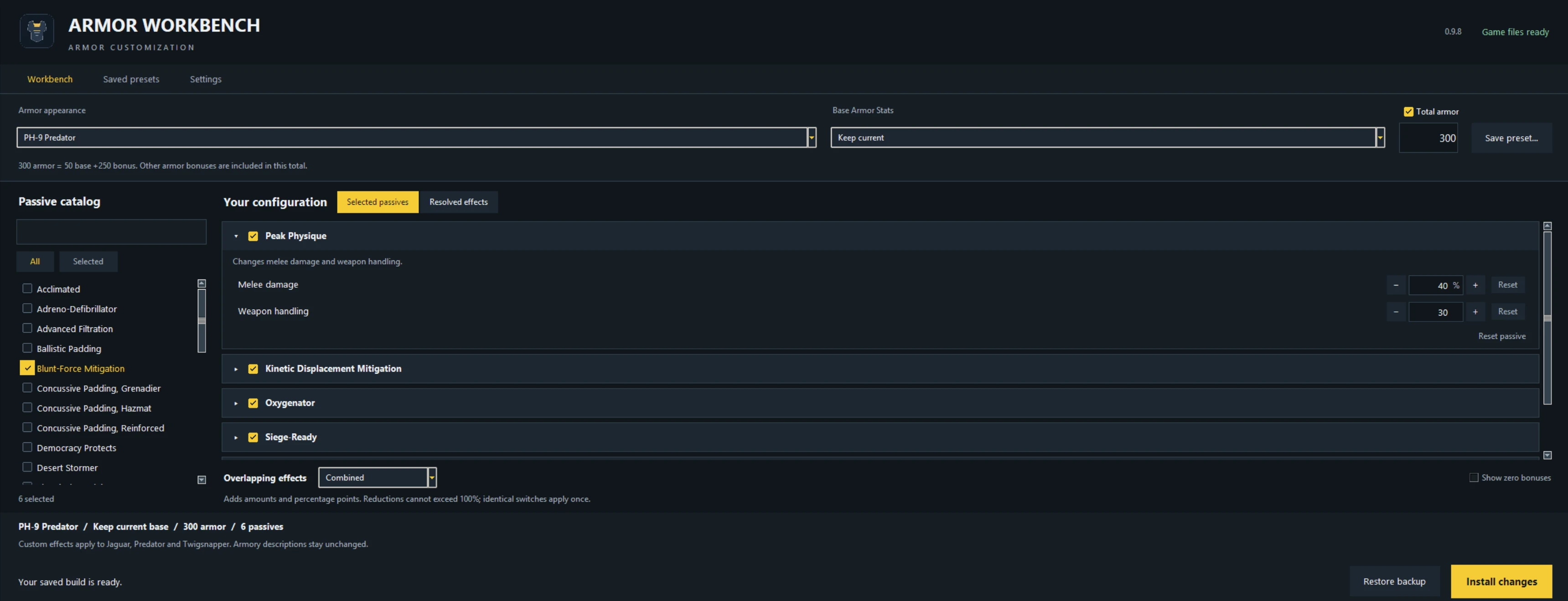
Choose an armor, change its armor rating, add or swap passives, and adjust their values. For example, an armor with Peak Physique can also have Scout, Siege-Ready, Feet First and many others. Use one passive or build a combination. You decide.
You can edit individual armors or select multiple armors to apply a build in bulk. Choose to keep each armor’s original passive and add your selected extras, or replace their passives with your selected combination.
Base armor class controls movement and stamina, while Total armor lets you choose your armor rating separately. Leave Total armor unticked to keep the stock rating and let your selected passives determine any armor bonuses.
The editor should automatically find your Helldivers 2 Steam installation. If it doesn’t, select your game folder through Settings.
Close HD2 before installing or removing changes.
Launch HD2 after installation finishes. You can close Workbench afterward. This is a file editor, not a live in-game editor.
To prepare original armor settings, use Reset this armor or Reset all armors within the Settings, then click Install changes. The Default Passives List tab shows each armor’s original passive. Unnamed armor entries include their original class, base armor and passive to help identify them.
Some armors share passive data. Editing those effects can also affect other armors that use them. Workbench shows the affected armors. Fully independent passive values are still being researched.
Adreno-Defibrillator limitation: Adding Adreno to another armor, such as Ironclad, also gives that passive combination and its values to AD-11 Livewire, AD-26 Bleeding Edge and AD-49 Apollonian.
For example, Ironclad with Adreno + Blunt-Force Mitigation means those three armors also receive that combination. All armors using Adreno must share the same passives and values. Their appearance and base armor class remain separate. Adreno and Integrated Explosives cannot be combined.
English and Simplified Chinese are available under Settings → Language → 简体中文. Chinese translations use translation tools, so they may not be 100% accurate.
Updating: Saved builds and restore backups use a persistent data folder. You dont need to copy ArmorWorkbenchData with every update. If older data isn’t detected, use Settings → Import saved data and select your previous ArmorWorkbenchData folder. Restore installed changes before importing another data collection, and keep your old folder until you’ve confirmed the import worked.
The download includes separate Windows and Linux folders. Linux comes ready to launch without installing Python or compiling anything, but it is still VERY EXPERIMENTAL. I have no way to test Linux myself, so please inform me of any bugs or issues.
This editor also works with Luna Loader, so you're welcome to include this too.
This was vibecoded to get something out of nothing after the recent HD2 update. It’s an experimental public beta, so please share any bugs or issues you find. Thank you and enjoy!
Choose an armor, change its armor rating, add or swap passives, and adjust their values. For example, an armor with Peak Physique can also have Scout, Siege-Ready, Feet First and many others. Use one passive or build a combination. You decide.
You can edit individual armors or select multiple armors to apply a build in bulk. Choose to keep each armor’s original passive and add your selected extras, or replace their passives with your selected combination.
Base armor class controls movement and stamina, while Total armor lets you choose your armor rating separately. Leave Total armor unticked to keep the stock rating and let your selected passives determine any armor bonuses.
The editor should automatically find your Helldivers 2 Steam installation. If it doesn’t, select your game folder through Settings.
Close HD2 before installing or removing changes.
Launch HD2 after installation finishes. You can close Workbench afterward. This is a file editor, not a live in-game editor.
To prepare original armor settings, use Reset this armor or Reset all armors within the Settings, then click Install changes. The Default Passives List tab shows each armor’s original passive. Unnamed armor entries include their original class, base armor and passive to help identify them.
Some armors share passive data. Editing those effects can also affect other armors that use them. Workbench shows the affected armors. Fully independent passive values are still being researched.
Adreno-Defibrillator limitation: Adding Adreno to another armor, such as Ironclad, also gives that passive combination and its values to AD-11 Livewire, AD-26 Bleeding Edge and AD-49 Apollonian.
For example, Ironclad with Adreno + Blunt-Force Mitigation means those three armors also receive that combination. All armors using Adreno must share the same passives and values. Their appearance and base armor class remain separate. Adreno and Integrated Explosives cannot be combined.
English and Simplified Chinese are available under Settings → Language → 简体中文. Chinese translations use translation tools, so they may not be 100% accurate.
Updating: Saved builds and restore backups use a persistent data folder. You dont need to copy ArmorWorkbenchData with every update. If older data isn’t detected, use Settings → Import saved data and select your previous ArmorWorkbenchData folder. Restore installed changes before importing another data collection, and keep your old folder until you’ve confirmed the import worked.
The download includes separate Windows and Linux folders. Linux comes ready to launch without installing Python or compiling anything, but it is still VERY EXPERIMENTAL. I have no way to test Linux myself, so please inform me of any bugs or issues.
This editor also works with Luna Loader, so you're welcome to include this too.
This was vibecoded to get something out of nothing after the recent HD2 update. It’s an experimental public beta, so please share any bugs or issues you find. Thank you and enjoy!
