 Tool Description
This tool allows you to use your own audio files (WAV, MP3, OGG) or YouTube links as in-game radio music.
This tool is intended for users who are using the global version of Windows 11.
 Requirements:
Before using the tool, you must install Wwise and .NET 10.
 Download the Wwise Launcher:
・Wwise Launcher Download
・Install Wwise version 2025.1.7.9143
 How to use:
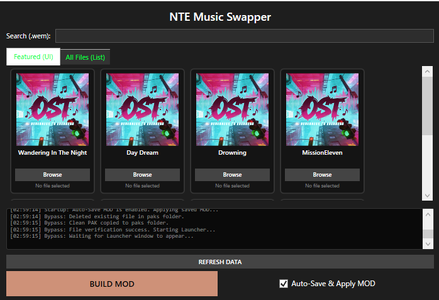
・Click the "Browse" button next to the radio track you want to replace.
Select your desired audio file.
・Once everything is ready, click "BUILD MOD".
When a success dialog appears, launch the game.
 ️Auto-Save & Apply MOD:
If enabled: your MOD will be saved and automatically applied next time.
If disabled: the MOD will reset when you close the tool.
 Important:
・Please run it as administrator.
・Use at your own risk.
・Do not use the BUILD MOD button while the game is running.
・Keep this tool running while the game is open. closing the tool during gameplay may cause issues.
・Do not launch the game until the dialog shows “Pak build complete!”. Otherwise, it will crash.
・If any issues occur, close the tool and launch the launcher to repair the affected files.
・If the tool closes when you press the BUILD MOD button, try disabling real-time protection or excluding this tool’s directory in your antivirus software, then reinstall it.

