NTE Music Swapper 1.9

A Mod for Neverness to Everness
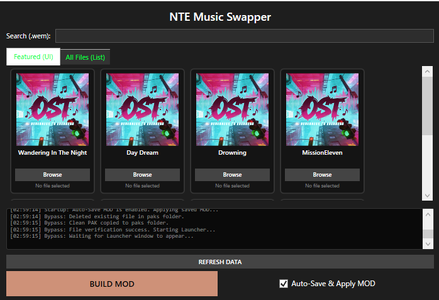
NTE Music Swapper Mod Preview Image
  • image.png
    image.png
    56.3 KB · Views: 2,140
1️⃣Tool Description

This tool allows you to use your own audio files (WAV, MP3, OGG) or YouTube links as in-game radio music.
This tool is intended for users who are using the global version of Windows 11.

2️⃣Requirements:
Before using the tool, you must install Wwise and .NET 10.

3️⃣Download the Wwise Launcher:
・Wwise Launcher Download
・Install Wwise version 2025.1.7.9143

4️⃣How to use:

・Click the "Browse" button next to the radio track you want to replace.
Select your desired audio file.
・Once everything is ready, click "BUILD MOD".
When a success dialog appears, launch the game.

5️⃣️Auto-Save & Apply MOD:

If enabled: your MOD will be saved and automatically applied next time.
If disabled: the MOD will reset when you close the tool.

⚠️Important:

・Please run it as administrator.

・Use at your own risk.

・Do not use the BUILD MOD button while the game is running.

・Keep this tool running while the game is open. closing the tool during gameplay may cause issues.

・Do not launch the game until the dialog shows “Pak build complete!”. Otherwise, it will crash.

・If any issues occur, close the tool and launch the launcher to repair the affected files.

・If the tool closes when you press the BUILD MOD button, try disabling real-time protection or excluding this tool’s directory in your antivirus software, then reinstall it.
100 MB
Log in or sign up to download
Uploaded by
Landmark
Downloads
692
Views
14,271
First release
Last update
Platform
PC 
Version
1.9
Total Size
100 MB
Rating
3.67 star(s) 6 ratings

Uploaded by

  • 692
  • 14,271

Ratings

3.67 star(s) 6 ratings

Tags

There are no tags available.

Latest updates

  1. Improved usability

    Removed the need to switch between YouTube URLs and local files.
  2. Fixed bugs

    Fixed bugs
  3. Fixed bug

    Fixed an issue where the music would cut off midway.

Kaff

Members
Members
May 9, 2026
0
7
so i did everything on the guide, when i open the app nte launcher also opens but it says update right so i just ignored and swap the music on the app then it says pak build complete i press update on nte launcher and when i opened it the music not there still defaults, and when i relog with the swapper app opened most of the audio in game is gone except for like the overworld music and character grunting and when i just reinstall everything and update first instead of building the mod it still the same what did i do wrong?
wait for the launcher update to be done, then build your mod, then login.
The launcher update actually removes all the replaced songs so if done right (or wrong), audio can be gone
 

Noavid

Members
Members
May 11, 2026
0
3
1. First, we have modified the logic to detect file check events from the official launcher, fixing a bug that occurred when the official launcher's file check was slow due to reasons such as HDD issues.

2. Music file lengths are now properly reflected. It does not matter whether the file is shorter or longer than the original music file.

3. When adding music files, you can now freely add them without having to select a file path or YouTube link mode separately.

4. If the mod is successfully built, the music path/YouTube link added via browse is now saved locally. This allows you to load it the next time you launch the tool, improving convenience when you need to rebuild the mod due to reasons such as official updates.


*****Important Note*****

Close the official launcher and do not run it again while the tool is open. You will need to rebuild the mod.

If you wish to close the tool, simply closing the tool will also close the official launcher.
 

NOXR

Members
Members
May 14, 2026
0
0
wait for the launcher update to be done, then build your mod, then login.
my wording were probably really bad, but i did mention that i updated it first then build the mod and the result is the same
 

Tax the Toaster

Members
Members
May 23, 2026
0
0
Im having and issue where even after installing Wwise, pressing Build Mod still just sends me to the download website. i have the correct version, im wondering if i need any of the addons, as i only went with the defult

-Edit: a day later its working, the only change made is shutting down my computer.
 
Last edited:

Small Fei

Members
Members
May 19, 2026
0
0
Thanks for the tool! I'm on the TW (Taiwan server) client, not global. Any chance to add configurable settings (e.g. window title / path) to support both versions? The TW launcher name is NTETWLauncher.exe. Or does the TW client need a separate mod? Appreciate your help!
 

ByteFun

Members
Members
May 25, 2026
0
0
Program crash after click on BUILD button. "Could not find a part of the path './NTE Music Swapper\Unpack\HT'."
 

Noavid

Members
Members
May 11, 2026
0
3
Program crash after click on BUILD button. "Could not find a part of the path './NTE Music Swapper\Unpack\HT'."
There is a high probability that the game path was not automatically detected for some reason.

You can configure this manually by going to the MusicSwapper installation path and looking at app_settings.json. Example: "GameRootDir": "C:\\Program Files\\Neverness To Everness"

Please note that even my friend, who installed the game on an extremely slow HDD, has confirmed that it works.
 

Crudefuture

Members
Members
May 25, 2026
0
0
When I click on 'BUILD MOD', the tool closes. I disabled real-time AV protection, and added the directory to be excluded, and re-installed in both cases but it still just closes. I'm using Malwarebytes AV if that means anything.
 

eric4705

Members
Members
May 30, 2026
0
0
The program you created is no longer useful. Why aren't you continuing to update it?

When I add WAV music files, the UI says the mod has downloaded successfully, but when I actually launch the game, it frequently crashes for some reason (I am speaking about both DX11 and DX12). Even when I manage to launch the game, the radio, where music should be playing, only plays the original tracks.

I am writing this review hoping you will fix this quickly.

Please update it soon!