-
 image_2026-10-15_224837875.png
 -
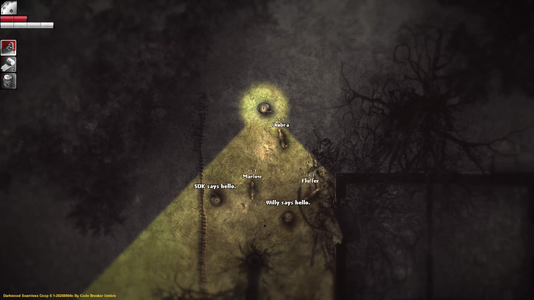 image_2026-10-15_224846359.png
 -
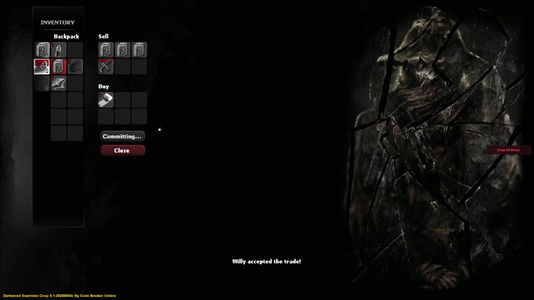 image_2026-10-15_224850440.png
 -
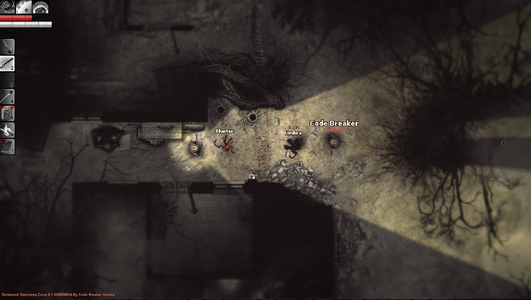 image_2026-10-15_224854636.png
 -
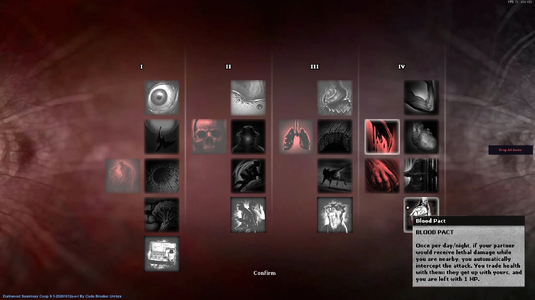 image_2026-10-15_224858905.png
 -
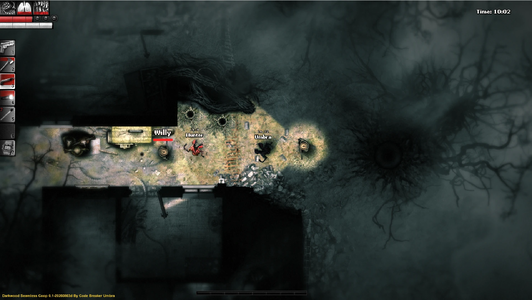 image_2026-10-15_224902387.png
 -
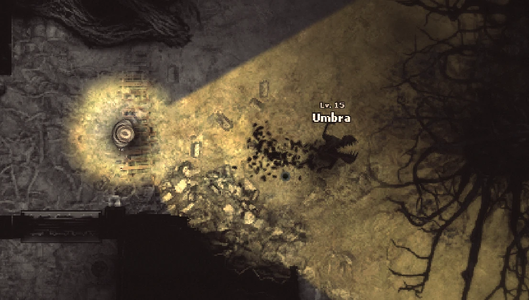 image_2026-10-15_224907565.png
 -
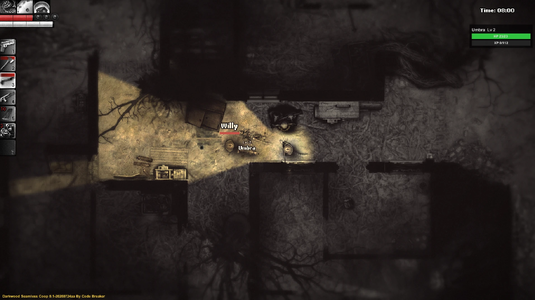 image_2026-10-15_224911399.png
 -
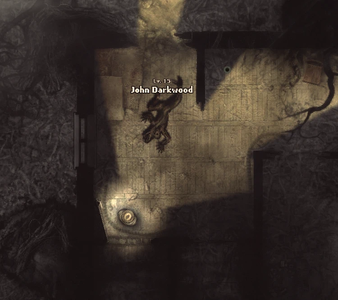 image_2026-10-15_224914866.png
 -
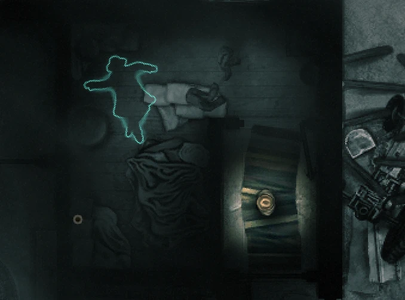 image_2026-10-15_224918173.png
 -
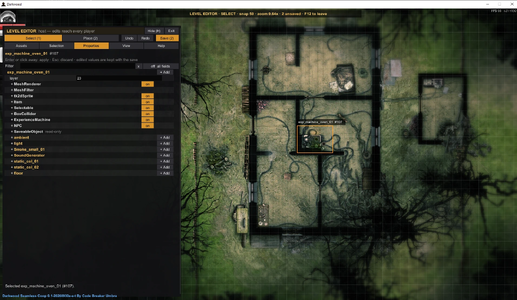 image_2026-10-15_224922148.png
 -
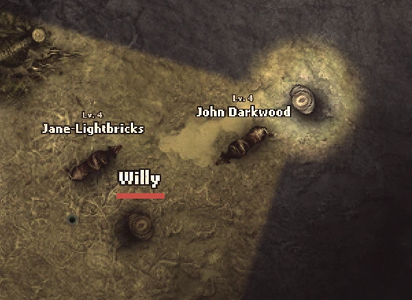 image_2026-10-15_224927849.png
 -
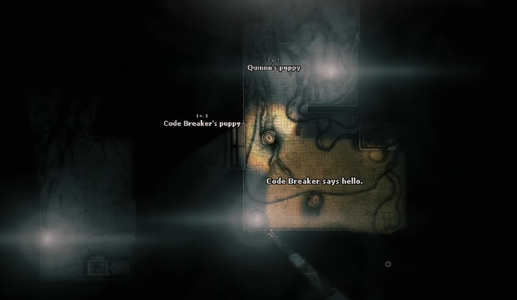 image_2026-10-15_224931857.png
DARKWOOD SEAMLESS CO-OP MOD
Survive the Woods Together — Online Co-op for 2 to 6 Players

Darkwood Seamless Co-op
Overview
The Darkwood Co-op Mod lets you play Darkwood online with your friends, from 2 to 6 players. Play the whole story together in the same world: the same days and nights, the same weather, the same monsters knocking at the door. Every player has their own character, their own mutations and their own pet, and you can trade with each other.
One player is the host: they load their save, and everyone else joins it. Joining is as easy as accepting a Steam invite, and you can also connect with an IP address if you prefer. The mod is available in English, Spanish, French and Brazilian Portuguese.
Streaming your game? With the Twitch Integration, any player can link their own Twitch channel and let their viewers join in: with Channel Points, Bits, subs and raids, they can send an enemy after you, change the weather, heal you or feed your pet. Feel free to DM me on Discord: codebreakerumbra. I'd be more than happy to support your stream and take feedback in real time!
Want something different? Try Endless Mode: a brand-new random world, one hideout, and one night after another until everyone is dead. It has its own section below.
This mod adds some fun extras that are not part of the original game. Some of them change the balance or break the mood a little — all in the name of fun! The host can turn most of them on or off.Installation
Every player needs to install the mod, the host and everyone who joins. It takes two steps: install BepInEx (the mod loader), then put the mod's files in place.
Step 1 — Find your game folder
- In Steam, right-click Darkwood in your library, then choose Manage → Browse local files.
- The folder that opens is your game folder: it holds Darkwood.exe and the Darkwood_Data folder.
Step 2 — Install BepInEx
- 1. Download BepInEx 5, the file named BepInEx_win_x64_5.4.23.5.zip, from the BepInEx releases page. Take the x64 version of BepInEx 5: not the x86 one, and not BepInEx 6.
- 2. Open the zip and extract everything inside it straight into your game folder. When you are done, the game folder holds a BepInEx folder, winhttp.dll and doorstop_config.ini, right next to Darkwood.exe. They must not end up inside another folder.
- 3. Start Darkwood once and go to the main menu, then close the game. This lets BepInEx create its folders, including BepInEx\plugins.
Step 3 — Install the mod
- 1. Download the mod and open its zip.
- 2. Put DarkwoodCoopMod.dll in Darkwood\BepInEx\plugins (create the "plugins" folder if it doesn't exist). If the zip also has DarkwoodCoop... folders (languages, icons, shaders), put them in BepInEx\plugins too, next to the dll.
- 3. Start the game and press F9. If the Co-op Menu opens, everything works.

Example result of installation folder
Updating and Uninstalling
- To update, replace DarkwoodCoopMod.dll (and the folders) with the new ones. Everyone in a lobby needs the same version, or nobody can join.
- To uninstall, delete DarkwoodCoopMod.dll and the DarkwoodCoop... folders from BepInEx\plugins. To remove BepInEx as well, delete the BepInEx folder, winhttp.dll and doorstop_config.ini. Your saves are not touched.
The game doesn't start, or F9 does nothing? Check that winhttp.dll sits next to Darkwood.exe, and that the dll is in BepInEx\plugins. The file Darkwood\BepInEx\LogOutput.log tells what went wrong; send it along with your report (see Reporting a Bug). Please also make sure that your steam is launched before starting the game; BepInEx can fail to load if the game needs to start steam. Try restarting your steam completely and then launch the game through steam.
Getting Started
Hosting a Game:
- 1. Start Darkwood.
- 2. Press F9 to open the Co-op Menu (should be open by default).
- 3. Choose your name, how many players can join (2 to 6), the difficulty (or a preset, from Lucid to Nightmare), and which extras you want (pets, friendly fire, and more). Leave the connection on Steam — there is nothing to set up.
- 4. Click Host Lobby, then Invite and pick your friends. You can also copy the lobby ID and send it to them.
- 5. Load or create a new save file.
- 6. When you stop the lobby, the game ends for everyone and you go back to the main menu. You can host again whenever you like.
- 7. Highly recommended: while your friends are joining, everyone who is already in the game should stand still and wait until all players have joined. Moving around, opening containers or fighting while someone is still loading in can make the worlds go out of sync.
Using Direct IP instead of Steam? Give your friends your public IP address — the Host tab shows it, with a copy button, and keeps it hidden until you click Show. You also need to open two ports on your router: 7777 (UDP) and 7778 (TCP), unless you changed them.

The Host tab: connection, session settings and the host's extras
Joining a Game:
- 1. Start Darkwood with the mod installed.
- 2. Press F9 to open the Co-op Menu.
- 3. Type your name. Then accept your friend's Steam invite, or paste the lobby ID they sent you. (Using Direct IP? Type the host's address instead.)
- 4. Click Join Game. You will see a summary of the lobby: accept it to join.
- 5. You don't need a save of your own. The host's world is copied into a special co-op slot, so your own saves are never touched.

The Join tab: join a friend's Steam lobby by invite or by lobby ID
Features
Playing Together
- The Whole Story, 2 to 6 Players — Play Darkwood's full story from start to finish with up to 6 players.
- Steam Invites or Direct IP — With Steam there is nothing to set up: the host clicks Invite and friends join straight from Steam. If the Steam overlay is turned off, share the lobby ID instead. Direct IP is still there for playing on a home network or through a VPN like Radmin or Hamachi, and the mod switches to it by itself if Steam isn't available.
- One Shared World — Everyone has the same time of day, the same weather (rain, fog, lightning) and the same night attacks (red lights, earthquakes, banshee waves). What happens for the host happens for everyone.
- Shared Objects — Doors, windows, barricades, generators, saws, traps, lamps, workbenches and every chest or cupboard are the same for everyone. If you push, drag or break something, your friends see it too, and things you place, like bear traps and lanterns, show up for the whole group.
- Travel Together — When someone goes into a bunker, a house or any other area, the whole group goes in together, and comes back out together.
- Shared Dangers — Spilled gasoline, fire, spider infection on the floor, things enemies throw, gunshots and broken glass are real for everyone. If your friend starts a fire, it can burn you too. A thrown knife stays on the ground for anyone to pick up, and one that hits a teammate ends up in their bag.
- Difficulty That Grows With Your Group — Every extra player makes enemies tougher and shop prices higher, so a bigger group still has to fight for it. Playing alone is the normal game. The host can pick a difficulty preset, from Lucid to Nightmare, or tune enemy health, damage and speed and shop prices by hand. Be warned: anything harder than the default — the Hard, Extreme and Nightmare presets, or settings you raise yourself — is meant to feel unfair, on purpose. It is not recommended for casual players; it is for groups looking for a true challenge.
- Dreams, the Ending and the Credits — When the host has a dream, everyone else sleeps and wakes up next to the host afterwards. If something would put another player to sleep (like the radio tower gas), it puts the host to sleep instead, so the group always stays together. Everyone sees the ending, the credits and the game-over video.
- See Your Friends — Every teammate has their name and a health bar above their head. If one of them goes down, a countdown appears above them, and you can see it even through walls so you can always find them. A red marker also appears where they fell, and the map outlines the place each teammate is in, in their own color. You can also have a downed teammate outlined in their color (see Accessibility and Comfort).
- Smarter Enemies — Enemies go after whoever is closest and in sight, not only the host, and they don't keep switching targets every second. They leave downed players alone. Pets can never hurt players.
- Safe Joining — While someone is still loading in, the host can't change chapter or enter a new area, so nobody gets left behind. If your connection drops, just join again and you get your place back. Several friends can join at the same time, even from the same house.
Going Down and Getting Back Up
- Downed, Not Dead — When you would die, you fall to the ground instead and have a short time to be rescued. A teammate can pick you up with a few bandages. The bandages come from the rescuer first, and from your own pockets if they don't have enough.
- Dead Until Dawn — If nobody saves you in time, you watch the others until morning. At sunrise you wake up at the hideout, just like after a normal death.
- Spectator Camera — While you are dead, the camera follows a living teammate. Use the left and right mouse buttons to switch between them.
- Last Man Standing — If you are the last one alive, you get a few seconds of healing, strength, stamina and speed to help you survive the night.
- Named Belongings — When a player dies, the bag they drop has their name on it.

A downed teammate, with the time left to revive them

A downed teammate outlined in their colour, seen through a wall
Pets
- Your Own Pet — If the host turns pets on, every player gets one. It follows you, fights with you, carries items for you and gets stronger over time.
- Pet Commands — Press B to open the pet wheel. Passive: follows you and avoids fights. Aggressive: follows you and attacks any enemy it sees. Neutral: stays around your hideout. Guard: guards the spot where you are standing and attacks any enemy it sees. Stay: waits where you are standing and avoids fights. Call: brings your pet straight to you. Point at an enemy and press G to send your pet after it; only you see that enemy outlined, in your color. Press G again on nothing to call it off. You can also type /pet-behavior followed by passive, aggressive, neutral, guard or stay in the chat, and /pet-name to rename your pet.
- Pet Food Bowl — Build one at the workbench. Put meat in it at your hideout, and your pet will eat and gain experience on its own.
- Your Pet Grows Up — Pets level up and change shape as they grow: Puppy, Dog, Mutated Dog, Chomper and Alpha Chomper. Each stage has more health, hits harder and carries more. Talk to the Trader at your hideout to make your pet evolve. At the highest level, the Trader can also turn it into a Swamper and back, as often as you like, without changing its level or strength.
- Shadow Armor — Chomper pets are covered in shadow armor. It burns away in your flashlight's light and grows back in the dark, without hurting your pet.
- Pets Respect Your Hideout — A pet never damages anything inside a hideout. Outside, it only breaks doors and barricades when it is Aggressive or on Guard.
- Pets Never Die for Good — Anyone can revive a downed pet with a bandage, or send it back to the hideout.
- Pet Display — Press F5 to show your pet's name, level, health and experience on screen. Press F6 to show or hide pet names in the world.

Pets follow their owners, with their name and level above them
Items, Trading and Chests
- Trade With Friends — Press F7 to show you are ready to trade. A friend can then walk up to you and trade using the game's normal trading screen, with your items as your stock. Trading between players never costs bandages and is never affected by the higher shop prices.
- Shared Chests, No Copies — Everyone can look inside the same chest, wardrobe or body at the same time and watch the items move. Only one person can take things out at a time, so two players can never grab the same item and both end up with it.
- Nothing Lost When Dropped — Items you drop or pick up keep everything: upgrades, ammo and condition. An upgraded axe is still upgraded when your friend picks it up.
- Drop All Items — Empty your whole bag and hotbar into one bag on the ground, to hand your gear to a friend quickly.
- Tidy Workbench Storage — A new Sort button tidies up the workbench's storage. Click it (or press R with the workbench open) to sort. Right-click it (or press Shift+R) to change how it sorts: by name, type, value or condition. Stacks of the same item are merged and empty slots go to the end — very handy when six people share one crate.

Trading with another player through the game's own trade screen
Mutations, Bounties and Progress
- Level Up Together — Essence is shared, so everyone levels up at the same moment. Each player picks their own mutations, and the selection screen stays open until everyone has chosen. The mod also adds four co-op mutations:
- — Field Medic (Tier 1): Revive downed friends faster.
- — Together We Stand (Tier 2): Better stamina recovery and stronger melee hits when you are near friends.
- — Challenger (Tier 3): Draw nearby enemies to you for a short time. Once a day, recharged at dawn.
- — Blood Pact (Tier 4): Once per day/night, if a friend near you would be killed, they survive instead. You swap health: they get up with yours, and you are left with 1 HP. If several nearby friends have it, the closest one pays.
- Passive Mutations on the Wheel — Your passive mutations and their drawbacks also appear on the skill wheel, so you can check them at a glance (you can turn this off in the QoL settings).
- Bounties — If the host turns them on, the Trader and the Wolfman offer jobs: hunt some creatures, or bring them some items. Everyone's kills count, and the reward is shared by the whole group. Hand the job in by the end of the next morning, or it fails and costs you some reputation.
- Reputation Is Your Money — Each player has their own reputation, which you spend in shops and when trading with friends.
- Your Character Is Saved — Each player's items, health, level, experience, upgrades and pet are saved on the host's computer, with the host's save. Story progress — journal, notes, keys and quest items — always follows the host.

The co-op mutations in the mutation menu
For the Host: Managing Saves
- See Who Has Played — In the Saves tab of the Co-op Menu, the host can see everyone who has ever joined this save.
- Kick and Reset — The host can kick a player and delete their character. Everything they carried (and everything their pet carried) is dropped in a bag with their name at the host's feet, so nothing is lost.
- Backups — Deleted characters are kept as backup files and can be put back by hand.
- Pet Reset — The host can send their own pet back to level 1 from the Saves tab.
- Clean Save Deletion — Deleting a save from the game's menu also removes all the co-op data linked to it (other players' characters, pets, food bowls and reputation), so a new game in that slot starts fresh.
- Co-op Saves — The first time you host from a save, the mod asks you to confirm, because this can't be undone. The save is then marked (COOP) in the save list, and when you load it the mod offers to open the lobby for you — your friends' characters and pets live in that world.
- No Accidental Stops — Closing the lobby from inside the game asks you to confirm first, and reminds you that it ends the game for everyone and takes you back to the main menu.

Managing the other players' saves from the Saves tab
Talking to Each Other
- Text Chat — Press Enter to type a message. Press F8 to show or hide the chat.
- Quick Chat Wheel — Press C for quick messages: Yes, No, Help, Heal, Ammo, Stand ground, Hideout and Hello. Yes and No are at the top, so you can answer in a flash. Messages appear in a bubble above your character.
- Pings — Press V to put a marker in the world for your friends. Each player can only have a few markers at a time, and they fade after a few seconds.
- Notes — Type /note and your message to leave a paper note on the ground. Your friends can walk up and read it. It disappears after a while, or after a few reads.
- Chat Commands — Type /help in the chat to see every command and the mod's keys.

Quick chat callouts above the players

A ping, with who placed it and how far away it is
Host Extras
Before starting, the host can turn these extras on in the Host tab. They are all off by default, except the co-op mutations. Each one works on its own, so you can pick and mix — pets without the flamethrower, tripwires without the bounties, and so on.
- Friendly Fire — Your weapons can hurt your friends.
- Last Stand — The last player alive gets a short power boost.
- More Aggressive Enemies — Enemies attack faster and turn faster, so running circles around them no longer keeps you safe. When they lunge, they aim where you are running to, not where you are. They go after the weakest player first — the most hurt, the one with no weapon, the one left alone — and stick to that target instead of switching back and forth. Always on in Nightmare Mode.
- Pets — Every player gets a pet.
- Bounties — The Trader and the Wolfman offer hunting and delivery jobs.
- Co-op Mutations — Adds the four co-op mutations (Field Medic, Together We Stand, Challenger, Blood Pact) to the mutation menu. On by default — turn it off if you only want the original mutations.
- Ammo Workbench — A special workbench for making ammo. The host builds it at the highest workbench level, with wood and scrap metal, and places it inside a hideout — one per hideout. It makes five kinds of ammo: shotgun shells, pellets, medium caliber bullets, and small and medium caliber magazines, all paid for with Gun Powder and scrap metal. Everyone can use it, and its storage is shared like any chest. Hold the button on it to dismantle it: you get back part of what it cost, plus everything in its storage. This extra also adds Gun Powder, which anyone can make at a normal workbench (highest level) with rotten mushrooms, gasoline and wood.
- Tripwires — A new trap: a wire stretched between two pegs. Make it at the workbench with wire and scrap metal, then hammer it into place — you can turn it with a key before you place it. Anything that walks into it bursts into flames, and the fire also lights spilled gasoline, gas tanks and floor infection. Whoever trips it burns for a moment. It only goes off once. After that, you can rearm it for some scrap metal (you only pay if you finish hammering), or take it apart to get the wire back. Everyone sees the same wire and the same fire, pets never set it off, and it stays after saving and loading.
- Flamethrower — Build a homemade flamethrower at the highest workbench level, from weapon parts, tape, gasoline and a gas tank. It holds more fuel than normal. Its flames light gasoline, blow up gas tanks and burn infection. Reloading fills it right up, using several gasoline cans if one isn't enough and emptying your almost-empty cans first, so nothing is wasted.
- Acid Pills — Make acid pills at the workbench from rotten mushrooms.
- Four Hidden Guns — Four weapons that are in the game files but can't normally be found can now be built at the workbench, each with its own on/off switch: Submachine Gun, Full-Auto Shotgun, Pellet Rifle and Pellet Pistol.
- Nightmare Mode — For groups who find the forest too kind. This mode is NOT designed to be fair, but rather give you an extreme challenge. When you die, the items you would have dropped are destroyed instead. Anything you kill — enemies, animals and NPCs — drops nothing but its quest items, keys and notes, and every enemy placed on the map comes back after each dawn. Enemies are always more aggressive (see More Aggressive Enemies above). The Trader only visits on odd days (a job taken from the Trader is due on the next visit). Every level-up gives you all the drawbacks on offer instead of one. Any gun can jam, and its ammo falls to the floor. Two sliders make the day pass faster and the night last longer. Its own Fragile Equipment switch makes a weapon break for good at 0 durability, and gives guns
a small chance to fall apart when fired. In Endless Mode
you set it on the Endless tab; there the Trader still comes every morning and the map's enemies don't come back. It has its own section on the Host tab, and a save hosted with it keeps it for good: once you confirm, it can never be turned off or changed for that save.
Accessibility and Comfort
- Color Blindness Filter (EXPERIMENTAL) — Helps with the three kinds of color blindness: red (protanopia), green (deuteranopia) and blue (tritanopia). Correct makes colors that are hard to tell apart easier to see; Simulate shows the screen the way someone with that color blindness sees it. A slider sets how strong it is, since most people have a milder form. It changes the whole game screen, but not the Co-op Menu, so you can always read it. Each player picks their own setting. It has not been tested on many computers yet: if your screen goes black or blank, set it back to Off and please let me know.
- Outline Downed Teammates — A downed teammate is outlined in their own color, even through walls, so you can always find them. The outline goes when they are revived or bleed out. Off by default; turn it on in the QoL tab. Each player picks their own setting.
- Motion Sickness — Turns off every camera shake (hits, explosions, screams, events). Each player picks their own setting.
- New Wheel Icons — The quick chat, pet and co-op mutation wheels have their own icons, so each option is easy to spot.
- Color Themes — Pick a color theme for the Co-op Menu.
- Text Size — Make the menu text bigger or smaller.
- Streamer Mode — Hides your IP address and ports on screen.
- Hide All UI — Press F4 to hide everything on screen except the world and the characters — great for recording. The Co-op Menu still opens, so you can always turn it back off.
- Turn What You Place — While placing any item (a trap, a lamp, a gas tank, a pet food bowl...), press R to turn it a quarter turn. The next item you place keeps the same direction. Everyone sees it turned the same way, and it stays that way after saving and loading.
- Change Your Keys — All the mod's keys can be changed in the game's Controls menu.
- Performance Mode — Turns off the mod's debug logs so the game runs a little faster.
- In-Game Help — A help window in the Co-op Menu explains every feature and key.
- Lobby Preview — Before joining, you see a summary of the lobby and choose whether to join.
- Clear Messages — Messages on screen tell you why you are waiting: how many players are still loading in, that the host is dreaming, or how many have picked their mutation.
- Translated — Everything is available in English, Spanish, French and Brazilian Portuguese.

The Visuals tab: colour blindness filters, motion sickness and menu themes
Twitch Integration
Let your Twitch viewers join the fun! Any player can link their own Twitch channel. Their viewers can then use Channel Points, Bits, subs or raids to do things to that player: send an enemy behind them, change the weather, write a message next to them, heal them, feed their pet... The whole group sees it happen, but the streamer is the one it happens to.
Several players can stream at the same time, each with their own channel and their own viewers. Twitch works in the co-op story mode only.
What Viewers Can Do
With Channel Points — the mod adds its own rewards to your channel. You choose which ones are available, how much each one costs and how long its cooldown is. Some of them ask the viewer to type a choice from a list.
- Spawn, Elite spawn — an enemy walks up behind you.
- Weather — a while of rain, fog, both, or a full storm.
- Dialog — the viewer writes a short message and it appears next to your character for a few seconds. Twitch's AutoMod checks every message first, and anything your moderators delete never shows up in the game.
- Event, Elite event — an earthquake, or a flock of crows across the screen.
- Hideout event, Elite hideout event — a scare in your own hideout after dark: flickering lights, black mist, knocking at the door, spider nests, a banshee dropping in... and nastier ones in the expensive version.
- Heal, Empower, Stamina boost — your viewers helping you, for once.
- Drop item — whatever you are holding falls to the floor.
- Feed pet — your pet gets a meal, which heals it and gives it experience.
- Sound — a growl, a footstep, a scream, something breaking, a branch snapping — somewhere close to you.
- The bride — she has waited long enough, send her in.
- Spawn boss — a great foe awakens.
- Turn off the generator — after dark, in your own hideout, the lights and everything plugged into the generator go out. Someone has to walk over and switch it back on.
Without Channel Points
- Cheers — Any amount of Bits puts the viewer's message next to your character.
- Subscriptions — Tier 1 heals you completely, Tier 2 also gives you the chomper meat bonuses, and Tier 3 adds an acid pill on top. A batch of gifted subs counts once.
- Follows and Raids — A message appears in the world next to you, with the name of who it was.
- Hype Trains — Every item in your bag and hotbar is fully repaired, and you get an acid pill — when the train starts, and again at every new level.
Setting It Up
- Make sure your channel has Channel Points. You need to be a Twitch Affiliate or Partner. In the Twitch Creator Dashboard, go through Monetization until you see Viewer Rewards → Channel Points. Without Channel Points the mod can't connect. Windows only.
- Connect your account. In the game, press F9 → Twitch → Account → Connect Twitch. Your browser opens on Twitch's own page with the code already filled in: approve it and come back to the game. It should now say Connected as <your name>. The mod only asks Twitch for what the rewards need, nothing else.
- Join a lobby. Host one or join one as usual.
- The host turns Twitch on. In F9 → Twitch → Lobby, the host flips the switch and approves each player who wants to stream. It is off in every new lobby, and the host doesn't need to approve themselves.
- Choose your rewards. In F9 → Twitch → Rewards, turn off anything you don't want and set the prices and cooldowns. The rewards appear on your channel by themselves, and pause by themselves whenever the game can't use them (during a loading screen, for example, or while a reward is cooling down). Your choices are saved for next time, but you need to sign in to Twitch again each time you start the game.

Choosing your Channel Points rewards, their prices and cooldowns
While You Are Streaming
- F1 Pauses Everything — Press F1 to pause everything your viewers can do to you; a message on screen confirms it. Press it again to carry on. A small line in the bottom-right corner always shows your status: waiting for the host, live, or paused.
- See Who Is Streaming — Streamers are marked in the F9 player list, and their name above their character is Twitch purple instead of white.
- The Twitch Tab — Four pages under F9 → Twitch: Account to connect or disconnect, Rewards to choose your rewards and their prices, Lobby for the host's switch and approvals, and Status to see what your viewers just did.
⚠ EXPERIMENTAL — ENDLESS MODE ⚠
This mode is brand new and hasn't been properly tested yet. Expect bugs, balance problems and changes between updates. Think of it as a preview, not a finished feature.
Endless Mode
A whole different way to play. Instead of loading a save, the host goes to the Endless tab of the Co-op Menu from the main menu and clicks Start Endless Run. The mod creates a brand-new random world, puts the group in a random hideout, and opens a lobby. Everyone has to join before the first night — once the host starts it, nobody else can get in.
No exploring, no bunkers and no chapters. You can't leave the hideout. The night comes to you.

Endless mode
How It Works
- Day (as long as you like) — Time is stopped and the Trader is waiting. Trade, craft and barricade for as long as you want. The Trader is the only place to get supplies, apart from what you take from dead enemies.
- Starting the Night — When everyone is ready, the host picks "Begin the night" while talking to the Trader. Only the host can do this, and not while a teammate is down. The Trader leaves and the hideout's generator starts up.
- Night — Waves of enemies attack the hideout. Every night the budget grows and stronger kinds show up. The weakest ones stop coming once tougher ones are available, so late nights bring fewer, nastier enemies instead of a swarm.
- Dawn — Everyone comes back to life, downed or dead, and every player still standing gets reputation to spend the next day. Then a new day begins.
Harder and Harder
- Tougher Every Night — Every night enemies get more health and hit harder, more of them come, and elite enemies start to appear. Elites can call for backup and use special attacks.
- Moving Hideouts — Every few nights, the whole group moves to another hideout. You are warned the evening before. You can't take anything with you — whatever you leave behind stays there, and it is still there if you come back later.
- Better Stock Over Time — The Trader sells better items as the nights go by, and also sells toolboxes, welders and pliers — what the workbench upgrades cost — for as long as a workbench still needs them. Every food your pet eats is on his list too: meat, odd meat, soporific meat and dead rats. He never sells quest or story items, or anything useless in a run that never leaves the hideout. The host can edit the Trader's list item by item: what can appear, from which night, how often, how many, and what is always in stock. Essence can be bought from the Trader or taken from dead enemies, so you can still get mutations.
- Starting Kit — Everyone starts at full health with a small kit: a few weapons, molotovs, bandages, boards and nails, and some traps (a smaller kit if your bag has no room). The workbench's crate also holds one table leg for each player. Everything else, you have to earn.
Endless Mutations
In an endless run the mutation menu is different. It has four tiers with five mutations each, made for surviving night after night. As usual, you pick one per tier and pay for it with a drawback.
Tier I — Upkeep
- Builder — Crafting is much faster and costs fewer ingredients.
- Engineer — Melee weapons you aren't holding slowly repair themselves, in your backpack or on your hotbar.
- Field Medic — Revive downed friends faster (same as the co-op mutation).
- Scavenger — Enemy corpses hold more items, and their essence is worth more.
- Quartermaster — More backpack slots, and more reputation for what you sell to the Trader.
Tier II — Field Control
- Hunter — You set traps faster, and anything caught in your traps takes more damage for a while and is outlined in red, so the whole group can see it. Once a night, use it from the skill wheel to mark every enemy around for a short time.
- Tactical — Guns you aren't holding, in your backpack or on your hotbar, reload themselves from the ammo you carry.
- Together We Stand — More stamina recovery and melee damage near friends (same as the co-op mutation).
- Carpenter — Your barricades are tougher and make whatever chews on them bleed. Taking one down gives back all the materials.
- Pathfinder — You move faster, and anyone you revive gets up with full stamina.
Tier III — Violence
- Vanguard — Nothing staggers you, you have more health, and your blood burns enemies close to you when you are hit.
- Fighter — Your melee hits sometimes tear enemies open: extra damage, then bleeding.
- Challenger — Draw nearby enemies to you (same as the co-op mutation).
- Gunsmith — Guns deal more damage, and some shots don't use a bullet.
- Pyromancer — Your fires burn longer and never hurt other players. Molotovs and fuel catch over a wider area.
Tier IV — Last Resort
- Cheater — Once a night, a killing blow doesn't kill you. You become invisible and untouchable for a few seconds, and a copy of you stays behind to fight.
- Blood Pact — Once a day, save a friend near you from a killing blow; you are left on 1 HP (same as the co-op mutation).
- Second Wind — You take longer to bleed out. When someone picks you up, you both get a few seconds of invulnerability and extra speed.
- Warden — The hideout's generator uses no fuel at night, and its doors and barricades are partly repaired at dawn.
- Symbiote — You and the teammate closest to you share every wound, and healing one of you heals both.
Tonics
- More Tonics — You can drink more health and stamina tonics than the usual limit.
- Strength Tonic — A new purple tonic, sold only by the endless Trader. Each dose makes your melee hits stronger, for the rest of the run, up to a limit.
- Saturated — After enough health tonics, earn a "one shot protection". Receiving a fatal blow from nearly full HP will prevent death and cap your HP to 1 for that instance of damage.
The Ammo Workbench Gets Stronger (Endless only)
If the Ammo Workbench extra is on, the bench becomes your way to get stronger during the run. This only happens in Endless Mode — the story mode is not affected.
- Bench Levels — You can upgrade the Ammo Workbench using the game's normal workbench upgrade costs. There is one level for the whole group and the whole run, so it stays when you move to a new hideout. Any player can ask for the upgrade.
- Upgrades You Can Repeat — The bench offers three upgrades for melee weapons and guns: Honed (more damage), Reinforced (wears out slower) and Balanced (uses less stamina), unlocked as the bench levels up. Unlike the normal game, you can add the same upgrade again and again, and there is no limit to how many a weapon can have.
- Each Upgrade Costs More — Every upgrade already on a weapon makes the next one more expensive, so a weapon you keep all run becomes a real investment. Prices at the normal Workbench don't change.
- Shared Bench, Your Own Weapons — The bench's level belongs to the group; your weapons belong to you. Like everything else in an endless run, none of it is saved.
The Wolfman Boss Night
- A Boss Before Every Move — The last night before each move is a boss night, and the boss is always the Wolfman.
- Time Stops — Morning won't come while he is alive. The night only ends when the Wolfman and all his guards are dead.
- Elite Guards — He brings a group of guards with him, with more elites when the host's difficulty is higher.
- He Talks — The Wolfman speaks when he arrives, during the fight and when he dies, in each player's own language.
Host Settings
Before starting, the host can shape the run in the Endless tab: pick a difficulty preset, from Lucid to Nightmare, or set everything by hand — the same session settings and extras as the Host tab, plus the starting reputation, how much reputation you get after the first night and how fast it grows, how much stronger enemies get each night, how many enemies come on the first night and how fast that grows, the most enemies allowed at once, and how many nights you stay in each hideout. A separate screen lets the host edit the Trader's stock. Everything else can be changed in the endless_config.json file, next to the mod's other files.

Setting up an endless run, and choosing what the Trader sells
Good to Know
- Nothing Is Saved — An endless run can't be saved, loaded or continued. It uses a temporary save that is deleted when the run ends. Your story saves, and your friends' characters in them, are never touched.
- Join Before the First Night — Once the first night starts, nobody can join or rejoin.
- Start From the Main Menu Only — You can't start an endless run from a save, or while a game is already open.
- The Run Ends When Everyone Is Dead — And only then. Unlike the story mode, the host dying doesn't end it: they wait for dawn like everyone else. When everyone is dead at the same time, the run is over and you see how many nights you survived. There is no continue.
- Two Extras Are Turned Off — Acid pills and bounties don't work in Endless Mode. Nightmare Mode does, set on the Endless tab. All the other extras, including pets, tripwires and the Ammo Workbench, work as usual. Pets start every run on Aggressive.
- Needs Two Working Hideouts — If the random world doesn't have at least two hideouts with working lights, it is refused, because the mode needs somewhere to move to.
A Little Extra: The World Editor
The mod also comes with a small world editor. It isn't really one of the mod's features — it started as a tool for building and testing, and it was left in because it might be fun to play with.
Press F12 to take a free camera and look around the world, then place, move, turn or remove objects, or change their settings. Your changes are saved with your save, and in co-op your friends see them too. Only the host (or a player on their own) can open it.
Back up your save before you try it. Saving the game will save your world edits.

The world editor, changing an object's properties
Limitations and Requirements
- Twitch Needs the Host's OK and an Affiliate/Partner Channel — Twitch stays off until the host turns it on in the lobby. Each streamer needs the host's approval and a Twitch Affiliate or Partner channel with Channel Points. Windows only, and you sign in again each time you start the game.
- Best Played on Steam — The mod is made to be played through Steam. Everyone needs Steam running, with Darkwood on their account. To use the invite window, Steam's in-game overlay must be turned on (otherwise, the host can share the lobby ID). Direct IP also works, but it is mostly there for testing: the host has to open two ports on their router and firewall (7777 UDP and 7778 TCP by default, both can be changed in the Host tab), or use a VPN like Radmin or Hamachi. Players joining never have to open anything.
- If the Host Falls, the Game Ends — The host holds the world together. If the host's countdown runs out, or if everyone is down or dead at the same time, the game ends for everyone.
- The Host Leads the Way — The group always travels together: if any player walks into or out of a bunker, everyone goes with them and arrives at the same door. Nobody can go through a door or change chapter while someone is still loading in. Only the host can use the fast-travel holes — if you try, you'll be asked to let the host do it, because the whole group has to arrive together.
- No Joining During Dreams or the Ending — You can't join while the host is in a dream, the prologue or the ending. Wait until they are back in the normal world. Players who are already in the game are fine: they just sleep through it.
- The Ending Is Played by the Host — The game's ending is made for one player. Everyone sees the ending screens and the credits, but only the host plays the very last part.
- No Pausing — In co-op the game never pauses. Opening the menu, the journal, the map or your inventory doesn't stop the world, and neither does choosing a mutation. Find a safe place first.
- The Morning Ends for Everyone — After a night, time stays stopped in the morning until any player leaves the hideout. Then the day starts for the whole group.
- The Game Saves During the Day — Everything is only saved during the day. What you do at night is saved the next morning.
- Pets Need to Explore — To grow past certain levels, your pet has to be in a deeper area: the Silent Forest, then the Old Woods, then the Swamp. A pet that reaches its limit stops gaining experience until you take it to the next area and talk to the Trader.
- Notes Don't Last — Paper notes disappear after a while or a few reads, and are gone when the session ends.
- Only the Host Builds the Ammo Workbench — Only the host can build and place it, only inside a hideout, and only one per hideout. Once it's there, everyone can use it, and anyone can make Gun Powder.
- Co-op Saves Need Their Host — Once you have hosted from a save, it can only be played with the lobby open. When you load it, the mod offers to open the lobby for you.
- Your Character Belongs to the Host's Save — Your character and pet are linked to the host's save and to your player name. Two players can't use the same name in one lobby: the second one is asked to pick another. If you change your name, you start again with a new character.
- Everyone Needs the Same Version — Everyone must have the exact same version of Darkwood and of the mod. If versions don't match, the player can't join, and a message shows both versions.
Keys
All keys can be changed in the game's Controls menu.
Code:
F9       Open / Close Co-op Menu
F7       Ready to Trade (on / off)
B        Pet Command Wheel
C        Quick Chat Wheel
V        Place a Ping
R        Turn an item while placing it / sort an open workbench crate
Enter    Open / Send Chat
Esc      Cancel Chat / Close Trade
F4       Hide All UI (for recording)
F5       Show / Hide Pet Info
F6       Show / Hide Pet Names
F8       Show / Hide Chat
F1       Pause All Twitch (only while streaming)
Debug Keys (used for bug reports, may be removed later):
Code:
F10      Debug and Network Panel
F11      Object Debug Overlay
F12      World Editor (host or solo only)
Known Issues
These problems are already known. If you run into something that isn't on this list, please report it (see below).
- The Mouse Is Drawn Behind the Co-op Menus — The mouse pointer shows up behind the mod's menus, which makes their buttons a little harder to click.
- Short Freezes With Fire and Explosions — Walking into a tripwire, throwing a molotov, or using other items that hit an area can freeze the game for a moment.
Reporting a Bug
Found a bug, a crash, or something that doesn't match between players? Please tell me, with as much detail as you can. Co-op bugs can be tricky to track down, so hearing from both the host and the other players helps a lot.
You can post your report here, or send it to me directly on Discord: codebreakerumbra.
Please include:
- Your role: Were you the host, or joining someone?
- Versions: Make sure everyone was on the same version of the mod and the game.
- What happened: What went wrong, and what did you expect to happen?
- How to make it happen again: Step by step, if you can.
- Host settings: Which extras were on (pets, friendly fire...) and how many players were there?
- Connection: Were you playing through Steam, or Direct IP? If Direct IP, did you open ports, or use a VPN like Radmin or Hamachi?
- Log files (very important): Please attach the LogOutput.log file from everyone involved — the host and the other players. You will find it in your game folder:
Code:
Darkwood\BepInEx\LogOutput.log
⚠ About the log files and your privacy
The log files contain personal information, such as your computer name, your Windows user name (in file paths), IP addresses (yours and the other players'), Steam IDs and player names. If you don't want this to be public, don't post your logs here: send them to me directly on Discord (codebreakerumbra) instead. They are only used to find and fix bugs.
Suggestions
Ideas are always welcome — several features in this mod started as someone's suggestion! The tricky part of an idea is rarely the idea itself: it is making it work with six people in the same world at once. Darkwood was made for one player, so every new feature first has to answer one question: "what do the other players see?"
If you answer the questions below, your idea is much quicker to look at. You don't need to know how the mod works — they are all about what you want to happen in the game.
How to write a suggestion
- Who can use it? — Every player, only the host, or a setting each player chooses for themselves? Should it be on or off by default? Does it need a workbench level, an item, a mutation, or a certain point in the story?
- What does it do? — Describe what you would see in the game. "The lantern I put down keeps burning after I walk away" is more useful than a technical description.
- When would you use it? — A real moment in the game: a certain night, a certain fight, something that went wrong the last time you played.
- What do the other players see? — The most important question, and the one people forget most. Does everyone see it, or only you? Who decides — the host, or whoever did it? What if two players do it at the same time, or to the same thing? What does someone who joins later see? What if a teammate is down, dead, or on the other side of the map?
- Should it be saved? — Should it stay after saving and loading, after someone leaves and comes back, or after a new night? Is it part of the host's world (like an item in a chest) or part of your own character (like your key settings)?
- Why is it good? — What does it make better, and for whom? "Groups of five whose crate is always a mess" is a better answer than "everyone".
- What's the downside? — Balance, screen space, another key to remember, performance, or a change to the normal game for people who didn't ask for it. An idea that mentions its own downside is taken much more seriously — every feature has one.
- Any other options? — If there is a smaller version of your idea, or something in the mod that almost does it already, say so. The smaller version is often the one that gets made.
Ideas that are easy to say yes to
- They use things already in the game — items, animations, sounds, menus — instead of needing new art.
- They are optional: a setting, or something you can simply ignore. An optional feature can't ruin anyone else's game.
- If something goes wrong (lag, someone loading), the worst that happens is visual — nobody loses an item or gets stuck.
- They have one clear owner. "The host decides" and "each player decides" are both fine; "whoever gets there first" usually isn't.
Ideas that are much harder
- They need new art, new animations or new visual effects. The mod can mostly only use what Darkwood already has.
- They need to send lots of information between players all the time.
- They change the normal game's balance for everyone, with no way to turn them off.
- They only make sense for one group size, or only for the host.
- They need changes to the game's maps. The mod can add, hide and move things, but it can't rebuild a place.
An example
- Who can use it: A host setting, off by default.
- What it does: A lantern left burning on the ground slowly attracts enemies at night.
- When you would use it: On purpose, as bait — put a lantern at the far end of the yard so the enemies go for it instead of the door you are barricading.
- What the others see: The host decides, because the host controls the enemies, so everyone sees the same enemies walk to the same lantern. Anyone's lantern works, not only the host's. Two lanterns close together don't add up — the enemies go to the nearest one. Someone who joins later sees whatever is already burning.
- Saved? Nothing extra needed. It only depends on whether the lantern is lit, and the game already saves lanterns.
- Why it's good: It gives dropped lanterns a use and a risk, so the group thinks about where to put light instead of lighting everything and forgetting about it.
- Downside: It makes nights harder for groups that already struggle, and without a clear sign it just looks like enemies showing up in strange places. The enemies would probably need to visibly stop at the lantern, or make a sound.
Short ideas are still read, and still welcome! The questions above just help turn "this would be cool" into something that can actually be made.
✦ Art by wellfuwu ✦
Every icon the mod adds to the game was made by wellfuwu.
Follow wellfuwu on Twitch

Mod icons made by wellfuwu
Every icon the mod adds to the game was made by wellfuwu.
Follow wellfuwu on Twitch
Mod icons made by wellfuwu
✦ Special Thanks ✦
This mod exists because these people tested it, broke it, and kept me going.
This mod exists because these people tested it, broke it, and kept me going.
- SongbirdLulu — Idea suggestion & moral support — Twitch
- wellfuwu — Icon illustrations & help with testing — Twitch
- SGT_Data — Help with testing — Twitch
- QuinnIsOffline — Help with testing — Twitch
- iEatCrabcakes — Moral support — Twitch
- roller_of_eyez — Help with testing — Twitch
- MarthXY — Help with testing & feedback — Twitch
- LizzyLynx — Help with testing & feedback — Twitch
- Sdk & Zyl0 — Huge moral support, help with testing, ideas & general QA — my close friends
And to everyone who reported a bug, sent a log, or simply played a night through with a friend — thank you.