

EVE Unbound — V1.0
Optional power-ups and boss-practice tools in one in-game menu.
General gameplay
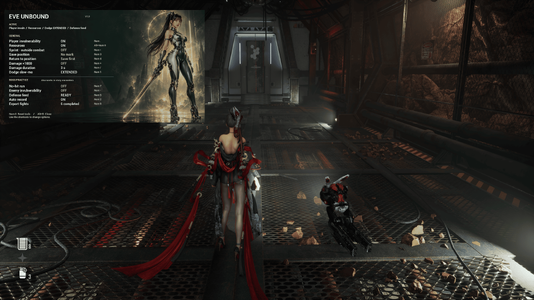
Press Alt+B to open or close the menu. The translucent background, clear General/Boss split and visible option states make it easy to check your setup. Shortcuts work with the menu open or closed.
Active-tool text and the defense feed are hidden while the menu is open.
At the start of each game session:
Requirements: Stellar Blade on Windows PC and a working Stellar Blade UE4SS installation.
Recommended loader: SB UE4SS 1.3. Install it separately; EVE Unbound does not include UE4SS.
Num means the numeric keypad. Enable Num Lock if the keypad shortcuts do not respond. Num . is the keypad decimal key. Note that you can edit the shortcuts to your own liking through the added txt file.
Thank you to SHIFT UP for creating Stellar Blade.
Thank you to the Stellar Blade modding community for sharing guides, tools, knowledge and inspiration. Learning from the community's experiments and ideas helped shape EVE Unbound.
Thanks also to the UE4SS developers and Stellar Blade loader maintainers for the tools that make these features possible.
Development was assisted by OpenAI Codex, and the menu artwork was created with OpenAI image generation.
Optional power-ups and boss-practice tools in one in-game menu.
Features
General gameplay
- Player invulnerability.
- ×1000 damage: timed boost or persistent toggle.
- Beta / Burst / Tachy gauge refill.
- Perfect-dodge slow motion: normal / off / extended.
- Outside-combat sprint speed: normal / 5× / 2×.
- Save position and teleport back.
- Reset gameplay tools.
- No-hit runs.
- Enemy / boss invulnerability.
- Defense feed showing your latest four defensive inputs.
- Automatic attempt recording.
- CSV export with fight timings, HP loss/recovery, inputs and tool usage.
Menu and defaults
Press Alt+B to open or close the menu. The translucent background, clear General/Boss split and visible option states make it easy to check your setup. Shortcuts work with the menu open or closed.
Active-tool text and the defense feed are hidden while the menu is open.
At the start of each game session:
- Optional modifiers are off.
- Perfect-dodge slow motion is normal.
- Automatic recording is on.
- The defense feed is off.
Installation
Requirements: Stellar Blade on Windows PC and a working Stellar Blade UE4SS installation.
Recommended loader: SB UE4SS 1.3. Install it separately; EVE Unbound does not include UE4SS.
- Close the game completely.
- Install SB UE4SS 1.3 following its mod-page instructions. Copy its SB folder into your Stellar Blade installation folder.
- Download and extract EVE Unbound V1.0.
- Copy the BossLab folder from the archive's Mods folder into your game's UE4SS Mods folder.
- Your final mod folder should be:
<game folder>\SB\Binaries\Win64\ue4ss\Mods\BossLab\ - Make sure to add the below to your UE4SS mods.txt file
BossLab : 1 - Start the game, enter normal gameplay and press Alt+B.
All shortcuts
Num means the numeric keypad. Enable Num Lock if the keypad shortcuts do not respond. Num . is the keypad decimal key. Note that you can edit the shortcuts to your own liking through the added txt file.
| Shortcut | Function |
|---|---|
| Alt+B | Open / close the menu |
| Num . | Player invulnerability on / off |
| Alt+Num 5 | Beta / Burst / Tachy refill on / off |
| Num * | Sprint speed: off → 5× → 2× → off |
| Num 3 | Save current position |
| Num 4 | Return to saved position |
| Num + | ×1000 damage on / off, using the selected duration |
| Num / | Cycle damage duration: 2 s / 3 s / 5 s / Toggle |
| Num 1 | Perfect-dodge slow motion: normal → off → extended → normal |
| Num 7 | No-hit run on / off |
| Num - | Enemy / boss invulnerability on / off |
| Num 5 | Defense feed on / off |
| Num 2 | Automatic attempt recording on / off |
| Num 8 | Export completed attempts to CSV |
| Num 0 | Reset gameplay tools and clear the position mark / defense feed |
Thanks and credits
Thank you to SHIFT UP for creating Stellar Blade.
Thank you to the Stellar Blade modding community for sharing guides, tools, knowledge and inspiration. Learning from the community's experiments and ideas helped shape EVE Unbound.
Thanks also to the UE4SS developers and Stellar Blade loader maintainers for the tools that make these features possible.
Development was assisted by OpenAI Codex, and the menu artwork was created with OpenAI image generation.
