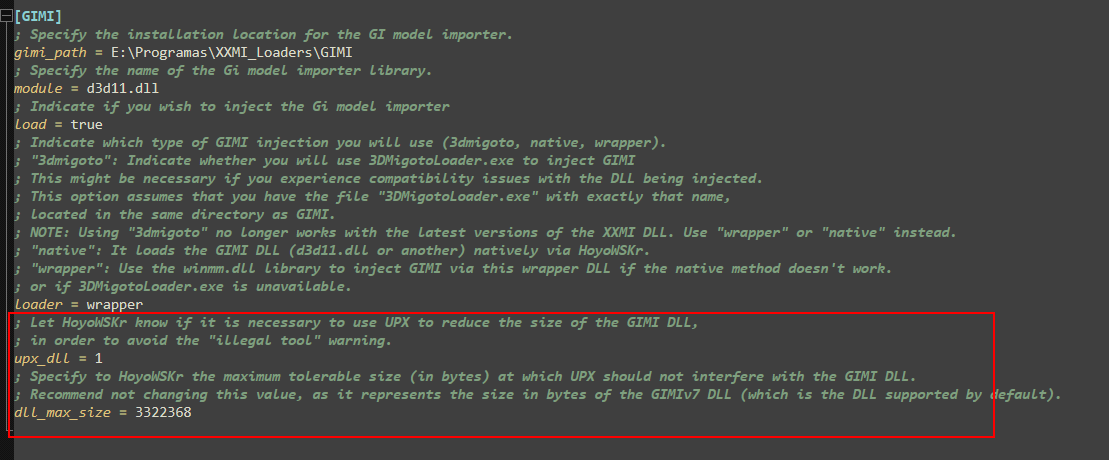
Thanks to a comment on "a certain (not exactly 'Christian') modding site," I learned that I could use the latest GIMI DLLs (from the XXMI version) without triggering the "Illegal tool" message. Previously, with the latest DLL, this message would appear regardless of the method used. To prevent this, the new version of HoyoWSKr includes the UPX (Ultimate Packer for eXecutables) executable, which is used to reduce the DLL's file size. It seems that Genshin flags the DLL if its file size is too large; for this reason, I have added two options to the configurator.
- upx_dll: If its value is 1 or "true", it enables the check for using UPX.
- dll_max_size: This specifies the maximum tolerated value before UPX applies compression. If your DLL is already below this value, UPX will not be applied, as the file size is already acceptable for Genshin. I recommend keeping this value as it is currently set in the file.
ADDITIONAL NOTES:
- If you use "Loader = 3dmigoto" with the latest version of GIMI, it will not work. This is not a fault of HoyoWSKr; rather, due to changes in the signatures, these new DLLs are simply incompatible with 3DMIgotoLoader.exe.
- Because the compiler has been changed, you may now need to run HoyoWSKr directly with administrator privileges. This is not a major issue, but it is something to keep in mind.
FALSE POSITIVE WARNING: Since the new build of HoyoWSKr contains UPX, antivirus software may be more restrictive toward it. I recommend adding HoyoWSKr—or its execution directory—to your whitelist to avoid any issues.
IMPORTANT NOTE:
Although the file to be downloaded has a .7z extension, it was actually compressed as .squashfs (as the filename itself indicates); therefore, you must extract it using the latest version of 7-Zip. I used squashfs to try to reduce the final file size. I may use this method for future mod files.