# 蜘蛛感应应应 蜘蛛感应v0.3.16
b站账号:锋利的比格犬 steam同名
需要Vanilla Plus Megapack
https://ayakamods.com/mods/vanilla-plus-megapack.3913/ 作为前置mod
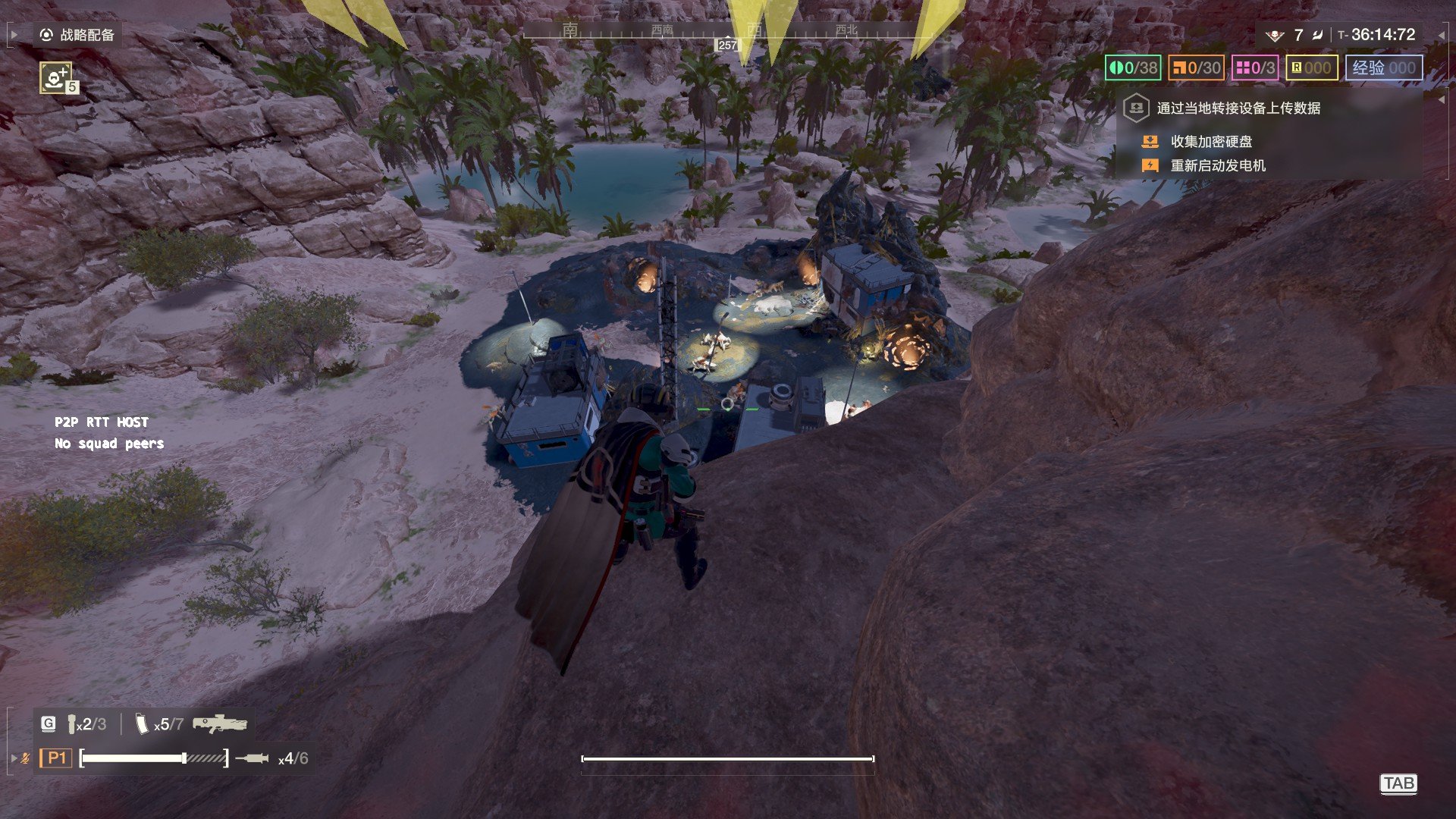
**敌人靠近,屏幕边缘就会朝它的方向亮起菱形箭头。**
不用回头、不用看小地图,余光就能发现背后的东西:敌人在哪个方向,光就往哪边亮;离得越近,光越大、越白、探得越深。虫子从斜后方摸上来、机器人绕到你侧面,都能提前一点点知道。
**怎么装**
1. 先关掉游戏,并把 Arsenal 库里的旧版本删掉
2. 把 `SpiderSense` 拖进 HD2Arsenal 导入。**导这个 zip 就行,不要自己把项目文件夹打包。**
3. 启用这个 mod 和加载器(加载器最后启用)→ Deploy → 进游戏。
**怎么调**
不用记快捷键,这个 mod 一个按键都没绑,不会和游戏操作冲突。所有设置都在游戏里:
**ESC > MODS → SpiderSense**,有五个滑块,拉完按 APPLY 立刻生效,不用重开任务:
| 滑块 | 什么时候动它 |
|---|---|
| 更改颜色 |现在可以在白、红、橙、黄、绿、蓝、粉、紫之间切换
| 显示角度 | 只想防背后就调成 90–180°,想看全方向就 360° |
| 触发半径 | 想早一点预警就拉大(默认 50 米)|
| 白度 | 在明亮的星球上看不清,就调高 |
| 光斑长度 | 觉得挡视野,先调小这个 |
| 光斑宽度 | 还是挡视野,再调小这个 |
**要注意的**
- 只对**敌人**响应,友军和已经死掉的敌人不会亮。
- 默认触发距离 50 米,觉得太吵就调小半径,或者把显示角度收到背后。
- 遇到了 bug,欢迎在评论区反馈!
Requires Vanilla Plus Megapack as a prerequisite mod:
https://ayakamods.com/mods/vanilla-plus-megapack.3913/
When enemies get close, a diamond-shaped arrow lights up at the edge of the screen pointing toward them.
No need to turn around or check the minimap—your peripheral vision will catch what's behind you: the light shines in the direction the enemy is in; the closer they are, the larger, whiter, and deeper it reaches. Whether bugs are sneaking up from diagonally behind or bots are flanking around to your side, you'll know a little earlier.
How to install
No need to memorize hotkeys; this mod doesn't bind a single key and won't conflict with game controls. All settings are in-game:
ESC > MODS → SpiderSense. There are five sliders; after adjusting, press APPLY and it takes effect immediately—no need to restart the mission:
[th]
Slider
[/th][th]
When to adjust it
[/th]
[td]Change Color[/td][td]You can now switch between white, red, orange, yellow, green, blue, pink, and purple[/td][td]Display Angle[/td][td]If you only want to guard your back, set it to 90–180°; if you want all directions, set it to 360°[/td][td]Trigger Radius[/td][td]If you want earlier warnings, increase it (default 50 m)[/td][td]Whiteness[/td][td]If it's hard to see on bright planets, increase it[/td][td]Glow Length[/td][td]If it blocks your view, reduce this first[/td][td]Glow Width[/td][td]If it still blocks your view, reduce this next[/td]
Things to note
b站账号:锋利的比格犬 steam同名
需要Vanilla Plus Megapack
https://ayakamods.com/mods/vanilla-plus-megapack.3913/ 作为前置mod
**敌人靠近,屏幕边缘就会朝它的方向亮起菱形箭头。**
不用回头、不用看小地图,余光就能发现背后的东西:敌人在哪个方向,光就往哪边亮;离得越近,光越大、越白、探得越深。虫子从斜后方摸上来、机器人绕到你侧面,都能提前一点点知道。
**怎么装**
1. 先关掉游戏,并把 Arsenal 库里的旧版本删掉
2. 把 `SpiderSense` 拖进 HD2Arsenal 导入。**导这个 zip 就行,不要自己把项目文件夹打包。**
3. 启用这个 mod 和加载器(加载器最后启用)→ Deploy → 进游戏。
**怎么调**
不用记快捷键,这个 mod 一个按键都没绑,不会和游戏操作冲突。所有设置都在游戏里:
**ESC > MODS → SpiderSense**,有五个滑块,拉完按 APPLY 立刻生效,不用重开任务:
| 滑块 | 什么时候动它 |
|---|---|
| 更改颜色 |现在可以在白、红、橙、黄、绿、蓝、粉、紫之间切换
| 显示角度 | 只想防背后就调成 90–180°,想看全方向就 360° |
| 触发半径 | 想早一点预警就拉大(默认 50 米)|
| 白度 | 在明亮的星球上看不清,就调高 |
| 光斑长度 | 觉得挡视野,先调小这个 |
| 光斑宽度 | 还是挡视野,再调小这个 |
**要注意的**
- 只对**敌人**响应,友军和已经死掉的敌人不会亮。
- 默认触发距离 50 米,觉得太吵就调小半径,或者把显示角度收到背后。
- 遇到了 bug,欢迎在评论区反馈!
Requires Vanilla Plus Megapack as a prerequisite mod:
https://ayakamods.com/mods/vanilla-plus-megapack.3913/
When enemies get close, a diamond-shaped arrow lights up at the edge of the screen pointing toward them.
No need to turn around or check the minimap—your peripheral vision will catch what's behind you: the light shines in the direction the enemy is in; the closer they are, the larger, whiter, and deeper it reaches. Whether bugs are sneaking up from diagonally behind or bots are flanking around to your side, you'll know a little earlier.
How to install
- Close the game first, and delete the old version from your Arsenal library.
- Drag
SpiderSenseinto HD2Arsenal to import. Just import this zip; do not package the project folder yourself. - Enable this mod and the loader (enable the loader last) → Deploy → launch the game.
No need to memorize hotkeys; this mod doesn't bind a single key and won't conflict with game controls. All settings are in-game:
ESC > MODS → SpiderSense. There are five sliders; after adjusting, press APPLY and it takes effect immediately—no need to restart the mission:
[th]
Slider
[/th][th]
When to adjust it
[/th]
[td]Change Color[/td][td]You can now switch between white, red, orange, yellow, green, blue, pink, and purple[/td][td]Display Angle[/td][td]If you only want to guard your back, set it to 90–180°; if you want all directions, set it to 360°[/td][td]Trigger Radius[/td][td]If you want earlier warnings, increase it (default 50 m)[/td][td]Whiteness[/td][td]If it's hard to see on bright planets, increase it[/td][td]Glow Length[/td][td]If it blocks your view, reduce this first[/td][td]Glow Width[/td][td]If it still blocks your view, reduce this next[/td]
Things to note
- Only responds to enemies; allies and already dead enemies won't light up.
- Default trigger distance is 50 m. If it feels too noisy, reduce the radius, or narrow the display angle to your back.
- If you run into bugs, feel free to report them in the comments!
