HD2Runtime requires BingusSharedLoader 18 or later
https://ayakamods.com/mods/bingus-shared-loader.3861/
A modding runtime that maps many Helldivers 2 values into an easier and safer API for creating mods with much less manual reverse engineering and guesswork.
Always Place HD2Runtime above the Bingus Shared Loader In Your Load Order.
Making a Mod with HD2Runtime
HD2Runtime is installed once and shared by mods that use it.
Creating a mod
Recommended Tool:
https://github.com/SkyeShade/HD2Runtime-ModBuilder/releases
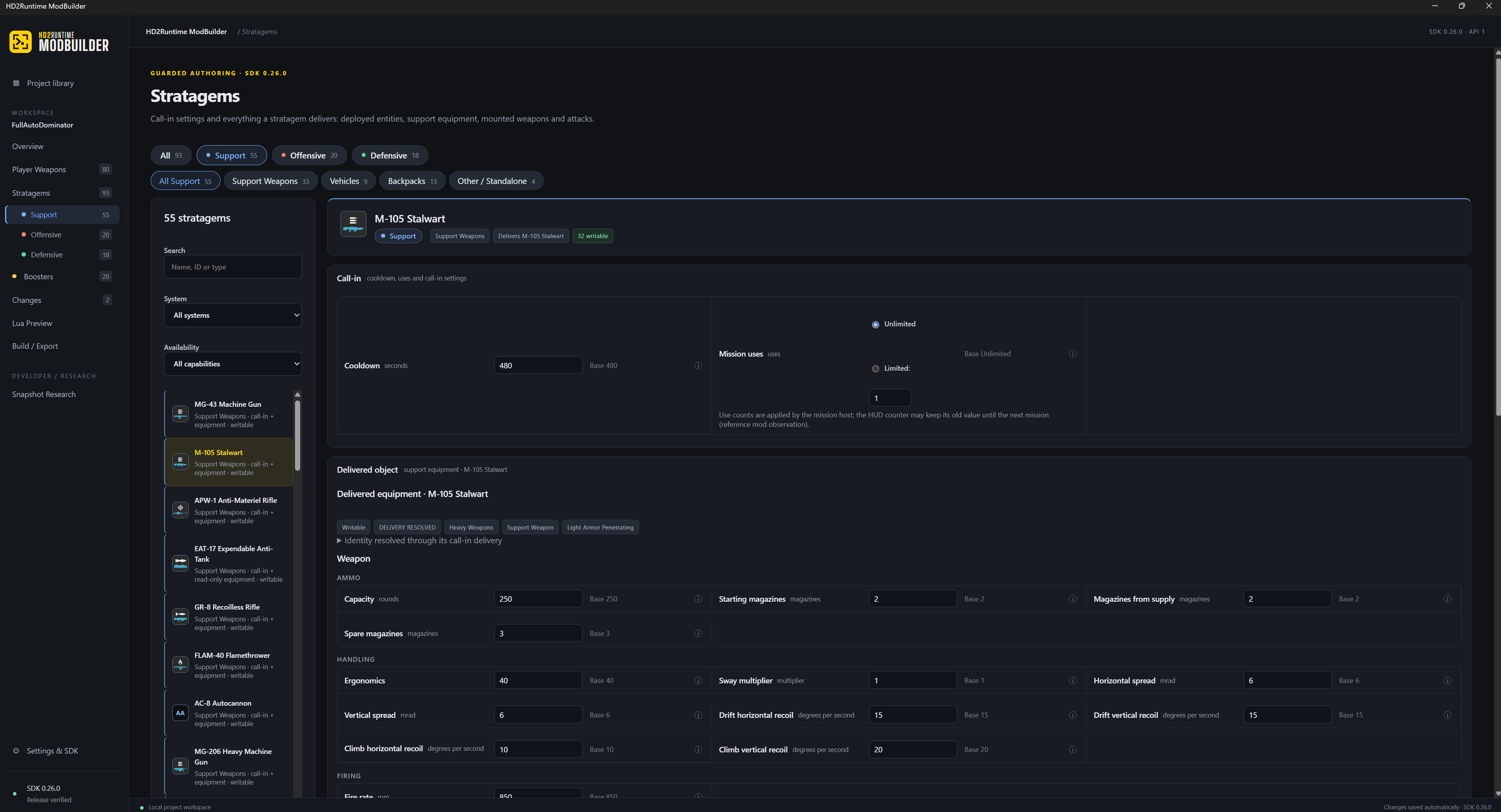
Runtime Modbuilder is a tool i made specifically to lower the barrier of entry to modding this game.
Warning: Some features are still experimental, and a few values may not map perfectly yet.
Manual Option:
1. Download and extract HD2Runtime-ModTemplate-<version>.zip from the github release page
2. Open the extracted folder in Rider or another code editor
3. Edit hd2runtime.json
- Change the mod name
- Change the resource ID to something unique, for example:
mods/yourname/my_mod
- Set the required HD2Runtime version for the features you use
4. Edit src/addon.lua
5. Run build.cmd
6. Import the ZIP created in the build folder into Arsenal or your mod manager
7. Enable Bingus Shared Loader, HD2Runtime, and your mod, then deploy and restart the game
Very Basic example
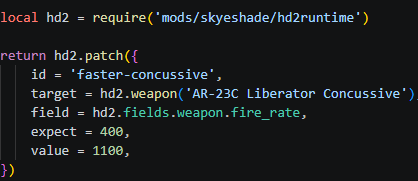
expect is the vanilla value Runtime expects before writing. Copy it from the SDK capability metadata; don’t guess it.
This changes the Liberator Concussive fire rate from its expected vanilla value of 400 RPM to 1100 RPM.
How do I know what values I can edit?
Download the HD2Runtime SDK from the github release and look inside its capability files.
Useful files include:
PlayerWeaponAuthoringCapabilities.json -> primary and secondary weapons
SupportWeaponAuthoringCapabilities.json ->support weapons
StratagemAuthoringCapabilities.json -> stratagems and deployed entities
VehicleAuthoringCapabilities.json -> vehicles
BackpackAuthoringCapabilities.json -> backpacks
MagazineAttachmentCapabilities.json -> magazine attachments
These files tell you:
- supported object names
- editable fields
- vanilla/default values
- whether a field is writable
- whether the edit affects shared data
- whether special safety acknowledgement flags are required
The expect value should normally come from the published baseline in these files. Do not guess it.
HD2Runtime checks the expected value before writing. If the game updated, another mod changed the value, or the target no longer matches what Runtime expects, the write is rejected instead of blindly modifying memory.
Useful operations
hd2.patch(...) -> applies one guarded change.
hd2.ensure(...) -> keeps a change applied if the game later resets it.
hd2.transaction(...) -> changes several fields on the same object together.
hd2.plan(...) -> coordinates changes across multiple objects.
Logs
If your mod does not work, check:
%LOCALAPPDATA%\CowboyBingus\Helldivers2\Logs\
Useful files:
BingusSharedLoader.log
HD2Runtime.log
APPLIED means Runtime successfully changed the value.
ALREADY_DESIRED means the value was already what your mod requested.
Full developer guide
See the HD2Runtime GitHub documentation for target navigation, safety flags, vehicles, backpacks, magazine attachments, plans, transactions and troubleshooting.
Github Link: https://github.com/SkyeShade/HD2Runtime
[Disclaimer]
LLMs were used during the development of this mod.
https://ayakamods.com/mods/bingus-shared-loader.3861/
A modding runtime that maps many Helldivers 2 values into an easier and safer API for creating mods with much less manual reverse engineering and guesswork.
Always Place HD2Runtime above the Bingus Shared Loader In Your Load Order.
Making a Mod with HD2Runtime
HD2Runtime is installed once and shared by mods that use it.
Creating a mod
Recommended Tool:
https://github.com/SkyeShade/HD2Runtime-ModBuilder/releases
Runtime Modbuilder is a tool i made specifically to lower the barrier of entry to modding this game.
Warning: Some features are still experimental, and a few values may not map perfectly yet.
Manual Option:
1. Download and extract HD2Runtime-ModTemplate-<version>.zip from the github release page
2. Open the extracted folder in Rider or another code editor
3. Edit hd2runtime.json
- Change the mod name
- Change the resource ID to something unique, for example:
mods/yourname/my_mod
- Set the required HD2Runtime version for the features you use
4. Edit src/addon.lua
5. Run build.cmd
6. Import the ZIP created in the build folder into Arsenal or your mod manager
7. Enable Bingus Shared Loader, HD2Runtime, and your mod, then deploy and restart the game
Very Basic example
expect is the vanilla value Runtime expects before writing. Copy it from the SDK capability metadata; don’t guess it.
This changes the Liberator Concussive fire rate from its expected vanilla value of 400 RPM to 1100 RPM.
How do I know what values I can edit?
Download the HD2Runtime SDK from the github release and look inside its capability files.
Useful files include:
PlayerWeaponAuthoringCapabilities.json -> primary and secondary weapons
SupportWeaponAuthoringCapabilities.json ->support weapons
StratagemAuthoringCapabilities.json -> stratagems and deployed entities
VehicleAuthoringCapabilities.json -> vehicles
BackpackAuthoringCapabilities.json -> backpacks
MagazineAttachmentCapabilities.json -> magazine attachments
These files tell you:
- supported object names
- editable fields
- vanilla/default values
- whether a field is writable
- whether the edit affects shared data
- whether special safety acknowledgement flags are required
The expect value should normally come from the published baseline in these files. Do not guess it.
HD2Runtime checks the expected value before writing. If the game updated, another mod changed the value, or the target no longer matches what Runtime expects, the write is rejected instead of blindly modifying memory.
Useful operations
hd2.patch(...) -> applies one guarded change.
hd2.ensure(...) -> keeps a change applied if the game later resets it.
hd2.transaction(...) -> changes several fields on the same object together.
hd2.plan(...) -> coordinates changes across multiple objects.
Logs
If your mod does not work, check:
%LOCALAPPDATA%\CowboyBingus\Helldivers2\Logs\
Useful files:
BingusSharedLoader.log
HD2Runtime.log
APPLIED means Runtime successfully changed the value.
ALREADY_DESIRED means the value was already what your mod requested.
Full developer guide
See the HD2Runtime GitHub documentation for target navigation, safety flags, vehicles, backpacks, magazine attachments, plans, transactions and troubleshooting.
Github Link: https://github.com/SkyeShade/HD2Runtime
[Disclaimer]
LLMs were used during the development of this mod.