English(ai)
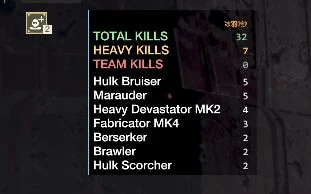
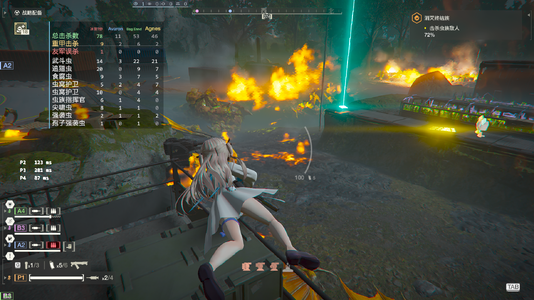
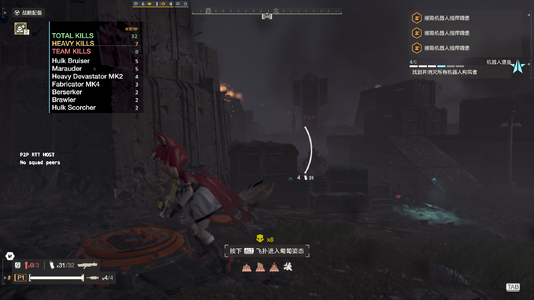
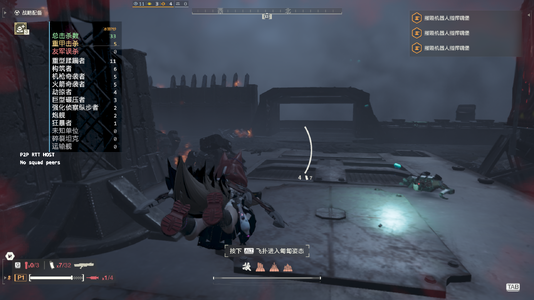
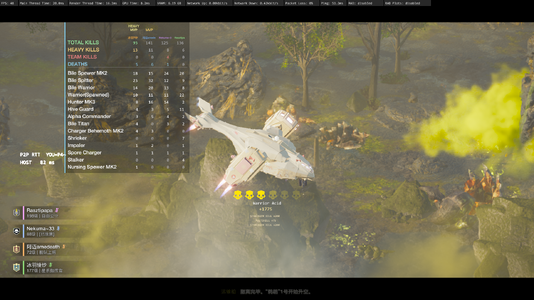
Kill Counter HUD - real-time kill statistics for you and your squad, shown in the top-left corner of the screen.
REQUIREMENTS
Three things must be installed for this mod to work. The first two are
mandatory; the third is needed only if you want to change settings in game.
1. Bingus Shared Loader - mandatory
Every HD2 Lua mod runs inside this loader. The game itself never executes the
addon files; the loader hooks the game's update loop and injects them there.
Without it this mod is never loaded and nothing appears on screen.
2. HD2Runtime - mandatory
This mod only reads game data, it never writes any, and HD2Runtime is what
makes that possible. It subscribes to the game's entity-death events so kills
can be counted as they happen, and it locates the official score tables so the
numbers match the debriefing screen exactly. It also validates those addresses
against the installed game build, so when the game updates, HD2Runtime is what
gets updated instead of this mod.
3. Mod Options Menu - needed for the settings screen
This adds the MODS tab to the in-game ESC menu, and this mod registers its
settings there (show HUD, language, scale, position, hide key). Without it the
HUD still runs and still counts kills, but no setting can be changed in game.
WHAT IT DOES
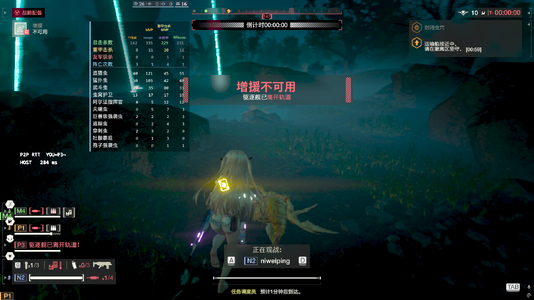
- Four summary rows, one column per player: total kills / heavy kills / friendly-fire kills / deaths
- Per-enemy-type breakdown: how many of each unit every player killed
- Gold MVP badge for the top killer and the top heavy-killer, re-evaluated every 10 seconds; merges into one "OVERALL MVP" if a single player holds both
- Player names follow the in-game P1-P4 colour coding
- Enemy names: official wiki translations in Chinese, in-game names in English
- Counts come from the same sources as the debriefing screen, so they match
- Enemy types present in the mission are scanned automatically on entry
- Fabricators (Automaton factories) are listed separately and excluded from the total
- Factory Striders are counted normally
- Your own numbers are the most accurate; as host, your squadmates' are too
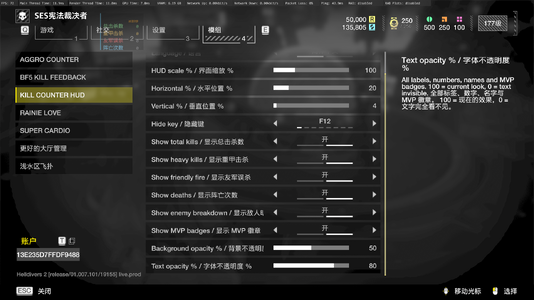
SETTINGS - in game: ESC > MODS > KILL COUNTER HUD
- Show HUD / Language (Chinese / English) / HUD scale 80-150%
- Horizontal position / Vertical position / Hide key
- Hide and scale-cycle hotkeys can also be bound in ModBindingsMenu
- Panel position is remembered between sessions
WHAT IT CANNOT DO
- Joining mid-mission: counting starts when you join. The game keeps no history of kills before that point, so earlier kills cannot be shown.
- Only Fabricators are tracked among structures; Illuminate ships and Warp Ships are not displayed yet.
- Which squadmate destroyed a structure cannot be attributed - the game does not expose that information.
- Friendly-fire totals are only as precise as the game's own counter.
- Automatons and Illuminate may show a few unidentified units, listed as "unknown unit".
- Anything the game itself does not track cannot be displayed.
- The panel cannot be dragged with the mouse; adjust its position with the sliders in the settings instead.
Requires Bingus Shared Loader, HD2Runtime and Mod Options Menu.
Made entirely by DSH.
If you find this mod useful, please consider leaving a five-star rating.
中文
队友击杀统计 HUD - 在屏幕左上角实时显示你与队友的击杀统计。
前置要求
需要安装三样东西。前两个是必需的,第三个只有在游戏内调整设置时才需要。
1. Bingus Shared Loader - 必需
所有 HD2 的 Lua mod 都运行在这个加载器里。游戏本身不会执行 addon 文件,
是加载器接管了游戏的 update 循环并把它们注入进去。没有它,本 mod 根本
不会被加载,屏幕上什么都不会出现。
2. HD2Runtime - 必需
本 mod 只读取游戏数据、从不写入,而这件事要靠 HD2Runtime 才能做到。它订阅
游戏的实体死亡事件,让击杀能被实时记下;它还会定位官方分数表,使数字与结算
界面完全一致。它同时会针对当前游戏版本校验这些地址,所以游戏更新时只需更新
HD2Runtime,而不必改本 mod。
3. Mod Options Menu - 设置界面需要
它在游戏内 ESC 菜单里加上「模组」标签页,本 mod 把设置注册在那里
(显示 HUD、语言、缩放、位置、隐藏键)。没有它,HUD 依然会运行、依然会统计
击杀,但你无法在游戏内更改任何设置。
当然你用那个汉化版也是能正常使用的
能做的
- 四行总览,每人一列:总击杀 / 重甲击杀 / 友军误杀 / 阵亡次数
- 敌人明细:本局出现的每种单位,各人分别击杀了多少
- 金色 MVP 徽章:击杀最高者与重甲最高者,每 10 秒重新判定一次;同一人包揽两项时合并为一个「全场最佳 MVP」
- 玩家名字颜色跟随游戏内 P1-P4 编号
- 敌人名称:中文用 wiki 官方译名,英文用游戏内原名
- 数据与结算界面同源,数字一致
- 进入任务时自动扫描本局出现的敌人类型
- 构筑者(机器人制造厂)单独列出,不计入总击杀
- 移动工厂正常统计
- 自己最精确;作为房主时队友的数据也精确
设置(游戏内 ESC -> 模组 -> KILL COUNTER HUD)
- 显示 HUD / 语言(中文 / English)/ 界面缩放 80-150%
- 水平位置 / 垂直位置 / 隐藏键
- 隐藏与循环缩放的热键也可在 ModBindingsMenu 中绑定
- 面板位置会被记住
做不到的
- 中途加入:从你加入时开始计算。游戏不保留加入前的击杀记录,因此无法显示此前的数据。
- 建筑只统计到构筑者一种;光能族的飞船与穿梭舰暂时不会显示。
- 无法判断是哪个队友拆毁了建筑 - 游戏未暴露该归属信息。
- 友军误杀的精度受限于游戏自身的统计。
- 机器人与光能族可能有个别未识别单位,会显示为「未知单位」。
- 游戏本身没有统计的数据无法显示。
- 面板不支持鼠标拖拽调整,位置请在设置里用滑块调整。
前置要求:Bingus Shared Loader、HD2Runtime、Mod Options Menu。
全程由 DSH 制作。
如果我的mod对你有帮助请给我一个五星吧
Kill Counter HUD - real-time kill statistics for you and your squad, shown in the top-left corner of the screen.
REQUIREMENTS
Three things must be installed for this mod to work. The first two are
mandatory; the third is needed only if you want to change settings in game.
1. Bingus Shared Loader - mandatory
Every HD2 Lua mod runs inside this loader. The game itself never executes the
addon files; the loader hooks the game's update loop and injects them there.
Without it this mod is never loaded and nothing appears on screen.
2. HD2Runtime - mandatory
This mod only reads game data, it never writes any, and HD2Runtime is what
makes that possible. It subscribes to the game's entity-death events so kills
can be counted as they happen, and it locates the official score tables so the
numbers match the debriefing screen exactly. It also validates those addresses
against the installed game build, so when the game updates, HD2Runtime is what
gets updated instead of this mod.
3. Mod Options Menu - needed for the settings screen
This adds the MODS tab to the in-game ESC menu, and this mod registers its
settings there (show HUD, language, scale, position, hide key). Without it the
HUD still runs and still counts kills, but no setting can be changed in game.
WHAT IT DOES

- Four summary rows, one column per player: total kills / heavy kills / friendly-fire kills / deaths
- Per-enemy-type breakdown: how many of each unit every player killed
- Gold MVP badge for the top killer and the top heavy-killer, re-evaluated every 10 seconds; merges into one "OVERALL MVP" if a single player holds both
- Player names follow the in-game P1-P4 colour coding
- Enemy names: official wiki translations in Chinese, in-game names in English
- Counts come from the same sources as the debriefing screen, so they match
- Enemy types present in the mission are scanned automatically on entry
- Fabricators (Automaton factories) are listed separately and excluded from the total
- Factory Striders are counted normally
- Your own numbers are the most accurate; as host, your squadmates' are too
SETTINGS - in game: ESC > MODS > KILL COUNTER HUD
- Show HUD / Language (Chinese / English) / HUD scale 80-150%
- Horizontal position / Vertical position / Hide key
- Hide and scale-cycle hotkeys can also be bound in ModBindingsMenu
- Panel position is remembered between sessions
WHAT IT CANNOT DO
- Joining mid-mission: counting starts when you join. The game keeps no history of kills before that point, so earlier kills cannot be shown.
- Only Fabricators are tracked among structures; Illuminate ships and Warp Ships are not displayed yet.
- Which squadmate destroyed a structure cannot be attributed - the game does not expose that information.
- Friendly-fire totals are only as precise as the game's own counter.
- Automatons and Illuminate may show a few unidentified units, listed as "unknown unit".
- Anything the game itself does not track cannot be displayed.
- The panel cannot be dragged with the mouse; adjust its position with the sliders in the settings instead.
Requires Bingus Shared Loader, HD2Runtime and Mod Options Menu.
Made entirely by DSH.
If you find this mod useful, please consider leaving a five-star rating.
中文
队友击杀统计 HUD - 在屏幕左上角实时显示你与队友的击杀统计。
前置要求
需要安装三样东西。前两个是必需的,第三个只有在游戏内调整设置时才需要。
1. Bingus Shared Loader - 必需
所有 HD2 的 Lua mod 都运行在这个加载器里。游戏本身不会执行 addon 文件,
是加载器接管了游戏的 update 循环并把它们注入进去。没有它,本 mod 根本
不会被加载,屏幕上什么都不会出现。
2. HD2Runtime - 必需
本 mod 只读取游戏数据、从不写入,而这件事要靠 HD2Runtime 才能做到。它订阅
游戏的实体死亡事件,让击杀能被实时记下;它还会定位官方分数表,使数字与结算
界面完全一致。它同时会针对当前游戏版本校验这些地址,所以游戏更新时只需更新
HD2Runtime,而不必改本 mod。
3. Mod Options Menu - 设置界面需要
它在游戏内 ESC 菜单里加上「模组」标签页,本 mod 把设置注册在那里
(显示 HUD、语言、缩放、位置、隐藏键)。没有它,HUD 依然会运行、依然会统计
击杀,但你无法在游戏内更改任何设置。
当然你用那个汉化版也是能正常使用的
能做的
- 四行总览,每人一列:总击杀 / 重甲击杀 / 友军误杀 / 阵亡次数
- 敌人明细:本局出现的每种单位,各人分别击杀了多少
- 金色 MVP 徽章:击杀最高者与重甲最高者,每 10 秒重新判定一次;同一人包揽两项时合并为一个「全场最佳 MVP」
- 玩家名字颜色跟随游戏内 P1-P4 编号
- 敌人名称:中文用 wiki 官方译名,英文用游戏内原名
- 数据与结算界面同源,数字一致
- 进入任务时自动扫描本局出现的敌人类型
- 构筑者(机器人制造厂)单独列出,不计入总击杀
- 移动工厂正常统计
- 自己最精确;作为房主时队友的数据也精确
设置(游戏内 ESC -> 模组 -> KILL COUNTER HUD)
- 显示 HUD / 语言(中文 / English)/ 界面缩放 80-150%
- 水平位置 / 垂直位置 / 隐藏键
- 隐藏与循环缩放的热键也可在 ModBindingsMenu 中绑定
- 面板位置会被记住
做不到的
- 中途加入:从你加入时开始计算。游戏不保留加入前的击杀记录,因此无法显示此前的数据。
- 建筑只统计到构筑者一种;光能族的飞船与穿梭舰暂时不会显示。
- 无法判断是哪个队友拆毁了建筑 - 游戏未暴露该归属信息。
- 友军误杀的精度受限于游戏自身的统计。
- 机器人与光能族可能有个别未识别单位,会显示为「未知单位」。
- 游戏本身没有统计的数据无法显示。
- 面板不支持鼠标拖拽调整,位置请在设置里用滑块调整。
前置要求:Bingus Shared Loader、HD2Runtime、Mod Options Menu。
全程由 DSH 制作。
如果我的mod对你有帮助请给我一个五星吧
