
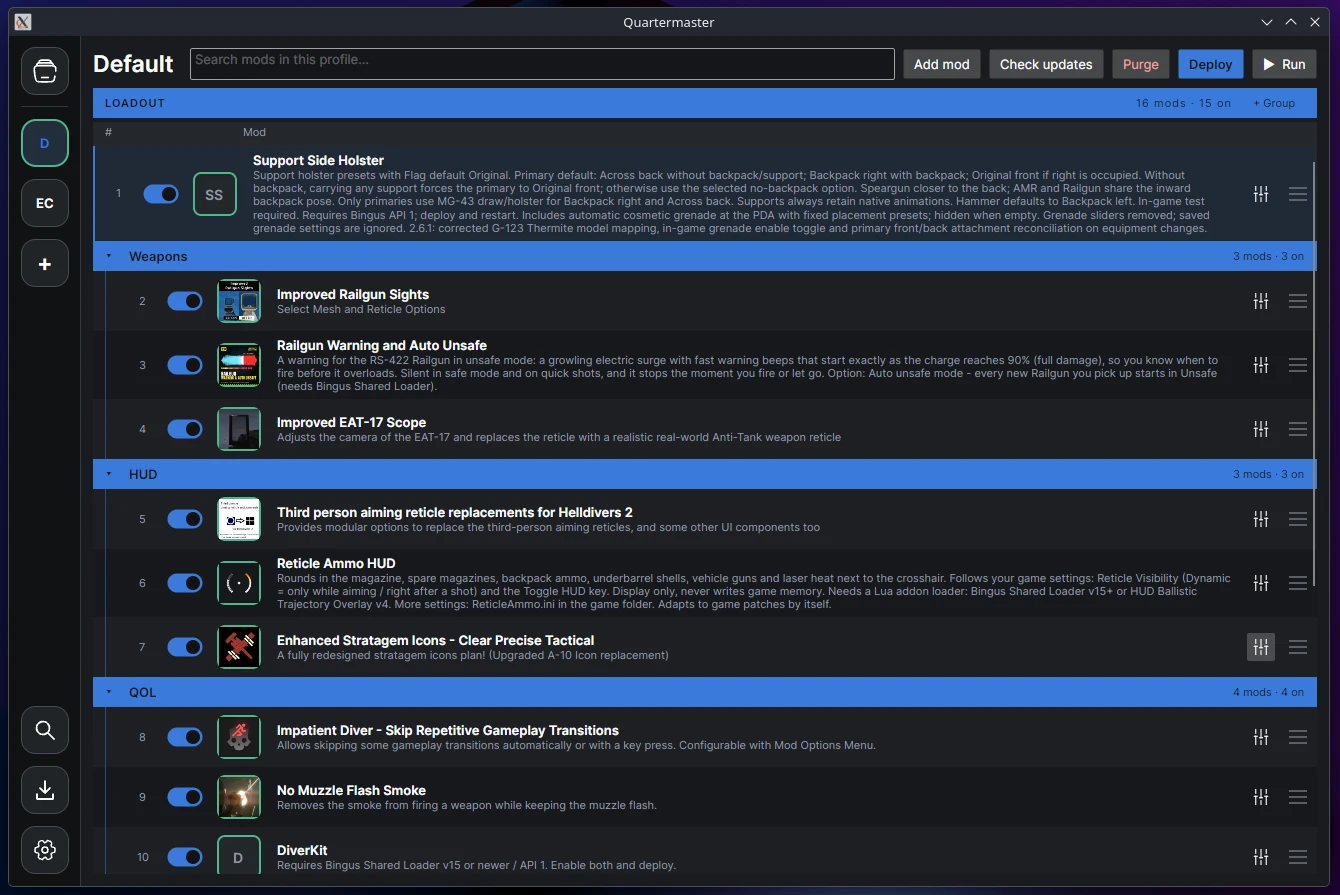
Quartermaster is a Helldivers 2 mod manager for organizing, updating, and deploying
mods. Search Nexus Mods from the app, track updates from Nexus Mods and GitHub,
and keep separate mod setups in profiles.
Disclaimer: This is actively in development and has yet to hit a stable v1.0 release. Expect the UI to change drastically, and features may be added or removed in subsequent versions.
- Mod search: browse Helldivers 2 Nexus Mods with thumbnails and open a
result's download page from the app.
- Mod updates: check your library or a profile for updates, then install
replacements without losing mod order, groups, or compatible option selections.
- Profiles: enable mods, select their options, organize them into collapsible
groups, and drag them to change load order.
- Repatching: repair outdated unit formats during deployment while keeping
the original mod files. Choose automatic repatching, confirmation, or disable it.
- Profile sharing: export a profile and its mods in one ZIP, or import someone
else's setup.
Installation
Download the latest archive for your operating system and architecture:
Most users will want "Quartermaster-win-x64-bundled.zip" if you are on a Windows computer.
Choose a `bundled` archive to run without installing .NET. The smaller `runtime`
archives require the .NET 10 runtime. Builds are available for Linux, Windows,
and macOS on x64 and ARM64.
Getting started
1. Open Settings and select your Helldivers 2 installation, or use
**Find Steam installs**. Configure provider credentials here if you want
search and online updates.
2. Open Library and choose Add mod to import a ZIP, folder, or Nexus Mods
or GitHub link. You can also drag ZIPs and folders into the app.
3. Click + in the sidebar to create a profile. Right-click mods in Library
and choose Add to to add them to it. Dropping a mod into a profile imports
it and adds it to that profile.
4. Select the mods and options you want, then click Deploy and Run.
Changes to a profile take effect when you deploy it. The deployed profile is
marked green; yellow mod outlines indicate a difference from what is deployed.
Use Purge to remove any deployed patches and have a vanilla game.
Right-click a profile to rename, duplicate, delete, or export it. Import a profile
ZIP through the create-profile dialog or by dropping it into the sidebar.
Search and updates
Use Search to find Helldivers 2 mods on Nexus Mods. Choose Open download
page to start an import. Quartermaster opens your browser and watches your
configured download folder; once the ZIP finishes downloading, it imports the mod.
Check updates in Library checks all tracked mods. In a profile, it checks
that profile's mods. Mods with an available update show an Update button.
GitHub release ZIPs download directly; Nexus Mods updates use your browser.
Updated mods keep their place in your profiles. After updates, you must redeploy.
The Downloads page shows pending and failed requests. You can attach a ZIP
manually if you already have it or download recognition misses it, retry a failed
request, or cancel it.
Provider credentials
Configure credentials in Settings, then click Save.
- Nexus Mods: a personal API key is required for search, update checks, and
browser download verification. Get it from Nexus account settings → API.
Free accounts can use the browser download flow; you still click the download
button on Nexus Mods. (Eventually this will use the official nexus integration, and this step will be unneeded)
- GitHub: a personal access token is optional and increases the API rate
limit. Create one under Settings → Developer settings → Personal access tokens.
Your mod files
Quartermaster keeps imported originals in its own library and repatches during
deployment. **Export repatched ZIP** in a mod's Library context menu saves a
repaired copy separately. Repatching is experimental, expect some failures.
Profile exports include mod files, load order, groups, and option selections.
Provider credentials are stored separately and are excluded from exports.
Application data is stored under `Quartermaster` in your user's local application
data directory. Its location is shown in Settings. Set
`QUARTERMASTER_DATA_DIRECTORY` to use another location.
mods. Search Nexus Mods from the app, track updates from Nexus Mods and GitHub,
and keep separate mod setups in profiles.
Disclaimer: This is actively in development and has yet to hit a stable v1.0 release. Expect the UI to change drastically, and features may be added or removed in subsequent versions.
- Mod search: browse Helldivers 2 Nexus Mods with thumbnails and open a
result's download page from the app.
- Mod updates: check your library or a profile for updates, then install
replacements without losing mod order, groups, or compatible option selections.
- Profiles: enable mods, select their options, organize them into collapsible
groups, and drag them to change load order.
- Repatching: repair outdated unit formats during deployment while keeping
the original mod files. Choose automatic repatching, confirmation, or disable it.
- Profile sharing: export a profile and its mods in one ZIP, or import someone
else's setup.
Installation
Download the latest archive for your operating system and architecture:
Most users will want "Quartermaster-win-x64-bundled.zip" if you are on a Windows computer.
Choose a `bundled` archive to run without installing .NET. The smaller `runtime`
archives require the .NET 10 runtime. Builds are available for Linux, Windows,
and macOS on x64 and ARM64.
Getting started
1. Open Settings and select your Helldivers 2 installation, or use
**Find Steam installs**. Configure provider credentials here if you want
search and online updates.
2. Open Library and choose Add mod to import a ZIP, folder, or Nexus Mods
or GitHub link. You can also drag ZIPs and folders into the app.
3. Click + in the sidebar to create a profile. Right-click mods in Library
and choose Add to to add them to it. Dropping a mod into a profile imports
it and adds it to that profile.
4. Select the mods and options you want, then click Deploy and Run.
Changes to a profile take effect when you deploy it. The deployed profile is
marked green; yellow mod outlines indicate a difference from what is deployed.
Use Purge to remove any deployed patches and have a vanilla game.
Right-click a profile to rename, duplicate, delete, or export it. Import a profile
ZIP through the create-profile dialog or by dropping it into the sidebar.
Search and updates
Use Search to find Helldivers 2 mods on Nexus Mods. Choose Open download
page to start an import. Quartermaster opens your browser and watches your
configured download folder; once the ZIP finishes downloading, it imports the mod.
Check updates in Library checks all tracked mods. In a profile, it checks
that profile's mods. Mods with an available update show an Update button.
GitHub release ZIPs download directly; Nexus Mods updates use your browser.
Updated mods keep their place in your profiles. After updates, you must redeploy.
The Downloads page shows pending and failed requests. You can attach a ZIP
manually if you already have it or download recognition misses it, retry a failed
request, or cancel it.
Provider credentials
Configure credentials in Settings, then click Save.
- Nexus Mods: a personal API key is required for search, update checks, and
browser download verification. Get it from Nexus account settings → API.
Free accounts can use the browser download flow; you still click the download
button on Nexus Mods. (Eventually this will use the official nexus integration, and this step will be unneeded)
- GitHub: a personal access token is optional and increases the API rate
limit. Create one under Settings → Developer settings → Personal access tokens.
Your mod files
Quartermaster keeps imported originals in its own library and repatches during
deployment. **Export repatched ZIP** in a mod's Library context menu saves a
repaired copy separately. Repatching is experimental, expect some failures.
Profile exports include mod files, load order, groups, and option selections.
Provider credentials are stored separately and are excluded from exports.
Application data is stored under `Quartermaster` in your user's local application
data directory. Its location is shown in Settings. Set
`QUARTERMASTER_DATA_DIRECTORY` to use another location.