MDL - Mod Dynamic Loader
Load, stop and reload Helldivers 2 mods while the game is running. No restart, no Deploy.在游戏运行中加载、停止、重载 Helldivers 2 的 mod。无需重启,无需 Deploy。
English
What is MDL?
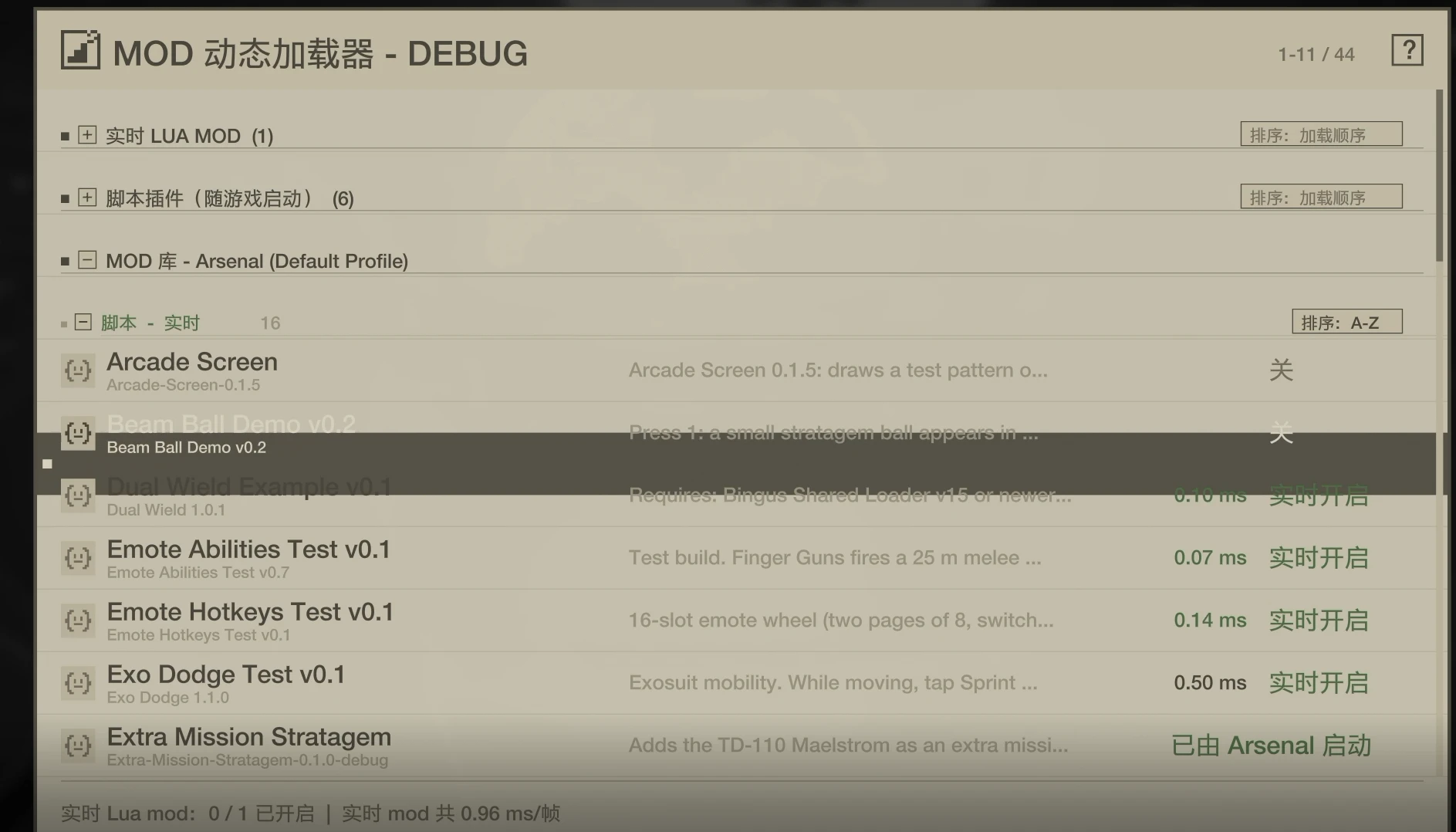
MDL is a mod loader for Helldivers 2 that lives in your ESC menu. It adds an MDL Settings tab next to GAME / SOCIAL / OPTIONS. From that tab you can start and stop Lua mods, run script addons straight from your HD2 Arsenal / HD2MM library, switch resource mods (models, textures) on and off without restarting, and see what every mod costs you per frame.Important: do not install MDL together with Bingus Shared Loader
MDL replaces Bingus Shared Loader (BSL). It contains its own startup loader, which finds and starts addons the same way BSL does and offers the same addon API (BSL API 1).- If BSL is installed, disable it in Arsenal / HD2MM, then Deploy MDL.
- Mods that say "Requires BSL" or "Requires BSL or MDL" work with MDL. This includes Mod Options Menu and Mod Bindings Menu.
- You need only one loader. MDL does everything BSL does, plus everything below.
Highlights
- Hot loading in game. Start, stop and reload Lua mods from the ESC menu without restarting and without Deploy.
- Your library, live. Script addons in your Arsenal / HD2MM library run with one click, read directly from the manager's files.
- Resource mods without restart. Switch models and textures on and off in game. They apply the next time the game loads those assets: the next mission, or back on the ship.
- Mixed mods too. A mod with both scripts and assets can go live: its script starts at once, its assets apply on the next load.
- See what each mod costs. Per-mod frame time, a Lua memory estimate, allocation rate, and optionally the engine objects and native memory each mod creates.
- Safe by design. Mods run in their own environment. A mod that keeps erroring is stopped. Memory patches are undone when a mod stops. An addon is never started twice.
- Native look. A real ESC menu tab. Two themes, English and Simplified Chinese built in, and every text translatable.
Features in detail
ESC menu tab
- Adds MDL Settings as a native tab in the in-game ESC menu.
- With Mod Options Menu installed, its MODS tab stays 4th and MDL Settings becomes the 5th. Both work.
- If the tab cannot be added (unknown game build, or
native_tab = false), the panel opens on the right side of the menu instead. - The ? button in the header opens a help page explaining every type, state and Arsenal's Deploy.
Live Lua mods (Mods folder)
- Put a mod in
%LOCALAPPDATA%\MDL\Helldivers2\Mods\<name>\mod.lua, with an optionalicon.png. - Click a mod's state to turn it on or off. Its page offers Reload from disk and the mod's own options (toggles, numbers, choices, actions).
- Auto reload (Settings): when you save a mod's Lua file, MDL reloads it. MDL uses Windows change notifications, so nothing is polled.
- Classic scripts that set
update = .../shutdown = ...also work. MDL captures those callbacks.
Mod library (HD2 Arsenal / HD2MM)
- Lists every mod in your current Arsenal profile, or in HD2MM, with icons. The file name is shown under each mod's name, so mods with the same name can be told apart.
- SCRIPT - LIVE: script addons (they carry an
-- HD2-Addon:line). Click OFF to run one now, straight from the library, with no Deploy. - RESOURCE - LIVE ON NEXT LOAD: models, textures and other assets you can switch without a restart.
- MIXED: scripts plus assets. They are live when possible; otherwise the page says why.
- LAUNCH ONLY: mods that can only start with the game. The ? next to the group explains why, and how to turn them on in Arsenal.
- SCRIPT - LIVE: script addons (they carry an
- Addons that Arsenal / HD2MM already loaded at launch show ON VIA Arsenal and are never started a second time.
- When you import a newer version of a running addon into Arsenal, MDL reloads it (with auto reload on) or marks it as outdated.
- Library pages show the type, the content, the last update time and the size of the mod's files.
Live resource mods
- Click OFF next to a resource mod. The first time, MDL spends a few seconds finding which game packages hold the assets the mod replaces, and remembers the result.
- MDL then places a copy of the mod next to those packages. The game picks it up the next time it loads them.
- LIVE ON is yellow while waiting for the next load and green once the mod is active. Click again to switch it off. Copies still in use are removed after the game unloads them.
- Mods that only change assets loaded once at startup show LAUNCH ONLY. Use Arsenal for those.
- Use each mod either live or through Arsenal, not both. When Arsenal deploys a mod, MDL removes its own copy of it.
Performance and diagnostics
- Frame cost of every running mod (average and peak), plus the total of all live mods.
- Update rate per mod, from every frame to every 8th frame, for mods that only poll. Skipped time is added to
dt. - MDL's own cost is shown at the bottom right of the main page, with a breakdown by part.
- Lua memory (estimate): what a running mod holds (tables, strings, functions). It is measured in slices of at most 1 ms per frame.
- Allocation rate (KB/s): how much garbage a mod's update creates.
- Engine objects and native memory (optional setting). This counts the units, GUIs and effects a mod creates, and the memory it takes through
ffi.C(VirtualAlloc / HeapAlloc / malloc). A stopped mod's page shows anything it left behind. - Background log writing: log files that addons rewrite often are written asynchronously, so the game thread is not blocked.
- The LuaJIT code cache is enlarged at startup, as BSL does, so many mods can be compiled at once.
Safety
- Each live mod gets its own environment. Its globals stay its own, while shared globals still work between mods.
- A mod whose callbacks fail 5 times is stopped automatically, with the reason on its page.
- Memory written through
ctx.writeis restored when the mod stops, but only if no one else has changed it since. - A mod that calls the game's update from inside its own update is caught. The extra call is ignored and the mod is flagged.
- After a game update, MDL looks up everything it needs again at start. Anything it cannot find switches itself off; MDL does not guess.
Interface
- Sorting per section: load order, A-Z, or newest update first.
- Folding per section. The launch addon section starts folded.
- Themes: Helldivers (yellow on dark) and Archive (paper and ink).
- Language: automatic by default. It follows the game's language, else Steam's, else Windows. Chinese shows Chinese; any other language MDL has no file for shows English.
- Translations: every text lives in
Languages\<code>.json. Edit any line, or copyen.jsonto add a language. - Optional animations, and optional keyboard control (
keyboard_in_menu).
Installation
- Close the game.
- If Bingus Shared Loader is installed: disable it in Arsenal / HD2MM.
- Import the MDL zip into HD2 Arsenal (or HD2MM), enable it and click Deploy.
- Start the game, press ESC and open the MDL Settings tab.
%LOCALAPPDATA%\MDL.Files
| Live Lua mods | %LOCALAPPDATA%\MDL\Helldivers2\Mods\ |
| Settings | %LOCALAPPDATA%\MDL\Helldivers2\MDL.cfg |
| Languages | %LOCALAPPDATA%\MDL\Helldivers2\Languages\ |
| Log (attach it to bug reports) | %LOCALAPPDATA%\MDL\Helldivers2\Logs\MDL.log |
[th]
What
[/th][th]
Where
[/th]
For modders
Script addons with an-- HD2-Addon: mods/<author>/<name> first line run live from the library with no changes. For mods made for MDL, mod.lua receives ctx and returns a table:
Code:
[COLOR=rgb(86, 156, 214)]local[/COLOR] ctx = ...[/COLOR]
[COLOR=rgb(187, 187, 187)][COLOR=rgb(86, 156, 214)]return[/COLOR] {
    name = [COLOR=rgb(214, 157, 133)]'My Mod'[/COLOR], version = [COLOR=rgb(214, 157, 133)]'1.0'[/COLOR], author = [COLOR=rgb(214, 157, 133)]'me'[/COLOR], icon = [COLOR=rgb(214, 157, 133)]'icon.png'[/COLOR],
    options = {
        {key = [COLOR=rgb(214, 157, 133)]'on'[/COLOR], label = [COLOR=rgb(214, 157, 133)]'Feature'[/COLOR], [COLOR=rgb(78, 201, 176)]type[/COLOR] = [COLOR=rgb(214, 157, 133)]'toggle'[/COLOR], default = [COLOR=rgb(86, 156, 214)]true[/COLOR]},
        {key = [COLOR=rgb(214, 157, 133)]'power'[/COLOR], label = [COLOR=rgb(214, 157, 133)]'Power'[/COLOR], [COLOR=rgb(78, 201, 176)]type[/COLOR] = [COLOR=rgb(214, 157, 133)]'number'[/COLOR], default = [COLOR=rgb(184, 215, 163)]1[/COLOR], [COLOR=rgb(78, 201, 176)]min[/COLOR] = [COLOR=rgb(184, 215, 163)]0[/COLOR], [COLOR=rgb(78, 201, 176)]max[/COLOR] = [COLOR=rgb(184, 215, 163)]5[/COLOR], step = [COLOR=rgb(184, 215, 163)]0.5[/COLOR]},
    },
    on_enable = [COLOR=rgb(220, 220, 220)][COLOR=rgb(86, 156, 214)]function[/COLOR](ctx)[/COLOR] [COLOR=rgb(86, 156, 214)]end[/COLOR],
    on_update = [COLOR=rgb(220, 220, 220)][COLOR=rgb(86, 156, 214)]function[/COLOR](ctx, dt)[/COLOR] [COLOR=rgb(86, 156, 214)]end[/COLOR],
    on_setting = [COLOR=rgb(220, 220, 220)][COLOR=rgb(86, 156, 214)]function[/COLOR](ctx, key, value)[/COLOR] [COLOR=rgb(86, 156, 214)]end[/COLOR],
    on_disable = [COLOR=rgb(220, 220, 220)][COLOR=rgb(86, 156, 214)]function[/COLOR](ctx)[/COLOR] [COLOR=rgb(86, 156, 214)]end[/COLOR],
}
ctx offers:settings/set: options saved for you.log.on_cleanup.cdef: safe to call again.module,read.write(address, bytes[, expected]): undone when the mod stops.restore.global: cleared when the mod stops.- Background tasks:
spawn,yield,sleep,wait_frames,checkpoint. scan: a pattern scan spread over several frames.
Notes and limits
- Lua mods run with the same access as the game. Only install mods you trust.
- Resource changes apply on the next load of those assets (next mission or back on the ship), not instantly.
- Some mods can only work from game start; MDL tells you which, and why.
- The memory figure is an estimate of Lua objects. Engine memory such as models or textures is not part of it.
- MDL does not detect conflicts between two different mods that change the same thing.
Credits
- Lua addon discovery and the startup registry are based on Bingus Shared Loader v18 by CowboyBingus. Thanks for the groundwork.
- LuaJIT (MIT licence).
中文
MDL 是什么?
MDL 是 Helldivers 2 的 mod 加载器,装好后会出现在 ESC 菜单里:在“游戏 / 社交 / 设置”旁边多出一个 MDL 设置 页签。在这里你可以:- 随时启动、停止 Lua mod;
- 直接运行 HD2 Arsenal / HD2MM 库里的脚本插件;
- 不重启就开关资源 mod(模型、贴图);
- 查看每个 mod 每帧的开销。
重要:不要与 Bingus Shared Loader 同时安装
MDL 取代 Bingus Shared Loader(BSL)。MDL 自带启动加载器,发现和启动插件的方式与 BSL 相同,并提供同样的插件接口(BSL API 1)。- 如果装了 BSL,请先在 Arsenal / HD2MM 中禁用它,再 Deploy MDL。
- 写着 “Requires BSL” 或 “Requires BSL or MDL” 的 mod 在 MDL 下照常工作,包括 Mod Options Menu 和 Mod Bindings Menu。
- 只需要一个加载器:BSL 能做的 MDL 都能做,另外还有下面这些功能。
亮点
- 游戏内热加载:在 ESC 菜单里启动、停止、重载 Lua mod,不用重启,也不用 Deploy。
- 库里的 mod 直接运行:Arsenal / HD2MM 库中的脚本插件点一下就能运行,直接读取管理器里的文件。
- 资源 mod 免重启:游戏中开关模型和贴图,游戏下次加载这些资源时生效(下一局任务或回到飞船)。
- 混合 mod 也行:同时带脚本和资源的 mod 可以实时开启,脚本立即运行,资源在下次加载时生效。
- 每个 mod 的开销一目了然:每帧耗时、Lua 内存估算、分配速度;还可以选择统计它创建的引擎对象和原生内存。
- 安全设计:每个 mod 在自己的环境里运行;反复出错的 mod 会被自动停止;停止时还原它改过的内存;同一个插件不会启动两次。
- 原生外观:真正的 ESC 菜单页签,两套主题,内置英文和简体中文,所有文字都可以翻译。
功能细则
ESC 菜单页签
- 在游戏内 ESC 菜单中加入原生页签 MDL 设置。
- 装有 Mod Options Menu 时,它的 MODS 页仍是第 4 页,MDL 设置是第 5 页,两者都能正常使用。
- 页签加不上时(未知的游戏版本,或设置了
native_tab = false),面板改为显示在菜单右侧。 - 标题栏的 ? 按钮打开帮助页,解释所有类型、状态和 Arsenal 的 Deploy。
实时 Lua mod(Mods 文件夹)
- 把 mod 放在
%LOCALAPPDATA%\MDL\Helldivers2\Mods\<名称>\mod.lua,可以附带icon.png。 - 点 mod 的状态即可开关。mod 详情页可以“从磁盘重新加载”,也可以调整 mod 自己的选项(开关、数值、选项、动作)。
- 自动重载(设置):保存 mod 的 Lua 文件后,MDL 会自动重载它。MDL 用的是 Windows 的目录变更通知,不需要轮询。
- 用
update = .../shutdown = ...写的传统脚本同样支持,MDL 会接管这些回调。
Mod 库(HD2 Arsenal / HD2MM)
- 列出 Arsenal 当前配置方案(或 HD2MM)中的全部 mod,带图标。名称下方显示文件名,同名 mod 也能分清。
- 脚本 - 实时:带
-- HD2-Addon:声明的脚本插件。点“关”就能立即从库里运行,不用 Deploy。 - 资源 - 下次加载时生效:模型、贴图等资源,不重启即可开关。
- 混合:脚本加资源。条件允许时可以实时开启,不能时页面会说明原因。
- 仅启动时:只能随游戏启动的 mod。分组旁的 ? 说明原因,以及如何在 Arsenal 中启用。
- 脚本 - 实时:带
- 已被 Arsenal / HD2MM 在启动时加载的插件显示“已由 Arsenal 启动”,不会再启动第二份。
- 把正在运行的插件的新版本拖进 Arsenal 后,MDL 会自动重载它(需开启自动重载),否则标记为“有新版本”。
- 库详情页显示类型、内容、最近更新时间和文件大小。
资源 mod 实时开关
- 在资源 mod 旁点“关”。第一次会花几秒查找它替换的资源在哪些游戏资源包里,结果会记住。
- 之后 MDL 把 mod 的副本放到这些资源包旁边,游戏下次加载它们时就会用上。
- 实时开启 为黄色时表示等待下次加载,变绿表示已生效。再点一次即可关闭,仍在使用中的副本会在游戏卸载这些资源后删除。
- 只修改游戏启动时一次性加载的资源的 mod 显示“仅启动时”,请用 Arsenal 启用。
- 同一个 mod 请只用一种方式:要么实时,要么 Arsenal。Arsenal 部署某个 mod 时,MDL 会删掉自己放的副本。
性能与诊断
- 每帧耗时:每个运行中的 mod 的平均值和峰值,以及所有实时 mod 的合计。
- 更新频率:可以按 mod 设置,从每帧到每 8 帧一次,适合只做轮询的 mod;跳过的时间会累加进
dt。 - MDL 自身耗时:主页右下角显示,点开可以看各部分。
- Lua 内存(估算):运行中的 mod 持有的表、字符串、函数等。测量分片进行,每帧最多 1 ms。
- 分配速度(KB/s):mod 的 update 每秒产生多少垃圾。
- 引擎对象和原生内存(可选设置):统计 mod 创建的单位、GUI、特效,以及它通过
ffi.C(VirtualAlloc / HeapAlloc / malloc)申请的内存。mod 停止后,详情页列出它的遗留。 - 日志后台写入:插件频繁重写的日志文件改为异步写入,不阻塞游戏线程。
- 启动时扩大 LuaJIT 代码缓存(与 BSL 相同),让大量 mod 都能被编译。
安全
- 每个实时 mod 有自己的环境:它的全局变量互不干扰,mod 之间共享的全局照常可用。
- 回调累计出错 5 次的 mod 会被自动停止,原因显示在它的页面上。
- 通过
ctx.write写入的内存,在 mod 停止时会还原;如果期间被别人改过,就不还原。 - mod 在自己的 update 里调用游戏 update 时会被拦下:多出来的那次调用被忽略,并给该 mod 标记警告。
- 游戏更新后,MDL 每次启动都会重新查找所需的一切。找不到的部分直接关闭,不会去猜。
界面
- 排序(每个分类单独设置):加载顺序、A-Z、最近更新。
- 折叠(每个分类单独设置):“脚本插件(随游戏启动)”默认折叠。
- 主题:地狱潜兵(深色底黄字)和档案(纸张与墨色)。
- 语言:默认自动,依次跟随游戏语言、Steam 语言、Windows 语言。中文显示中文,MDL 没有对应语言文件时显示英文。
- 翻译:所有文字都在
Languages\<代码>.json里,可以改任意一行,也可以复制en.json添加新语言。 - 可选动画;可选键盘操作(
keyboard_in_menu)。
安装
- 关闭游戏。
- 如果装了 Bingus Shared Loader,先在 Arsenal / HD2MM 中禁用它。
- 把 MDL 压缩包导入 HD2 Arsenal(或 HD2MM),启用,点 Deploy。
- 启动游戏,按 ESC,打开 MDL 设置 页签。
%LOCALAPPDATA%\MDL。文件位置
| 实时 Lua mod | %LOCALAPPDATA%\MDL\Helldivers2\Mods\ |
| 设置 | %LOCALAPPDATA%\MDL\Helldivers2\MDL.cfg |
| 语言文件 | %LOCALAPPDATA%\MDL\Helldivers2\Languages\ |
| 日志(反馈问题时请附上) | %LOCALAPPDATA%\MDL\Helldivers2\Logs\MDL.log |
[th]
内容
[/th][th]
位置
[/th]
给 mod 作者
第一行带-- HD2-Addon: mods/<作者>/<名称> 的脚本插件无需修改,就能从库里实时运行。专为 MDL 写的 mod,mod.lua 接收 ctx 并返回一个表(示例见上方英文部分)。ctx 提供:settings/set:自动保存的选项。log。on_cleanup。cdef:可以重复调用。module、read。write(地址, 字节[, 期望值]):mod 停止时自动还原。restore。global:mod 停止时清除。- 后台任务:
spawn、yield、sleep、wait_frames、checkpoint。 scan:分摊到多帧的特征码扫描。
注意与限制
- Lua mod 拥有和游戏相同的权限,请只安装你信任的 mod。
- 资源改动在游戏下次加载这些资源时才生效(下一局任务或回到飞船),不是立刻生效。
- 有些 mod 只能随游戏启动;MDL 会告诉你是哪些,以及原因。
- 内存数值是对 Lua 对象的估算,不包括模型、贴图等引擎内存。
- MDL 不检测两个不同 mod 修改同一处时的冲突。
致谢
- Lua插件发现和启动注册基于 CowboyBingus 的 Bingus Shared Loader v18,感谢他打下的基础。
- LuaJIT(MIT 许可)。