• Important Notice: Please review our guidelines regarding cheating, game balancing, and mods for Helldivers 2. Read the full notice here before downloading or uploading mods.

Drop in with 8 stratagems!!! 1.1.1

A Mod for Helldivers 2
  • Miker
Drop in with 8 stratagems!!! akl_mod_preview_image
  • 2026-10-09 20_30_48-HELLDIVERS™ 2.png
    2026-10-09 20_30_48-HELLDIVERS™ 2.png
    251.8 KB · Views: 239

Stratagem Extra Pairs v1.1.1 — Up to 8 Stratagems!​

By Miker and ChatGPT/Codex

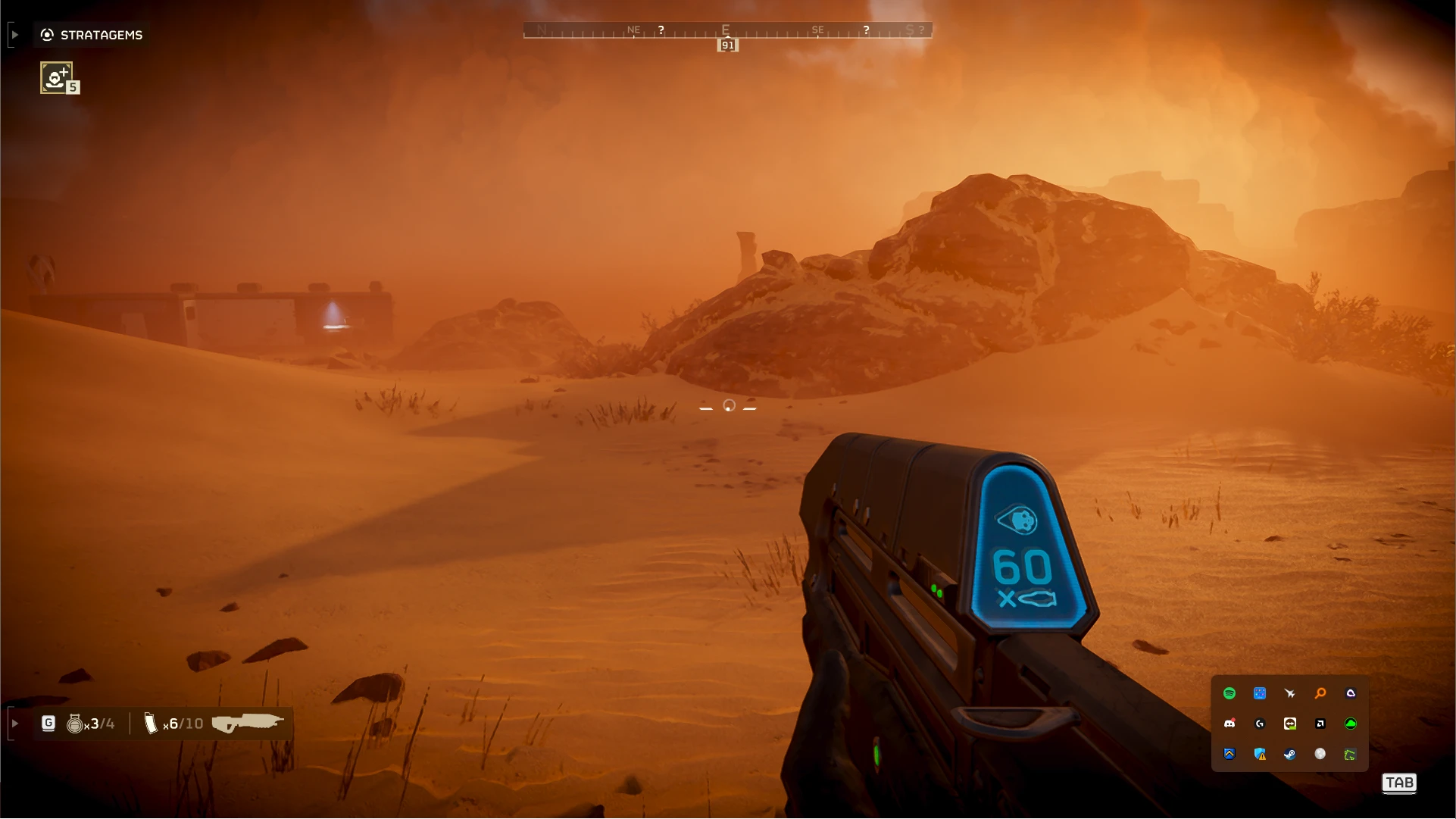
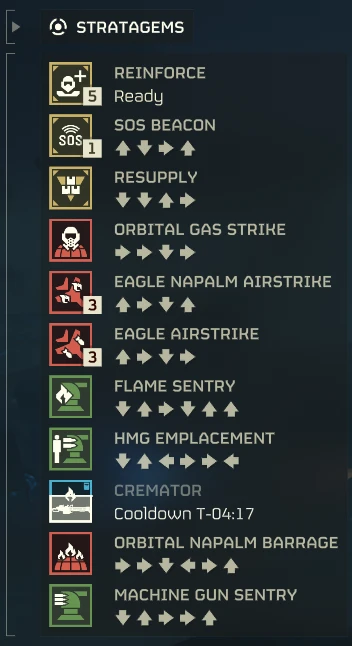
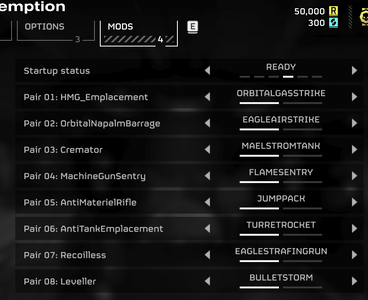
UPDATE 1.1.1 adds a status slider in the mod menu (Requires Bingus Vanilla Plus Megapack) and shows your stratagem pairs. See screenshot.


HOW DOES IT WORK?​

This mod lets you link an extra stratagem to each of your 4 equipped stratagems, giving you up to 8 usable stratagems instead of 4!

For example:

  • You equip Machine Gun Sentry.
  • You link Flame Sentry to it in the configuration file.
  • In-game, you can now call in BOTH sentries, even though you only equipped one!
You can customize all 4 pairs!

INSTALLATION​

  1. Close Helldivers 2.
  2. Import the ZIP into Arsenal or HD2 ModManager.
  3. Enable the mod using Bingus Shared Loader v15+ (API 1).
  4. Purge / Deploy your mods.
  5. Launch the game and WAIT 2 MINUTES ON YOUR SHIP, 3 MINUTES IF YOU HAVE LOTS OF MODS before selecting your stratagems.
That's it! The mod automatically activates with 4 preconfigured pairs. No hotkeys or additional menus required!

HOW TO CUSTOMIZE YOUR STRATAGEMS​

After launching the mod at least once:

  1. Close the game.
  2. Press Win + R and paste this path:

    %LOCALAPPDATA%\CowboyBingus\Helldivers2\StratagemExtraPairs
  3. Open settings.ini with Notepad.
  4. Find the [Links] section:
[Links]
Source1=OrbitalPrecisionStrike
Extra1=OrbitalGasStrike
Source2=OrbitalGatlingBarrage
Extra2=OrbitalEMSStrike
Source3=OrbitalAirburstStrike
Extra3=GatlingSentry
Source4=MachineGunSentry
Extra4=FlameSentry
  • Source = The stratagem you equip in your loadout.
  • Extra = The additional stratagem you receive automatically.
Change the names to whatever compatible stratagems you want! A list of 94 available configuration names is included in settings.ini, with descriptions to help you choose.

  1. Save the file and restart the game.
  2. WAIT 2 MINUTES ON YOUR SHIP, 3 MINUTES IF YOU HAVE LOTS OF MODS, then equip your 4 chosen Source stratagems.
IMPORTANT: You must restart the game after making changes. You cannot edit the configuration while playing.

IMPORTANT WARNINGS​

  • SOLO / PRIVATE TESTING ONLY! Do not use this in public lobbies. It's extremely visible and unbalanced.
  • DO NOT USE SEAF SQUAD STRATAGEMS. They may cause crashes.
  • Do not use the same stratagem more than once or link a stratagem that's already being used as a Source.
  • If you use an eagle or multiple, USE THEM AS EXTRAS, NOT SOURCES.
  • To disable a pair, set both its Source and Extra to None
  • I have tested multiple combinations of pairs with success.
  • If something doesn't work, check STATUS.txt and LOG.txt in the mod's configuration folder.

FOR OTHER MODDERS​

I discovered that the game's Additional_stratagem value, normally used for Eagle Rearm, can be linked to other stratagems!

This opens up some crazy possibilities: chained stratagems, custom selection menus, or potentially preparing every stratagem in a single mission! (It seems that the game does not like having more than 10 stratagems prepared and crashes, maybe you'll find a workaround)

I encourage other modders to experiment, improve this project, and build on it! Source code and tests are included.


❤️ Support my work

All my mods will always remain free! If you'd like to support my work, consider buying me a coffee:

https://ko-fi.com/mikerbiker
49.1 KB
Log in or sign up to download
Uploaded by
Miker
Downloads
720
Comments
34
Views
5,963
First release
Last update
Platform
PC 
Version
1.1.1
Total Size
49.1 KB
Rating
5.00 star(s) 3 ratings

Uploaded by

  • 720
  • 5,963

Ratings

5.00 star(s) 3 ratings

Tags

There are no tags available.

More mods from Miker

  • PC JUMP PACK HALF RECHARGE TIME

  • PC MA5C Halo rifle 60 round mags

  • PC Moor Mushroom Launch like old times

  • PC Warp Pack Cooling doubled

  • PC Orbital laser unlimited uses

Latest updates

  1. Big update, status in mod menu and see configured pairs. Also more choices.

    Expanded to 16 configurable Source → Extra pairs, so you can prepare different faction loadouts...
  2. Fixed a situation that would prevent the application of the mods even if the definitions were found.

    Basically, if there was any read error on the memory scan, the mod would fail even if it had...
  3. V1.0 ! Added the eagles in the ini files, only use them as EXTRAS, not SOURCES.

    Tested by myself. Eagle rearm appears after using an eagle. Less updates will come after that, I...

Miker

Members
Members
Sep 22, 2026
41
22
I got this to work one time. It would be nice if it could somehow tell me when it is ready to start. Also, 5 minutes seems a bit too long to have to wait in the ship after every game boot up.
I reduced it further. Wait about 60 seconds. I don't really have a way to tell you when the scan finished unless you look at the log yourself and adjust with your computer's speed. Give version 0.5.4 a try!
 

rowger

Members
Members
Sep 21, 2026
24
11
For me it takes 1 minute and 14 seconds. Look at the log file and adjust with your computer. 3 minutes is on the safe side.

View: https://imgur.com/QsfsZNt

yea my pc always takes at least 5 minutes minimum. prob due to loading like 50 different bingus-based mods at once, but even after the fps recovers it still takes *a while* for it to scan (on my pc its more like 9000mb it needs to scan, if i had only 3k like you it would indeed be quick)

after testing this latest update tho, its indeed very quick. its done in less than 3 minutes which is basically how long the other mods take to load too. thats a big improvement
 

Perronista

Members
Members
Sep 8, 2026
37
10
22:56:25 CONFIG PAIR: OrbitalNapalmBarrage -> OrbitalLaser
22:56:25 CONFIG PAIR: Orbital120mmHEBarrage -> EagleGasStrike
22:56:25 CONFIG PAIR: OrbitalGatlingBarrage -> EagleBomb
22:56:25 CONFIG PAIR: Railgun -> FRV_Supply
22:56:25 WAITING v1.0.0: automatic scan in 15 seconds; WAIT 2 MINUTES IN YOUR SHIP WHEN STARTING THE GAME. No hotkeys required.
22:56:40 SCANNING: remain aboard ship; automatic application follows successful validation
22:56:40 SCANNING: 0 MiB
22:56:45 SCANNING: 67 MiB
22:56:50 SCANNING: 131 MiB
22:56:55 SCANNING: 199 MiB
22:57:00 SCANNING: 262 MiB
22:57:05 SCANNING: 326 MiB
22:57:10 SCANNING: 383 MiB
22:57:15 SCANNING: 442 MiB
22:57:20 SCANNING: 499 MiB
22:57:25 SCANNING: 570 MiB
22:57:30 SCANNING: 643 MiB
22:57:35 SCANNING: 709 MiB
22:57:40 SCANNING: 772 MiB
22:57:45 SCANNING: 848 MiB
22:57:50 SCANNING: 929 MiB
22:57:55 SCANNING: 1050 MiB
22:58:00 SCANNING: 1193 MiB
22:58:05 SCANNING: 1328 MiB
22:58:10 SCANNING: 1524 MiB
22:58:15 SCANNING: 1729 MiB
22:58:20 SCANNING: 1947 MiB
22:58:25 SCANNING: 2164 MiB
22:58:30 SCANNING: 2369 MiB
22:58:35 SCANNING: 2555 MiB
22:58:40 SCANNING: 2756 MiB
22:58:45 SCANNING: 2975 MiB
22:58:50 SCANNING: 3218 MiB
22:58:55 SCANNING: 3467 MiB
22:59:00 SCANNING: 3719 MiB
22:59:05 SCANNING: 3975 MiB
22:59:10 SCANNING: 4224 MiB
22:59:15 SCANNING: 4474 MiB
22:59:20 SCANNING: 4718 MiB
22:59:25 SCANNING: 4955 MiB
22:59:30 SCANNING: 5173 MiB
22:59:35 SCANNING: 5363 MiB
22:59:40 SCANNING: 5590 MiB
22:59:45 SCANNING: 5833 MiB
22:59:47 DEFINITION: EagleStrafingRun at 1FF898C20F0, type=30, additional=49
22:59:47 DEFINITION: EagleAirstrike at 1FF898C25A0, type=18, additional=49
22:59:47 DEFINITION: EagleRearm at 1FF898C2D70, type=49, additional=0
22:59:47 DEFINITION: OrbitalNapalmBarrage at 1FF898C9EE0, type=106, additional=0
22:59:47 DEFINITION: OrbitalLaser at 1FF898CA840, type=107, additional=0
22:59:47 DEFINITION: Orbital120mmHEBarrage at 1FF898C9D50, type=136, additional=0
22:59:47 DEFINITION: EagleGasStrike at 1FF898C2BE0, type=126, additional=49
22:59:47 DEFINITION: OrbitalGatlingBarrage at 1FF898C9BC0, type=4, additional=0
22:59:47 DEFINITION: EagleBomb at 1FF898C2280, type=3, additional=49
22:59:47 DEFINITION: Railgun at 1FF898CC7C8, type=56, additional=0
22:59:47 DEFINITION: FRV_Supply at 1FF898D2224, type=26, additional=0
22:59:47 SCAN DONE (all required definitions found; early stop): 6202218832 bytes read; 524288 failed bytes; 186.8 seconds scanning; 201.8 seconds since addon load
22:59:47 REFUSED: scan incomplete; no automatic retry; send LOG.txt


I think I did something wrong but I don't know what
 

Miker

Members
Members
Sep 22, 2026
41
22
22:56:25 CONFIG PAIR: OrbitalNapalmBarrage -> OrbitalLaser
22:56:25 CONFIG PAIR: Orbital120mmHEBarrage -> EagleGasStrike
22:56:25 CONFIG PAIR: OrbitalGatlingBarrage -> EagleBomb
22:56:25 CONFIG PAIR: Railgun -> FRV_Supply
22:56:25 WAITING v1.0.0: automatic scan in 15 seconds; WAIT 2 MINUTES IN YOUR SHIP WHEN STARTING THE GAME. No hotkeys required.
22:56:40 SCANNING: remain aboard ship; automatic application follows successful validation
22:56:40 SCANNING: 0 MiB
22:56:45 SCANNING: 67 MiB
22:56:50 SCANNING: 131 MiB
22:56:55 SCANNING: 199 MiB
22:57:00 SCANNING: 262 MiB
22:57:05 SCANNING: 326 MiB
22:57:10 SCANNING: 383 MiB
22:57:15 SCANNING: 442 MiB
22:57:20 SCANNING: 499 MiB
22:57:25 SCANNING: 570 MiB
22:57:30 SCANNING: 643 MiB
22:57:35 SCANNING: 709 MiB
22:57:40 SCANNING: 772 MiB
22:57:45 SCANNING: 848 MiB
22:57:50 SCANNING: 929 MiB
22:57:55 SCANNING: 1050 MiB
22:58:00 SCANNING: 1193 MiB
22:58:05 SCANNING: 1328 MiB
22:58:10 SCANNING: 1524 MiB
22:58:15 SCANNING: 1729 MiB
22:58:20 SCANNING: 1947 MiB
22:58:25 SCANNING: 2164 MiB
22:58:30 SCANNING: 2369 MiB
22:58:35 SCANNING: 2555 MiB
22:58:40 SCANNING: 2756 MiB
22:58:45 SCANNING: 2975 MiB
22:58:50 SCANNING: 3218 MiB
22:58:55 SCANNING: 3467 MiB
22:59:00 SCANNING: 3719 MiB
22:59:05 SCANNING: 3975 MiB
22:59:10 SCANNING: 4224 MiB
22:59:15 SCANNING: 4474 MiB
22:59:20 SCANNING: 4718 MiB
22:59:25 SCANNING: 4955 MiB
22:59:30 SCANNING: 5173 MiB
22:59:35 SCANNING: 5363 MiB
22:59:40 SCANNING: 5590 MiB
22:59:45 SCANNING: 5833 MiB
22:59:47 DEFINITION: EagleStrafingRun at 1FF898C20F0, type=30, additional=49
22:59:47 DEFINITION: EagleAirstrike at 1FF898C25A0, type=18, additional=49
22:59:47 DEFINITION: EagleRearm at 1FF898C2D70, type=49, additional=0
22:59:47 DEFINITION: OrbitalNapalmBarrage at 1FF898C9EE0, type=106, additional=0
22:59:47 DEFINITION: OrbitalLaser at 1FF898CA840, type=107, additional=0
22:59:47 DEFINITION: Orbital120mmHEBarrage at 1FF898C9D50, type=136, additional=0
22:59:47 DEFINITION: EagleGasStrike at 1FF898C2BE0, type=126, additional=49
22:59:47 DEFINITION: OrbitalGatlingBarrage at 1FF898C9BC0, type=4, additional=0
22:59:47 DEFINITION: EagleBomb at 1FF898C2280, type=3, additional=49
22:59:47 DEFINITION: Railgun at 1FF898CC7C8, type=56, additional=0
22:59:47 DEFINITION: FRV_Supply at 1FF898D2224, type=26, additional=0
22:59:47 SCAN DONE (all required definitions found; early stop): 6202218832 bytes read; 524288 failed bytes; 186.8 seconds scanning; 201.8 seconds since addon load
22:59:47 REFUSED: scan incomplete; no automatic retry; send LOG.txt


I think I did something wrong but I don't know what
So the scan failed to read some of your memory (probably a mod) and then refused to apply the stratagem links even if the failed memory part was not necessary to the mod. I uploaded a fix in version 1.0.1 to apply the mod even if it fails to read all the memory as long as it can find all the required definitions.

Try it out!
 

MeMud

Members
Members
Sep 30, 2026
1
0
so this requires only bingus loader right, or is there another dependency, and how do you know when its done scanning, the first time i loaded in i didnt see a scanning text or a menu or anything
 

Miker

Members
Members
Sep 22, 2026
41
22
so this requires only bingus loader right, or is there another dependency, and how do you know when its done scanning, the first time i loaded in i didnt see a scanning text or a menu or anything
To know if it's finished scanning, you'd need to check the file status.txt here :
%LOCALAPPDATA%\CowboyBingus\Helldivers2\StratagemExtraPairs
paste that in a folder or your windows search bar and it will open the folders, open the current date folder and check the file. Or just wait a couple of minutes in your ship before dropping in.
No there's or text or sound notification in game. Bingus's API doesn't support that. I could potentially send a windows sound when the scan is finished but that might be confusing. I'll do some testing.