Important: This mod requires BSL v18 ,S.E.A.F Call-In Stratagem Replacer and MOD OPTIONS MENU to be installed first:
https://ayakamods.com/mods/s-e-a-f-call-in-stratagem-replacer.4374/?page=9
https://github.com/CowboyBingus/ModOptionsMenu/releases/tag/v1.2
Many thanks to IvoryApples and cowboybingus for the inspiration behind this mod.
SEAF Drop / S.E.A.F Call-In Stratagem Replacer:
Download
Mod Options Menu:
Download v1.2
Press Esc to cancel. Key combinations are not currently supported, and Q is reserved for marking targets.
Make sure your new bindings don't conflict with the game's controls or other mods.
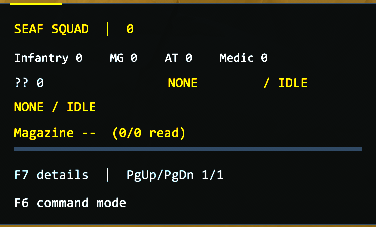
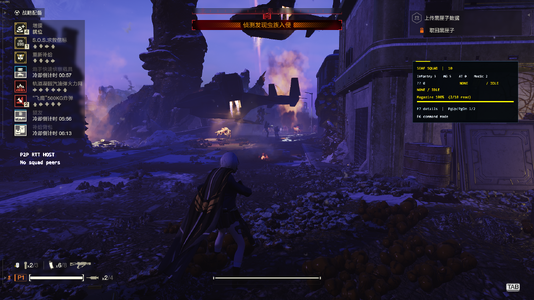
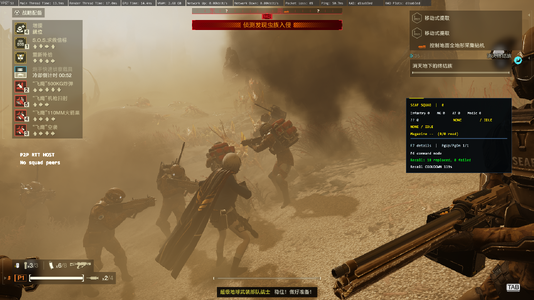
You can adjust the HUD scale, language, and visibility in the mod settings. Press F7 by default to toggle the detailed HUD view.
Marking a target increases its attack priority, but whether SEAF troops actually fire still depends on line of sight, weapon capabilities, and their current AI state.
v1.3.3 reduces false-positive line-of-fire obstruction checks and allows troops to resume firing after a single successful clear-line-of-fire check.
If you can consistently reproduce the issue, please report it along with your logs.
I recommend keeping the total number of living SEAF soldiers across the entire map at around 40. This includes troops summoned by other players.
60 is not an official, fixed, or guaranteed safe limit.
Entities that haven't been properly cleaned up, other installed mods, and the overall battlefield load can also contribute to lag or crashes.
Try to avoid repeatedly summoning large numbers of troops and leave some headroom for the game. Even staying around 40 soldiers cannot guarantee a crash-free experience.
Their current orders are carried over, but their weapons, health, and ammunition are regenerated. Their original unit types and injury states are not guaranteed to be preserved.
The default recall key is F5, with a 120-second cooldown. You can adjust the cooldown in the mod settings.
Then try recalling your troops or deploying new ones to compare the results.
If you're using the built-in stat adjustments, please disable the standalone SEAF Tweaks mod to avoid conflicting modifications.
The ammo percentage represents the average magazine fill percentage of soldiers whose ammo data has been successfully read.
If you see --, it means no valid data has been retrieved yet.
%LOCALAPPDATA%\CowboyBingus\Helldivers2\Logs
Please save the logs after exiting the game and before launching it again, so the relevant information isn't lost or overwritten.
e-mail: leo851369@gmail.com
When reporting an issue, please attach:
Detailed reports make it much easier for me to reproduce and fix issues. Thanks for helping improve SEAF Commander!
B站链接:https://www.bilibili.com/video/BV1n...ck&vd_source=e81260f6577a48916a0072cff0a65c02
欢迎前来支持
S.E.A.F Call-In Stratagem Replacer :
https://ayakamods.com/mods/s-e-a-f-call-in-stratagem-replacer.4374/?page=9
MOD OPTIONS MENU:
https://github.com/CowboyBingus/ModOptionsMenu/releases/tag/v1.2
通过游戏内轮盘和菜单指挥、召回并调整你的 SEAF 小队。
召回会重新生成士兵及其装备、生命和弹药。修改数值后,等待配置完成,再召回或部署新兵进行对比。标记目标是集火优先级,烟雾资源未就绪时会跳过烟雾,召回照常执行。
Q:怎么更改功能按键?
A:按 ESC → Mod Options Menu → SEAF Commander,打开对应改键项并点击“应用”。等弹窗出现,松开所有按键,再按新键即可。Esc 取消,暂不支持组合键,Q 保留用于标记。
Q:为什么改键后菜单还显示旧键?
A:以弹窗的“绑定成功”为准,重新打开 ESC 菜单后会刷新显示。注意避开游戏和其他 MOD 的按键。
Q:怎么拖动、缩放或隐藏 HUD?
A:按 ESC 后先松开鼠标,再按住面板拖动。缩放、语言、显示开关可在 MOD 菜单设置;默认 F7 切换明细。
Q:怎么让 SEAF 跟随或驻守?
A:使用游戏通讯轮盘中的“跟随我/坚守位置”。跟随队形在玩家周围约 20 米半径内选点;驻守以下令位置为中心,范围约 50 米半径。
Q:怎么使用标记集火?
A:默认按 F6 开启命令模式,再用 Q 标记敌人。标记提高攻击优先级,实际开火仍受视线、武器和 AI 状态影响。
Q:为什么敌人很近,SEAF 还是不开火?
A:可能存在友军挡线、换弹、视线遮挡或 AI 状态限制。V1.3.3 已减少挡线误判,并改为一次有效无遮挡确认后恢复开火;仍能稳定复现的话,请附日志反馈。
Q:地图里最多能放多少名 SEAF?
A:根据目前游玩反馈,接近 60 名时容易出现稳定性问题,建议将全地图存活 SEAF 总数控制在 40 名左右。这包括其他玩家召唤的士兵;60 名不是固定、安全的官方上限。
Q:明明不到 60 名,为什么还可能卡顿或闪退?
A:存活人数不是唯一因素,尚未清理的实体、其他 MOD 和当前战场负载也可能影响稳定性。减少连续召唤,为地图留出余量;40 名左右也不能保证绝不闪退。
Q:召回会保留原来的装备、生命和弹药吗?
A:召回会重新生成士兵,沿用当前指令,但装备、生命和弹药会重新构建,不保证保留原兵种或受伤状态。
Q:按召回键没有反应怎么办?
A:先检查当前绑定、技能冷却及是否仍在 ESC 菜单中。默认召回为 F5,冷却 120 秒,可在 MOD 菜单调整。
Q:改了伤害、射速或穿甲,为什么感觉没变化?
A:点击“应用”,等待配置加载完成,再召回或部署新兵对比。使用内置调整时,请停用独立 Seaf Tweaks,避免重复修改。
Q:HUD 人数和弹药为什么不是立即更新?
A:数据分批采样,大队伍更新需要时间。弹药百分比是已读取成员的平均弹匣比例,-- 表示暂未读到有效数据。
Q:需要安装哪些前置?
A:Bingus Shared Loader、SEAF Drop,以及用于游戏内设置的 Mod Options Menu
Q:出现问题后,日志在哪里找?
A:按 Win+R,输入:
%LOCALAPPDATA%\CowboyBingus\Helldivers2\Logs
退出游戏后、下次启动前保存日志。反馈时附上 SeafCommanderRuntime.log、SeafCommanderStartup.log,并说明问题时间、人数、房主/客机及使用的其他 MOD。
反馈可以发送至我的邮箱:1450948961@qq.com
https://ayakamods.com/mods/s-e-a-f-call-in-stratagem-replacer.4374/?page=9
https://github.com/CowboyBingus/ModOptionsMenu/releases/tag/v1.2
Many thanks to IvoryApples and cowboybingus for the inspiration behind this mod.
SEAF Commander v1.3.0
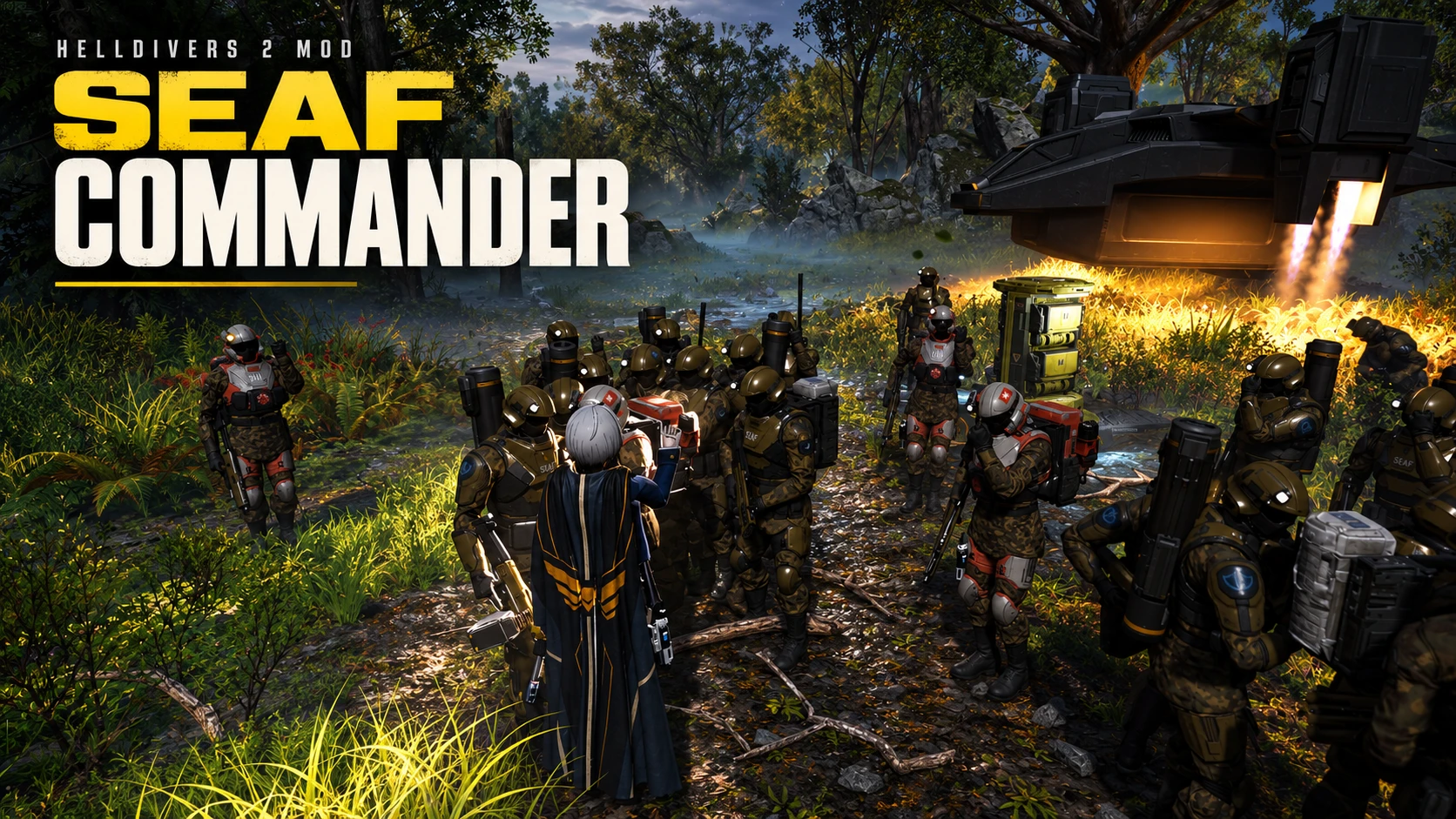
Give your SEAF squad Follow and Hold Position orders through the in-game communication wheel. Monitor your squad with the HUD, and access additional features such as first aid, fast recall and marked-target priority.Requirements
Install compatible versions of these mods separately:- Bingus Shared Loader
- SEAF Drop
- Mod Options Menu
SEAF Drop / S.E.A.F Call-In Stratagem Replacer:
Download
Mod Options Menu:
Download v1.2
Main Features
- Global commands: Follow your Helldiver or guard a fixed position, with marked-target priority.
- Fast F5 recall: Refresh SEAF near you, inherit the current command and optionally deploy smoke.
- Customizable HUD: Drag, resize or hide the panel. View troop counts, roles and magazine ammo percentages, with English and Chinese support.
- Medical support: Manual or automatic first aid, Guard-mode medic healing and medical sidearm ammo maintenance.
- Troop enhancements: Improved health and catch-up movement.
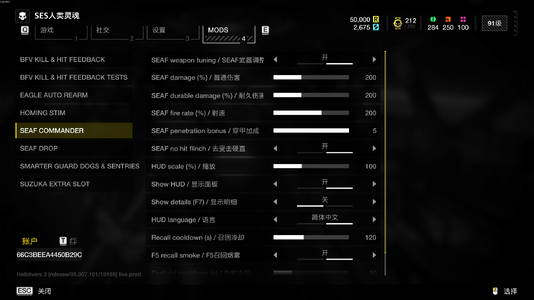
- In-game settings: Adjust damage, durable damage, fire rate, penetration bonus and hit flinch, alongside HUD options and ability cooldowns.
Controls
- Communication wheel: Follow Me / Hold Position.
- F5: Recall SEAF.
- F6: Toggle command mode; use Q to mark enemies.
- F7: Expand or collapse HUD details.
- PgUp / PgDn: Switch detail pages.
- F9: First aid.
- ESC: Open the menu, release the left mouse button, then click and hold the HUD to drag it.
SEAF Commander – Frequently Asked Questions (FAQ)
Q: How do I change the keybindings?
A: Press ESC → Mod Options Menu → SEAF Commander, select the keybinding you want to change, and click Apply. When the prompt appears, release all keys, then press the new key you want to assign.Press Esc to cancel. Key combinations are not currently supported, and Q is reserved for marking targets.
Q: Why does the menu still show the old key after rebinding?
A: If the popup says the key was successfully bound, the change has been saved. The displayed key will update the next time you open the ESC menu.Make sure your new bindings don't conflict with the game's controls or other mods.
Q: How do I move, resize, or hide the HUD?
A: Press ESC, release the mouse button, then click and drag the HUD panel to reposition it.You can adjust the HUD scale, language, and visibility in the mod settings. Press F7 by default to toggle the detailed HUD view.
Q: How do I order SEAF troops to follow me or hold position?
A: Use the game's communication wheel and select "Follow Me" or "Hold Position."- Follow: Soldiers spread out within approximately a 20-meter radius around the player.
- Hold Position: Soldiers take positions within approximately a 50-meter radius of the location where the order was issued.
Q: How do I use the target marking and focus fire feature?
A: Press F6 by default to enable Command Mode, then press Q to mark an enemy.Marking a target increases its attack priority, but whether SEAF troops actually fire still depends on line of sight, weapon capabilities, and their current AI state.
Q: Why won't my SEAF troops shoot even when enemies are nearby?
A: Several factors can prevent soldiers from firing, including friendly units blocking their line of fire, reloading, obstructed visibility, or AI behavior restrictions.v1.3.3 reduces false-positive line-of-fire obstruction checks and allows troops to resume firing after a single successful clear-line-of-fire check.
If you can consistently reproduce the issue, please report it along with your logs.
Q: How many SEAF soldiers can I have on the map?
A: Based on player feedback so far, stability issues become more common when the number of active SEAF soldiers approaches 60.I recommend keeping the total number of living SEAF soldiers across the entire map at around 40. This includes troops summoned by other players.
60 is not an official, fixed, or guaranteed safe limit.
Q: Why am I still experiencing lag or crashes with fewer than 60 SEAF soldiers?
A: The number of living soldiers isn't the only factor affecting performance and stability.Entities that haven't been properly cleaned up, other installed mods, and the overall battlefield load can also contribute to lag or crashes.
Try to avoid repeatedly summoning large numbers of troops and leave some headroom for the game. Even staying around 40 soldiers cannot guarantee a crash-free experience.
Q: Does recalling SEAF troops preserve their original weapons, health, and ammo?
A: No. The recall feature despawns the original soldiers and spawns new ones near you.Their current orders are carried over, but their weapons, health, and ammunition are regenerated. Their original unit types and injury states are not guaranteed to be preserved.
Q: What should I do if the recall key doesn't work?
A: Check your current keybinding, the recall cooldown, and whether you're still inside the ESC menu.The default recall key is F5, with a 120-second cooldown. You can adjust the cooldown in the mod settings.
Q: Why don't my damage, fire rate, or armor penetration changes seem to work?
A: Make sure you click Apply and wait for the configuration to finish loading.Then try recalling your troops or deploying new ones to compare the results.
If you're using the built-in stat adjustments, please disable the standalone SEAF Tweaks mod to avoid conflicting modifications.
Q: Why don't the HUD soldier count and ammo values update instantly?
A: HUD data is sampled in batches, so larger squads may take longer to update.The ammo percentage represents the average magazine fill percentage of soldiers whose ammo data has been successfully read.
If you see --, it means no valid data has been retrieved yet.
Q: Where can I find the logs if something goes wrong?
A: Press Win + R and enter:%LOCALAPPDATA%\CowboyBingus\Helldivers2\Logs
Please save the logs after exiting the game and before launching it again, so the relevant information isn't lost or overwritten.
e-mail: leo851369@gmail.com
When reporting an issue, please attach:
- SeafCommanderRuntime.log
- SeafCommanderStartup.log
Detailed reports make it much easier for me to reproduce and fix issues. Thanks for helping improve SEAF Commander!
SEAF Commander v1.3.0
通过游戏内通讯轮盘,向 SEAF 小队下达跟随和驻守指令。借助hud实时观察小队状态,以及进行急救,传送还有标记集火等更多功能
注意:游戏有两个前置mod,分别是mod options menu和S.E.A.F Call-In Stratagem Replacer,详情见安装方法B站链接:https://www.bilibili.com/video/BV1n...ck&vd_source=e81260f6577a48916a0072cff0a65c02
欢迎前来支持
前置要求
请单独安装与游戏版本兼容的以下模组:- Bingus Shared Loader
- SEAF Drop
- mod options menu
S.E.A.F Call-In Stratagem Replacer :
https://ayakamods.com/mods/s-e-a-f-call-in-stratagem-replacer.4374/?page=9
MOD OPTIONS MENU:
https://github.com/CowboyBingus/ModOptionsMenu/releases/tag/v1.2
通过游戏内轮盘和菜单指挥、召回并调整你的 SEAF 小队。
主要功能
- 全局跟随和固定位置驻守,支持标记敌人的目标优先级。
- F5 快速召回,接续当前指令,可选烟雾集结。
- 可拖动、缩放、隐藏的中英文 HUD,显示人数、兵种和弹匣百分比。
- 手动或自动急救、驻守医疗兵治疗和治疗副武器弹药维护。
- 提升士兵生命与追赶能力。
- 菜单可调整普通伤害、耐久伤害、射速、穿甲加成、去受击硬直,以及 HUD 和技能冷却。
操作
轮盘下达跟随/驻守;F5 召回;F6 开关命令模式,配合 Q 标记敌人;F7 切换明细;PgUp/PgDn 翻页;F9 急救。按 ESC 后先松开鼠标,再拖动 HUD。安装与注意事项
需要 Bingus Shared Loader,游戏内设置需要 Mod Options Menu;使用 SEAF Drop 部署士兵。停用旧版 Commander,使用内置数值调整时停用独立 Seaf Tweaks,替换后完整重启游戏。召回会重新生成士兵及其装备、生命和弹药。修改数值后,等待配置完成,再召回或部署新兵进行对比。标记目标是集火优先级,烟雾资源未就绪时会跳过烟雾,召回照常执行。
Q:怎么更改功能按键?
A:按 ESC → Mod Options Menu → SEAF Commander,打开对应改键项并点击“应用”。等弹窗出现,松开所有按键,再按新键即可。Esc 取消,暂不支持组合键,Q 保留用于标记。
Q:为什么改键后菜单还显示旧键?
A:以弹窗的“绑定成功”为准,重新打开 ESC 菜单后会刷新显示。注意避开游戏和其他 MOD 的按键。
Q:怎么拖动、缩放或隐藏 HUD?
A:按 ESC 后先松开鼠标,再按住面板拖动。缩放、语言、显示开关可在 MOD 菜单设置;默认 F7 切换明细。
Q:怎么让 SEAF 跟随或驻守?
A:使用游戏通讯轮盘中的“跟随我/坚守位置”。跟随队形在玩家周围约 20 米半径内选点;驻守以下令位置为中心,范围约 50 米半径。
Q:怎么使用标记集火?
A:默认按 F6 开启命令模式,再用 Q 标记敌人。标记提高攻击优先级,实际开火仍受视线、武器和 AI 状态影响。
Q:为什么敌人很近,SEAF 还是不开火?
A:可能存在友军挡线、换弹、视线遮挡或 AI 状态限制。V1.3.3 已减少挡线误判,并改为一次有效无遮挡确认后恢复开火;仍能稳定复现的话,请附日志反馈。
Q:地图里最多能放多少名 SEAF?
A:根据目前游玩反馈,接近 60 名时容易出现稳定性问题,建议将全地图存活 SEAF 总数控制在 40 名左右。这包括其他玩家召唤的士兵;60 名不是固定、安全的官方上限。
Q:明明不到 60 名,为什么还可能卡顿或闪退?
A:存活人数不是唯一因素,尚未清理的实体、其他 MOD 和当前战场负载也可能影响稳定性。减少连续召唤,为地图留出余量;40 名左右也不能保证绝不闪退。
Q:召回会保留原来的装备、生命和弹药吗?
A:召回会重新生成士兵,沿用当前指令,但装备、生命和弹药会重新构建,不保证保留原兵种或受伤状态。
Q:按召回键没有反应怎么办?
A:先检查当前绑定、技能冷却及是否仍在 ESC 菜单中。默认召回为 F5,冷却 120 秒,可在 MOD 菜单调整。
Q:改了伤害、射速或穿甲,为什么感觉没变化?
A:点击“应用”,等待配置加载完成,再召回或部署新兵对比。使用内置调整时,请停用独立 Seaf Tweaks,避免重复修改。
Q:HUD 人数和弹药为什么不是立即更新?
A:数据分批采样,大队伍更新需要时间。弹药百分比是已读取成员的平均弹匣比例,-- 表示暂未读到有效数据。
Q:需要安装哪些前置?
A:Bingus Shared Loader、SEAF Drop,以及用于游戏内设置的 Mod Options Menu
Q:出现问题后,日志在哪里找?
A:按 Win+R,输入:
%LOCALAPPDATA%\CowboyBingus\Helldivers2\Logs
退出游戏后、下次启动前保存日志。反馈时附上 SeafCommanderRuntime.log、SeafCommanderStartup.log,并说明问题时间、人数、房主/客机及使用的其他 MOD。
反馈可以发送至我的邮箱:1450948961@qq.com