
HD2 Clear Sight
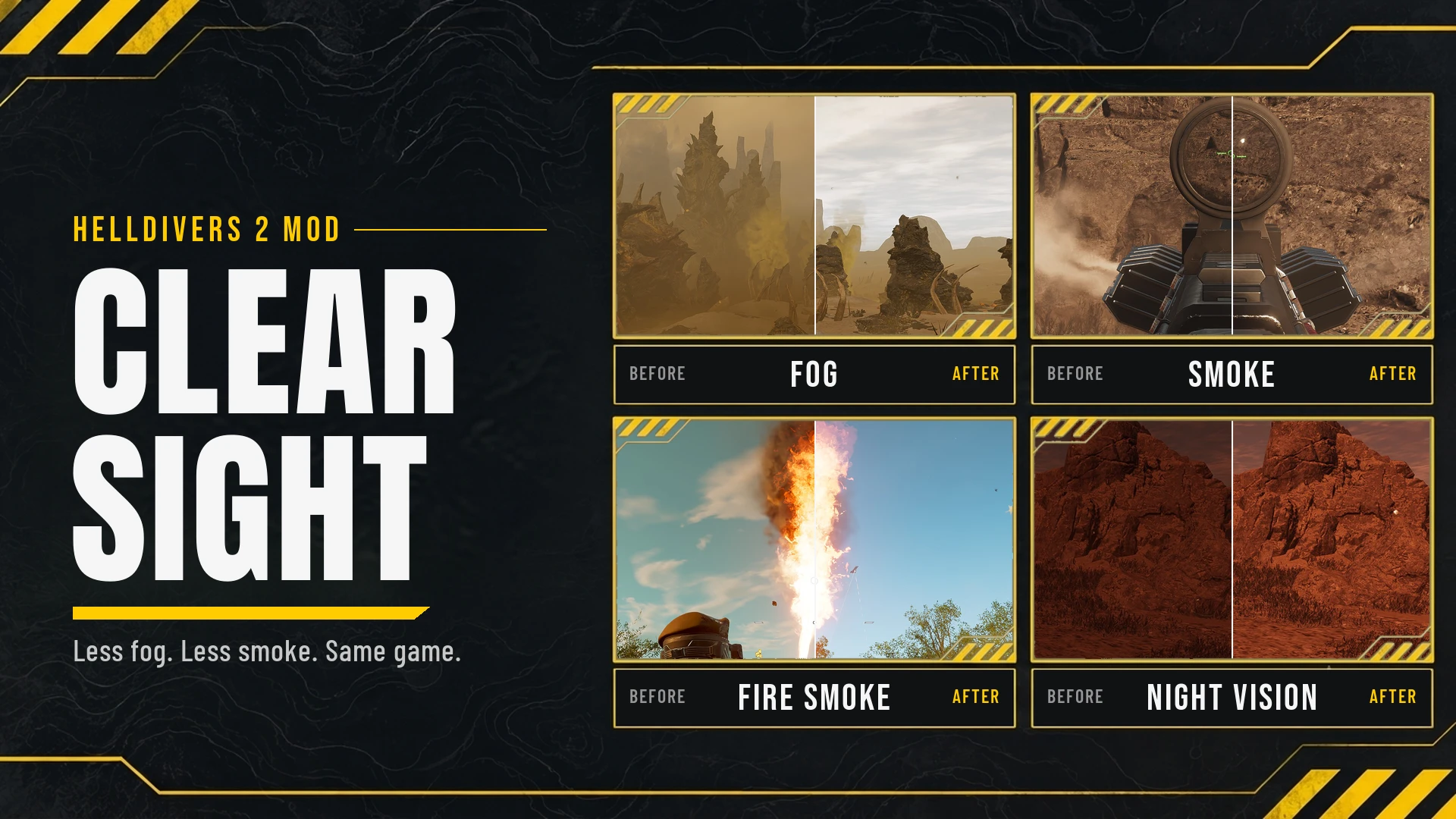
Reduces visual distractions such as excessive fog, smoke, explosions, flashes and screen effects while keeping the game immersive.
Reduces visual distractions such as excessive fog, smoke, explosions, flashes and screen effects while keeping the game immersive.
Every effect is a separate Arsenal option with its own strength level. Gas used by players stays vanilla.
- Version 0.1.1, game build 26568081
- Requires the Arsenal mod manager
- Resource patch only: no Lua, no loader, no DLL, no data (dl_bin) changes
- Fewer particles can reduce GPU bottlenecks and improve 1% low frame rates
Clear Sight does not draw anything new on screen. It only lowers values the game already has: particle opacity and lifetime, fog density, bloom, lens flare, screen overlays, vignettes and night color grading. The aim is that you stop noticing the haze, not that you notice the mod.
Game modding tutorials
Game modding tutorials
Kept vanilla on purpose
- Gas used by players (G-4 Gas grenade, gas mines, Gas Mortar Sentry, Eagle Gas Airstrike, Orbital Gas Strike, S-11 Speargun gas, TX-41 Sterilizer, AX/TX-13 Dog Breath) and the effect on targets affected by gas
Numbers are how much of the vanilla effect remains (25% = keep 25%, 0% = remove all). The first sub-option is the default. Option labels in Arsenal are in English in the main zip (HD2 Clear Sight 0.1.1.zip) and in Korean in the KR zip.
Material - Must be enabled when using Fog, Equipment Smoke, Ambient Smoke, Gimmick Smoke, Explosion Dust, Explosion Cloud or Flame Soot. On its own the screen looks vanilla. Smoke Lifetime, Flame Flash, Flash and Light Shafts carry the base materials they need and work without it.
Smoke Lifetime (50% / 75% / 25% / 10%)
Shortens how long smoke columns, explosion dust, landing dust, fire smoke and the like last. Smoke density is kept. Smoke in effects handled by other options, such as Eagle and Orbital strikes, is shortened to match that option's level when that option is on.
Flame Flash (100% / 0% / 5% / 10% / 25% / 50%)
Lowers the opacity of flamethrower-type flame effects (FLAM-40 Flamethrower, FLAM-66 Torcher, SMG/FLAM-34 Stoker, P-72 Crisper, SG-451 Cookout, B/FLAM-80 Cremator, A/FLAM-40 Flame Sentry, AX/FLAM-75 Hot Dog, EXO-51 Lumberer Exosuit, M-104 Incinerator Fast Recon Vehicle). Black smoke is adjusted in Flame Soot. The default is 100% (vanilla).
Flash (10% / 25% / 0% / 5% / 50%)
Lowers the opacity of muzzle flashes and explosion flashes, including the Meltagun, and turns off the light the flashes cast on their surroundings and their volumetric light shafts. Laser weapon sparks (LAS-17 Double-Edge Sickle heat stages, LAS-7 Dagger, LAS-58 Talon, LAS-99 Quasar Cannon) and the shimmering glow around the LAS-98 Laser Cannon beam follow the same level. Glowing effects that opacity alone cannot dim also have their brightness lowered by the same level. Shape, size and duration stay the same. Turn the option off for 100%.
Light Shafts (on / off)
Disables the volumetric light shafts (beams of light) around fires, explosions and lights. Volumetric light shafts of flashes are handled by Flash.
Fog (25% / 0% / 50%)
Reduces volumetric fog and clouds, ground fog, height fog that builds up with distance and altitude, and the atmospheric haze in the distance toward the sun. Fog also diffuses light, so choosing 0% can make nights and cave interiors very dark (other fog removal mods behave the same way). If places like bug nests with a covered top get too dark, pick Fog 50%. Gas clouds stay vanilla.
Equipment Smoke (25% / 0% / 50%)
Reduces smoke created by equipment use: firing and casing ejection smoke, laser weapon overheat smoke and heat sink vapor, laser sentry overheat vapor, and thrust smoke from jump packs, hover packs, guard dogs and missiles. Some explosion smoke that uses the same texture as muzzle smoke (e.g. the high explosive grenade) is reduced too.
Ambient Smoke (25% / 0% / 50%)
Reduces smoke coming from objects: spore smoke from Spore Spewers, smoke columns from burning wrecks, enemy facility chimneys, Cyborg smoke grenades, lava pits, volcanic plants and magma vents, the volcanic activity operation modifier, ship steam, warp pack cooling vapor and ship floor smoke.
Gimmick Smoke (25% / 0% / 50%)
Reduces the Eagle Smoke Strike, Orbital Smoke Strike, smoke grenades (G-3 Smoke, G-89 Smokescreen) and the smoke from the Orbital Walking Barrage, spore bursts from highland mushrooms, and the dense spore clouds of Spore Spewers, Nursing Spewers and Caustic Chargers. The lingering gray smoke screen cloud is reduced too. Only clouds put out by enemies are picked out; the planet's base ground fog follows Fog. Gas always stays vanilla.
Explosion Dust (50% / 25% / 0%)
Reduces explosion smoke and dirt, Hellpod, supply and dropship landing dust, impact dust, and dust from destroyed enemies, enemy facilities and objectives.
Explosion Cloud (50% / 25% / 0%)
Reduces the black clouds around explosion fire from Eagle and Orbital strikes, Hellbombs, rockets, grenades, napalm and incendiaries, and the black soot left as fire cools.
Flame Soot (0% / 25% / 50%)
Reduces the black smoke around the flames of flamethrower-type weapons. The flames themselves are handled by Flame Flash.
Heat Haze (0% / 25% / 50%)
Reduces heat haze (shimmering air) from laser and plasma weapons, explosions, engines and the Melta mine.
Shield (10% / 25% / 50%)
Lowers the opacity of the shields of shield generator packs and shield generator relays to keep your view clear from inside them.
Weather (100% / 0% / 25% / 50%)
Reduces rain streaks and raindrops on rainy planets, and other particle effects that come with planet weather. The default is 100% (vanilla).
Bloom (40% / 50% / 30% / 20% / 10%)
Lowers the strength of bloom (light bleed around bright light sources) and disables anamorphic bloom (horizontal light bleed) at every level. Night bloom is set to half of the day value, so nothing gets brighter than vanilla. Requires the in-game Bloom graphics setting to be on.
Lens Flare (25% / 50% / 0%)
Reduces the sun flare and lens ghosts (rows of light artifacts across the screen) that appear when you look toward the sun.
Stims (25% / 50% / 0%)
Lowers the strength of the screen effects of stims and the Experimental Infusion booster. The yellow color overlay of Experimental Infusion is shown in the same teal as a stim, and the saturation boost and screen distortion are reduced by the same ratio. 0% hides the color overlay and screen distortion.
Hit Vignette (50% / 25% / 0%)
Lowers the strength of the vignette shown at the screen edges when you are hit, at low health, on death and when burning, the red flash at the moment of a hit, and the damage overlay on the left and right of the screen. A vignette does not cover your central view, but frequent flashes or long exposure can add to eye strain.
Aim Vignette (25% / 50% / 0%)
Lowers the strength of the vignette that darkens the screen edges when aiming in first person.
Atmospheric Spores (Spores Only / Gloom Veil)
Removes the bug spores that obscure the mission map, briefing map, minimap and drop point selection hologram under the "Atmospheric Spores" operation modifier. Gloom Veil also removes the yellow spore clouds (Gloom area marking) on the galaxy map.
Night Visibility (Medium / Weak / Strong)
Corrects the brightness of dark areas to make enemies and terrain features more visible at night (shade, foliage, craters). Midtones and dark skies can brighten as well, while the brightest areas change comparatively little. Night color grading applies to 221 of 281 planets; Gloom planets stay vanilla.
A few effect files hold effects from several options; those follow the option that owns the file (e.g. a little smoke inside flash particles is removed whenever Flash is on). Some flash particles are shared by other weapons, so the same flash changes there too. Exact counts are in README_EN.txt (README_KO.txt in the KR zip).
Installation
- Close the game.
- In Arsenal, turn off other smoke, fog, muzzle flash and particle removal mods.
- Remove any older version of HD2 Clear Sight, then add this zip.
- Turn on Material, then the options you want, and pick one sub-option for each.
- Deploy.
Compatibility
If two mods change the same game file, only one applies, depending on deploy order. Do not use Clear Sight together with other smoke, fog, muzzle flash or particle removal mods.
Game updates - important
Every option contains full copies of the game files it changes. Fog in particular contains the renderer settings and 50 fog and atmosphere shader libraries, Gimmick Smoke contains a fog volume shader library, and Lens Flare contains 4 lens flare shader libraries.
- When an update is announced, turn the mod off (at least Fog, Gimmick Smoke, Bloom and Lens Flare) and Deploy before launching the game.
- Otherwise the game may fail to start or look wrong, and updated effects may be overwritten with old versions.
- Keep it off until a new version is released.
No real-time option switching, automatic graphics tuning or real-time exposure control. These would need Lua or data changes, which this mod does not use.
Credits
Based on HD2 Smoke Control by etxp (MIT). Clear Sight is not an official version of Smoke Control; do not enable the two together.
Thanks to the authors of Clear View, Hydrogen, Yet Another Eye-Straining Muzzle Flash and Explosion Particle Remover, WARDUST and Dynamic Shadows, and Bubble Shields for their permission, and to everyone listed in the Permissions and credits section and in CREDITS.txt.
License
Code and documentation: MIT (see LICENSE.txt). Game assets are not covered and remain the property of their owners.
HELLDIVERS 2 is developed by Arrowhead Game Studios and published by Sony Interactive Entertainment.

