Description
Hellforge Unlocker is a tool that adds all missing Warbonds, Superstore Items and previous Campaign Rewards and preorder Items to a synced Hellforge Profile. You have the option to keep progression and play for medals to unlock individual items or aquire everything automatically.
This program doesn't touch any Helldivers 2 code, doesn't circumvent any DRM or other Protection - it only ever interacts with Hellforge (not the game it copied, just Hellforge) and nothing else.
In its essence it only edits some files that don't belong to anyone but yourself on your own machine. Nobody can claim ownership over those - Hellforge Unlocker itself isn't a crack, hack or provides access to any content by itself. It's by all means just a better text editor.
Important Information
Please keep in mind that executing untrusted programs like mine is generally a very risky thing to do. It could potentially include malware or do other things that you don't want - there's no way to be 100% protected against such attacks. Virus-Scans aren't realiable protection - by using this mod you are providing me an ureasonable amount of trust.
There's unfortunately nothing I can do to prove I'm a trustworthy actor. You should run untrusted Software in a sandboxed environment!
How to Use
1. Download and extract the Hellforge Unlocker.exe file from the zip into your Hellforge Folder
2. Prepare your profile by syncing it once using the Hellforge sync. If you previously synced your profile you're good.
3. Start the game once on the profile you want to update
4. Exit Hellforge completely
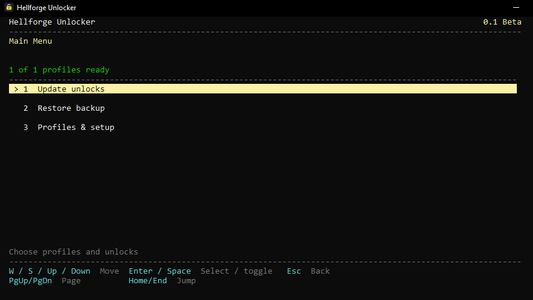
5. Run the Hellforge Unlocker.exe and follow its instruction. Use W/S to move up and down and confirm with space. ESC brings you back to the previous menu.
6. If there's anything missing or if the application is still running, the program will tell you precisely what to do.
7. Chose "Update unlocks" to begin the process and select a profile or all profiles you want to unlock
8. Select all content you want to add
9. Chose whether you want to keep progression or complete all warbonds.
10. Preview the changes or click "Create backup and unlock" to proceed
11. You have the option to view backups, logs and changes or close the software at this point.
Uninstall
Hellforge Unlocker will keep a profile backup for you but you can also always delete your profile and resync to restore it to your vanilla state.
Hellforge Unlocker is a tool that adds all missing Warbonds, Superstore Items and previous Campaign Rewards and preorder Items to a synced Hellforge Profile. You have the option to keep progression and play for medals to unlock individual items or aquire everything automatically.
This program doesn't touch any Helldivers 2 code, doesn't circumvent any DRM or other Protection - it only ever interacts with Hellforge (not the game it copied, just Hellforge) and nothing else.
In its essence it only edits some files that don't belong to anyone but yourself on your own machine. Nobody can claim ownership over those - Hellforge Unlocker itself isn't a crack, hack or provides access to any content by itself. It's by all means just a better text editor.
Important Information
Please keep in mind that executing untrusted programs like mine is generally a very risky thing to do. It could potentially include malware or do other things that you don't want - there's no way to be 100% protected against such attacks. Virus-Scans aren't realiable protection - by using this mod you are providing me an ureasonable amount of trust.
There's unfortunately nothing I can do to prove I'm a trustworthy actor. You should run untrusted Software in a sandboxed environment!
How to Use
1. Download and extract the Hellforge Unlocker.exe file from the zip into your Hellforge Folder
2. Prepare your profile by syncing it once using the Hellforge sync. If you previously synced your profile you're good.
3. Start the game once on the profile you want to update
4. Exit Hellforge completely
5. Run the Hellforge Unlocker.exe and follow its instruction. Use W/S to move up and down and confirm with space. ESC brings you back to the previous menu.
6. If there's anything missing or if the application is still running, the program will tell you precisely what to do.
7. Chose "Update unlocks" to begin the process and select a profile or all profiles you want to unlock
8. Select all content you want to add
9. Chose whether you want to keep progression or complete all warbonds.
10. Preview the changes or click "Create backup and unlock" to proceed
11. You have the option to view backups, logs and changes or close the software at this point.
Uninstall
Hellforge Unlocker will keep a profile backup for you but you can also always delete your profile and resync to restore it to your vanilla state.