NTE Music Swapper 1.9

A Mod for Neverness to Everness
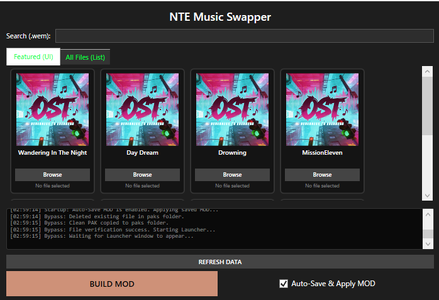
NTE Music Swapper Mod Preview Image
  • image.png
    image.png
    56.3 KB · Views: 2,138
1️⃣Tool Description

This tool allows you to use your own audio files (WAV, MP3, OGG) or YouTube links as in-game radio music.
This tool is intended for users who are using the global version of Windows 11.

2️⃣Requirements:
Before using the tool, you must install Wwise and .NET 10.

3️⃣Download the Wwise Launcher:
・Wwise Launcher Download
・Install Wwise version 2025.1.7.9143

4️⃣How to use:

・Click the "Browse" button next to the radio track you want to replace.
Select your desired audio file.
・Once everything is ready, click "BUILD MOD".
When a success dialog appears, launch the game.

5️⃣️Auto-Save & Apply MOD:

If enabled: your MOD will be saved and automatically applied next time.
If disabled: the MOD will reset when you close the tool.

⚠️Important:

・Please run it as administrator.

・Use at your own risk.

・Do not use the BUILD MOD button while the game is running.

・Keep this tool running while the game is open. closing the tool during gameplay may cause issues.

・Do not launch the game until the dialog shows “Pak build complete!”. Otherwise, it will crash.

・If any issues occur, close the tool and launch the launcher to repair the affected files.

・If the tool closes when you press the BUILD MOD button, try disabling real-time protection or excluding this tool’s directory in your antivirus software, then reinstall it.
100 MB
Log in or sign up to download
Uploaded by
Landmark
Downloads
690
Views
14,257
First release
Last update
Platform
PC 
Version
1.9
Total Size
100 MB
Rating
3.67 star(s) 6 ratings

Uploaded by

  • 690
  • 14,257

Ratings

3.67 star(s) 6 ratings

Tags

There are no tags available.

Latest updates

  1. Improved usability

    Removed the need to switch between YouTube URLs and local files.
  2. Fixed bugs

    Fixed bugs
  3. Fixed bug

    Fixed an issue where the music would cut off midway.

jefreexzone

Members
Members
May 14, 2026
0
0
it might need and update or it just me that cant get in to the game ?
 

Histericc

Members
Members
May 12, 2026
0
0
nvm it was dx11's fault, mod is amazin

I don't know if i'm the only one but my game performance was heavily affected by this mod,

i've been playing since release in cinematic settings at stable 120 fps, i got the mod to work but my game is now super laggy with big constant frame drops to the point of making it very hard to play.

i tried closing the music swapper and start the game normally and the performance was back to normal.
 

Yvriel

Members
Members
May 12, 2026
0
0
This mod has one problem, for example, the original game song is 3 minutes long, then we replace it with our chosen song which is 4 minutes long, when in the game the song of our choice only plays for about 3 minutes according to its original duration.
 

Noavid

Members
Members
May 11, 2026
0
3
does anyone get their songs setup reset when closing the app ?
Are you saying that the paths or links registered under "browse" are being reset? They are being reset for me as well. I don't think this was the case before the YouTube link update, but it is quite inconvenient.

Would you like to try downgrading to 1.4? I haven't tried that myself.

Personally, I wish users could manually save path/link data in a JSON file so it would update automatically every time a build is made, but the developer isn't responding to my messages at all.

To be honest, having to rebuild the mod every time there is a minor update is quite annoying.
 
Last edited:

Exci

Members
Members
May 13, 2026
0
0
Is it only 1 song at a time that can be replaced cuz a replace the others and it only plays 1 track
 

Kaff

Members
Members
May 9, 2026
0
7
Is it only 1 song at a time that can be replaced cuz a replace the others and it only plays 1 track
No ? I have replaced every songs in the Walkman and they all played correctly.
 

Benacolata

Members
Members
May 19, 2026
0
0
Mod works great, my only complaint is that the music will cut off if the song is more than 3 minutes long. Im not sure if this a problem with the mod itself or the game
 

NOXR

Members
Members
May 14, 2026
0
0
so i did everything on the guide, when i open the app nte launcher also opens but it says update right so i just ignored and swap the music on the app then it says pak build complete i press update on nte launcher and when i opened it the music not there still defaults, and when i relog with the swapper app opened most of the audio in game is gone except for like the overworld music and character grunting and when i just reinstall everything and update first instead of building the mod it still the same what did i do wrong?