NTEMM (Mod Manager) 1.3.1

A Mod for Neverness to Everness
NTEMM (Mod Manager) Mod Preview Image
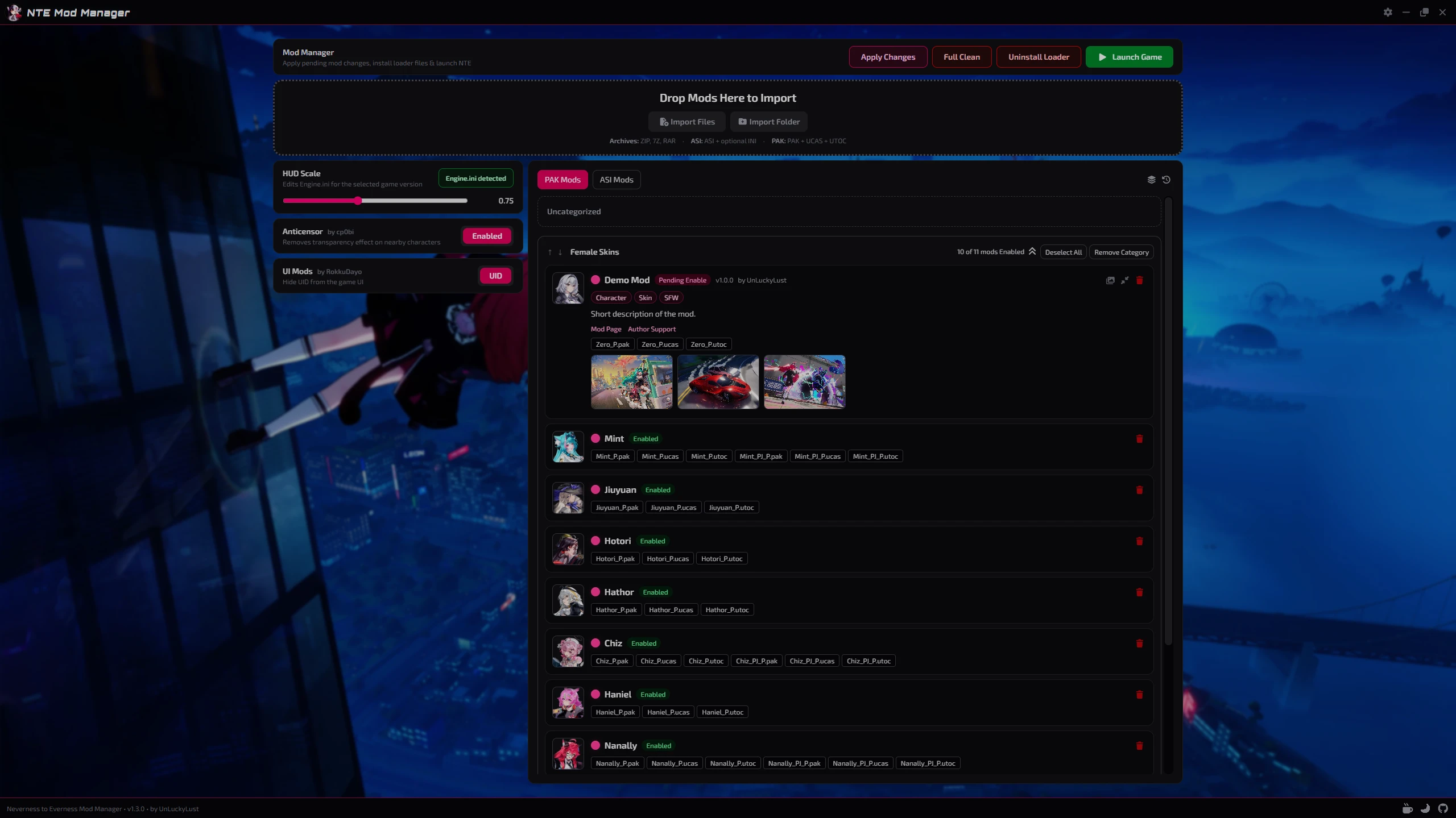
  • NTEMM_HomePage.png
    NTEMM_HomePage.png
    1.7 MB · Views: 522
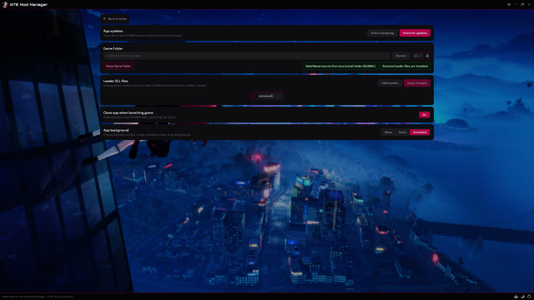
  • NTEMM_Settings.png
    NTEMM_Settings.png
    2.5 MB · Views: 337

NTEMM - Neverness to Everness Mod Manager​

Tired of manually moving `.pak` files around?
NTEMM is a lightweight mod manager made for Neverness to Everness that will helps you organize, install and manage your mods through a clean desktop interface.

Supports both .pak and .asi mods with built-in loader management, drag & drop organization, integrated tools and a sleek modern UI for fast and simple mod management.


Features

  • Easy .pak and .asi mod management
  • Drag & drop categories
  • Pending changes system
  • Automatic game detection
  • Global + CN + TW versions support
  • Built-in loader installer
  • Custom mod folder icons
  • Lightweight modern UI


Integrated Tools

Loader Management
  • Install or remove loader files directly from NTEMM.
Anticensor Toggle
HUD/UI Scale Editor
  • Adjust the in-game HUD scale directly from the app with automatic `Engine.ini` detection.
    huge thanks to Tayuya UI Scale Fix
UID Hider


Installation

  1. Download the installer
  2. Run setup
  3. Launch NTEMM.exe
  4. Select your game folder
  5. Start importing mods


Supported Mod Types

  • .pak
  • .asi


For Mod Creators

NTEMM supports optional mod.json metadata file.
Adding a mod.json file to your mod folder allows the manager to automatically display additional information such as the mod name, author, version, description, tags and links directly inside the app.
Example mod.json:
Code:
{
  "name": "ModName",
  "version": "1.0.0",
  "author": "AuthorName",
  "description": "Short description of the mod.",
  "modLink": "https://ayakamods.com/mods/ntemm-mod-manager.2624/",
  "supportLink": "https://ko-fi.com/unluckylust",
  "tags": ["Character", "Skin", "SFW"]
}

Preview Images

NTEMM supports an option to include preview images with mods so they can be displayed directly inside the app.
To add previews, simply place the images next to the mod files and make sure their file names contain preview.
Supported image formats include: .png | .jpg | .jpeg | .webp | .gif | .bmp | .avif


Important Notes

Windows Defender or SmartScreen may show a warning on first launch because the application is currently unsigned. This is common for many indie/open-source applications.
NTEMM does not create mods or modify game code.
It is only used to organize and manage existing community-made mods.
Latest builds are publicly scanned on VirusTotal

Support and donations

The mod is offered for free, but if you are interested in supporting its development and the other mods I publish, you can do so through Ko-fi or Buymeacoffee, any donation is greatly appreciated!

Feedback, suggestions, and testing reports are always welcome.​

40.1 MB
Log in or sign up to download
Uploaded by
UnLuckyLust
Downloads
336
Views
2,896
First release
Last update
Platform
PC 
Version
1.3.1
Total Size
40.1 MB
Rating
0.00 star(s) 0 ratings

Uploaded by

  • 336
  • 2,896

Ratings

0.00 star(s) 0 ratings

Latest updates

  1. Mods and Loader State Fixes (v1.3.1)

    - Improved saved mods and loader state handling per game version. - Fixed clean, reset, and...
  2. Expanded Mod Support & Loader Configuration (v1.3.0)

    - Reworked mod importing to support complex nested mods. - Improved mod update handling so...
  3. UI Polish, Preview Images & CN Loader Fixes (v1.2.0)

    - Updated several UI elements to use clearer icons instead of plain text. - Improved mod cards...

UnLuckyLust

Building my Dreams...
Members
May 25, 2026
0
1
Oh so I need to browse the game directory and search the mod folder to put the image file? Any chance to open mod directory from mod loader or paste img from clipboard? Thanks btw
I will add a button to open the mods folder in the next update, for now you can simply re-import the mod with the image files and call it the same, this will update the existing mod.
 

TGFL

Members
Members
May 29, 2026
0
0
Hey there
I added some mods and Launched the game with ntemm
but the mods wont work.
anything i can try?
 

UnLuckyLust

Building my Dreams...
Members
May 25, 2026
0
1
Hey there
I added some mods and Launched the game with ntemm
but the mods wont work.
anything i can try?
You can try renaming the version.dll, some users report that version0.dll was working for them, but you can get full list of names here.

You can do it from NTEMM setting page.
 

TheAestheticFur

Members
Members
May 7, 2026
0
23
This mod loader refuses to inject the mods into the game on Linux. I'm running Arch Linux with the latest packages and the latest dwproton.
 

UnLuckyLust

Building my Dreams...
Members
May 25, 2026
0
1
This mod loader refuses to inject the mods into the game on Linux. I'm running Arch Linux with the latest packages and the latest dwproton.
The app was built for Windows, so it makes sense that it wouldn't work properly on other operating systems, but it can certainly be adapted to Linux.
I'll look into it when I have some more time.
I've been too busy the last few days to update the app, hopefully I can work on it over the weekend.
 

abhorrentgale

Members
Members
Jun 4, 2026
0
2
slightly confused because nothing seems to be working. the version.dll is in C\Program Files\Neverness To Everness and everything seems to be alright, but nothing happens?
 

UnLuckyLust

Building my Dreams...
Members
May 25, 2026
0
1
slightly confused because nothing seems to be working. the version.dll is in C\Program Files\Neverness To Everness and everything seems to be alright, but nothing happens?
Please make sure the .asi file is also in the game folder and has been successfully installed.
 

abhorrentgale

Members
Members
Jun 4, 2026
0
2
alright. i have the loader.asi, version.dll, everything checks out, but after double checking everything (and even repairing files and stuff in the game launcher) it still doesn't seem to be working. any other tips?
 

UnLuckyLust

Building my Dreams...
Members
May 25, 2026
0
1
alright. i have the loader.asi, version.dll, everything checks out, but after double checking everything (and even repairing files and stuff in the game launcher) it still doesn't seem to be working. any other tips?
Please try to check if the built-in mods are working properly (anticensor and uid hider).
And are you using the global version of the game or another version?
 

abhorrentgale

Members
Members
Jun 4, 2026
0
2
i'm using global. the game folder is valid, and i've tested with anticensor and the UID thing, but they don't seem to function. windows antidefender isn't deleting anything, so that's why i'm lost lol