NTEMM (Mod Manager) 1.3.1

A Mod for Neverness to Everness
NTEMM (Mod Manager) Mod Preview Image
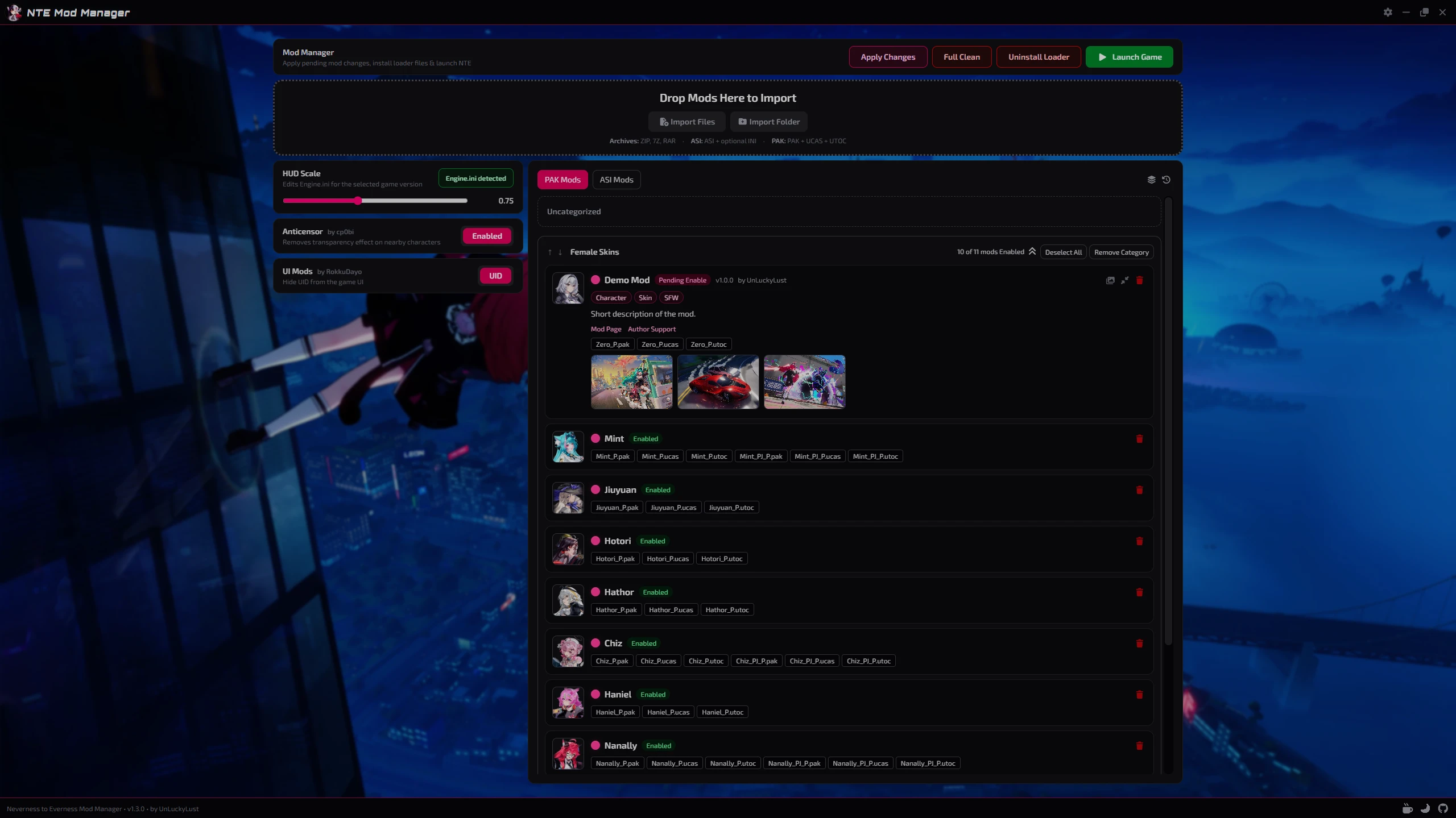
  • NTEMM_HomePage.png
    NTEMM_HomePage.png
    1.7 MB · Views: 522
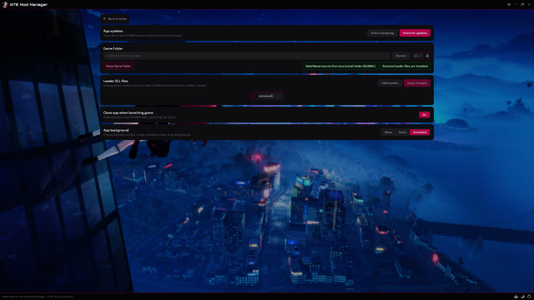
  • NTEMM_Settings.png
    NTEMM_Settings.png
    2.5 MB · Views: 337

NTEMM - Neverness to Everness Mod Manager​

Tired of manually moving `.pak` files around?
NTEMM is a lightweight mod manager made for Neverness to Everness that will helps you organize, install and manage your mods through a clean desktop interface.

Supports both .pak and .asi mods with built-in loader management, drag & drop organization, integrated tools and a sleek modern UI for fast and simple mod management.


Features

  • Easy .pak and .asi mod management
  • Drag & drop categories
  • Pending changes system
  • Automatic game detection
  • Global + CN + TW versions support
  • Built-in loader installer
  • Custom mod folder icons
  • Lightweight modern UI


Integrated Tools

Loader Management
  • Install or remove loader files directly from NTEMM.
Anticensor Toggle
HUD/UI Scale Editor
  • Adjust the in-game HUD scale directly from the app with automatic `Engine.ini` detection.
    huge thanks to Tayuya UI Scale Fix
UID Hider


Installation

  1. Download the installer
  2. Run setup
  3. Launch NTEMM.exe
  4. Select your game folder
  5. Start importing mods


Supported Mod Types

  • .pak
  • .asi


For Mod Creators

NTEMM supports optional mod.json metadata file.
Adding a mod.json file to your mod folder allows the manager to automatically display additional information such as the mod name, author, version, description, tags and links directly inside the app.
Example mod.json:
Code:
{
  "name": "ModName",
  "version": "1.0.0",
  "author": "AuthorName",
  "description": "Short description of the mod.",
  "modLink": "https://ayakamods.com/mods/ntemm-mod-manager.2624/",
  "supportLink": "https://ko-fi.com/unluckylust",
  "tags": ["Character", "Skin", "SFW"]
}

Preview Images

NTEMM supports an option to include preview images with mods so they can be displayed directly inside the app.
To add previews, simply place the images next to the mod files and make sure their file names contain preview.
Supported image formats include: .png | .jpg | .jpeg | .webp | .gif | .bmp | .avif


Important Notes

Windows Defender or SmartScreen may show a warning on first launch because the application is currently unsigned. This is common for many indie/open-source applications.
NTEMM does not create mods or modify game code.
It is only used to organize and manage existing community-made mods.
Latest builds are publicly scanned on VirusTotal

Support and donations

The mod is offered for free, but if you are interested in supporting its development and the other mods I publish, you can do so through Ko-fi or Buymeacoffee, any donation is greatly appreciated!

Feedback, suggestions, and testing reports are always welcome.​

40.1 MB
Log in or sign up to download
Uploaded by
UnLuckyLust
Downloads
336
Views
2,896
First release
Last update
Platform
PC 
Version
1.3.1
Total Size
40.1 MB
Rating
0.00 star(s) 0 ratings

Uploaded by

  • 336
  • 2,896

Ratings

0.00 star(s) 0 ratings

Latest updates

  1. Mods and Loader State Fixes (v1.3.1)

    - Improved saved mods and loader state handling per game version. - Fixed clean, reset, and...
  2. Expanded Mod Support & Loader Configuration (v1.3.0)

    - Reworked mod importing to support complex nested mods. - Improved mod update handling so...
  3. UI Polish, Preview Images & CN Loader Fixes (v1.2.0)

    - Updated several UI elements to use clearer icons instead of plain text. - Improved mod cards...

UnLuckyLust

Building my Dreams...
Members
May 25, 2026
0
1
i'm using global. the game folder is valid, and i've tested with anticensor and the UID thing, but they don't seem to function. windows antidefender isn't deleting anything, so that's why i'm lost lol
Strange that it doesn't work, I just checked again and it seems there is no general problem and the mods still work for me.
The last thing I can recommend right now is to do a Full Clean (via NTEMM) and then reinstall the loader files, it sometimes helps after a launcher update.
 

abhorrentgale

Members
Members
Jun 4, 2026
0
2
well now i get an error saying "please close programs causing errors and restart" which promptly closes it. it works now i guess lol
 

UnLuckyLust

Building my Dreams...
Members
May 25, 2026
0
1
well now i get an error saying "please close programs causing errors and restart" which promptly closes it. it works now i guess lol
Please make sure you don't have any leftover files that were manually installed in the game folder, the files that come with NTEMM shouldn't cause such a problem.
 

abhorrentgale

Members
Members
Jun 4, 2026
0
2
back to square one. mods are not working. i don't know what to do anymore lol

edit it's directx breaking it, i don't know what's prompting it to error and crash still because i can't find anything that i installed manually that could break it
 
Last edited:

akiratdl

Members
Members
Jun 5, 2026
0
0
Where exactly am I supposed to install NTEMM? The "game files" can be a lot
 

UnLuckyLust

Building my Dreams...
Members
May 25, 2026
0
1
Where exactly am I supposed to install NTEMM? The "game files" can be a lot
NTEMM can be installed anywhere, you just need to fill in the settings with the correct address for the game files, the correct address is the main folder 'Neverness To Everness', which contains the 'Client' folder and the launcher's .exe file.
 

CrypticChaos

Members
Members
May 8, 2026
0
0
so when i try to apply changes it just says access denied
 
Last edited:

UnLuckyLust

Building my Dreams...
Members
May 25, 2026
0
1
so when i try to apply changes it just says access denied
Please make sure that all game processes are closed.
If the problem persists, you should try to remove files that were installed manually from the game folder, also delete the '~mods' folder.
After that, you should perform a Full Clean via NTEMM.
After making sure that there are no leftover files, you can reinstall the loader and mods via NTEMM.
 

CrypticChaos

Members
Members
May 8, 2026
0
0
Please make sure that all game processes are closed.
If the problem persists, you should try to remove files that were installed manually from the game folder, also delete the '~mods' folder.
After that, you should perform a Full Clean via NTEMM.
After making sure that there are no leftover files, you can reinstall the loader and mods via NTEMM.
i have to do this every time i want to turn on a mod or add a new mod