NTE Music Swapper 1.9

A Mod for Neverness to Everness
NTE Music Swapper Mod Preview Image
  • image.png
    image.png
    56.3 KB · Views: 2,141
1️⃣Tool Description

This tool allows you to use your own audio files (WAV, MP3, OGG) or YouTube links as in-game radio music.
This tool is intended for users who are using the global version of Windows 11.

2️⃣Requirements:
Before using the tool, you must install Wwise and .NET 10.

3️⃣Download the Wwise Launcher:
・Wwise Launcher Download
・Install Wwise version 2025.1.7.9143

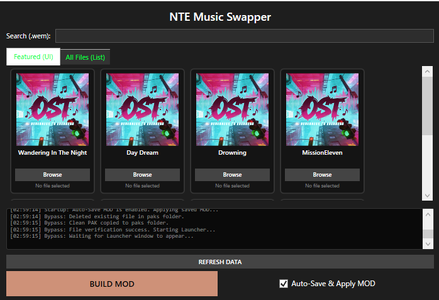
4️⃣How to use:

・Click the "Browse" button next to the radio track you want to replace.
Select your desired audio file.
・Once everything is ready, click "BUILD MOD".
When a success dialog appears, launch the game.

5️⃣️Auto-Save & Apply MOD:

If enabled: your MOD will be saved and automatically applied next time.
If disabled: the MOD will reset when you close the tool.

⚠️Important:

・Please run it as administrator.

・Use at your own risk.

・Do not use the BUILD MOD button while the game is running.

・Keep this tool running while the game is open. closing the tool during gameplay may cause issues.

・Do not launch the game until the dialog shows “Pak build complete!”. Otherwise, it will crash.

・If any issues occur, close the tool and launch the launcher to repair the affected files.

・If the tool closes when you press the BUILD MOD button, try disabling real-time protection or excluding this tool’s directory in your antivirus software, then reinstall it.
100 MB
Log in or sign up to download
Uploaded by
Landmark
Downloads
692
Views
14,281
First release
Last update
Platform
PC 
Version
1.9
Total Size
100 MB
Rating
3.67 star(s) 6 ratings

Uploaded by

  • 692
  • 14,281

Ratings

3.67 star(s) 6 ratings

Tags

There are no tags available.

Latest updates

  1. Improved usability

    Removed the need to switch between YouTube URLs and local files.
  2. Fixed bugs

    Fixed bugs
  3. Fixed bug

    Fixed an issue where the music would cut off midway.

Kaff

Members
Members
May 9, 2026
0
7
Song lists update in UnPak1:

378170871 - Champion
18403445 - Play On!
 

Kaff

Members
Members
May 9, 2026
0
7
Some BGMs during city exploration: (I can't really tell which BGM is for which weather conditions/day-night/regions, I just heard them a lot when driving around the map so I recognized them)

445162043 - BGM 1 3:34
582136728 - BGM 2 2:58
143864574 - BGM 3 3:24
426815353 - BGM 4 3:00
1052703972 - BGM 5 2:58
1061747025 - BGM 6 2:57
336991061 - BGM 7 2:52
866416465 - BGM 8 2:50
408391070 - BGM 9 2:32
646761173 - BGM 10 2:32
81574844 - BGM 11 1:58
411692549 - BGM 12 1:49
 

Noavid

Members
Members
May 11, 2026
0
3
Some BGMs during city exploration: (I can't really tell which BGM is for which weather conditions/day-night/regions, I just heard them a lot when driving around the map so I recognized them)

445162043 - BGM 1 3:34
582136728 - BGM 2 2:58
143864574 - BGM 3 3:24
426815353 - BGM 4 3:00
1052703972 - BGM 5 2:58
1061747025 - BGM 6 2:57
336991061 - BGM 7 2:52
866416465 - BGM 8 2:50
408391070 - BGM 9 2:32
646761173 - BGM 10 2:32
81574844 - BGM 11 1:58
411692549 - BGM 12 1:49
Did you happen to find the album songs that were added this time?

Since those album songs are also City BGM, surely if I swap songs, does that mean the City BGM itself changes, not just the radio song?
 

Kaff

Members
Members
May 9, 2026
0
7
Update to City BGMs (Sightseeing Guide):

582136728 - City No Sleep 2:58
426815353 - The Great Escape:30% 3:00
1061747025 - The Great Escape:60% 2:57
446567437 - I Was Born To Shine 2:22
623647940 - Opening Here Tonight 2:22
81574844 - City of Glitter 1:58
336991061 - Tour Log:33% 2:52
1052703972 - Tour Log:66% 2:58
445162043 - City of Gold 3:33
411692549 - Good Morning, Yurutown 1:58

I can't seem to find them in the music replacer tho, idk what I'm doing wrong..
 

analog

Members
Members
Oct 5, 2025
0
0
Hi! First of all, thank you for creating NTE Music Swapper. I tested v1.9 with the latest NTE client and wanted to report a possible compatibility issue.

My setup:

  • Latest NTE client
  • NTE Music Swapper v1.9
  • Build MOD completes successfully without any errors.
  • Wwise conversion, BNK patching, and Pak building all report success.
However, after the generated PatchPak (pakchunk3-Windows_0_P.pak) is applied, the game crashes immediately on startup with an Unreal Engine EXCEPTION_ACCESS_VIOLATION error.

I did some testing:

  • Removing the generated pakchunk3-Windows_0_P.pak allows the game to launch normally.
  • Launching the game without Music Swapper works perfectly.
  • The crash happens even without adding any custom WAV files, so it does not seem to be caused by the audio file itself.
I also noticed that after a failed launch, the NTE launcher sometimes downloads or repairs game files automatically.

From inspecting the latest NTE PatchPaks, it looks like the game now uses a full IoStore structure (.pak, .utoc, .ucas, and .sig files), while Music Swapper only generates the .pak PatchPak. It might be a compatibility issue with the latest NTE PatchPak/IoStore format.

I hope this information helps with debugging. I'd be happy to provide crash logs or additional information if needed.

Thanks again for your hard work on this tool!
 

questt

Members
Members
May 14, 2026
0
0
"Starting Pak build process..." with wwise installed. redirects me to download audiokinetic with it installed. What exactly am i supposed to do with audiokinetic and wwise