
Description
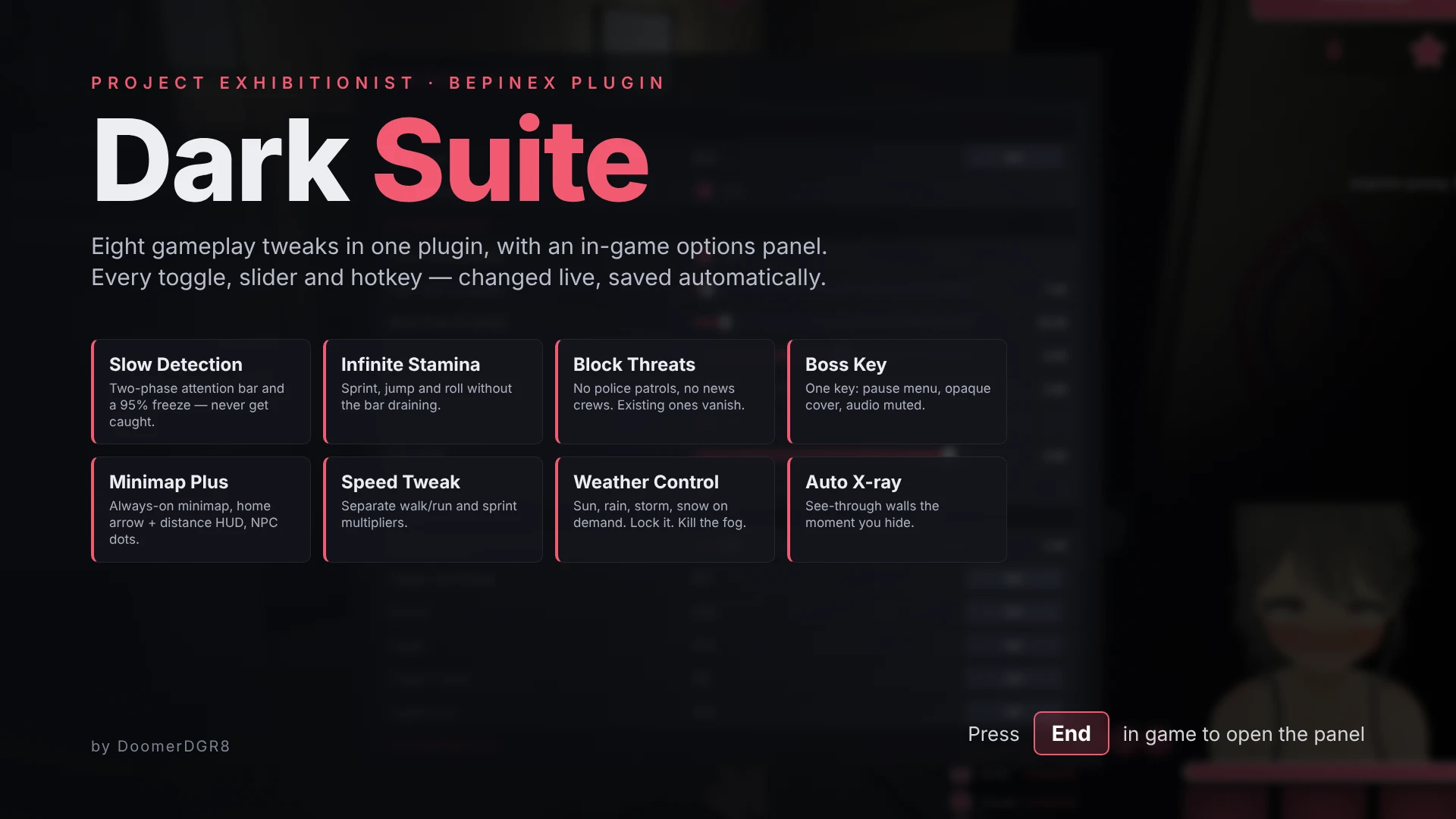
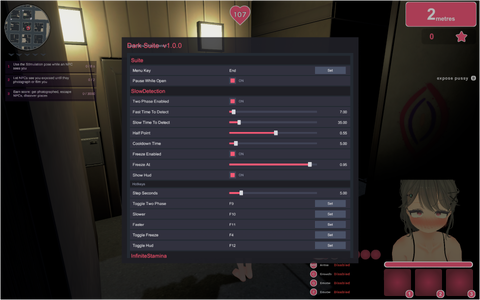
Dark Suite bundles every quality-of-life and sandbox tweak I wanted for Project Exhibitionist into a single BepInEx plugin with an in-game options panel. Press End at any time to open it: every setting is a toggle, slider or rebindable hotkey, changes apply instantly, and the panel freezes the game while it is open. Sections collapse (and stay collapsed), sliders have −/+ buttons and arrow-key fine tuning, and every setting has a Reset button. Nothing in the game's files is modified; everything is applied at runtime through Harmony hooks and can be switched off module by module, so you can use it as a full cheat kit or just pick the one or two conveniences you care about.
Installation instructions
Main features
Slow Detection — the NPC attention bar fills at normal speed up to the half point (so "expose until half" missions still tick quickly), then slows down for the rest; both halves are tunable. A separate freeze option caps every bar at 95%, so detection can never complete while you stay in view. F9 toggles two-phase, F10/F11 adjust the slow half, F4 toggles the freeze, F12 hides the status line.
Infinite Stamina — sprint, jump and roll without the bar draining. F8 toggles.
Block Threats — stops police officers, patrols and wanted-response squads from spawning and removes any already present; does the same for TV news crews. F1 and F2 toggle each independently.
Boss Key — Pause/Break opens the game's own pause menu with a fully opaque cover behind it and mutes audio. If the menu can't open (cutscenes), it hard-pauses with a plain screen instead; press again to resume.
Minimap Plus — forces the minimap on regardless of the Show Minimap setting, adds arrows on the minimap edge pointing to Home and to the selected target, and draws NPC dots on the minimap coloured by their suspicion level (grey, yellow, orange, red). F3 toggles the arrows, F7 the NPC dots.
Speed Tweak — separate multipliers for normal movement (walk/run/crouch) and sprint. Numpad +/− and */÷ adjust them live, Numpad 9 resets.
Weather Control — pick Sunny, Overcast, Calm Rain, Rain, Storm, Fog or Snow from the panel or Numpad 1–7, lock the weather so the game's forecast rotation can't change it (Numpad 0), and remove the dense fog feature entirely (Numpad ., on by default).
Auto X-ray — when you hide in a trash can, locker or dumpster, the x-ray view switches on by itself; H still toggles it afterwards. Opacity is adjustable.
GPS — a thin line on the ground leading to your destination (selected location, else the waypoint pin, else Home), with small pulses of light running toward it. Routes follow the game's own walking paths and are re-planned every half second, so a wrong turn just gives a new route. Remaining distance shows under the compass, and the route is also drawn on the minimap. Numpad Enter toggles.
Compass — a thin bar at the top of the screen with N/E/S/W, a centre heading line, and markers with distance for Home (green), the waypoint pin (pink) and the selected POI target (blue). Double-click a location on the full map (M) to target it. The full map can be dragged and panned with the arrow keys at any zoom. In Long Way Home, Home points to your actual destination even when it's kilometres away.
Loot Tweaks — trash can search speed multiplier, how many items a can gives (up to 10), optional guaranteed rarity, and Delete destroys the held flash/cover item (TV, box, bag) instantly.
Unstuck — Page Down nudges the character one metre in the look direction to get out of geometry.
Skip Intros — skips the studio logo and disclaimer at startup, the Long Way Home run intro and the location cinematics (university, stadium, restaurant, gym) through the game's own skip paths. Optional: no first-use tutorial popups, and a quick flash instead of the location arrival title card.
Ultrawide Fix (off by default) — on screens wider than 16:9 the HUD keeps its 16:9 size instead of growing with the width, and the in-PC character customizer preview keeps the right aspect. Turn it on in the panel if you play ultrawide; on some setups it can make clicks land slightly off.
Every hotkey above is the default and can be rebound from the panel (click Set, press a key). All modules are on by default except GPS, the weather lock and Ultrawide Fix. The weather you pick lasts for the session; fog removal is remembered.
Requirements
BepInEx 5.4.x (x64, Mono build) — the plugin targets the game's Mono runtime and will not load under BepInEx 6 or the IL2CPP builds. Built against Project Exhibitionist's current Steam release (Unity 2022.3); if a game update renames internal classes, a module will log "module X failed" and disable itself while the rest keep working. No other mods are required, and it coexists with ReShade/RenoDX overlays (Home, F5 and F6 are left free for those).
Key bindings
All defaults; every one can be rebound from the panel (click Set, press a key). End opens and closes the panel.
Slow Detection
Dark Suite bundles every quality-of-life and sandbox tweak I wanted for Project Exhibitionist into a single BepInEx plugin with an in-game options panel. Press End at any time to open it: every setting is a toggle, slider or rebindable hotkey, changes apply instantly, and the panel freezes the game while it is open. Sections collapse (and stay collapsed), sliders have −/+ buttons and arrow-key fine tuning, and every setting has a Reset button. Nothing in the game's files is modified; everything is applied at runtime through Harmony hooks and can be switched off module by module, so you can use it as a full cheat kit or just pick the one or two conveniences you care about.
Installation instructions
- Install BepInEx 5 (x64) into the game folder (the one containing Project Exhibitionist.exe) and run the game once so BepInEx creates its folders.
- Download Dark Suite and extract the zip into the game's root folder (next to Project Exhibitionist.exe); it places DarkSuite.dll in BepInEx\plugins\DarkSuite\.
- Start the game. The config file BepInEx\config\com.darkdoomer.pe.suite.cfg is created on first run; edit it there or, more easily, press End in game.
- To confirm it loaded, check BepInEx\LogOutput.log for "Dark Suite 1.9.2 loaded" and "Suite: tick hub is alive".
Main features
Slow Detection — the NPC attention bar fills at normal speed up to the half point (so "expose until half" missions still tick quickly), then slows down for the rest; both halves are tunable. A separate freeze option caps every bar at 95%, so detection can never complete while you stay in view. F9 toggles two-phase, F10/F11 adjust the slow half, F4 toggles the freeze, F12 hides the status line.
Infinite Stamina — sprint, jump and roll without the bar draining. F8 toggles.
Block Threats — stops police officers, patrols and wanted-response squads from spawning and removes any already present; does the same for TV news crews. F1 and F2 toggle each independently.
Boss Key — Pause/Break opens the game's own pause menu with a fully opaque cover behind it and mutes audio. If the menu can't open (cutscenes), it hard-pauses with a plain screen instead; press again to resume.
Minimap Plus — forces the minimap on regardless of the Show Minimap setting, adds arrows on the minimap edge pointing to Home and to the selected target, and draws NPC dots on the minimap coloured by their suspicion level (grey, yellow, orange, red). F3 toggles the arrows, F7 the NPC dots.
Speed Tweak — separate multipliers for normal movement (walk/run/crouch) and sprint. Numpad +/− and */÷ adjust them live, Numpad 9 resets.
Weather Control — pick Sunny, Overcast, Calm Rain, Rain, Storm, Fog or Snow from the panel or Numpad 1–7, lock the weather so the game's forecast rotation can't change it (Numpad 0), and remove the dense fog feature entirely (Numpad ., on by default).
Auto X-ray — when you hide in a trash can, locker or dumpster, the x-ray view switches on by itself; H still toggles it afterwards. Opacity is adjustable.
GPS — a thin line on the ground leading to your destination (selected location, else the waypoint pin, else Home), with small pulses of light running toward it. Routes follow the game's own walking paths and are re-planned every half second, so a wrong turn just gives a new route. Remaining distance shows under the compass, and the route is also drawn on the minimap. Numpad Enter toggles.
Compass — a thin bar at the top of the screen with N/E/S/W, a centre heading line, and markers with distance for Home (green), the waypoint pin (pink) and the selected POI target (blue). Double-click a location on the full map (M) to target it. The full map can be dragged and panned with the arrow keys at any zoom. In Long Way Home, Home points to your actual destination even when it's kilometres away.
Loot Tweaks — trash can search speed multiplier, how many items a can gives (up to 10), optional guaranteed rarity, and Delete destroys the held flash/cover item (TV, box, bag) instantly.
Unstuck — Page Down nudges the character one metre in the look direction to get out of geometry.
Skip Intros — skips the studio logo and disclaimer at startup, the Long Way Home run intro and the location cinematics (university, stadium, restaurant, gym) through the game's own skip paths. Optional: no first-use tutorial popups, and a quick flash instead of the location arrival title card.
Ultrawide Fix (off by default) — on screens wider than 16:9 the HUD keeps its 16:9 size instead of growing with the width, and the in-PC character customizer preview keeps the right aspect. Turn it on in the panel if you play ultrawide; on some setups it can make clicks land slightly off.
Every hotkey above is the default and can be rebound from the panel (click Set, press a key). All modules are on by default except GPS, the weather lock and Ultrawide Fix. The weather you pick lasts for the session; fog removal is remembered.
Requirements
BepInEx 5.4.x (x64, Mono build) — the plugin targets the game's Mono runtime and will not load under BepInEx 6 or the IL2CPP builds. Built against Project Exhibitionist's current Steam release (Unity 2022.3); if a game update renames internal classes, a module will log "module X failed" and disable itself while the rest keep working. No other mods are required, and it coexists with ReShade/RenoDX overlays (Home, F5 and F6 are left free for those).
Key bindings
All defaults; every one can be rebound from the panel (click Set, press a key). End opens and closes the panel.
Slow Detection
- F9 — toggle two-phase detection
- F10 / F11 — second half slower / faster (±5 s)
- F4 — toggle the 95% freeze
- F12 — show / hide the status line
- F8 — toggle
- F1 — toggle police block
- F2 — toggle news crew block
- Pause / Break — opaque pause cover + mute (press again to resume a hard pause)
- F3 — toggle minimap arrows (Home, target)
- Shift + F3 — toggle the compass bar
- F7 — toggle NPC dots
- Shift + F7 — clear the selected target
- Double-click on the full map (M) — select / deselect a POI as target
- Arrow keys or drag on the full map (M) — pan
- Middle-click on the full map (M) — the game's own waypoint pin (shown on the compass)
- Numpad Enter — toggle the route line
- Numpad + / Numpad − — normal speed ±0.25×
- Numpad * / Numpad / — sprint speed ±0.25×
- Numpad 9 — reset both to 1.0×
- Numpad 1 Sunny · 2 Overcast · 3 Calm rain · 4 Rain · 5 Storm · 6 Fog · 7 Snow
- Numpad 8 — log the presets available in this scene
- Numpad 0 — toggle weather lock
- Numpad . — toggle fog removal
- Delete — destroy the held flash/cover item
- Page Down — jump 1 m in the look direction
