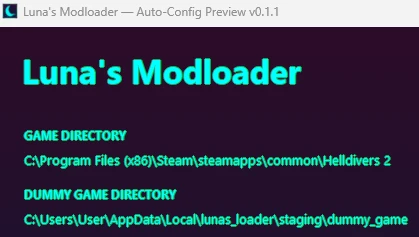
Luna Auto-Config Preview — Unofficial Remix
A modified version of Luna’s Modloader designed to make configuring mods that edit shared game files less frustrating.
Change a supported mod’s settings, save them, and let the loader refresh affected downstream configurations automatically before deploying.
IMPORTANT — UNOFFICIAL REMIX
This remix was made by Huff Designs.
Luna’s original creator had no part in developing or testing this remix. It is not an official Luna update, and the original creator may not support it.
Please report problems with this version here rather than expecting the original creator to troubleshoot it.
Credit for the original loader belongs to its original creator. Original licenses and notices are included.
WHAT CHANGED
• Automatically refreshes supported downstream configurations when an earlier mod changes.
• Prepares a configurator’s input without mixing in that same mod’s previous output.
• Checks for stale supported configurations before deployment.
• Preserves saved selections when regenerating supported mods.
• Adds an activity bar, current action, stage description and elapsed time.
• Clearly distinguishes working, waiting for an open configurator, completed and failed actions.
• Records action stages in a progress log.
For supported combinations, this reduces the repeated Reset config and Rebuild dummy sequences previously needed after changing shared-file mods.
The activity bar shows that the interface is responding. It is not an exact percentage or proof that an external configurator is making progress.
Mods can still use the loader’s normal configuration and deployment features, but automatic refresh is not guaranteed for every editor or version.
Importing a ZIP alone does not automatically run its configurator.
INSTALLATION
1. Close Helldivers 2 and any other Luna window.
2. Extract the complete ZIP.
3. Run Luna Modloader Auto-Config Preview.exe.
Existing Luna users will see their existing library and settings. This remix uses the same storage folder as ordinary Luna:
%LOCALAPPDATA%\lunas_loader
New users should select their game folder and add their mod ZIPs normally.
Do not run the original loader and this remix at the same time.
CONFIGURE AND PLAY
1. Put your mods in the intended load order.
2. Click Configure on the mod you want to change.
3. Choose its settings, apply or save them, and close its configurator.
4. Wait for supported dependent configurations to refresh.
5. Click Deploy.
6. Wait for “Deployed. Launch the game normally.”
7. Launch Helldivers 2 through Steam.
COMPATIBILITY AND LIMITATIONS
Automatic refresh regenerates supported configurations from their updated inputs. It cannot resolve every conflicting edit or make incompatible mods compatible.
Unknown editors, overlapping changes, altered program files and unsupported game formats can still require attention.
Normal deployment checks, backups, recovery handling and game-closed protections remain in place.
This is a preview release. Configuration and private deployment/restoration tests have passed, but every mod combination and gameplay situation has not been tested.
It does not fix gameplay bugs inside individual mods.
REMOVAL AND RETURNING TO ORIGINAL LUNA
Close the game and use Purge to restore deployed files before removing mods.
To return to the original Luna application, close this remix and open your original loader. The library format is unchanged. The original application retains its previous configuration-refresh limitations.
Keep your deployment and recovery backups.
LOGS AND TROUBLESHOOTING
Open this folder with Windows + R:
%LOCALAPPDATA%\lunas_loader
Useful files include:
• progress.log — action stages and completion status
• loader.log — recorded errors
• startup-error.txt — startup errors, when generated
When reporting a problem, include the loader version, game build, mod versions, load order, exact error and relevant logs.
Source, automatic-refresh documentation, test reports and licenses are included in Extras.
Current release: Auto-Config Preview v0.1.1 — 11.74 MB
Based on Luna’s Modloader 0.8.0 Experimental.
Unofficial remix by Huff Designs.
A modified version of Luna’s Modloader designed to make configuring mods that edit shared game files less frustrating.
Change a supported mod’s settings, save them, and let the loader refresh affected downstream configurations automatically before deploying.
IMPORTANT — UNOFFICIAL REMIX
This remix was made by Huff Designs.
Luna’s original creator had no part in developing or testing this remix. It is not an official Luna update, and the original creator may not support it.
Please report problems with this version here rather than expecting the original creator to troubleshoot it.
Credit for the original loader belongs to its original creator. Original licenses and notices are included.
WHAT CHANGED
• Automatically refreshes supported downstream configurations when an earlier mod changes.
• Prepares a configurator’s input without mixing in that same mod’s previous output.
• Checks for stale supported configurations before deployment.
• Preserves saved selections when regenerating supported mods.
• Adds an activity bar, current action, stage description and elapsed time.
• Clearly distinguishes working, waiting for an open configurator, completed and failed actions.
• Records action stages in a progress log.
For supported combinations, this reduces the repeated Reset config and Rebuild dummy sequences previously needed after changing shared-file mods.
The activity bar shows that the interface is responding. It is not an exact percentage or proof that an external configurator is making progress.
Mods can still use the loader’s normal configuration and deployment features, but automatic refresh is not guaranteed for every editor or version.
Importing a ZIP alone does not automatically run its configurator.
INSTALLATION
1. Close Helldivers 2 and any other Luna window.
2. Extract the complete ZIP.
3. Run Luna Modloader Auto-Config Preview.exe.
Existing Luna users will see their existing library and settings. This remix uses the same storage folder as ordinary Luna:
%LOCALAPPDATA%\lunas_loader
New users should select their game folder and add their mod ZIPs normally.
Do not run the original loader and this remix at the same time.
CONFIGURE AND PLAY
1. Put your mods in the intended load order.
2. Click Configure on the mod you want to change.
3. Choose its settings, apply or save them, and close its configurator.
4. Wait for supported dependent configurations to refresh.
5. Click Deploy.
6. Wait for “Deployed. Launch the game normally.”
7. Launch Helldivers 2 through Steam.
COMPATIBILITY AND LIMITATIONS
Automatic refresh regenerates supported configurations from their updated inputs. It cannot resolve every conflicting edit or make incompatible mods compatible.
Unknown editors, overlapping changes, altered program files and unsupported game formats can still require attention.
Normal deployment checks, backups, recovery handling and game-closed protections remain in place.
This is a preview release. Configuration and private deployment/restoration tests have passed, but every mod combination and gameplay situation has not been tested.
It does not fix gameplay bugs inside individual mods.
REMOVAL AND RETURNING TO ORIGINAL LUNA
Close the game and use Purge to restore deployed files before removing mods.
To return to the original Luna application, close this remix and open your original loader. The library format is unchanged. The original application retains its previous configuration-refresh limitations.
Keep your deployment and recovery backups.
LOGS AND TROUBLESHOOTING
Open this folder with Windows + R:
%LOCALAPPDATA%\lunas_loader
Useful files include:
• progress.log — action stages and completion status
• loader.log — recorded errors
• startup-error.txt — startup errors, when generated
When reporting a problem, include the loader version, game build, mod versions, load order, exact error and relevant logs.
Source, automatic-refresh documentation, test reports and licenses are included in Extras.
Current release: Auto-Config Preview v0.1.1 — 11.74 MB
Based on Luna’s Modloader 0.8.0 Experimental.
Unofficial remix by Huff Designs.