Sniper Third-Person Reticles
NoMoFOMO + Hidden Content Unlocker Mod
Patreon: https://www.patreon.com/c/huff_designs
Ko-fi: https://ko-fi.com/huff_designs
Discord: https://discord.gg/rMYvNq9t8z
PayPal: contact me directly.
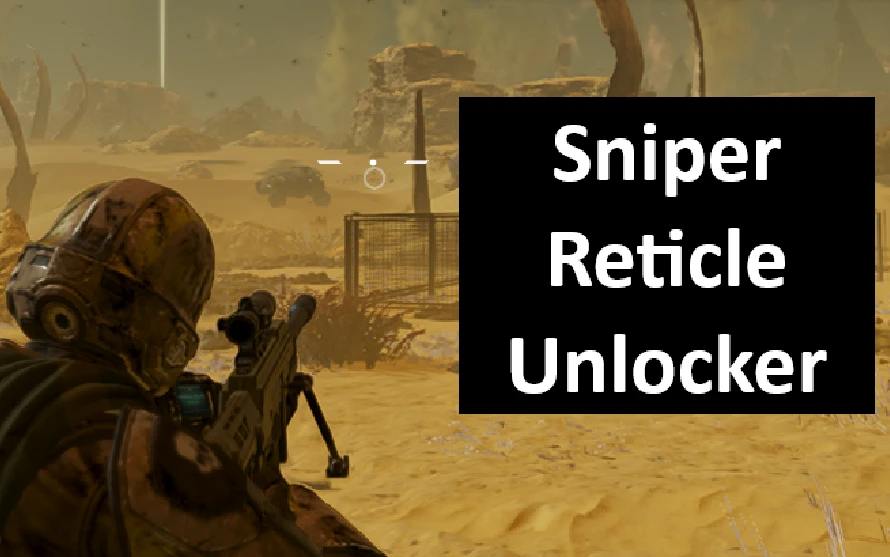
Enable the game’s native third-person aiming crosshair for supported rifles, with individual toggles for each weapon.
Supported weapons
- R-40 Sightliner
- APW-1 Anti-Materiel Rifle
- AMW-20 Apex
All three are enabled by default. Uncheck any rifle you want to leave unchanged.
The crosshair follows the weapon’s aim—it is not a fixed screen overlay. Damage, recoil, ammunition, handling and first-person scopes are unchanged.
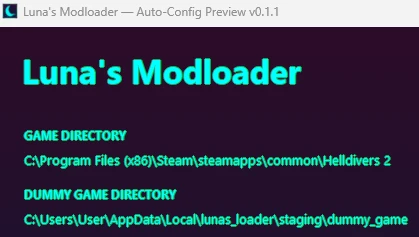
Installation with Luna
1. Close Helldivers 2.
2. Purge your current deployment before adding the ZIP.
3. Add the ZIP and rebuild the dummy.
4. Configure your earlier weapon mods first, then configure this mod.
5. Select your rifles and click **Configure for Luna**.
6. After the configuration window closes, click **Deploy** in Luna.
7. Launch the game normally through Steam.
Other mods that edit the same weapon data must preserve these changes. Changing your load order or an earlier mod’s settings may require reconfiguration.
Standalone installation
1. Extract the entire ZIP, including the **Configurator** folder.
2. Run **Sniper Third-Person Reticles v0.1.0.exe**.
3. Select your Helldivers 2 folder.
4. Choose your rifles and click **Install reticles**.
5. Launch the game normally.
Use one installation method. If Luna manages your deployed files, configure this mod through Luna.
Checking the reticles
Fully restart the game after applying changes. Equip the Sightliner or call down a fresh AMR or Apex, then aim over the shoulder.
Make sure reticle visibility is enabled in the game’s settings. Existing weapon instances can retain their previous settings until the game restarts.
Removal
Luna: Close the game, disable this mod, click **Purge**, then deploy your remaining mods.
Standalone: Close the game, run the configurator and click **Restore previous files** before deleting the mod folder.
Logs and troubleshooting
Logs are located at:
`%LOCALAPPDATA%\SniperThirdPersonReticles\Logs`
When reporting a problem, include the affected weapon, game build, mod order and logs.
No additional script loader or Experimental Lua setting is required.
**Experimental release:** File-generation, deployment and restoration checks have passed. Visibility and compatibility still need testing across different setups.
Version: v0.1.0 — 15.30 MB
Built for Steam game build 26251122.
NoMoFOMO + Hidden Content Unlocker Mod
Patreon: https://www.patreon.com/c/huff_designs
Ko-fi: https://ko-fi.com/huff_designs
Discord: https://discord.gg/rMYvNq9t8z
PayPal: contact me directly.
Enable the game’s native third-person aiming crosshair for supported rifles, with individual toggles for each weapon.
Supported weapons
- R-40 Sightliner
- APW-1 Anti-Materiel Rifle
- AMW-20 Apex
All three are enabled by default. Uncheck any rifle you want to leave unchanged.
The crosshair follows the weapon’s aim—it is not a fixed screen overlay. Damage, recoil, ammunition, handling and first-person scopes are unchanged.
Installation with Luna
1. Close Helldivers 2.
2. Purge your current deployment before adding the ZIP.
3. Add the ZIP and rebuild the dummy.
4. Configure your earlier weapon mods first, then configure this mod.
5. Select your rifles and click **Configure for Luna**.
6. After the configuration window closes, click **Deploy** in Luna.
7. Launch the game normally through Steam.
Other mods that edit the same weapon data must preserve these changes. Changing your load order or an earlier mod’s settings may require reconfiguration.
Standalone installation
1. Extract the entire ZIP, including the **Configurator** folder.
2. Run **Sniper Third-Person Reticles v0.1.0.exe**.
3. Select your Helldivers 2 folder.
4. Choose your rifles and click **Install reticles**.
5. Launch the game normally.
Use one installation method. If Luna manages your deployed files, configure this mod through Luna.
Checking the reticles
Fully restart the game after applying changes. Equip the Sightliner or call down a fresh AMR or Apex, then aim over the shoulder.
Make sure reticle visibility is enabled in the game’s settings. Existing weapon instances can retain their previous settings until the game restarts.
Removal
Luna: Close the game, disable this mod, click **Purge**, then deploy your remaining mods.
Standalone: Close the game, run the configurator and click **Restore previous files** before deleting the mod folder.
Logs and troubleshooting
Logs are located at:
`%LOCALAPPDATA%\SniperThirdPersonReticles\Logs`
When reporting a problem, include the affected weapon, game build, mod order and logs.
No additional script loader or Experimental Lua setting is required.
**Experimental release:** File-generation, deployment and restoration checks have passed. Visibility and compatibility still need testing across different setups.
Version: v0.1.0 — 15.30 MB
Built for Steam game build 26251122.