
This mod will receive more updates to improve the menu in the future.
HD2 Custom Mission Creator v2.0.0
Lets you edit almost any Helldivers mission, adding extra main, sub or side objectives.
Create your own mission variations directly aboard your ship through an in-game menu, with no Cheat Engine required. Choose an existing mission template, customise its objectives, and apply your changes before generating the mission.
Now includes biome selection and weighted two-biome mixing! Change the environment of your selected mission, or combine two biomes with adjustable weights.
Features
Requires Bingus Shared Loader API 1, installed separately, and a compatible Helldivers 2 mod manager with ZIP import and Purge/Deploy support.
Download and installation
Helpful information
Partial. In testing, added sub and side objectives appeared for all players, but terrain could differ between the host and other players. Colonies, Megafactories and Megacities appeared less affected.
Generating a mission without added sub and side objectives may help. Multiplayer biome selection and mixing are not confirmed to generate matching terrain for every player.
Troubleshooting
An objective will not add: Check the status message. It may already be present, or the template may have no usable slots left.
Changes do not appear: Confirm Review & Apply
HD2 Custom Mission Creator v2.0.0
Lets you edit almost any Helldivers mission, adding extra main, sub or side objectives.
Create your own mission variations directly aboard your ship through an in-game menu, with no Cheat Engine required. Choose an existing mission template, customise its objectives, and apply your changes before generating the mission.
Now includes biome selection and weighted two-biome mixing! Change the environment of your selected mission, or combine two biomes with adjustable weights.
Features
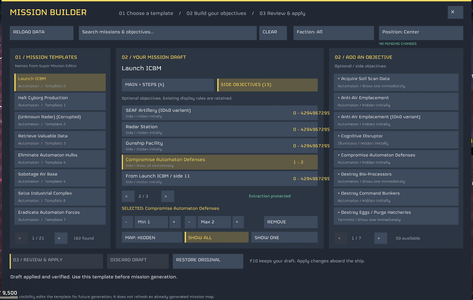
- Browse 162 named mission templates, with search and faction filters.
- Add main objectives, supporting sub-objectives and side objectives.
- Type minimum and maximum generation counts.
- Choose whether side objectives are hidden, show one, or show all on the mission map.
- Review changes, discard drafts, or restore original objectives from the current session.
- Search and select biomes for your selected Galactic Map mission.
- Mix two biomes with custom weights, quick 75/25, 50/50 and 25/75 presets, and a swap button.
- Clear Objectives / Biomes tabs and adjustable menu position.
- Keyboard and mouse capture while the menu is open, preventing typing and clicking from moving your character or firing weapons.
- F10 to open or close the editor.
Requires Bingus Shared Loader API 1, installed separately, and a compatible Helldivers 2 mod manager with ZIP import and Purge/Deploy support.
Download and installation
- Download the ZIP from this mod’s download section.
- Fully close Helldivers 2 and remove or disable any previous Custom Mission Creator version.
- Import the ZIP into your mod manager and enable it alongside Bingus Shared Loader API 1.
- Run Purge + Deploy, launch the game, remain aboard your ship, and press F10.
- In Objectives, click Load Templates and select a mission from the left-hand list.
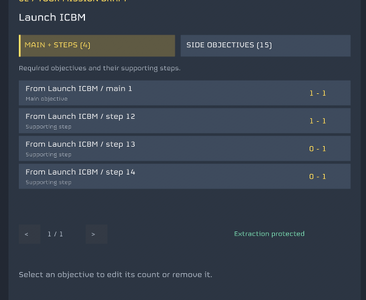
- Open Main + Steps or Side Objectives, then click an objective in the right-hand library to add it.
- Select an objective in your draft to adjust its counts or remove it. Click Min or Max, enter 0–100, and press Enter. Escape cancels text entry.
- For side objectives, choose Map: Hidden, Show all, or Show one.
- Click Review & Apply, then Confirm. Generate the affected mission afterward.
- As the lobby host, select a mission on the Galactic Map while aboard your ship.
- Open F10 → Biomes, select the Primary slot, then search for and choose a biome.
- For a blend, enable Blend two biomes, select Secondary, and choose a different biome.
- Choose a blend preset or click each weight and type a value from 0–1000. Weights are relative: 75/25 and 3/1 produce the same ratio. Both cannot be zero.
- Click Apply Biomes and wait until it says Ready to Launch before launching normally.
Helpful information
- Edit aboard the ship and generate the mission afterward. Objective edits change existing templates; they do not create new mission cards or refresh an already-generated map.
- The primary biome controls the sky and mission layout. Mixing affects terrain regions; weights do not guarantee exact percentages of land coverage or blend the weather and sky.
- Disable blending for primary-only selection. A zero secondary weight uses primary only; a zero primary weight uses secondary only, including its sky and layout.
- Not every biome pair or objective combination is compatible. Some objectives need supporting steps, specific factions, terrain or mission types. Dependencies are not added automatically.
- Templates have limited objective slots. Clicking an objective already in your draft selects it; increase its count to request more instances. Extraction records are protected.
- F10 keeps your draft during the current session. Drafts and restore backups are session-only; there is no persistent preset system.
- Game updates and other mods editing the same templates or biome data may cause conflicts. Restart after eight prepared biome mixes to clear retained resources.
Partial. In testing, added sub and side objectives appeared for all players, but terrain could differ between the host and other players. Colonies, Megafactories and Megacities appeared less affected.
Generating a mission without added sub and side objectives may help. Multiplayer biome selection and mixing are not confirmed to generate matching terrain for every player.
Troubleshooting
An objective will not add: Check the status message. It may already be present, or the template may have no usable slots left.
Changes do not appear: Confirm Review & Apply
