ModDiver Laboratory 1.8.5

A Mod for Helldivers 2
ModDiver Laboratory akl_mod_preview_image
  • page1.png
    page1.png
    50.8 KB · Views: 353
  • page3.png
    page3.png
    69.1 KB · Views: 352
  • page2.png
    page2.png
    51.2 KB · Views: 322
  • page5.png
    page5.png
    47.8 KB · Views: 327
  • page4.png
    page4.png
    87.7 KB · Views: 302
  • page6.png
    page6.png
    128.3 KB · Views: 250

UNINSTALL ANY VERSION BEFORE 1.8.5 THAN RUN THE ModDiver Laboratory.exe​

Shortcut will be made on desktop. All versions post 1.8.5 auto-update so no need to re-download.

ModDiver Laboratory v1.8.5 AUTO-UPDATE introduced — Detailed Description​

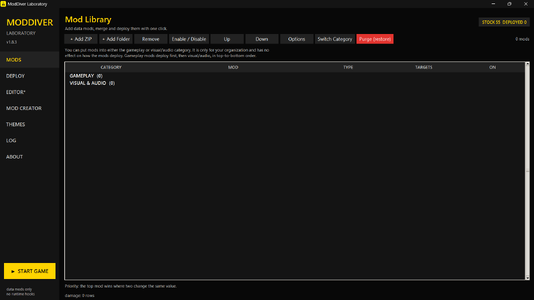
ModDiver Laboratory is a free, open-source Windows application for managing and editing Helldivers 2 game data. It brings a mod library, an offline mod merger, built-in editing tools, deployment and recovery controls, and game launching into one portable application.

The app includes its own Python runtime, so you do not need to install Python separately. It works with game files on disk and does not inject code into or hook the running game. Compatible Lua mods run through a selected in-game loader, not through the Laboratory itself.

Supported Mods and Formats​

ModDiver can import mods from ZIP files or folders. It supports:

  • Generated game-data files (.dl_bin): The Laboratory compares each mod’s file with a captured copy of the original game file, then merges compatible changes.
  • YAO and QET .stream descriptors: These contain information used to apply a matching game-data file. The Laboratory recognizes both descriptor types.
  • Arsenal patch files (.patch_N): Patch indices are reassigned during deployment so multiple patches can coexist.
  • GPU resource files: Companion .gpu_resources files are deployed with their patches.
  • General game-data files and assets: Files such as textures, audio and other assets can be backed up and deployed.
  • Manifests and options: The Laboratory reads manifest.json, hellforge-mod.json and mod.json. Supported Options and SubOptions are shown as choices when adding a mod.
  • Mixed mods: A single ZIP or folder can contain both mergeable .dl_bin files and ordinary assets.
New in 1.8.3: Chef-compatible Lua mods. Lua files are placed under the mod/ folder for the loader. The Laboratory includes Chef’s Shared Loader and Boot Mod Loader; only one can be deployed at a time. Lua compatibility depends on the mod and loader. DLL, EXE and ASI files are detected but not deployed.

Merge Engine​

The Merge Engine combines enabled mods offline using a captured stock copy of the game files as its baseline.

  1. It compares each mod’s game-data file with the stock file and identifies the changed byte ranges.
  2. It combines changes that can be applied together and logs conflicts with the affected offsets and mod names.
  3. Mods higher in the enabled list take priority when changes overlap.
  4. For five known game-data tables, it can also flag changes to different fields within the same fixed-size record as a possible conflict.
  5. If a candidate changes the file length, the Laboratory avoids merging by byte offsets and uses the highest-priority candidate for that file.
  6. The merged data is hash-corrected, sealed again, checked, and then written to the game.
The engine operates on file differences; it does not interpret every field in the game’s undocumented data formats. Its conflict report is intended to help identify collisions, not guarantee that every combination of mods will work in-game.

Editors and Mod Creation​

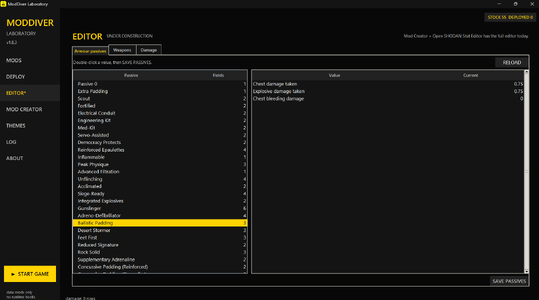
Three in-app editing tools cover passive bonuses, weapon handling and damage settings. The Laboratory also includes:

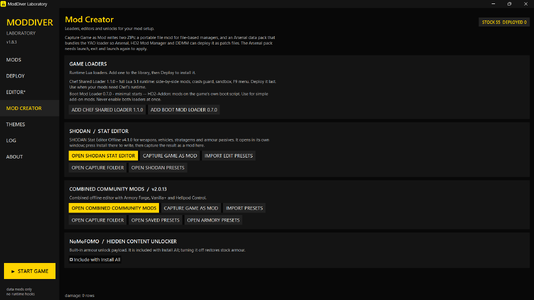
  • SHODAN Stat Editor Offline v4.1.0
  • Combined Community Mods v2.0.13, including Armory Forge, Vanilla+ and Hellpod tools
Edits and presets can be exported. The Laboratory can also capture game changes as a library mod, a portable ZIP, and an Arsenal data pack. Captured mods can be deployed directly from the Laboratory. Buttons in Mod Creator open the captured-mod and editor preset folders, and Armory Forge preset imports are saved in persistent storage.

The Arsenal data pack contains a YAO loader and patch files. Arsenal, HD2 Mod Manager and DDMM can deploy those patches. The pack checks that the target file matches the expected original, so it may not apply to a different game build. Its first installation requires launching the game, exiting normally, and launching it again. Do not enable another boot-replacement loader at the same time.

Deployment, Recovery and Safety​

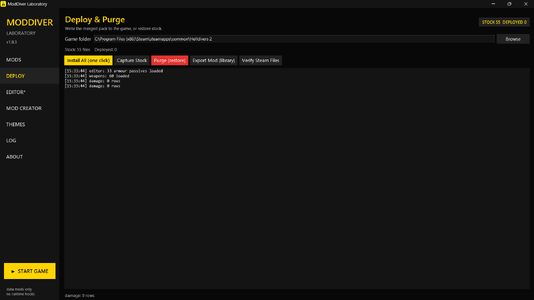
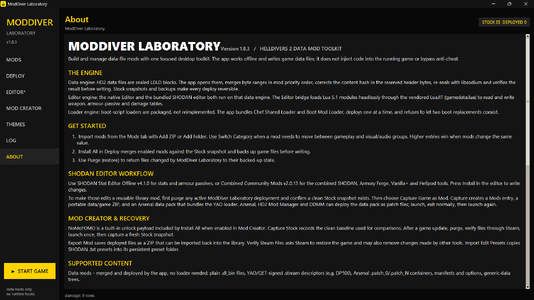
  • Install All deploys enabled mods and captures the stock baseline automatically if one does not exist.
  • Purge restores files the Laboratory backed up and removes files it added.
  • Verify Steam Files can restore game files through Steam.
  • Writes use a temporary file and an atomic replacement, reducing the chance of leaving a partially written game file.
  • Imported archives are checked for unsafe paths and size limits. Malformed or truncated sealed files are skipped with a log message.
  • The Laboratory does not deploy DLL, EXE or ASI injectors and does not bypass anti-cheat.
For a game update, purge the Laboratory’s deployed changes, verify the game files through Steam, launch the game once, and capture a new stock baseline before deploying mods again. A baseline from an older build may not be suitable for the updated game.

Other Features​

  • NoMoFOMO + Hidden Content Unlocker: A built-in on/off feature in Mod Creator.
  • Game launcher: Launch Helldivers 2 from the Laboratory.
  • Versioned application files: Separate versioned folders help avoid locked-DLL conflicts when launching updated copies.

Setup​

  1. Extract the release ZIP.
  2. Run ModDiver Laboratory.exe.
  3. If Windows warns that the app is unsigned, select More info → Run anyway, or unblock the file in its Properties.
  4. Use the About tab for feature guides.
The first Install All captures the stock baseline automatically. Do this while the game is clean and unmodded. Capture Stock clears the previous stock snapshot before creating a new one.

Credits​

  • SHODAN — Stat Editor and game-data hash correction and sealing components
  • Chef chfb — Chef Shared Loader
  • VeganSquid — Boot Mod Loader
  • Medic 3048 — File Mod Merger, whose merging model inspired this implementation
  • Cowboy Bingus — Bingus Shared Loader and Vanilla+ Megapack
  • huffdesigns — NoMoFOMO
  • Yao — ModDiver Laboratory and Merge Engine
See LICENSES.md in the release for third-party component licenses.
  • Like
Reactions: Djangozi
34 MB
Log in or sign up to download
Uploaded by
yaoMods
Downloads
184
Comments
14
Views
2,591
First release
Last update
Platform
PC 
Version
1.8.5
Total Size
34 MB
Rating
0.00 star(s) 0 ratings

Uploaded by

  • 184
  • 2,591

Ratings

0.00 star(s) 0 ratings

More mods from yaoMods

  • PC Realistic Athletic Helldiver

  • PC THE ILLUMINATE GREAT HOST

  • PC BETTER OR WORSE PASSIVES

  • PC Yao's Democracy Protects Streak Rebalance

Latest updates

  1. 1.8.5

    Adds the scroll and select all/none to options tab. Options tab is also made easier to see and...
  2. ModDiver Laboratory 1.8.3

    ModDiver Laboratory 1.8.3 Create and export mods: Capture game changes as a Laboratory mod, a...

yaoMods

Members
Members
Sep 22, 2026
12
8
Do we really need 10 new mod loaders released every day?
You don't. This uses Chef's Shared Loader architecture (the standard at this point for HD2 mods) but with more supported mod types and a built-in merge engine from Medic. In addition to the Community Stat Editor (has Bingus's MegaPack changes) with the option to turn your changes into a standalone mod that the ModDivers Lab can run. Mod Manager, ModBuilder, Mod Loader and Debugger. This is essentially an all in one tool for HD2.
 

yaoMods

Members
Members
Sep 22, 2026
12
8
This is actually a modder development tool, and the real front-end is mdl, which can implement transcription to the ffi layer
Not really - those deeper runtime/FFI layers are gone post-7.2.0 (no more LuaJIT/ffi). This tool stays offline for that reason.
 

yaoMods

Members
Members
Sep 22, 2026
12
8
So does this allow us to use old mods before EAC that ran off BSL?
Some older BSL data mods may work if they use a supported YAO-DLBRIDGE format and are compatible with your game build. ModDiver recalculates the data hash when merging. Mods that rely on BSL runtime features may not work. Chef-compatible Lua mods can be used with Chef’s Shared Loader.
 

Wandering Fox

Members
Members
Sep 27, 2026
9
0
Does this allow you to also install cosmetic/audio/etc mods that previously required Arsenal? I added a bunch of mods that I had in Arsenal to it and most of them seem to work, but I am having a problem getting BFA to work. Since I can't load 7z files, I extracted it into a folder and added the folder. It says that the mod targets 135 items, and when I deploy mods, I see the BFA edits going in, but nothing is changed in the game itself.

Concept mech works fine, as do glow/emissives for supply packs, resupply pods, SEAF shells, and pod icons, so I am not sure why BFA isn't working correctly.
 

yaoMods

Members
Members
Sep 22, 2026
12
8
Does this allow you to also install cosmetic/audio/etc mods that previously required Arsenal? I added a bunch of mods that I had in Arsenal to it and most of them seem to work, but I am having a problem getting BFA to work. Since I can't load 7z files, I extracted it into a folder and added the folder. It says that the mod targets 135 items, and when I deploy mods, I see the BFA edits going in, but nothing is changed in the game itself.

Concept mech works fine, as do glow/emissives for supply packs, resupply pods, SEAF shells, and pod icons, so I am not sure why BFA isn't working correctly.
I looked into the issue. ModDiver Lab fully supports Arsenal mods and all other possible cosmetic/audio mods, it also supports new types of mods that arsenal doesn't deploy. The ones that target data files.

For BFA, I only had problems locating the mod zip folder with (add zip, now fixed). However, after extracting it can be added to the library with (add folder). After that I deployed BFA with and without content unlocker but both worked fine so the merge engine did its job because they both target the same files. So I think the issue was with options in the library. Because BFA has a lot of options you have to pick and the default is 1, so you didn't see anything in-game because they weren't selected. That being said i also forgot to add the scroll feature to the options tab so even if you tried opening the options tab you would not be able to select all options.

I have now released the new 1.8.5 version which adds the scroll and select all/none to options tab. Options tab is also made easier to see. I have also added the auto-update feature in the About/Update section so now the program will update it self on its own. 7z is also a supported import format now.