Useful if you need to edit blueprint or apply Skeletalmesh Morph Fix Tool to your cooked assets.
I'm just providing this as a toolpack to help with the modding process. You can also use retocGUI or ReZen Tool.
If you use the Custom Engine version made for NTE, you don't need to apply any Skeletamesh Morph anymore!
I assume you've already cooked your asset with Unreal Editor 5.6 (stock) / Unreal Editor 5.6 (custom)
If you don't know how to do this, you must follow this tutorial. (This is mainly for stock version)
This pack include:
- retoc: https://github.com/trumank/retoc
- UAssetGUI: https://github.com/atenfyr/uassetgui
- cmd bat file (Based on SRCW, i've edited them to works for NTE)
(I don't know who originally created the .bat file, feel free to message me about it)
Instruction:
Drop them to :
Neverness To Everness\Client\WindowsNoEditor\HT\Content\Paks\~mods
Now you ready for testing!
Happy Modding!
I'm just providing this as a toolpack to help with the modding process. You can also use retocGUI or ReZen Tool.
If you use the Custom Engine version made for NTE, you don't need to apply any Skeletamesh Morph anymore!
I assume you've already cooked your asset with Unreal Editor 5.6 (stock) / Unreal Editor 5.6 (custom)
If you don't know how to do this, you must follow this tutorial. (This is mainly for stock version)
For custom Engine:
Open UnrealEditor.exe in the Win64 folder and create a new "HT" project
If the editor does not launch, create a working directory such as
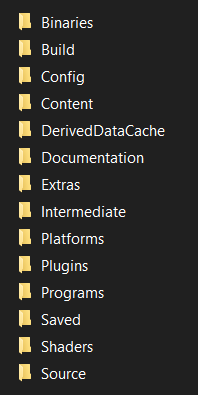
All of these files must be located in the “Engine” folder, which is itself located in the “Windows” folder.
You can choose the name of the top-level folder.
Open UnrealEditor.exe in the Win64 folder and create a new "HT" project
If the editor does not launch, create a working directory such as
X:\UE5-NTE\Windows\EngineAll of these files must be located in the “Engine” folder, which is itself located in the “Windows” folder.
You can choose the name of the top-level folder.
This pack include:
- retoc: https://github.com/trumank/retoc
- UAssetGUI: https://github.com/atenfyr/uassetgui
- cmd bat file (Based on SRCW, i've edited them to works for NTE)
(I don't know who originally created the .bat file, feel free to message me about it)
Instruction:
- Extract zip file anywhere
You may have to edit your game path directory in the .txt
- Put all your cooked assets from Unreal Engine 5.6 in "Game Mod" folder
Copy paste "HT" folder
Code:C:\users\%USERNAME%\Documents\Unreal Projects\HT\Saved\Cooked\Windows - Clean up your subfolder, remove any unused files (keep only your mod edit)
Apply any Morph fixes if necessary (not needed if you using the custom engine version), then run "RepackMod.bat" - Find your packed mod in Game Repack
All mod will be packed here.
Drop them to :
Neverness To Everness\Client\WindowsNoEditor\HT\Content\Paks\~mods
Now you ready for testing!
Happy Modding!