已经兼容621.24驱动
※※※请将版本驱动调整为616.64※※※
---------版本基于N卡开发 不确定其他卡能否正常使用
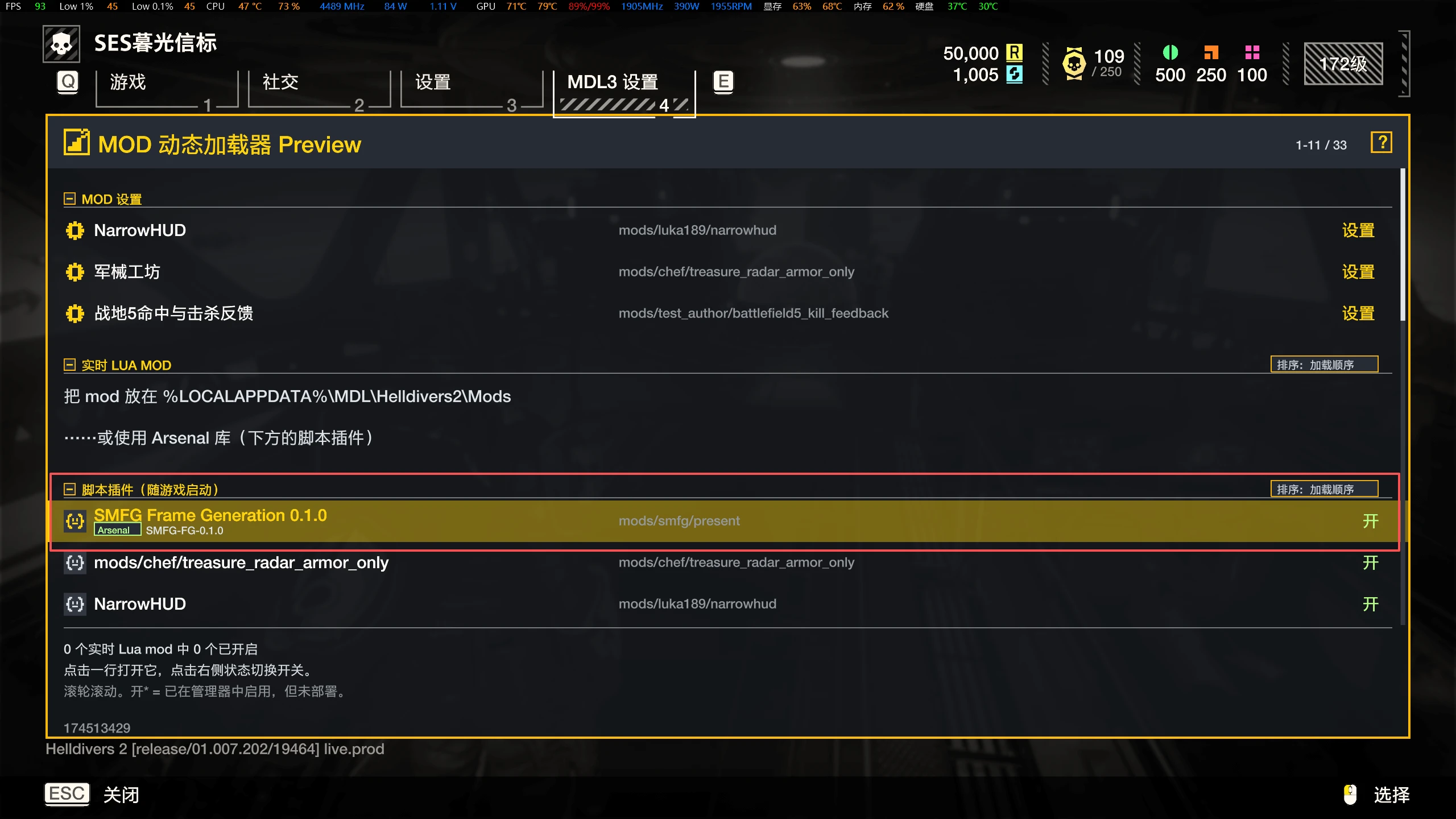
1.注意!这个MOD加载请放在所有MOD的最后加载,也就是最下面,优先级最后!之前写成优先级最高,是错误的!!
2.注意!如果进入游戏卡死,关游戏再进,多试几次就能正常了,而且会越来越流畅(不知道什么原因,但是我试了一整天试出来的)
3.注意,该mod只在N卡 616.64版本测试过,其他版本可能会出现卡死的情况!!!
4.配合BFV是可以稳定运行的,但是再加narrowHUD就不行,原因应该是屏幕插入的东西太多了,没MDL3强行卡掉了!!!!
依赖(必须先有)
本模块不是独立注入器,它跑在 MDL3 的 Lua 宿主里:
需要 MDL3(HD2 的 Lua 模组加载框架)。mod\SMFG-FG-<版本>.mod.zip 就是一个 MDL3 patch 包,里面只有 manifest.json + data\9ba626afa44a3aa3.patch_0。
需要用 Arsenal / MDL3 系的 Mod 管理器导入并启用;管理器负责把 patch 写进游戏的 data\,游戏启动时由 MDL3 把 mods/smfg/present 这个 Lua 宿主跑起来。
Lua 宿主会再调用 loadlib 加载 %LOCALAPPDATA%\SMFG\smfg_present.dll,这时插帧才开始工作。
没有 MDL3,或者没有通过管理器导入时,DLL 只会留在目录里,不会有任何效果:日志里不会出现 present_lua.log,也不会出现 fg12: hook: installed。
给《绝地潜兵 2》用的第三方帧生成模块:
实测
RTX 3080 Ti、2560×1440:源帧约 40 fps,上屏稳定在 80 fps 附近。连续 26 分 44 秒、62,160 个源帧、12 万余次呈现,fails=0,无崩溃、无显卡复位。
功能
插 1 帧或 2 帧:multiplier=2 让 40→80,3 让 40→120;显存或算力吃紧就留在 2。
上屏帧率上限:设成显示器刷新率,就不再多算没人看见的帧。
HUD 保护:文字、准星、罗盘单独处理,镜头移动时不再拖影;强度可调。
遮挡与静止场景:被遮住的区域、几乎不动的画面直接用真实帧,不做无意义的插值。
设备丢失自保:驱动把显卡摘掉时自动停止插帧、只做原样呈现,游戏继续跑。
控制面板:图形界面改全部参数,三档预设(标准 / 保守 / 只跑诊断);带 * 的项会提示需要重启游戏。
热更新:除少数启动期参数,其余改动约 5 秒内在游戏里生效,不用反复重启。
一键诊断包:点一下就把日志、显卡型号、驱动版本和 GPU 复位记录打包成一个 zip。
只挂钩子不生成(dryRun):用来判断某个现象是不是这个模块造成的。
总开关:enabled=0 时完全旁路,游戏按原版运行。
环境要求
项目 要求
系统 Windows 10 / 11 64 位
显卡 NVIDIA RTX 30 / 40 系
驱动 616.64(32.0.16.1664)实测通过;617.14 同分支但未实测;621.x 已知不可用
游戏 Helldivers 2 1.8.x(DX12)
分辨率 任意;1440p 是主要调优目标
安装
把 bin\smfg_present.dll 和 cfg\smfg.ini 一起放进 %LOCALAPPDATA%\SMFG\,两者必须同目录,否则参数不生效。
把 mod\SMFG-FG-<版本>.mod.zip 交给 Mod 管理器导入,不要解压。
把 bin\SMFG-Panel.exe 放在哪都行,它始终编辑上面提到的那个 ini。
怎么确认在跑
日志里出现 fg12: adapter '...' ... driver=...、fg12: hook: installed,以及结尾的 presents=… fails=0,就说明在跑。想确认参数读的是哪份 ini 时,查看面板底部状态栏的路径,或者日志里的 fg12: cfg: 行。
边界
不改游戏:不修改 helldivers2.exe,不替换游戏 DLL,不改安装目录里的原始文件;卸载就是删掉那个 Mod 归档。
不附带任何游戏素材,也不绕过购买或激活。
免费,仅限个人非商业使用;禁止转卖或收费分发。
游戏启用 Easy Anti-Cheat,第三方模块存在账号处罚风险,这一点无法消除,请自行判断是否使用。
Dependencies
This is not a standalone injector. It runs inside the MDL3 Lua host:
MDL3 is required (the Lua modding framework for HD2). mod\SMFG-FG-<version>.mod.zip is an MDL3 patch package containing only manifest.json and data\9ba626afa44a3aa3.patch_0.
Import and enable it through an Arsenal / MDL3-family mod manager. The manager writes the patch into the game's data\, and MDL3 runs the mods/smfg/present Lua host at start-up.
That Lua host then calls loadlib to load %LOCALAPPDATA%\SMFG\smfg_present.dll; only at that point does frame generation start.
Without MDL3 and without importing the package, the DLL just sits in the folder and nothing happens: no present_lua.log, and certainly no fg12: hook: installed.
A third-party frame-generation module for Helldivers 2: it inserts a frame between two rendered ones, roughly doubling the presented frame rate.
Measured
RTX 3080 Ti at 2560×1440: ~40 fps source, ~80 fps presented. Sustained 26 min 44 s, 62,160 source frames, 120k+ presents, fails=0, no crash, no GPU reset.
Features
One or two inserted frames: multiplier=2 gives 40→80, 3 gives 40→120; stay at 2 if VRAM or headroom is tight.
Present rate cap: set it to your refresh rate and stop paying for frames nobody sees.
HUD protection: text, crosshair and compass are handled separately so they don't smear when the camera moves; strength is adjustable.
Occlusion and near-static scenes: hidden regions and barely-moving frames use the real frame instead of being interpolated.
Device-loss safety: if the driver drops the device, generation switches off and only passthrough remains; the game keeps running.
Control panel: every setting in a GUI, three presets (standard / conservative / diagnose-only), restart-only keys marked *.
Hot reload: everything except a few startup-time keys applies within ~5 s; no restart.
One-click diagnostics: packages logs, GPU model, driver version and GPU reset records into a single zip.
Hook without generating (dryRun): tells you whether a symptom comes from this module at all.
Master switch: enabled=0 bypasses everything; the game runs stock.
Requirements
Item Requirement
OS Windows 10 / 11, 64-bit
GPU NVIDIA RTX 30 / 40 series
Driver 616.64 (32.0.16.1664) verified; 617.14 is the same branch but untested; 621.x is known broken
Game Helldivers 2 1.8.x (DX12)
Resolution any; 1440p is the tuning target
Install
Put bin\smfg_present.dll and cfg\smfg.ini into %LOCALAPPDATA%\SMFG\; they must sit in the same folder, or the settings won't apply.
Import mod\SMFG-FG-<version>.mod.zip through your mod manager; don't unpack it.
bin\SMFG-Panel.exe can live anywhere; it always edits the ini above.
How to tell it's running
If the log shows fg12: adapter '...' ... driver=..., fg12: hook: installed, and presents=… fails=0, it is running. To confirm which ini is being read, check the path in the panel's status bar, or the fg12: cfg: line in the log.
Scope
No game modification: helldivers2.exe is untouched, no game DLL is replaced, no original file in the install directory is changed. Uninstalling means deleting the mod archive.
No game assets are shipped, and nothing bypasses purchase or activation.
Free for personal, non-commercial use; resale or paid distribution is not permitted.
Helldivers 2 runs Easy Anti-Cheat; third-party modules carry a risk of account action that the author cannot remove; decide for yourself whether to use it.
Helldivers 2 及其素材归 Arrowhead Game Studios AB 与 Sony Interactive Entertainment 所有。本项目为第三方作品,与上述公司无隶属、无赞助、无认可关系。
Helldivers 2 and its assets belong to Arrowhead Game Studios AB and Sony Interactive Entertainment. This is an unofficial project with no affiliation, endorsement or sponsorship.
※※※请将版本驱动调整为616.64※※※
---------版本基于N卡开发 不确定其他卡能否正常使用
1.注意!这个MOD加载请放在所有MOD的最后加载,也就是最下面,优先级最后!之前写成优先级最高,是错误的!!
2.注意!如果进入游戏卡死,关游戏再进,多试几次就能正常了,而且会越来越流畅(不知道什么原因,但是我试了一整天试出来的)
3.注意,该mod只在N卡 616.64版本测试过,其他版本可能会出现卡死的情况!!!
4.配合BFV是可以稳定运行的,但是再加narrowHUD就不行,原因应该是屏幕插入的东西太多了,没MDL3强行卡掉了!!!!
依赖(必须先有)
本模块不是独立注入器,它跑在 MDL3 的 Lua 宿主里:
需要 MDL3(HD2 的 Lua 模组加载框架)。mod\SMFG-FG-<版本>.mod.zip 就是一个 MDL3 patch 包,里面只有 manifest.json + data\9ba626afa44a3aa3.patch_0。
需要用 Arsenal / MDL3 系的 Mod 管理器导入并启用;管理器负责把 patch 写进游戏的 data\,游戏启动时由 MDL3 把 mods/smfg/present 这个 Lua 宿主跑起来。
Lua 宿主会再调用 loadlib 加载 %LOCALAPPDATA%\SMFG\smfg_present.dll,这时插帧才开始工作。
没有 MDL3,或者没有通过管理器导入时,DLL 只会留在目录里,不会有任何效果:日志里不会出现 present_lua.log,也不会出现 fg12: hook: installed。
给《绝地潜兵 2》用的第三方帧生成模块:
实测
RTX 3080 Ti、2560×1440:源帧约 40 fps,上屏稳定在 80 fps 附近。连续 26 分 44 秒、62,160 个源帧、12 万余次呈现,fails=0,无崩溃、无显卡复位。
功能
插 1 帧或 2 帧:multiplier=2 让 40→80,3 让 40→120;显存或算力吃紧就留在 2。
上屏帧率上限:设成显示器刷新率,就不再多算没人看见的帧。
HUD 保护:文字、准星、罗盘单独处理,镜头移动时不再拖影;强度可调。
遮挡与静止场景:被遮住的区域、几乎不动的画面直接用真实帧,不做无意义的插值。
设备丢失自保:驱动把显卡摘掉时自动停止插帧、只做原样呈现,游戏继续跑。
控制面板:图形界面改全部参数,三档预设(标准 / 保守 / 只跑诊断);带 * 的项会提示需要重启游戏。
热更新:除少数启动期参数,其余改动约 5 秒内在游戏里生效,不用反复重启。
一键诊断包:点一下就把日志、显卡型号、驱动版本和 GPU 复位记录打包成一个 zip。
只挂钩子不生成(dryRun):用来判断某个现象是不是这个模块造成的。
总开关:enabled=0 时完全旁路,游戏按原版运行。
环境要求
项目 要求
系统 Windows 10 / 11 64 位
显卡 NVIDIA RTX 30 / 40 系
驱动 616.64(32.0.16.1664)实测通过;617.14 同分支但未实测;621.x 已知不可用
游戏 Helldivers 2 1.8.x(DX12)
分辨率 任意;1440p 是主要调优目标
安装
把 bin\smfg_present.dll 和 cfg\smfg.ini 一起放进 %LOCALAPPDATA%\SMFG\,两者必须同目录,否则参数不生效。
把 mod\SMFG-FG-<版本>.mod.zip 交给 Mod 管理器导入,不要解压。
把 bin\SMFG-Panel.exe 放在哪都行,它始终编辑上面提到的那个 ini。
怎么确认在跑
日志里出现 fg12: adapter '...' ... driver=...、fg12: hook: installed,以及结尾的 presents=… fails=0,就说明在跑。想确认参数读的是哪份 ini 时,查看面板底部状态栏的路径,或者日志里的 fg12: cfg: 行。
边界
不改游戏:不修改 helldivers2.exe,不替换游戏 DLL,不改安装目录里的原始文件;卸载就是删掉那个 Mod 归档。
不附带任何游戏素材,也不绕过购买或激活。
免费,仅限个人非商业使用;禁止转卖或收费分发。
游戏启用 Easy Anti-Cheat,第三方模块存在账号处罚风险,这一点无法消除,请自行判断是否使用。
Dependencies
This is not a standalone injector. It runs inside the MDL3 Lua host:
MDL3 is required (the Lua modding framework for HD2). mod\SMFG-FG-<version>.mod.zip is an MDL3 patch package containing only manifest.json and data\9ba626afa44a3aa3.patch_0.
Import and enable it through an Arsenal / MDL3-family mod manager. The manager writes the patch into the game's data\, and MDL3 runs the mods/smfg/present Lua host at start-up.
That Lua host then calls loadlib to load %LOCALAPPDATA%\SMFG\smfg_present.dll; only at that point does frame generation start.
Without MDL3 and without importing the package, the DLL just sits in the folder and nothing happens: no present_lua.log, and certainly no fg12: hook: installed.
A third-party frame-generation module for Helldivers 2: it inserts a frame between two rendered ones, roughly doubling the presented frame rate.
Measured
RTX 3080 Ti at 2560×1440: ~40 fps source, ~80 fps presented. Sustained 26 min 44 s, 62,160 source frames, 120k+ presents, fails=0, no crash, no GPU reset.
Features
One or two inserted frames: multiplier=2 gives 40→80, 3 gives 40→120; stay at 2 if VRAM or headroom is tight.
Present rate cap: set it to your refresh rate and stop paying for frames nobody sees.
HUD protection: text, crosshair and compass are handled separately so they don't smear when the camera moves; strength is adjustable.
Occlusion and near-static scenes: hidden regions and barely-moving frames use the real frame instead of being interpolated.
Device-loss safety: if the driver drops the device, generation switches off and only passthrough remains; the game keeps running.
Control panel: every setting in a GUI, three presets (standard / conservative / diagnose-only), restart-only keys marked *.
Hot reload: everything except a few startup-time keys applies within ~5 s; no restart.
One-click diagnostics: packages logs, GPU model, driver version and GPU reset records into a single zip.
Hook without generating (dryRun): tells you whether a symptom comes from this module at all.
Master switch: enabled=0 bypasses everything; the game runs stock.
Requirements
Item Requirement
OS Windows 10 / 11, 64-bit
GPU NVIDIA RTX 30 / 40 series
Driver 616.64 (32.0.16.1664) verified; 617.14 is the same branch but untested; 621.x is known broken
Game Helldivers 2 1.8.x (DX12)
Resolution any; 1440p is the tuning target
Install
Put bin\smfg_present.dll and cfg\smfg.ini into %LOCALAPPDATA%\SMFG\; they must sit in the same folder, or the settings won't apply.
Import mod\SMFG-FG-<version>.mod.zip through your mod manager; don't unpack it.
bin\SMFG-Panel.exe can live anywhere; it always edits the ini above.
How to tell it's running
If the log shows fg12: adapter '...' ... driver=..., fg12: hook: installed, and presents=… fails=0, it is running. To confirm which ini is being read, check the path in the panel's status bar, or the fg12: cfg: line in the log.
Scope
No game modification: helldivers2.exe is untouched, no game DLL is replaced, no original file in the install directory is changed. Uninstalling means deleting the mod archive.
No game assets are shipped, and nothing bypasses purchase or activation.
Free for personal, non-commercial use; resale or paid distribution is not permitted.
Helldivers 2 runs Easy Anti-Cheat; third-party modules carry a risk of account action that the author cannot remove; decide for yourself whether to use it.
Helldivers 2 及其素材归 Arrowhead Game Studios AB 与 Sony Interactive Entertainment 所有。本项目为第三方作品,与上述公司无隶属、无赞助、无认可关系。
Helldivers 2 and its assets belong to Arrowhead Game Studios AB and Sony Interactive Entertainment. This is an unofficial project with no affiliation, endorsement or sponsorship.