Treasure Radar
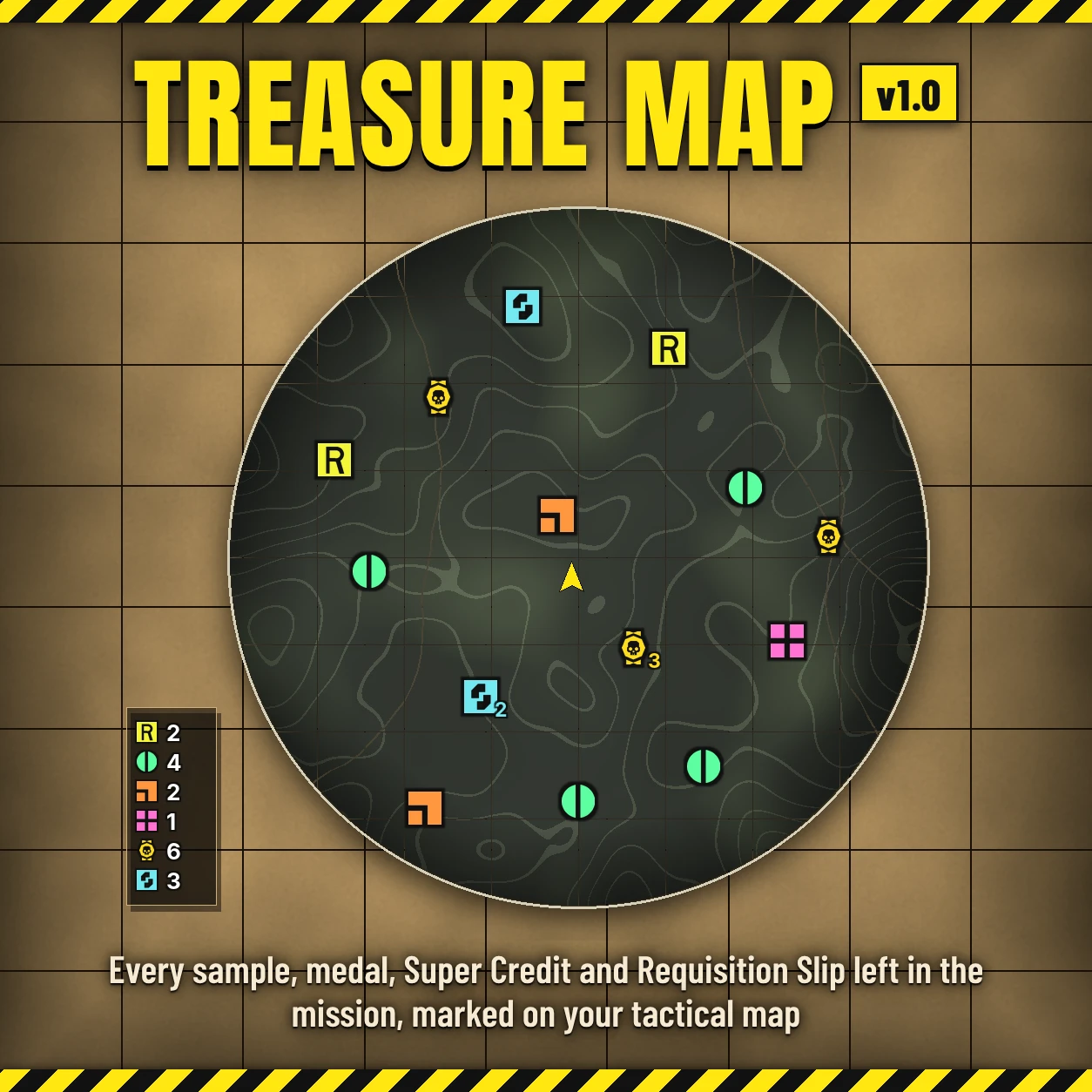
Every sample, medal, Super Credit, Requisition Slip and supply around you, on a sonar radar where your map opens.
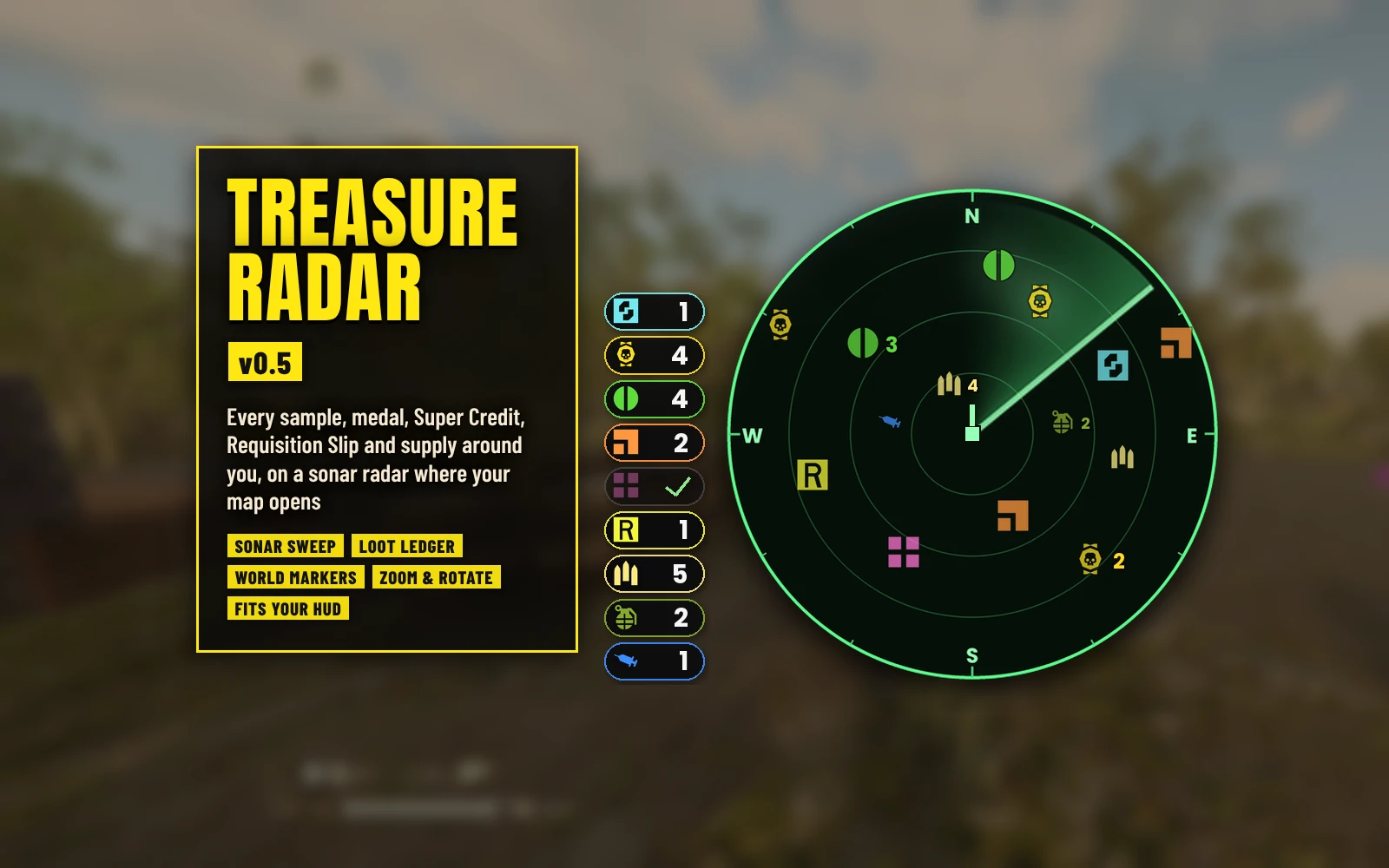
A round sonar radar sits where the game's map opens (bottom right) and shows the loot and supplies still lying around you, with a ledger of what's left in the mission and markers floating over the pickups near you. Sweep up the loot and restock before extraction instead of running back and forth looking for it. It's the successor of Treasure Map, rebuilt for the current game, and it has its own loader built in: nothing else to install.
Features
Options
In your mod manager (Arsenal / HD2 Mod Manager), on the mod's row:
Requirements
None. Treasure Radar has its own loader built in.
Install / update
Uninstall
Disable it in your mod manager, then Purge and Deploy. Its files in %LOCALAPPDATA% (treasure_radar.log, treasure_radar_state.txt, treasure_radar_trace.txt, treasure_radar_zoom.txt) can be deleted.
Compatibility
Known limitations
Troubleshooting
Credits
Source code
Source and every release are on GitHub: Th3chef/Treasure-Radar
Every sample, medal, Super Credit, Requisition Slip and supply around you, on a sonar radar where your map opens.
A round sonar radar sits where the game's map opens (bottom right) and shows the loot and supplies still lying around you, with a ledger of what's left in the mission and markers floating over the pickups near you. Sweep up the loot and restock before extraction instead of running back and forth looking for it. It's the successor of Treasure Map, rebuilt for the current game, and it has its own loader built in: nothing else to install.
Features
- Sonar radar: Super Credits, Medals, Common, Rare and Super Samples, Requisition Slips, ammo boxes, grenade packs and stim packs around you, each kind in its own color with the game's own pickup icons. A sweep turns every 3 seconds and each pickup lights up as it passes. North is up, with N, E, S and W on the rim, or the radar turns with you (Rotate With View).
- Where your map opens: the radar sits exactly where the game's map opens, so opening the map covers it and nothing else on your HUD moves. It follows your HUD Scale and HUD Edge Offset settings.
- Loot farther out: loot beyond the radar's range sits on its edge, pointing the way. Supplies only show inside the range.
- Piles: pickups of one kind lying together share one icon, with how many it stands for next to it.
- Loot ledger (optional): left of the radar, a pill for each kind, outlined in its color, with how many are still lying in the mission. It counts down as things are picked up, and a cleared kind turns gray with a check mark.
- World markers (optional): each pickup near you gets its icon floating over it in the world, with how far it is (25, 50 or 100 m; F8 hides or shows them). Pickups lying together share one marker with a count.
- Up to date: a pickup near you that's picked up (by you or anyone else) leaves the radar, the markers and the ledger at once; farther away, within 3 seconds.
- Zoom: the numpad's + and - step the radar's range from 50 to 500 m; it remembers the last one.
- Hide it: F7, or holding Tab for a moment, hides or shows the radar and the ledger (a tap still just opens the map).
- Your look: Opacity (100, 75, 50, 25 or 0%: at 0 only the icons and counts are left), Size (Small, Medium or Large) and the radar's Range (75 to 300 m).
- Pick what you want: each kind is its own option.
- Light and safe: it only works in missions, lists the pickups every 3 seconds spread over several frames, pauses that while there's nothing to show, and reads the game without changing anything in it.
Options
In your mod manager (Arsenal / HD2 Mod Manager), on the mod's row:
- Treasure Radar (core) - the radar. Keep this ticked.
- Loot Ledger - the pills left of the radar with how many of each kind are left.
- Opacity - 100% (without it), 75, 50, 25 or 0%: how solid the radar's panel and sweep and the ledger's pills are.
- Size - Medium (without it), Small or Large.
- Rotate With View - the radar turns with you instead of north up.
- World Markers - 50 m (default), 25 m or 100 m.
- Range - 150 m (without it), 75, 100, 200, 250 or 300 m.
- Super Credits, Medals, Common Samples, Rare Samples, Super Samples, Requisition Slips, Ammo Boxes, Grenade Packs, Stim Packs - each kind on its own.
Requirements
None. Treasure Radar has its own loader built in.
Install / update
- Mod manager (Arsenal / HD2 Mod Manager): add Treasure-Radar-0.5.1.zip and enable it, tick Treasure Radar (core), the kinds you want and any options, then Purge and Deploy.
- Coming from Treasure Map: disable or remove Treasure Map first (it needs the old loaders, which no longer work on the current game).
Uninstall
Disable it in your mod manager, then Purge and Deploy. Its files in %LOCALAPPDATA% (treasure_radar.log, treasure_radar_state.txt, treasure_radar_trace.txt, treasure_radar_zoom.txt) can be deleted.
Compatibility
- It replaces the game's empty boot script (that's how it loads), so it can't be used together with another mod that replaces boot, like a stand-alone mod loader. Everything else, HUD mods included, is fine.
- Only you see the radar, the ledger and the markers. Nobody else needs the mod.
- Reads the game only; it never changes anything in it.
- Made and tested on the October 2026 game version (the Lua 5.1 build).
Known limitations
- Enemy structures and side objectives aren't shown: nothing the mod can read changes when one is destroyed or done, so they would stay on the radar for the whole mission.
- The game's map covers the radar while it's open.
- The radar's spot is measured for HUD Scale 0.75 to 1.25 and any HUD Edge Offset with the default Map Position; with another Map Position it may sit a little off the map.
- Loot shows up once the game has spawned it near you (the list refreshes every 3 seconds).
Troubleshooting
- Nothing shows: check Treasure Radar (core) and at least one kind are ticked, that you Purged and Deployed, and that no other mod replaces the game's boot script. It only shows in missions.
- The radar sits off the map: post your resolution and HUD settings (HUD Scale, HUD Edge Offset, Map Position) with a screenshot with the map open.
- Attach the log to a bug report: treasure_radar.log in %LOCALAPPDATA% (type %LOCALAPPDATA% into the File Explorer address bar and press Enter). It shows the options you picked, your HUD settings, what it found in each mission and any errors.
Credits
- The pickup icons are copies of the game's own pickup icons.
- Fonts: Poppins, Anton and Barlow Condensed (SIL Open Font License).
Source code
Source and every release are on GitHub: Th3chef/Treasure-Radar