
![[Working as of 7.2.1] Stratagem extra pairs, Now with menu out of game akl_mod_preview_image](/data/mod_icons/4/4735.webp?1791668232)
# Stratagem Extra Pairs v2.0 — Up to 8 Stratagems!
***Conflicts with any mod that modifies generated_stratagem_settings.dl_bin like Balls Stay Put or SHODAN Stat Editor***
**By Miker and ChatGPT/Codex**
Link an extra stratagem to each of your four equipped stratagems, giving you up to **eight usable stratagems instead of four**.
For example: link **Machine Gun Sentry → Flame Sentry**. Equip Machine Gun Sentry in your loadout, and you also receive Flame Sentry in the mission.
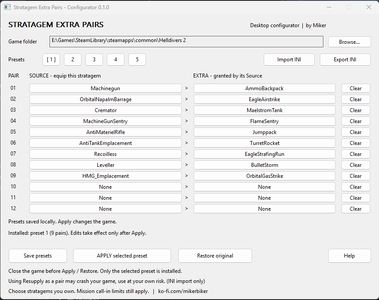
**v2.0 brings a standalone Windows configuration app: five presets, searchable choices, and one-click Apply. No Bingus Loader, Python, CMD scripts, memory scanning, or startup waiting required.**
## What's new in v2.0?
- **Five saved presets with 12 Source → Extra pairs each.** Prepare different loadouts for different factions.
- **Searchable Source and Extra pickers.** Click a choice, search, and double-click a result to select it.
- **One-click Apply** saves all five presets and installs the selected preset.
- **Import/export INI** to reuse or share configurations.
- **Restore original** removes the file modification while keeping your presets.
- **Automatic backups and file checks** protect the original resource and refuse conflicting modifications.
- Replaces the previous in-game menu and scanner with a desktop app. **Close the game before applying changes, then launch normally.**
## Requirements
- Windows 10/11, 64-bit.
- The supported Helldivers 2 PC files from the **October 22, 2026 update**, tested by Miker.
- Write access to your game folder.
No mod loader or mod manager is required. This package is opened directly, not imported into Arsenal. Compatibility is checked against exact game-file fingerprints; a later update may require an updated version of this app.
## Installation and use
1. Disable your previous loader-based Stratagem Extra Pairs mod, if installed. Keep your old INI if you want to import it.
2. Extract the ZIP into a folder outside the game directory.
3. Open **Stratagem-Pairs-Configurator.exe**.
4. If the game is not detected, click **Browse** and select your current `bin\helldivers2.exe`.
5. Select a preset using buttons **1–5**. Click a Source or Extra to choose a stratagem. **Clear** removes both sides of that row.
6. **Close Helldivers 2**, then click **APPLY selected preset** once.
7. Launch the game normally, equip your Sources, and start a mission. **There is no scan or waiting period.**
**Save presets** saves your choices without changing the game. **Apply** saves your choices and installs the selected preset. Switching preset buttons alone does not change what is installed; check the status line.
Changes stay installed between game sessions. You only need to open the app again when changing your configuration or restoring the original resource. F7 and other in-game menu bindings are not used in v2.0.
## Presets and default pairs
Preset 1 starts with these eight configured pairs. Presets 2–5 start empty.
| Source | Extra |
| --- | --- |
| OrbitalNapalmBarrage | EagleAirstrike |
| Cremator | MaelstromTank |
| MachineGunSentry | FlameSentry |
| AntiMaterielRifle | Jumppack |
| AntiTankEmplacement | TurretRocket |
| Recoilless | EagleStrafingRun |
| Leveller | BulletStorm |
| HMG_Emplacement | OrbitalGasStrike |
**Only equipped Sources grant Extras.** Twelve configured pairs let you cover alternative loadouts; they do not grant twelve Extras at once. Applying an empty preset restores the original stratagem resource.
## Existing users
**Desktop preview users:** close the old app and open the v2.0 EXE. Your existing presets, game location, and installation record are reused. No restore or reconfiguration is needed.
**File test v0.2 users:** the app recognizes the tested payload and adopts its verified original backup. Keep `generated_stratagem_settings.dl_bin.MikerPairsTest-v02.original` until the app has successfully applied once. Afterward, use the app's **Restore original** instead of the old Restore.cmd.
**v1.3/v1.4 users:** use **Import INI** to load your old settings. Import replaces all five preset choices after confirmation and backs up your previous saved settings. It does not apply them to the game until you click Apply.
Old 16-row INIs are compacted if necessary and contain at most twelve nonempty pairs. Files with more than twelve nonempty pairs are refused rather than truncated; split those pairs into presets before importing. The old MenuKey setting is ignored.
## Rules and known limitations
- **Eagles are Extras only.** Their built-in Eagle Rearm links are preserved.
- Duplicate Sources, duplicate Extras, self-links, and chains within a preset are not allowed. You can reuse choices in different presets.
- SEAF Squad, Eagle Rearm, and unsupported mission utilities are excluded from the picker.
- Resupply is hidden from the picker but remains accepted as an INI Source for existing configurations. **Using Resupply as a pair may crash your game, use at your own risk.**
- Choose stratagems you own and can normally select. Some catalogue entries may be unused, unreleased, or unavailable. Every entry and combination has not been individually verified.
- **The game's active-stratagem capacity is unchanged.** Using nine stratagems, including an Eagle and its Rearm, can leave no room for mission-specific call-ins such as SSSD, flags, or Hellbombs. Prefer eight stratagems; if using nine, avoid Eagles.
- Other mods that change `data\game\generated_stratagem_settings.dl_bin` conflict with this app. It refuses unrecognized resource contents. Compatibility with other mods is not universally verified.
## Restore / uninstall
1. Close Helldivers 2.
2. Open the app and click **Restore original**.
3. After restoration succeeds, you may delete the app folder. Your saved presets remain available.
Disabling a mod in a manager does not undo this direct file modification. Restore before installing another mod that changes the same resource.
The original backup is `data\game\generated_stratagem_settings.dl_bin.MikerPairs.original`. The adjacent `.MikerPairs.json` file is the installation/recovery record. Keep both while the modification is installed. Restore refuses unknown or newer resource contents rather than overwriting a game update.
## Settings and troubleshooting
Settings and logs are stored in:
`%APPDATA%\Miker\StratagemExtraPairs\`
- `settings.ini`: all five presets and the game location.
- `settings.ini.bak`: the previous saved configuration.
- `APP-LOG.txt`: application log.
**Export INI** exports all five presets without your local game path. Close the app before manually editing its saved INI.
If an operation fails, send the error text and APP-LOG.txt. Redact personal paths before posting publicly. Keep your original backups. An unsupported-build error may mean the game has updated; do not force an overwrite.
## Testing and source
**Miker reported successful testing of the file-based mod and the standalone configuration app.** v2.0 retains that tested implementation, with release version and documentation updates.
Offline checks cover resource generation, preserved Rearm links, twelve-pair configuration, INI migration, backup/restore, interrupted-operation recovery, conflicting-file refusal, and migration from the file test. These checks and Miker's tests do not verify every possible game configuration.
`Source.zip` contains the source code, build instructions, tests, and vendored dependencies. The package contains no private decryption key, game EXE/DLL, or memory scanner.
Credits: Miker and ChatGPT/Codex; the supplied HD2 Mod Development Guide and Developer Kit; [FileDiver contributors](https://github.com/xypwn/filediver); Go's cryptography libraries. See THIRD-PARTY-NOTICES.txt.
## Support
If you enjoy the mod, you can support Miker here: **https://ko-fi.com/mikerbiker**
***Conflicts with any mod that modifies generated_stratagem_settings.dl_bin like Balls Stay Put or SHODAN Stat Editor***
**By Miker and ChatGPT/Codex**
Link an extra stratagem to each of your four equipped stratagems, giving you up to **eight usable stratagems instead of four**.
For example: link **Machine Gun Sentry → Flame Sentry**. Equip Machine Gun Sentry in your loadout, and you also receive Flame Sentry in the mission.
**v2.0 brings a standalone Windows configuration app: five presets, searchable choices, and one-click Apply. No Bingus Loader, Python, CMD scripts, memory scanning, or startup waiting required.**
## What's new in v2.0?
- **Five saved presets with 12 Source → Extra pairs each.** Prepare different loadouts for different factions.
- **Searchable Source and Extra pickers.** Click a choice, search, and double-click a result to select it.
- **One-click Apply** saves all five presets and installs the selected preset.
- **Import/export INI** to reuse or share configurations.
- **Restore original** removes the file modification while keeping your presets.
- **Automatic backups and file checks** protect the original resource and refuse conflicting modifications.
- Replaces the previous in-game menu and scanner with a desktop app. **Close the game before applying changes, then launch normally.**
## Requirements
- Windows 10/11, 64-bit.
- The supported Helldivers 2 PC files from the **October 22, 2026 update**, tested by Miker.
- Write access to your game folder.
No mod loader or mod manager is required. This package is opened directly, not imported into Arsenal. Compatibility is checked against exact game-file fingerprints; a later update may require an updated version of this app.
## Installation and use
1. Disable your previous loader-based Stratagem Extra Pairs mod, if installed. Keep your old INI if you want to import it.
2. Extract the ZIP into a folder outside the game directory.
3. Open **Stratagem-Pairs-Configurator.exe**.
4. If the game is not detected, click **Browse** and select your current `bin\helldivers2.exe`.
5. Select a preset using buttons **1–5**. Click a Source or Extra to choose a stratagem. **Clear** removes both sides of that row.
6. **Close Helldivers 2**, then click **APPLY selected preset** once.
7. Launch the game normally, equip your Sources, and start a mission. **There is no scan or waiting period.**
**Save presets** saves your choices without changing the game. **Apply** saves your choices and installs the selected preset. Switching preset buttons alone does not change what is installed; check the status line.
Changes stay installed between game sessions. You only need to open the app again when changing your configuration or restoring the original resource. F7 and other in-game menu bindings are not used in v2.0.
## Presets and default pairs
Preset 1 starts with these eight configured pairs. Presets 2–5 start empty.
| Source | Extra |
| --- | --- |
| OrbitalNapalmBarrage | EagleAirstrike |
| Cremator | MaelstromTank |
| MachineGunSentry | FlameSentry |
| AntiMaterielRifle | Jumppack |
| AntiTankEmplacement | TurretRocket |
| Recoilless | EagleStrafingRun |
| Leveller | BulletStorm |
| HMG_Emplacement | OrbitalGasStrike |
**Only equipped Sources grant Extras.** Twelve configured pairs let you cover alternative loadouts; they do not grant twelve Extras at once. Applying an empty preset restores the original stratagem resource.
## Existing users
**Desktop preview users:** close the old app and open the v2.0 EXE. Your existing presets, game location, and installation record are reused. No restore or reconfiguration is needed.
**File test v0.2 users:** the app recognizes the tested payload and adopts its verified original backup. Keep `generated_stratagem_settings.dl_bin.MikerPairsTest-v02.original` until the app has successfully applied once. Afterward, use the app's **Restore original** instead of the old Restore.cmd.
**v1.3/v1.4 users:** use **Import INI** to load your old settings. Import replaces all five preset choices after confirmation and backs up your previous saved settings. It does not apply them to the game until you click Apply.
Old 16-row INIs are compacted if necessary and contain at most twelve nonempty pairs. Files with more than twelve nonempty pairs are refused rather than truncated; split those pairs into presets before importing. The old MenuKey setting is ignored.
## Rules and known limitations
- **Eagles are Extras only.** Their built-in Eagle Rearm links are preserved.
- Duplicate Sources, duplicate Extras, self-links, and chains within a preset are not allowed. You can reuse choices in different presets.
- SEAF Squad, Eagle Rearm, and unsupported mission utilities are excluded from the picker.
- Resupply is hidden from the picker but remains accepted as an INI Source for existing configurations. **Using Resupply as a pair may crash your game, use at your own risk.**
- Choose stratagems you own and can normally select. Some catalogue entries may be unused, unreleased, or unavailable. Every entry and combination has not been individually verified.
- **The game's active-stratagem capacity is unchanged.** Using nine stratagems, including an Eagle and its Rearm, can leave no room for mission-specific call-ins such as SSSD, flags, or Hellbombs. Prefer eight stratagems; if using nine, avoid Eagles.
- Other mods that change `data\game\generated_stratagem_settings.dl_bin` conflict with this app. It refuses unrecognized resource contents. Compatibility with other mods is not universally verified.
## Restore / uninstall
1. Close Helldivers 2.
2. Open the app and click **Restore original**.
3. After restoration succeeds, you may delete the app folder. Your saved presets remain available.
Disabling a mod in a manager does not undo this direct file modification. Restore before installing another mod that changes the same resource.
The original backup is `data\game\generated_stratagem_settings.dl_bin.MikerPairs.original`. The adjacent `.MikerPairs.json` file is the installation/recovery record. Keep both while the modification is installed. Restore refuses unknown or newer resource contents rather than overwriting a game update.
## Settings and troubleshooting
Settings and logs are stored in:
`%APPDATA%\Miker\StratagemExtraPairs\`
- `settings.ini`: all five presets and the game location.
- `settings.ini.bak`: the previous saved configuration.
- `APP-LOG.txt`: application log.
**Export INI** exports all five presets without your local game path. Close the app before manually editing its saved INI.
If an operation fails, send the error text and APP-LOG.txt. Redact personal paths before posting publicly. Keep your original backups. An unsupported-build error may mean the game has updated; do not force an overwrite.
## Testing and source
**Miker reported successful testing of the file-based mod and the standalone configuration app.** v2.0 retains that tested implementation, with release version and documentation updates.
Offline checks cover resource generation, preserved Rearm links, twelve-pair configuration, INI migration, backup/restore, interrupted-operation recovery, conflicting-file refusal, and migration from the file test. These checks and Miker's tests do not verify every possible game configuration.
`Source.zip` contains the source code, build instructions, tests, and vendored dependencies. The package contains no private decryption key, game EXE/DLL, or memory scanner.
Credits: Miker and ChatGPT/Codex; the supplied HD2 Mod Development Guide and Developer Kit; [FileDiver contributors](https://github.com/xypwn/filediver); Go's cryptography libraries. See THIRD-PARTY-NOTICES.txt.
## Support
If you enjoy the mod, you can support Miker here: **https://ko-fi.com/mikerbiker**


![[Working as of 7.2.1] JUMP PACK HALF RECHARGE TIME Mod](/data/mod_icons/4/4318.webp?1790643588 "[Working as of 7.2.1] JUMP PACK HALF RECHARGE TIME Mod for Helldivers 2")
![[OUTDATED] Hellbomb Anywhere Mod](/data/mod_icons/5/5224.webp?1792336110 "[OUTDATED] Hellbomb Anywhere Mod for Helldivers 2")
![[OUTDATED] MA5C Halo rifle 60 round mags Mod](/data/mod_icons/4/4076.webp?1790206231 "[OUTDATED] MA5C Halo rifle 60 round mags Mod for Helldivers 2")
![[OUTDATED] Moor Mushroom Launch like old times Mod](/data/mod_icons/4/4412.webp?1790804290 "[OUTDATED] Moor Mushroom Launch like old times Mod for Helldivers 2")
![[OUTDATED] Warp Pack Cooling doubled Mod](/data/mod_icons/4/4370.webp?1790730989 "[OUTDATED] Warp Pack Cooling doubled Mod for Helldivers 2")