
This mod will be receiving more updates to improve the menu in the future.
HD2 Custom Mission Creator v1.0.1 (small mod conflict fix)
Lets you edit almost any Helldivers mission, adding extra main, sub or side objectives.
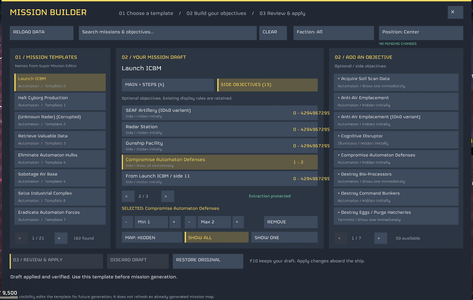
Create your own mission variations directly aboard your ship through an in-game menu—no Cheat Engine required. Choose an existing mission template, customise its objectives, and apply your changes before generating the mission.
Features
Requires Bingus Shared Loader, installed separately, and a compatible Helldivers 2 mod manager with ZIP import and Purge/Deploy support.
Download and installation
Helpful information
Yes and No. Sub and Side objectives spawn in for all players but terrain generates different for Host and others. Though Colonies, Megafactories and Megacities should not have this issue.
Or just generate a mission without set sub and side objectives and it should work fine aswell.
Troubleshooting
An objective will not add: Read the status message at the bottom. It may already be present, or the template may have no usable slots remaining.
Changes do not appear: Make sure you confirmed Review & Apply and generated a new mission using the edited template.
For bug reports, include the mision template ID/name, objective name, displayed error and CustomMissionCreator.log.
The log is normally located at:
%LOCALAPPDATA%/CowboyBingus/Helldivers2/Logs/CustomMissionCreator.log
Credits
Mission layout and mission names are based on S’Super Mission Editor v1.0.4.1.3. Runs through Bingus Shared Loader. Thanks to the original tool and loader authors and ChatGPT Astra for making pretty much everything work.
HD2 Custom Mission Creator v1.0.1 (small mod conflict fix)
Lets you edit almost any Helldivers mission, adding extra main, sub or side objectives.
Create your own mission variations directly aboard your ship through an in-game menu—no Cheat Engine required. Choose an existing mission template, customise its objectives, and apply your changes before generating the mission.
Features
- Browse 162 named mission templates.
- Search missions and objectives, with faction filters.
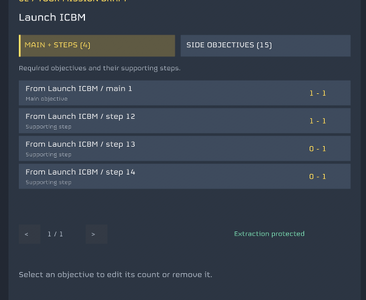
- Add main objectives, supporting sub-objectives and side objectives.
- Type minimum and maximum generation counts.
- Choose whether side objectives are hidden, show one, or show all on the mission map.
- Review changes before applying them.
- Discard unfinished drafts or restore original objectives from the current session.
- Adjustable menu position.
- F10 to open or close the editor.
Requires Bingus Shared Loader, installed separately, and a compatible Helldivers 2 mod manager with ZIP import and Purge/Deploy support.
Download and installation
- Download the mod’s download section.
- Fully close Helldivers 2.
- Remove or disable any previous Custom Mission Creator version.
- Import the ZIP into your mod manager and enable it.
- Make sure Bingus Shared Loader API 1 is also enabled.
- Run Purge + Deploy.
- Launch the game, remain aboard your ship, and press F10.
- Click Load Templates and select a mission from the left-hand list.
- Open Main + Steps or Side Objectives.
- Click an objective in the right-hand library to add it.
- Select an objective in your draft to adjust its counts or remove it.
- Click Min or Max, type a number from 0–100, and press Enter. Escape cancels text entry.
- For side objectives, choose Map: Hidden, Show all, or Show one.
- Click Review & Apply, then Confirm.
- Generate the affected mission afterward.
Helpful information
- Editing must be done aboard the ship.
- This changes existing mission templates; it does not create new mission cards or refresh an already-generated mission map.
- Main objectives may require supporting steps. These dependencies are not added automatically.
- Some objectives require specific factions, terrain or mission types. Not every combination will work.
- Templates have limited objective slots. If a template is full, remove an existing objective before adding another.
- Clicking an objective already in your draft selects it. Increase its count to request more instances.
- Extraction records are protected.
- Drafts and restore backups are session-only; there is no persistent preset system.
- Game updates may require a mod update. Other mods editing the same mission templates may conflict.
Yes and No. Sub and Side objectives spawn in for all players but terrain generates different for Host and others. Though Colonies, Megafactories and Megacities should not have this issue.
Or just generate a mission without set sub and side objectives and it should work fine aswell.
Troubleshooting
An objective will not add: Read the status message at the bottom. It may already be present, or the template may have no usable slots remaining.
Changes do not appear: Make sure you confirmed Review & Apply and generated a new mission using the edited template.
For bug reports, include the mision template ID/name, objective name, displayed error and CustomMissionCreator.log.
The log is normally located at:
%LOCALAPPDATA%/CowboyBingus/Helldivers2/Logs/CustomMissionCreator.log
Credits
Mission layout and mission names are based on S’Super Mission Editor v1.0.4.1.3. Runs through Bingus Shared Loader. Thanks to the original tool and loader authors and ChatGPT Astra for making pretty much everything work.
