
DESCRIPTION
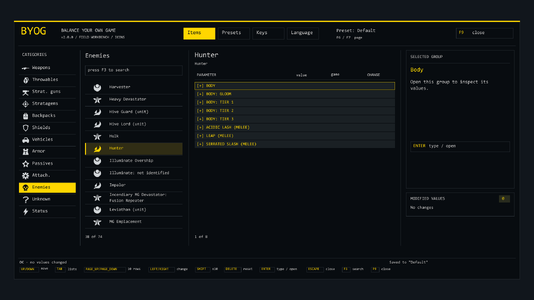
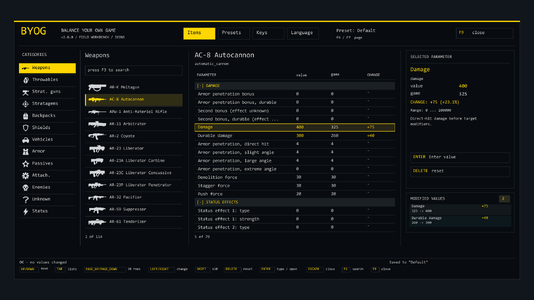
BYOG (Balance Your Own Game) lets you change the numbers of Helldivers 2 from inside the game. Press F9, pick a weapon, a grenade, a stratagem, a backpack, a shield or a vehicle, and change its values one by one: damage, armor penetration, fire rate, recoil, magazine size, blast radius, cooldowns, sentry lifetime, vehicle health and much more. The change applies at once and is remembered the next time you start the game.
Every value is set on its own, for one item at a time. In the game's data many weapons share the same round (the Liberator and the Stalwart, a machine gun sentry and the MG-43). BYOG gives an item its own data the moment you change it, so making one weapon stronger does not quietly change another.
It is made for playing with friends who know you are using it: your own difficulty, your own balance, your own silly loadouts.
INSTALLATION INSTRUCTIONS
1. Install Bingus Shared Loader (v15 or newer) and a mod manager that installs addon packages (Arsenal).
2. Add BYOG-v1.0.1.zip to the mod manager, enable it, deploy.
3. Start the game and press F9.
To uninstall, disable the mod in the manager. Your settings are kept in %LOCALAPPDATA%\BYOG; delete that folder to forget them.
Menu keys (all of them can be changed on the Keys page):
- F9: open / close
- F6 / F7: previous / next page
- Up / Down, PageUp / PageDown: move
- Tab: switch between the item list and the value list
- Left / Right: change category, or lower / raise the selected value (hold Shift for ten times the step)
- Insert: in the item list, open the search; on a value, type the number in; confirms what you typed
- End: cancel what you are typing; clear the search
- Delete: put the value back to the game's own
- F3: search
MAIN FEATURES
- In-game menu in the middle of the screen, with search and with the values of an item grouped under headings (damage, status effects, explosion, projectile, fire, ammo, handling...).
- Weapons (114 primary, secondary, support and melee): damage, durable damage, armor penetration per angle, demolition, stagger, push, fire rate, projectile speed, drag and gravity, pellets, blast radius and blast damage, magazine size and counts, recoil, spread, sway, ergonomics, heat, status effects (set enemies on fire, gas, stun...).
- Throwables (31): amounts, fuse, throw distance, blast radius and damage.
- Stratagem weapons (53): the guns of sentries, emplacements, guard dogs, exosuits and the Eagle, and the shells of orbital and Eagle strikes, with the same values as a hand weapon. Sentries also have a lifetime and a sight range.
- Stratagems (149): cooldown and number of uses.
- Backpacks (18): charges, starting charges, refill.
- Shields (4): health, radius, recharge delay and rate.
- Vehicles (14): health, armor, and for every part (legs, cockpit, doors, tracks...) its own health, armor and how much of its damage reaches the vehicle.
- "Explode like": make a weapon or grenade use the explosion of another item (a grenade launcher that leaves gas, a frag grenade that leaves fire).
- Everything is undone when you remove a change, and nothing stays in the game's files: the mod works in memory only.
- A config file for people who prefer text: %LOCALAPPDATA%\BYOG\config.txt, with every item, value and allowed range listed in catalog.txt. STATUS.txt tells you what was applied.
- Safe by design: the mod checks the game's files first and writes nothing on a game version it was not made for; every value is range-checked and read back.
REQUIREMENTS
- Bingus Shared Loader v15 or newer. It is the only requirement.
- Helldivers 2 game build release/01.007.101. After a game update the mod loads but changes nothing until a new version of BYOG is released (STATUS.txt says so).
Good to know:
- While the menu is open the game still receives your key presses. Typing a search moves your character, so use the menu on the ship or when it is safe.
- Some values are read by the game when a thing is created: a magazine size or a vehicle's health shows on the next weapon or vehicle, a stratagem's cooldown after its next use.
- More than 1023 rounds: a weapon can start a mission with more, but the game's resupply fills up to 1023 at most. The menu warns you.
- Some items are still shown by the game's internal name instead of the name you know. Corrections are welcome.
- Multiplayer worked without problems in our own lobbies. Please use it with people who agree to it, not on strangers.
- Use at your own risk. This mod is not made, approved or supported by Arrowhead Game Studios or Sony.
Source code (MIT license): https://github.com/KEGstudios/byog
SHOUT OUTS
- The author of Bingus Shared Loader, without which none of this would run.
- The FileDiver project and the people who documented the game's data formats; the research for this mod stands on their work.
- Our friends who tested build after build and reported every odd explosion.
!!!Do NOT use this mod in multiplayer as it can ruin other players game and fun. Use responsibly!!!
BYOG (Balance Your Own Game) lets you change the numbers of Helldivers 2 from inside the game. Press F9, pick a weapon, a grenade, a stratagem, a backpack, a shield or a vehicle, and change its values one by one: damage, armor penetration, fire rate, recoil, magazine size, blast radius, cooldowns, sentry lifetime, vehicle health and much more. The change applies at once and is remembered the next time you start the game.
Every value is set on its own, for one item at a time. In the game's data many weapons share the same round (the Liberator and the Stalwart, a machine gun sentry and the MG-43). BYOG gives an item its own data the moment you change it, so making one weapon stronger does not quietly change another.
It is made for playing with friends who know you are using it: your own difficulty, your own balance, your own silly loadouts.
INSTALLATION INSTRUCTIONS
1. Install Bingus Shared Loader (v15 or newer) and a mod manager that installs addon packages (Arsenal).
2. Add BYOG-v1.0.1.zip to the mod manager, enable it, deploy.
3. Start the game and press F9.
To uninstall, disable the mod in the manager. Your settings are kept in %LOCALAPPDATA%\BYOG; delete that folder to forget them.
Menu keys (all of them can be changed on the Keys page):
- F9: open / close
- F6 / F7: previous / next page
- Up / Down, PageUp / PageDown: move
- Tab: switch between the item list and the value list
- Left / Right: change category, or lower / raise the selected value (hold Shift for ten times the step)
- Insert: in the item list, open the search; on a value, type the number in; confirms what you typed
- End: cancel what you are typing; clear the search
- Delete: put the value back to the game's own
- F3: search
MAIN FEATURES
- In-game menu in the middle of the screen, with search and with the values of an item grouped under headings (damage, status effects, explosion, projectile, fire, ammo, handling...).
- Weapons (114 primary, secondary, support and melee): damage, durable damage, armor penetration per angle, demolition, stagger, push, fire rate, projectile speed, drag and gravity, pellets, blast radius and blast damage, magazine size and counts, recoil, spread, sway, ergonomics, heat, status effects (set enemies on fire, gas, stun...).
- Throwables (31): amounts, fuse, throw distance, blast radius and damage.
- Stratagem weapons (53): the guns of sentries, emplacements, guard dogs, exosuits and the Eagle, and the shells of orbital and Eagle strikes, with the same values as a hand weapon. Sentries also have a lifetime and a sight range.
- Stratagems (149): cooldown and number of uses.
- Backpacks (18): charges, starting charges, refill.
- Shields (4): health, radius, recharge delay and rate.
- Vehicles (14): health, armor, and for every part (legs, cockpit, doors, tracks...) its own health, armor and how much of its damage reaches the vehicle.
- "Explode like": make a weapon or grenade use the explosion of another item (a grenade launcher that leaves gas, a frag grenade that leaves fire).
- Everything is undone when you remove a change, and nothing stays in the game's files: the mod works in memory only.
- A config file for people who prefer text: %LOCALAPPDATA%\BYOG\config.txt, with every item, value and allowed range listed in catalog.txt. STATUS.txt tells you what was applied.
- Safe by design: the mod checks the game's files first and writes nothing on a game version it was not made for; every value is range-checked and read back.
REQUIREMENTS
- Bingus Shared Loader v15 or newer. It is the only requirement.
- Helldivers 2 game build release/01.007.101. After a game update the mod loads but changes nothing until a new version of BYOG is released (STATUS.txt says so).
Good to know:
- While the menu is open the game still receives your key presses. Typing a search moves your character, so use the menu on the ship or when it is safe.
- Some values are read by the game when a thing is created: a magazine size or a vehicle's health shows on the next weapon or vehicle, a stratagem's cooldown after its next use.
- More than 1023 rounds: a weapon can start a mission with more, but the game's resupply fills up to 1023 at most. The menu warns you.
- Some items are still shown by the game's internal name instead of the name you know. Corrections are welcome.
- Multiplayer worked without problems in our own lobbies. Please use it with people who agree to it, not on strangers.
- Use at your own risk. This mod is not made, approved or supported by Arrowhead Game Studios or Sony.
Source code (MIT license): https://github.com/KEGstudios/byog
SHOUT OUTS
- The author of Bingus Shared Loader, without which none of this would run.
- The FileDiver project and the people who documented the game's data formats; the research for this mod stands on their work.
- Our friends who tested build after build and reported every odd explosion.
!!!Do NOT use this mod in multiplayer as it can ruin other players game and fun. Use responsibly!!!


Pinned comment