
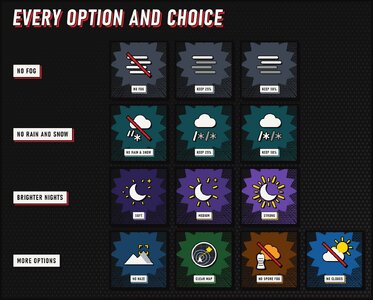
No fog • No distance haze • No rain and snow • Brighter nights • Clear map • No Spore Spewer fog • No clouds
Clear Visibility clears the air on every planet. The fog is gone, mountains and bases on the horizon stay sharp, rain and snow stop falling around you, the clouds can clear from the sky, and bug spores no longer cover your map, so you can read the battlefield and spot what is coming from much further away.
Each part is its own option in HD2 Arsenal, so you keep only what you want. Fog, rain and snow, and the brighter nights come in strengths: clear them completely, or keep some of the planet's mood.
Version 1.0.15 works with the current game. It installs through HD2 Arsenal.
- No fog. Turns the fog off on every planet, including ground mist and the mist that settles in valleys. Gas, smoke and the fog around Spore Spewers still show. Pick how much fog is left: Remove all, or Keep 25% or Keep 50% to make it a quarter or half as thick, so the planet keeps some of its mood while you see farther.
- No distance haze. Removes the haze that hides far away terrain, so ridges, outposts and enemy structures stay crisp all the way to the horizon. The sky, the sun and the clouds keep their look.
- No rain and snow. Stops rain and snow falling around you and hides the storms on the horizon. Pick Remove all, or Keep 25% or Keep 50% to see them at a quarter or half of their strength.
- Brighter nights. Removing fog makes the dark darker, so this option lets the camera brighten dark scenes. Nights, dusk and dark places are no longer pitch black, and bright daylight stays the same. Pick a strength: Subtle is the darkest, about halfway between the game's own nights and Soft, with deep shadows and just enough light to see enemies. Soft keeps nights dark and moody but lets you see where you are going, Medium lets you see well across the battlefield while it still looks like night, Strong makes nights almost as bright as day. The glow around the moon and other lights at night is toned down to match, so the moon glares much less.
- Clear map. Removes the bug spore clouds that cover the map and the minimap on missions with Atmospheric Spores, so terrain, objectives and markers stay readable. The mission map on the war table is clear too.
- No Spore Spewer fog. Removes the thick spore fog around Spore Spewers, so you can see the spewer and the bugs around it. Gas still shows. It also clears the pale mist patches some planets have, even when No fog keeps some fog. Leave it unticked if you want the spewers to keep their fog.
- No clouds. Removes the clouds from the sky on every planet, high clouds included, and the shadows they cast on the ground. Leave it unticked if you like your clouds.
- No graphics preset needed. Every option works at any Volumetric Fog quality, from Low to Ultra.
- Your ship keeps its look. The Super Destroyer keeps its own lighting and atmosphere.
- Works next to other mods that don't change fog, weather or the map.
- Remove any other fog or weather mod.
- Download the main file and import the ZIP into HD2 Arsenal.
- Enable Clear Visibility and tick the options you want: No fog, No distance haze, No rain and snow, Brighter nights, Clear map, No Spore Spewer fog and No clouds. Where an option has choices, pick one.
- Deploy and play.
Updating? Import the new ZIP over the old one. HD2 Arsenal keeps the options you ticked and the choices you picked, and an option that gets choices for the first time starts on its first one, so nothing changes until you pick something new.
Clear Visibility changes some of the game's own graphics files. If a Helldivers 2 update changes them, the mod can stop working or look wrong until I update it. If the game won't start or looks wrong after a patch, untick No fog, No distance haze, Clear map, No Spore Spewer fog and No clouds and deploy again.
Rainstorms, blizzards and sandstorms are switched off by the same settings as snow, but not every weather has been seen in a mission yet. If one still shows up, let me know the planet and the weather. If nights look too bright or still too dark with Brighter nights, or the moon still glares, tell me the planet and which strength you picked. If clouds still show on a planet with No clouds, tell me the planet and the weather.
Tell me the mod version, the planet, the weather, which options you had ticked and which choices you picked. A screenshot looking toward the horizon helps a lot.
Clear Visibility works like a cosmetic mod: it swaps graphics files that the game loads itself, the same way skin and texture mods do, and it only changes what you see on your own screen. It doesn't hook into the game or read its memory, which is the kind of mod Arrowhead's November dev blog warns about. Your squad doesn't need it to play with you. Mods are still not officially supported, so as with any mod, use it at your own risk.


Pinned comment