Stratagem Extra Pairs v1.3 — Up to 9 Stratagems!
By Miker and ChatGPT/Codex
For example:
Alternative: Advanced users can still edit settings.ini manually at:
%LOCALAPPDATA%\CowboyBingus\Helldivers2\StratagemExtraPairs
Close the game before manually editing the file.
Note: The game seems to become unstable or crash when more than 10 stratagems are prepared. Maybe someone will find a workaround!
Using 9 stratagems with an Eagle and other mods that modify stratagems can fill all available stratagem slots, leaving no room for mission-specific call-ins such as the SSSD, Raise Flag, or Hellbomb.
To avoid this issue, I recommend either limiting your loadout to 8 stratagems, avoiding Eagles entirely or disable other mods that modify stratagems.
 Support my work
All my mods will always remain free! If you'd like to support my work, consider buying me a coffee:
https://ko-fi.com/mikerbiker
By Miker and ChatGPT/Codex
NEW IN v1.3
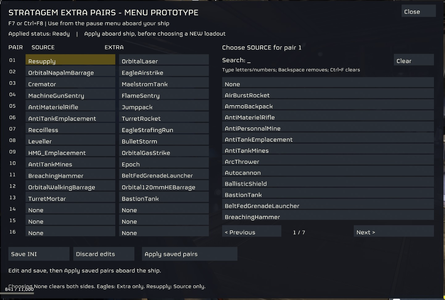
- NEW IN-GAME MENU! Press F7 while on your ship to configure your stratagem pairs!
- No more editing configuration files manually! Search for stratagems, select your pairs, save and apply them directly in-game.
- MUCH faster scanning! The mod remembers previously found stratagem definitions, making subsequent scans significantly faster.
- Improved mouse cursor handling in the menu.
- Removed the old Bingus Mod Options status display. Everything is now handled through F7!
HOW DOES IT WORK?
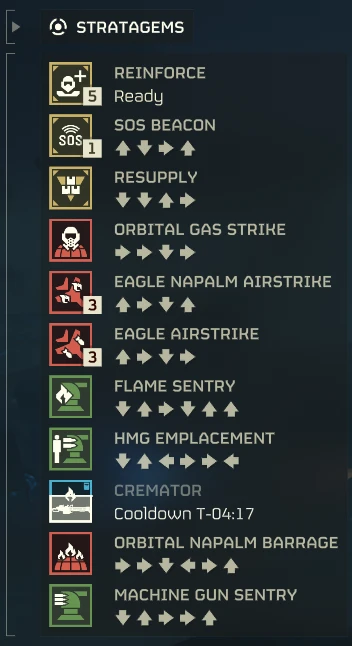
This mod lets you link an extra stratagem to each of your 4 equipped stratagems including resupply, giving you up to 9 usable stratagems instead of 4!For example:
- You equip Machine Gun Sentry.
- You link Flame Sentry to it using the F7 menu.
- In-game, you can now call in BOTH sentries, even though you only equipped one!
INSTALLATION
- Close Helldivers 2.
- Import the ZIP into Arsenal or HD2 ModManager.
- Enable the mod using Bingus Shared Loader.
- Purge / Deploy your mods.
- Launch the game and stay on your ship while the mod initializes.
HOW TO CUSTOMIZE YOUR STRATAGEMS
No need to close the game or manually edit files anymore!- While on your ship, press F7 to open the configuration menu.
- Search for and select the Source and Extra stratagems you want for each pair.
- Click Save INI to save your configuration.
- Click Apply Saved Pairs twice and wait until the mod reports Ready.
- Select your 4 Source stratagems in your loadout and launch a new mission!
- Source = The stratagem you equip in your loadout.
- Extra = The additional stratagem you receive automatically.
Alternative: Advanced users can still edit settings.ini manually at:
%LOCALAPPDATA%\CowboyBingus\Helldivers2\StratagemExtraPairs
Close the game before manually editing the file.
IMPORTANT WARNINGS
- SOLO / PRIVATE TESTING ONLY! Do not use this in public lobbies. It's extremely visible and unbalanced.
- DO NOT USE SEAF SQUAD STRATAGEMS. They may crash the game.
- EAGLES CAN ONLY BE USED AS EXTRAS, NOT SOURCES.
- Do not use duplicate stratagems or create chains between Sources and Extras.
- To disable a pair, set both its Source and Extra to None.
- Multiple combinations have been successfully tested, but not every stratagem is guaranteed to work.
- If something doesn't work, check STATUS.txt and LOG.txt in the mod's configuration folder.
FOR OTHER MODDERS
I discovered that the game's Additional_stratagem value, normally used for Eagle Rearm, can be linked to other stratagems!Note: The game seems to become unstable or crash when more than 10 stratagems are prepared. Maybe someone will find a workaround!
 KNOWN ISSUE — Mission Stratagem Limit
Using 9 stratagems with an Eagle and other mods that modify stratagems can fill all available stratagem slots, leaving no room for mission-specific call-ins such as the SSSD, Raise Flag, or Hellbomb.To avoid this issue, I recommend either limiting your loadout to 8 stratagems, avoiding Eagles entirely or disable other mods that modify stratagems.
Support my workAll my mods will always remain free! If you'd like to support my work, consider buying me a coffee:
https://ko-fi.com/mikerbiker