ModDiver Laboratory - Updates

You are using an out of date browser. It may not display this or other websites correctly.
You should upgrade or use an alternative browser.
You should upgrade or use an alternative browser.
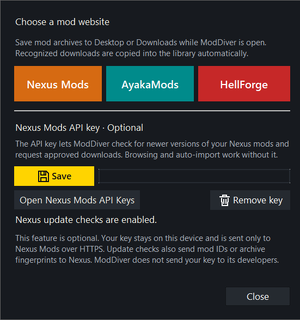
- You can now click "Get Mods" -> pick your website -> pick a mod -> download. The mod download will now be detected and the mod will be automatically added to your library.
- Your mods can now be updated automatically when a new version releases. Completely optional and only for Nexus Mods. Click "Get Mods" -> Open Nexus Mods API keys -> scroll to the bottom and click personal API key -> copy and paste into ModDiver Lab and click save.
Your keys are encrypted and are not shared. ModDiver Laboratory only has one way internet access. Meaning it only downloads updates and no data is sent or collected. This feature is optional and you do not need to use it.
Other:
- Faster loading for preview images
- Better icons and descriptions for guides
Attachments
- Better mod options menu, now includes preview images.
- Better merge engine large mod resolution after performance improvement of 2.7.0
- hover over a "?" to see what that thing does
- parse and copy time for large mods reduced by 10.02 to 4.95 seconds or about 50% for most
- better manifest discovery
- Completely Purge Mod Library also activates a standard game purge as intended
- Performance improvements to merge and deploy and importing and exporting
- Program scans for the game installation much better and more manual control
- Fix a mod preview UI bug
1. Better Audio creation
- Takes are grouped together and can be selected all at once, also individual takes from any sequence can be selected and custom audio applied to them.
- Clips, import any number of clips (audio you want quick access to) and apply them easily.
- Labeled the longest sounds as FIRING because most of the longest entries are firing sounds for weapons. However also sometimes labeled leaf/environment sounds as firing. Will fix later, this is due to how I made the labels which are auto applied to the longest sound.
2. Visual creation is completely different and easier to use.
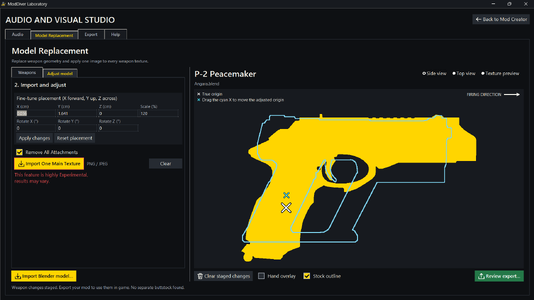
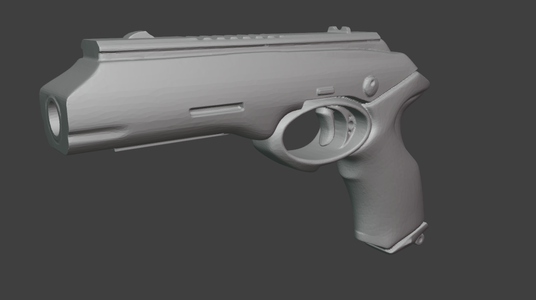
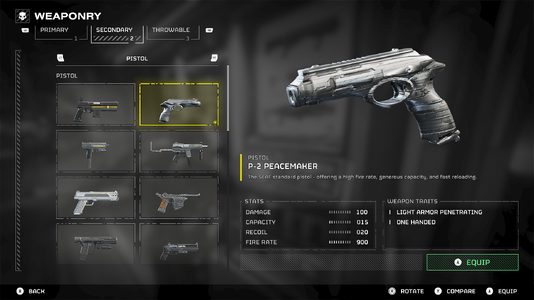
- Select your weapon, Import a Blender model (.blend file) and it will be applied to that weapon.
- You have an in-app 3D/2D environment to adjust the model as much as you like.
- Also includes other options like remove attachments and very experimental TEXTURE swap.
3. Multi-core processing up to 8 cores, and much better single-core.
- As this program gets bigger and better more computing power is required to avoid very long loading or bad performance.
- Still incredibly efficient but the changes above require more compute.
To sum up, if you have a few mp4 or other audio clips and a model (OBJ, STL, OFF, PLY and Blend) you can now make your own custom weapon mod.
Experimental, but pretty cool. Try it out.
Attachments
Optimization and fixes
You will notice everything loads faster and many of the visual issues are gone
### When updating from a version before 2.6.0 you will see a Migration pop up. This will automatically make the necessary changes described bellow.
1. Core program restructuring
- Before 2.6.0 ModDiver Lab would keep itself on your desktop and store important data in your local folder in many dedicated folders.
Now the program cleanly installs everything into one ModDiver Lab LOCAL folder. This is one folder in your local app data that contains everything from now on.
- Now the zip contains 2 files only ( the .exe installer and INSTALLATIONS and licenses ). Working on getting the exe and components signed so there would not be any more Windows trojan warning, this however may take a while.
Essentially a more professional installation, like any other app you would install.
2. More features and more polished past features
- Audio and Visual Studio are significantly improved (will be improved further in the future)
- A more beginner friendly UI and workflow for both Audio and Visual changes
- Use a png or any other supported texture and swap the texture on any of the currently decoded entries
- Make a mod that is both visual and audio
- The Studio now saves backups of your work every 30 seconds or 5 changes
- You can start by clicking "Create a Project" or just start making and the program will save everything on it's own.
- Some minor improvements to the ModDiverEditor
3. User interface and Appearance
- Huge overhaul to the appearance of the ModDiver Lab
- More options for customization in the settings
- New ways to UNINSTALL the program
- More options on control of the program
- UI bug fixes
Attachments
-
 Descent [email protected]402.7 KB · Views: 5
- Audio Studio has more options and a redesign of the UI to fit those options (distance drop-off audio, trim and more)
- General optimization of the app loading files 1.9ms to 0.05ms
- Improvements to the ModDiverEditor. Better asset loading, redesign of the loading bar to not block view and other
- Mods in the library have improved visual effects when dragged and guide arrows show where the mod will go
- Updated built-in tools
ModDiver Laboratory 2.4.2
- Resolved or mapped 74,643 additional Native Editor records.
- Added searchable resource IDs, enum identities, collection labels, and empty-slot identification.
- Linked 1,883 network records to their matching entities.
- Mapped all 1,645 destruction settings to their resource records.
- Reduced unresolved records to 392; unknown fields remain read-only.
- HellForge expanded support for the Native editor and Audio Studio
- Audio Studio now has more functionality.
- Built-in guides
- Ability to make a mod that is both swapping texture and audio
- Areas where HellForge support was lacking are now improved
- Many different short-cuts in the new guides tab
- Better overall mod generation and workflow
1. Improvements to the ModDiverEditor
- Now you can deploy all your other mods with the changes in the editor and the lab will safely merge them.
- Previously if an editor Shodan or other changed a file that you have another mod changing they would fight and there would be issues now they are merged because the editors changes are turned into a mod that is loaded into your library so the merge engine is able to merge it with other mods.
- Huge performance improvements to the ModDiverEditor reducing lag from 76ms to 0.19ms (streamlined background process)
- Other computational changes to the editor that improve file decoding.
2. Better Purge. Able to recognize a small bug/feature where a loader of your choice wants to override game data or insert it's own mod. Now the Purge function will see that too and when you click Purge it will remove that mod too.
3. Log is made to be more user friendly and less steam verification is needed for app operations.
4. some other stuff i can't remember
- Better Merge/Deploy and Update/Repair logic and Purge
- More User-friendly controls. If the program needs something it will tell you. If there are issues and conflicts it will mostly resolve most of them. If not it will provide step by step instructions on what to do in the log.
- Any mods that are hard to clean up will be cleaned from the game with no issues. Massive improvements to game verification and repair.
- Minor UI fixes.
- New options in the settings and improved current options.