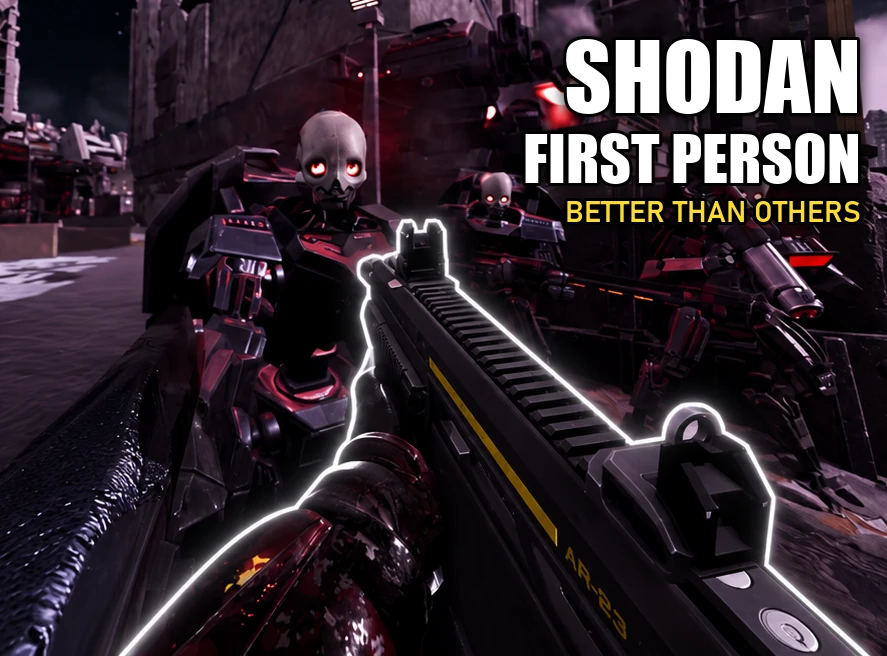
A first person camera for Helldivers 2 with its own in-game settings panel. Press F6 and you play the whole mission from your Helldiver's eyes, on foot, behind the wheel of an FRV, in a tank or in a mech. Every view can be tuned in game while you play.
Stay tuned for future updates with many upcoming improvements!
Main features
Keys
F6 turns first person on or off.
Hold F7 to see the game's own camera, let go to go back.
F10 opens the settings panel.
Every key can be changed in the panel.
Camera
Move the camera forward, up or sideways, set your field of view and a separate one for aiming, and smooth out the view. Keep different setups as profiles and swap between them with a key. Pick where the game switches to third person, like the galactic map, every vehicle and emplacement individually, the map or the stratagem menu.
Aim correction
The game still fires from your gun, which sits a bit below and to the right of your eyes. Without a fix your shots would land off the crosshair, more so the closer the target is. Aim correction turns your view a little so the crosshair lines up with where the gun is really aiming. By default it lines up at 30 metres, works both from the hip and while aiming, and never turns the view more than 8 degrees.
You can change all of it on the Aim tab. Strength sets how much of the gap gets corrected while aiming. 10 is exact, and lower feels gentler but your shots land a bit off. "Correct for enemies" lines up on the enemy under your crosshair instead of a fixed 30 metres. That is more accurate up close, but the view turns harder when you swing from a near target to a far one. It is off by default, and hip fire has its own switch for it.
How it affects gameplay: the view sometimes turns slightly on its own as the correction catches up, mostly when you snap between targets at very different distances. Up close or around cover your gun can hit a wall or rock that your eyes are looking past, because the bullet still leaves from the gun. If something feels off, try experimenting.
Stance
Crouching and going prone get their own camera position and field of view. Diving, lying down, getting knocked down and getting back up all keep a clean first person view.
Meshes
Hide any part of your helldiver that gets in the way, from the helmet to the cape. Hide the guns in your hands or on your back, and hide your armour while scoped.
Vehicles
Set the driver, passenger and gunner seats for every FRV, the passenger seats of the Bastion and the Maelstrom, and the view in every mech and emplacement. Each one can also stay in third person if you prefer.
Installation instructions
1. Install Chef Shared Loader 1.0.0 or newer.
2. Add the SHODAN First Person zip in your mod manager and deploy.
3. Start the game. Press F6 for first person and F10 to open the settings panel.
Help me improve the mod
Please direct any feedback, suggestions and improvements to https://github.com/SHODAN-HORAI/SHODAN-First-Person
My goal is to make this mod the best it can be.
Requirements
Chef Shared Loader 1.0.0 or newer.
Permissions
GNU General Public License v3.0. You can use, change and share it, but anythingyou distribute that is based on it must also be released under the GPL v3 with its source.
Stay tuned for future updates with many upcoming improvements!
Main features
Keys
F6 turns first person on or off.
Hold F7 to see the game's own camera, let go to go back.
F10 opens the settings panel.
Every key can be changed in the panel.
Camera
Move the camera forward, up or sideways, set your field of view and a separate one for aiming, and smooth out the view. Keep different setups as profiles and swap between them with a key. Pick where the game switches to third person, like the galactic map, every vehicle and emplacement individually, the map or the stratagem menu.
Aim correction
The game still fires from your gun, which sits a bit below and to the right of your eyes. Without a fix your shots would land off the crosshair, more so the closer the target is. Aim correction turns your view a little so the crosshair lines up with where the gun is really aiming. By default it lines up at 30 metres, works both from the hip and while aiming, and never turns the view more than 8 degrees.
You can change all of it on the Aim tab. Strength sets how much of the gap gets corrected while aiming. 10 is exact, and lower feels gentler but your shots land a bit off. "Correct for enemies" lines up on the enemy under your crosshair instead of a fixed 30 metres. That is more accurate up close, but the view turns harder when you swing from a near target to a far one. It is off by default, and hip fire has its own switch for it.
How it affects gameplay: the view sometimes turns slightly on its own as the correction catches up, mostly when you snap between targets at very different distances. Up close or around cover your gun can hit a wall or rock that your eyes are looking past, because the bullet still leaves from the gun. If something feels off, try experimenting.
Stance
Crouching and going prone get their own camera position and field of view. Diving, lying down, getting knocked down and getting back up all keep a clean first person view.
Meshes
Hide any part of your helldiver that gets in the way, from the helmet to the cape. Hide the guns in your hands or on your back, and hide your armour while scoped.
Vehicles
Set the driver, passenger and gunner seats for every FRV, the passenger seats of the Bastion and the Maelstrom, and the view in every mech and emplacement. Each one can also stay in third person if you prefer.
Installation instructions
1. Install Chef Shared Loader 1.0.0 or newer.
2. Add the SHODAN First Person zip in your mod manager and deploy.
3. Start the game. Press F6 for first person and F10 to open the settings panel.
Help me improve the mod
Please direct any feedback, suggestions and improvements to https://github.com/SHODAN-HORAI/SHODAN-First-Person
My goal is to make this mod the best it can be.
Requirements
Chef Shared Loader 1.0.0 or newer.
Permissions
GNU General Public License v3.0. You can use, change and share it, but anythingyou distribute that is based on it must also be released under the GPL v3 with its source.