Support Weapon Quad-Drop 0.5.1

A Mod for Helldivers 2
Support Weapon Quad-Drop akl_mod_preview_image
  • Screenshot_v042_account_censored.png
    Screenshot_v042_account_censored.png
    224.5 KB · Views: 869
  • Screenshot 2026-10-08 100913.png
    Screenshot 2026-10-08 100913.png
    3.2 MB · Views: 371

Support Weapon Quad-Drop ​


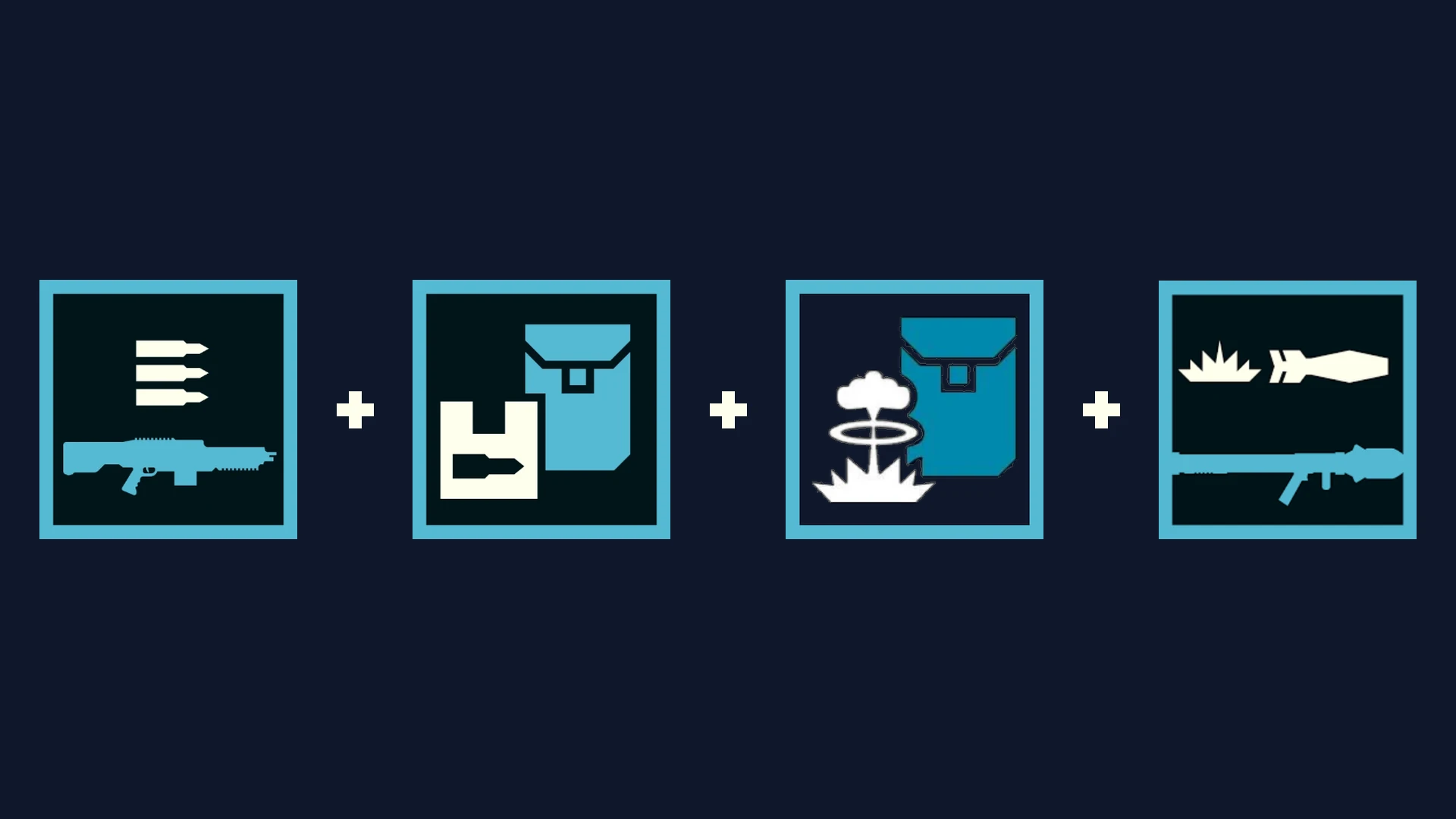
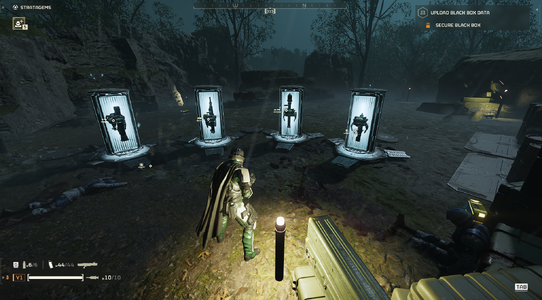
Support Weapon Quad-Drop expands your support weapon Hellpods with 3 bonus equipment slots. A single stratagem call-in drops up to 4 items simultaneously: your primary support weapon, a secondary weapon or payload, and two backpacks/utility items from the same hellpod.


  • • v0.5.0 (In-Game HUD) (currently fixing backpack weapons)​

    • Press F10 anywhere (Ship or In-Mission) to open Esc to close.
    • Customize all 29 support weapons individually.
    • Live search bar, mouse wheel scrolling, and 1-click loadout profiles.
    • Zero Mod Menu Tabs used (leaves all 8 tabs open for other mods).
  • Screenshot 2026-10-08 201008.png

    • v0.4.5 (Pause Menu)​

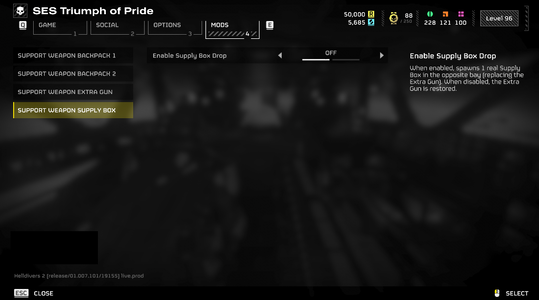
    • Configured via Options → MODS → Support Weapon.
    • Universal 3-slot setup across all weapons.
    • Compact 3-tab layout.
  • Screenshot_menu_safe.png


    Screenshot 2026-10-08 143938.png

    Hellpod Layout​

    • Slot 1: Primary Weapon (Native call-in)
    • Bay 2: Auto / Secondary Weapon / Backpack / Supply Box
    • Bay 3: Left Rack (Any Backpack / Weapon / Supply Box)
    • Bay 4: Right Rack (Any Backpack / Weapon / Supply Box)

      Quick Tips​
    • Sync / Refresh: If drops ever feel out of sync after joining a mission or updating mods, open F10 and click your profile card or [RELOAD] to re-arm all pods instantly.
    • Load Order: Give this mod and Bingus Shared Loader high priority in your mod manager.
    • Multiplayer: All squad members should install the mod to interact with extra dropped items without placeholder icons.
Known Incompatible Mods
(v0.4.5 only; v0.5.0 should have no problem with those mods, though not fully tested yet)
Requirements


Installation
  • Close Helldivers 2.
  • Install and enable the dependencies in your mod manager (Arsenal, Echelon, or Vortex).
  • Import your chosen version zip archive (HD2-Support-Weapon-Quad-Drop-0.5.0.zip or 0.4.5) and enable it.
  • Deploy mods and launch the game.
  • In-game:
    • For v0.5.0: Press F10 to open the HUD, select your weapons and payloads, or click a profile.
    • For v0.4.5: Open Options -> MODS, configure your slots, and press Apply.


Multiplayer
requirement: All players must install this mod and its required dependencies. Players without it may see a purple question mark instead of the added backpack and be unable to interact with it. Additional testing is still needed to verify if 2 players using this mod will still see the purple question mark or not.


Credits
- birdzlittlehelper — Creator and author of the original 0.2.0 version
- Clover886 — Creator of the original Quasar + Shield Pack Care Package.
- CowboyBingus — Creator of Bingus Shared Loader and the Mod Options Menu.
- SkyeShade — Creator of HD2Runtime.
- UI Inspiration:
  • Shodan / Armory Mod — Inspiration for the in-game tactical overlay concept.


Permissions
Anyone is welcome to use, modify, improve, redistribute, or build upon this mod. Please retain credit to all contributors.
161.3 KB
Log in or sign up to download
Uploaded by
teucer
Downloads
540
Comments
37
Views
5,297
First release
Last update
Platform
PC 
Version
0.5.1
Rating
5.00 star(s) 1 ratings

Uploaded by

  • 540
  • 5,297

Ratings

5.00 star(s) 1 ratings

More mods from teucer

  • PC Support Weapon Quad-Drop + Better AC-8 Autocannon with B-1 Supply Pack

Latest updates

  1. Hotfix layout collisions and refine backpack warnings

    Bumped version to 0.5.1 across HUD title bar, manifest, and runtime headers Relocated heavy...
  2. 0.5.0 - The Quad-Drop Customizer Update

    v0.5.0 Changelog: - New F10 In-Game Menu: Configure all 29 support weapons on the fly without...
  3. 0.4.5 - Compatibility Overhaul & Mod Options Sync Fix

    bug fixes

Desiderium

Members
Members
Oct 4, 2026
86
27
hmm. maybe set the mod's load priority higher, this worked for Oscar1108.
I use Echelon with a bunch of mods without any issues.
Set it higher and lower; no dice. I also purged everything and imported my modlist to Echelon and redeployed and still not working.

I have to do a one-by-one test later I guess. I wonder if Hellpod skins conflict with this at all? It shouldn't right? Since it's just cosmetic. I have the NOD overhaul which reskins the hellpods and Quad-Drop was partially working when I didn't have the overhaul loaded, but I also have 70 other mods...
 

Desiderium

Members
Members
Oct 4, 2026
86
27
Hey, I'm back after sleeping, doing the one-by-one test.

So far, I have discovered that this mod still works with modded weapons.

This mod also still works with cosmetically-modded hellpods.

There are a LOT of incompatible mods, likely far more than I've discovered here:

CONFIRMED INCOMPATIBILITIES (Quad-Drop won't work at all):​

I have informed the mod authors where possible about the incompatibility between your mod and theirs, as I'm not sure if the fix would lie on your end or on theirs.​

 
Last edited:

teucer

Members
Members
Oct 3, 2026
14
6
Hey, I'm back after sleeping, doing the one-by-one test.

So far, I have discovered that this mod still works with modded weapons.

This mod also still works with cosmetically-modded hellpods.

There are a LOT of incompatible mods, likely far more than I've discovered here:

CONFIRMED INCOMPATIBILITIES (Quad-Drop won't work at all):​

I have informed the mod authors where possible about the incompatibility between your mod and theirs, as I'm not sure if the fix would lie on your end or on theirs.​

i will look in to it and see what can i do
 

teucer

Members
Members
Oct 3, 2026
14
6
i will look in to it and see what can i do

Thanks boss man/woman/individual of culture.
v0.4.4 is uploaded!

Thanks for taking the time to test and report the conflicting mods so I could track down the cause.
Found the issue: it was a startup timing conflict that caused Quad-Drop to stop loading whenever other mods loaded first. It is now properly synced with the game loop and runs independently from the menu, making it much more compatible with existing and future mods.

Tested it ingame with all of those mods running together. Enjoy
Quad-Drop-Compatibility-Proof-Grid.png
 

Desiderium

Members
Members
Oct 4, 2026
86
27
v0.4.4 is uploaded!

Thanks for taking the time to test and report the conflicting mods so I could track down the cause.
Found the issue: it was a startup timing conflict that caused Quad-Drop to stop loading whenever other mods loaded first. It is now properly synced with the game loop and runs independently from the menu, making it much more compatible with existing and future mods.

Tested it ingame with all of those mods running together. Enjoy
Quad-Drop-Compatibility-Proof-Grid.png
DAMN! You are a beast. Thank you so much.
 

Desiderium

Members
Members
Oct 4, 2026
86
27
v0.4.4 is uploaded!

Thanks for taking the time to test and report the conflicting mods so I could track down the cause.
Found the issue: it was a startup timing conflict that caused Quad-Drop to stop loading whenever other mods loaded first. It is now properly synced with the game loop and runs independently from the menu, making it much more compatible with existing and future mods.

Tested it ingame with all of those mods running together. Enjoy
Quad-Drop-Compatibility-Proof-Grid.png
Thanks again man, it's way better but still some incompatibilities. Spent another hour figuring them out for you. Curiously, some incompatibilities are new, while some are old, and for some reason three of them are D-Glitch mods.

I deleted the old version, purged, and deployed. I also purged and deployed one by one for every mod during the troubleshooting process.

Quad Drop is located right above Bingus Loader, and right below HD2Runtime.

What I'm noticing now compared to your previous version is that now, the mod options are always appearing at the top of the first page, but the mod itself still doesn't work with these specific mods. Calling in AMR, stalwart, etc. no backpacks, no ammo, nothing; just the weapon itself.

Slot 1 is toggled ON

Slot 2 is toggled ON

Extra Weapon slot is toggled OFF

Supply Box is toggled ON

Individual incompatibilities (loaded just Quad Drops and these mods in couples together):


If you want, I could show you my whole modlist via an imgur album or something. That may provide a clue.​


Also, bug report: The AMR is dropping with a Supply Pack and Shield Generator Pack instead of a Hover Pack even though I have it set to Hover Pack. I decided to change both backpacks to Hover Pack to see if it would fix it, but it didn't; it still drops a Supply Pack and a Shield Generator Pack. This may potentially be conflicting with Timmothy's Customizable Lift pack mod.

Edit: I can confirm that Timmothy's Customizable Lift Pack mod is NOT the problem. Something else is preventing my backpack selections from working. NONE of the backpack selections for ANY weapon are working at the moment; they're just spawning the default loadouts you set.

Arguably, this bug is the larger issue
 
Last edited:

teucer

Members
Members
Oct 3, 2026
14
6
Thanks again man, it's way better but still some incompatibilities. Spent another hour figuring them out for you. Curiously, some incompatibilities are new, while some are old, and for some reason three of them are D-Glitch mods.

I deleted the old version, purged, and deployed. I also purged and deployed one by one for every mod during the troubleshooting process.

Quad Drop is located right above Bingus Loader, and right below HD2Runtime.

What I'm noticing now compared to your previous version is that now, the mod options are always appearing at the top of the first page, but the mod itself still doesn't work with these specific mods. Calling in AMR, stalwart, etc. no backpacks, no ammo, nothing; just the weapon itself.

Slot 1 is toggled ON

Slot 2 is toggled ON

Extra Weapon slot is toggled OFF

Supply Box is toggled ON

Individual incompatibilities (loaded just Quad Drops and these mods in couples together):


If you want, I could show you my whole modlist via an imgur album or something. That may provide a clue.​


Also, bug report: The AMR is dropping with a Supply Pack and Shield Generator Pack instead of a Hover Pack even though I have it set to Hover Pack. I decided to change both backpacks to Hover Pack to see if it would fix it, but it didn't; it still drops a Supply Pack and a Shield Generator Pack. This may potentially be conflicting with Timmothy's Customizable Lift pack mod.

Edit: I can confirm that Timmothy's Customizable Lift Pack mod is NOT the problem. Something else is preventing my backpack selections from working. NONE of the backpack selections for ANY weapon are working at the moment; they're just spawning the default loadouts you set.

Arguably, this bug is the larger issue
Thanks so much for taking the time to test those one by one, that was super helpful.
I just updated the 0.4.5 build to fix both issues
hopefully it will work.:)
 
Last edited:

Desiderium

Members
Members
Oct 4, 2026
86
27
Nice, the backpack selection bug got fixed. Thanks again man.

I don't want you to feel like I'm dogging you or anything, but Quad Pods is still not working, with those same four mods. (Backpack selection bug is fixed though.) I'm done troubleshooting for the night though (would rather actually play the game 😉) but I genuinely appreciate you being so responsive and trying to fix the incompatibilities.

Since we can't find the exact issue (for now at least), I suggest simply adding these four mods as known conflicts to the main mod description.

If there are any logs or anything I can provide you, let me know and I'll try to help in that way as well, I'm just really tired of the troubleshooting.
 

teucer

Members
Members
Oct 3, 2026
14
6
Nice, the backpack selection bug got fixed. Thanks again man.

I don't want you to feel like I'm dogging you or anything, but Quad Pods is still not working, with those same four mods. (Backpack selection bug is fixed though.) I'm done troubleshooting for the night though (would rather actually play the game 😉) but I genuinely appreciate you being so responsive and trying to fix the incompatibilities.

Since we can't find the exact issue (for now at least), I suggest simply adding these four mods as known conflicts to the main mod description.

If there are any logs or anything I can provide you, let me know and I'll try to help in that way as well, I'm just really tired of the troubleshooting.
All good man, thanks a lot for testing ,glad the backpacks work. added those mods to known conflicts as suggested